Best Fingerprint Door Locks 2026: What a Sensor Buys You
Affiliate Disclosure: This article contains affiliate links. If you buy through these links, we may earn a commission at no extra cost to you. Our editorial opinions are our own and are not influenced by affiliate relationships. Read our full disclosure policy →
Contents
Quick Answer
Buy the Wyze Auto-Lock Bolt v2 if you are replacing a deadbolt and want the fewest ways to get locked out — it is the only pick here with a USB-C emergency power port, which turns a dead-battery lockout into a thirty-second problem instead of a locksmith call. Buy the Veise KS02A instead if you want physical keys in a drawer as the fallback rather than a power bank. Either way, treat the fingerprint reader as the convenience feature it is: NIST’s own guidance is that a fingerprint is not a secret, and that a recognition-accuracy figure tells you nothing about spoofing, so what keeps the door shut is the bolt and the backup.
What a Fingerprint Sensor Actually Buys You
A fingerprint reader on a deadbolt solves exactly one problem, and it solves it well: the gap between arriving at your door and getting through it. No pocket search, no code to remember, no phone to wake up. On a lock you use eight times a day, half a second beats eight seconds, and that difference is why people who buy one rarely go back.
What it does not do is make the door harder to open by force. A fingerprint sensor sits on the outside escutcheon and drives the same motor and the same bolt every keypad lock uses. The strike plate, the screws holding it into the frame and the length of the bolt throw are still what decides whether a shoulder gets through — which is why a serious upgrade pairs one of these with a door reinforcement kit rather than treating the lock as the whole answer.
So the honest framing for this category is a convenience upgrade with a security floor to protect, not a security upgrade with a convenience bonus. Everything below follows from that.
What Changes and What Doesn’t When You Add a Fingerprint Reader
✅ Genuinely better
- Entry in under a second with your hands full
- No codes to share, rotate or overhear at the door
- Per-person access you can revoke without rekeying
- A record of who came in, on the locks with an app
- No key hidden outside for the babysitter to find
❌ Unchanged by the sensor
- How much force the bolt and strike plate resist
- How well the door frame is anchored to the studs
- Whether the door can be pried at the latch side
- Ground-floor windows and the back door
- What happens if the batteries die with nobody home
About That 99.99% Number
Scroll any fingerprint lock listing and you will find a recognition-accuracy claim, usually 99.99 percent, often with a speed figure attached. Two of the four locks below advertise a version of it. It is worth understanding what that kind of number measures, because it is not what most buyers assume.
A figure like that describes a False Match Rate — how often the sensor accepts a finger it should have rejected, under test conditions. NIST’s digital identity guidance is blunt about the limits of that measurement: the False Match Rate “does not provide confidence in the authentication of the subscriber by itself” and, critically, “does not account for spoofing attacks”. A sensor can be excellent at telling two real fingers apart and still be fooled by something that is not a finger at all.
The same document goes further, and this is the sentence worth carrying into the purchase: “Biometric characteristics do not constitute secrets.” A print can be lifted from an object someone touched, or captured from a high-resolution photograph. You cannot change it after a compromise the way you change a passcode, which is why NIST concludes that biometrics should be used only alongside a physical authenticator, never on their own.
Two honest caveats about applying that here. NIST wrote SP 800-63B for digital identity systems — signing in to government and enterprise services — not for door hardware, and it is not a standard any of these locks is tested against. But the property it describes belongs to the fingerprint, not to the reader, and it does not change when the reader is screwed to a door. And a door lock already satisfies NIST’s own condition: the lock is the physical thing, and the bolt is what resists. That is the reassuring half of the finding, and it is why this category is fine to buy — as long as you buy it for speed rather than for a number on a box.
The Three Things a Recognition Figure Does Not Tell You
Spoofing
False Match Rate excludes it entirely, per NIST
Revocation
You cannot reissue a finger after a compromise
Secrecy
Prints are left on every surface you touch
All three points are stated directly in NIST SP 800-63B, Section 5.2.3. None of them makes a fingerprint lock a bad buy — they mean the sensor is the convenience layer, not the security layer.
The Backup Method Is the Real Decision
Every lock here reads a fingerprint in well under a second, and none of them will disappoint you on that. What separates them is the bad day — the batteries died while you were at work, the sensor will not read a wet finger, or a guest needs in and you are three states away. There are three real answers, and picking one is the actual decision.
A mechanical key. The Veise keeps two of them and a keyway to use them in. This fallback needs no power, no phone and no account, and it is the one to choose if the door is used by people who will not troubleshoot anything. The trade is that a keyway is also the part a bump key or a pick attacks, which is exactly the argument made in our guide to fully keyless entry locks.
Emergency external power. The Wyze takes a USB-C cable at the outside face, so a phone power bank wakes a dead lock long enough to let you in. No keyway means nothing to pick, and a flat battery stops being an emergency. The trade is that you have to own a charged power bank and a USB-C cable, and remember where they live.
Remote unlock over Wi-Fi. The Philips can be opened from the app anywhere there is a signal, which is the only fallback that works when you are not standing at the door. It is also the only one that stops working when your home internet does, so treat it as an addition to one of the other two rather than a replacement.
One note that applies to all of them: these locks warn well before they die, and the warning is easy to ignore for weeks. Our walkthrough on testing whether a smart lock battery is really dying covers what the beeps and flashes mean, including the common case where the battery is fine and a misaligned strike is drawing the current.
The Four Picks Side by Side
Every one of these is a fingerprint deadbolt that also takes a keypad code. The columns that matter are the ones where they genuinely diverge.
Wyze Auto-Lock Bolt v2 — best overall deadbolt swap
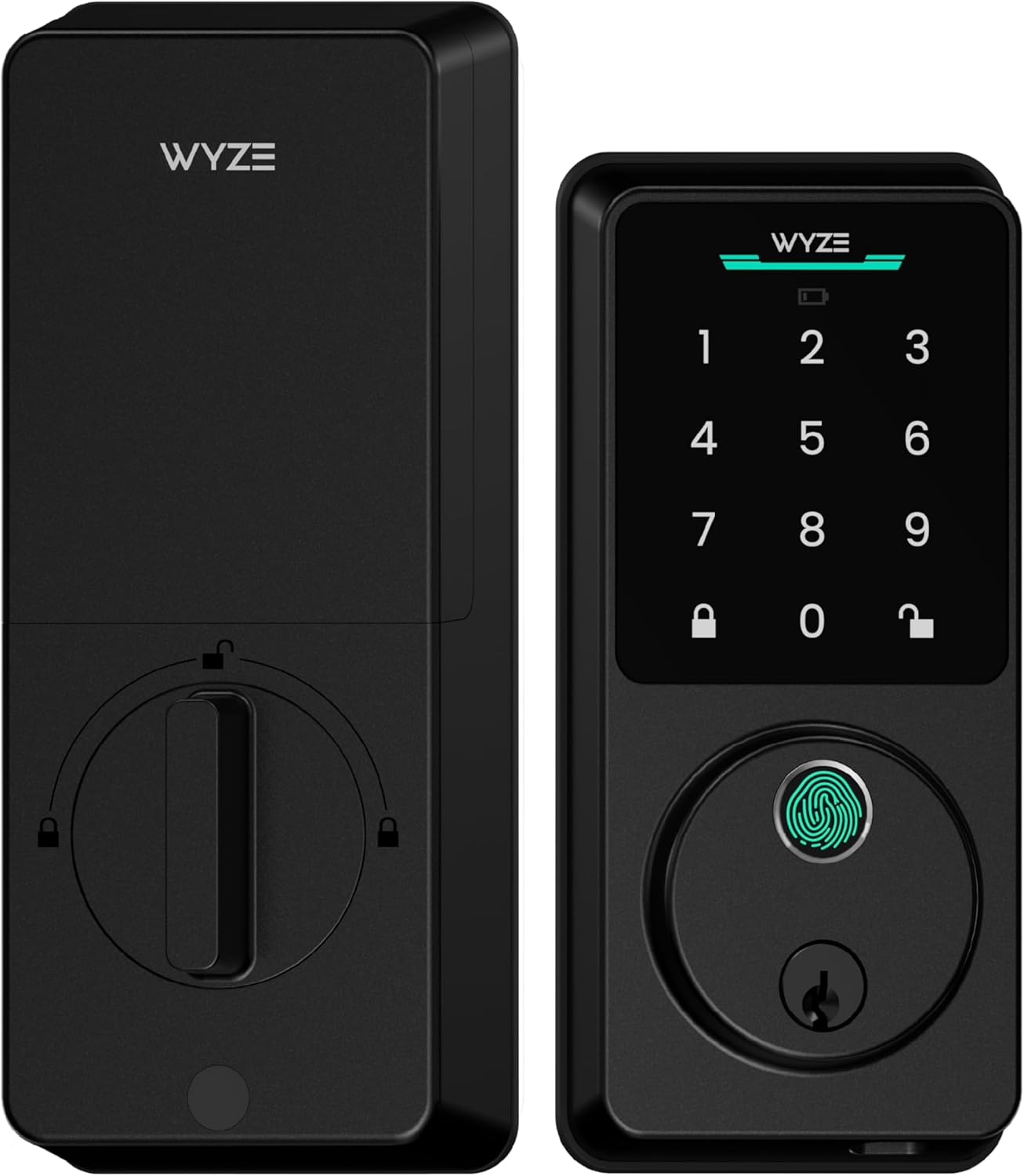
Key specs: Fingerprint deadbolt with a tempered-glass scanner the manufacturer describes as scratch and smudge resistant; built-in Wi-Fi; runs on 8 AA batteries with a stated life of up to 8 months, and carries a USB-C port so a dead lock can be powered from a power bank
The USB-C port is why this is first. Every other lock in the category answers a dead battery with a keyway, which means carrying the key you bought this lock to stop carrying. Wyze answers it with a power bank most people already own, and keeps the outside face free of a keyhole entirely. The eight AA cells are unusually many for the category and the stated eight-month life reflects that. Built-in Wi-Fi means no separate bridge to buy, and tempered glass is a sensible material for a surface that lives outdoors and gets touched with dirty hands.
✅ Pros
- USB-C emergency power — the best dead-battery answer in the category
- No keyway on the outside face, so nothing to pick or bump
- Wi-Fi built in, with no bridge or hub to buy separately
- Eight AA cells rather than four, with a stated eight-month life
- Scratch- and smudge-resistant tempered glass over the sensor
❌ Cons
- No mechanical key at all — if you want one, this is the wrong lock
- Deadbolt only, so the handle set stays whatever is on the door now
- Wyze’s track record in door hardware is short next to Schlage or Kwikset
- You have to keep a charged power bank and a USB-C cable somewhere sensible
Veise KS02A Fingerprint Keypad Deadbolt — best if you want a real key
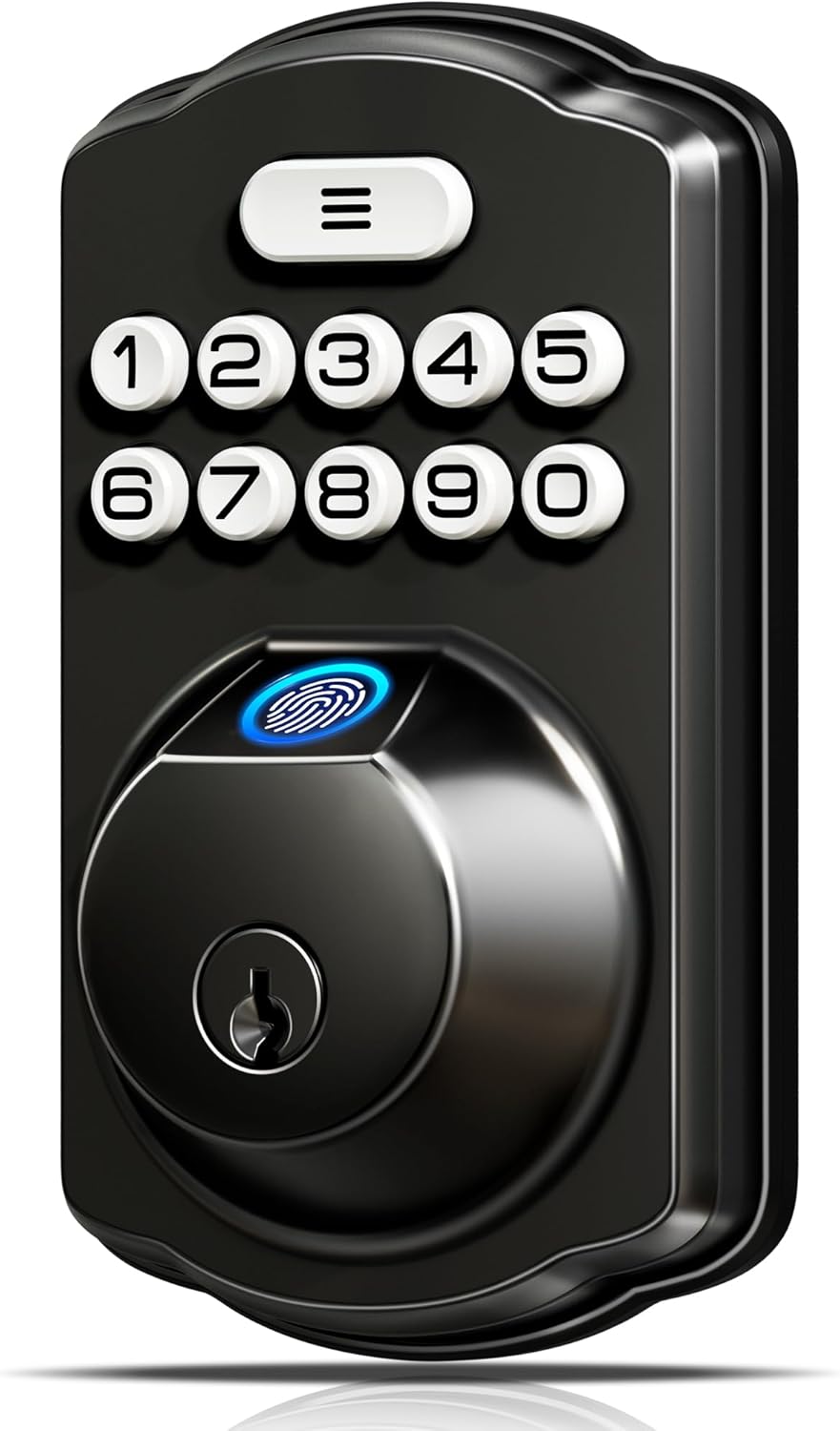
Key specs: Four ways in: fingerprint, keypad code, one-time guest code that deletes itself, and two mechanical keys; stores up to 20 fingerprints and 20 passcodes; no app or account required for the lock to work
This is the pick for a household that wants the reader for daily use and a boring physical key for everything else. It is a genuine four-way lock — finger, code, a one-time guest code that deletes itself after use, and two cut keys — and none of those four paths needs an app, an account or a working internet connection. It also carries much the largest owner base of the four, which counts for something in a category full of brands nobody has heard of.
✅ Pros
- Four independent ways in, including two mechanical keys
- Self-deleting one-time guest codes, handled on the lock itself
- Stores up to 20 fingerprints and 20 passcodes
- No app, account or internet needed for any function
- Much the largest owner base of the four picks here
❌ Cons
- No remote access at all — you cannot let anyone in from away
- The keyway is the part a pick or bump attack goes for
- No Wi-Fi means no entry alerts on your phone
- Veise is a marketplace-native brand with no hardware history outside it
Philips Wi-Fi Smart Deadbolt — best for remote access
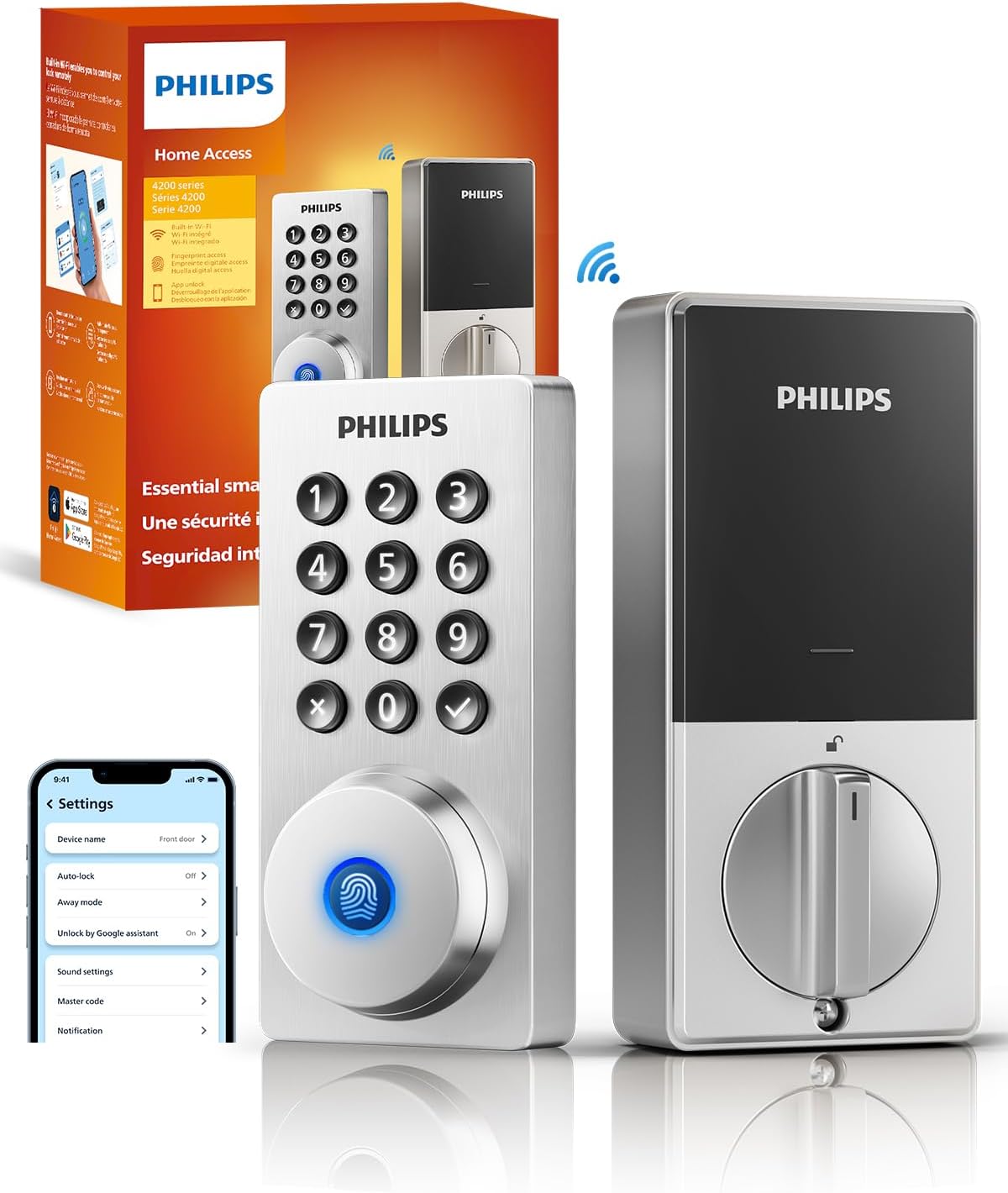
Key specs: Fingerprint, passcode, key, voice and remote app control over built-in Wi-Fi; works with Amazon Alexa and Google Assistant; supports temporary codes and shared fingerprint access, with entry alerts pushed to the phone
If the job includes letting a dog walker, a cleaner or a contractor in while you are at work, this is the one. Built-in Wi-Fi gives unlock from anywhere, real-time door status, entry alerts and temporary codes you can issue and revoke from the phone, plus Alexa and Google Assistant support. It is the most connected lock of the four and carries the most familiar name — though note Philips licenses its brand widely, so that name is a marketing fact rather than a manufacturing one.
✅ Pros
- Remote lock, unlock and status from anywhere over built-in Wi-Fi
- Temporary and shared access you can issue and revoke remotely
- Entry alerts pushed to the phone in real time
- Works with Alexa and Google Assistant for voice control
- Keeps a mechanical key as a fallback
❌ Cons
- Every remote feature depends on your home internet staying up
- Wi-Fi locks draw more power than Bluetooth-only ones
- The Philips name here is licensed, not a guarantee of the maker
- More setup than the Veise before it does anything useful
Ulecoce Fingerprint Deadbolt with Knob Set — best for a whole-door refit
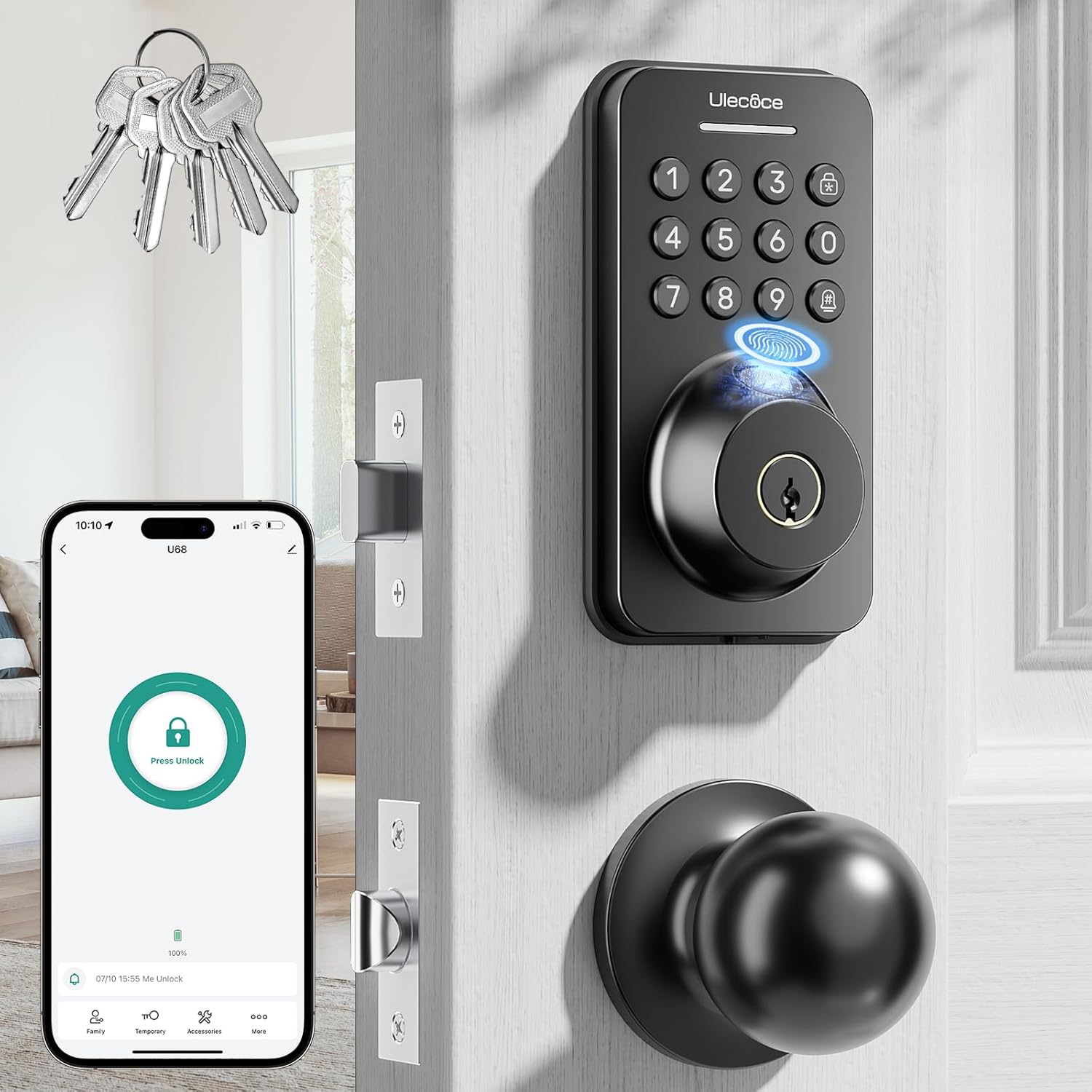
Key specs: Sold as a matched deadbolt and knob pair rather than a deadbolt alone, so the whole door set is replaced at once; fingerprint recognition the manufacturer states takes about 0.3 seconds; app control for temporary passcodes
The other three replace a deadbolt and leave whatever knob or lever is already below it, which on an older door often means new hardware sitting above a scuffed brass handle that does not match. This is sold as a matched deadbolt and knob set, so the door reads as one piece of hardware afterwards. Choose it when the door is being refitted rather than upgraded, and skip it when you only want the bolt changed.
✅ Pros
- Matched deadbolt and knob set, so the door looks deliberate afterwards
- One purchase and one install session instead of two
- App control for temporary passcodes
- Keeps a mechanical key backup
- Fast stated recognition time
❌ Cons
- Twice as much hardware to fit and align on install day
- Overkill if your existing handle set is fine
- Smaller owner base than the Veise
- The knob half is a conventional knob — you gain no security there
One gap all four picks share: each replaces the deadbolt entirely. If you want fingerprint entry without touching the existing deadbolt — because you rent, or the door hardware has to stay — the retrofit route is SwitchBot’s Lock Ultra paired with its Keypad Touch: the lock mounts over the existing deadbolt’s interior side, the keypad’s fingerprint reader (up to 100 prints, stored locally on the device) goes outside, and the original cylinder and keys keep working. We haven’t run that combination through this guide’s comparison, so treat it as the renter’s pointer rather than a fifth pick.
Whose Fingers This Category Fails
Fingerprint readers do not work equally well for everyone, and this is the part the listings leave out. These sensors read ridge pattern by detecting small differences in electrical capacitance across the finger, so anything that flattens, wets or insulates the ridges degrades the read.
In practice four groups have a harder time: people whose hands are frequently wet, people who work with their hands and have worn or cut ridges, older people whose ridge detail has softened with age, and young children whose prints are small and still changing. None of that is a reason to avoid the category — every lock here also takes a keypad code, and every one lets you enroll a finger several times. But if the person the lock is really for falls into one of those groups, enroll them first and test before you assume it works.
One trick that costs nothing: enroll the same finger three or four times at slightly different angles rather than enrolling four different fingers once each. A sensor that “never reads my thumb” is usually a sensor holding one narrow sample of it.
The Brand Question Nobody Wants to Ask
Three of the four names above did not exist in door hardware ten years ago. That is not a reason to reject them — the mechanical guts of these locks come from a small number of factories that also build for names you do recognize, and build quality is generally better than the prices suggest. But it changes two things worth thinking about before buying.
The first is parts and support in five years. A Schlage or Kwikset deadbolt bought today can be rekeyed, repaired and matched to a replacement for a very long time; our guides to Schlage’s lock range and Kwikset’s smart locks cover what that continuity is worth. A marketplace-native brand may simply stop selling the model, which matters more for app-dependent locks than for offline ones.
The second is the app and the account behind it. A lock that works fully offline — the Veise is the clearest example here — keeps working exactly as it does today no matter what happens to the company. A lock whose remote unlock runs through a manufacturer cloud does not. If that asymmetry matters, our roundup of smart locks with no subscription is the right next read, and the wider case for offline-first hardware is made in our guide to systems that need no monthly fee.
For what an independent test bench makes of the wider smart-lock field, including how the established brands compare on things a listing will not tell you, Security.org keeps a current comparison worth reading alongside this one. One established name that builds its entire line around fingerprint entry is Lockly — our roundup of Lockly smart locks goes through that catalogue model by model.
Final Recommendation
Start with the Wyze Auto-Lock Bolt v2. It has the best answer in the category to the only failure that actually strands you — a dead battery — and it gets there without putting a pickable keyway back on the outside of a door you bought a keyless lock for. For most single-family front doors that is the right default.
Change it in two situations. If anyone using the door would genuinely be stuck without a metal key in their hand — an older parent, a teenager, a cleaner who will not be downloading anything — buy the Veise KS02A and accept the keyway as the price. And if the real job is letting other people in while you are elsewhere, buy the Philips Wi-Fi Smart Deadbolt, because remote unlock is the one thing neither of the others does. The Ulecoce set is narrower: right when the whole door is being refitted, unnecessary when it is not.
Whichever you choose, spend the afternoon you saved on the frame. A fingerprint lock in a strike plate held by three-quarter-inch screws is a fast way into a door that still opens with one kick, and the fix costs a fraction of any lock on this page.
SafeBode does not yet run an in-house product testing program. This guide is built from manufacturer specifications, official support documentation, current retail listings and verified buyer feedback rather than hands-on testing, and we say so plainly rather than implying testing we have not done.
Frequently Asked Questions
Are fingerprint door locks secure?
They are as secure as the deadbolt they are attached to, which is the point. The sensor controls who the motor opens for; it does not change how much force the bolt resists. Treat the reader as a convenience feature and spend the security budget on the strike plate, the frame and the screws.
Can a fingerprint lock be fooled by a photo or a lifted print?
Spoofing is a real category of attack, and the accuracy figures manufacturers publish are measured in a way that excludes it. In practice it is not how homes get burgled — windows and forced doors are — but it is a reason not to think of a fingerprint as a password you cannot lose.
What happens if the batteries die?
It depends entirely on which lock you bought, and it is the most important difference between them. The Wyze takes emergency power over USB-C from a phone power bank. The Veise, Philips and Ulecoce all keep a mechanical key. No lock here leaves you with nothing, but the fallback you get is the one you chose at purchase.
Do fingerprint locks work in cold weather?
The mechanism does; the reading can suffer. Cold, dry skin flattens the ridge detail these sensors depend on, and gloves defeat them entirely. Every lock here also takes a keypad code, which is what most owners in cold climates use through winter.
How many fingerprints can these locks store?
Enough for any household — the Veise holds up to 20 fingerprints and 20 passcodes, and the others are broadly comparable. The practical limit is not the number of people; it is that each person’s finger should be enrolled several times at different angles, not once.
Can I install one of these myself?
Yes, if you are replacing an existing deadbolt. It is a screwdriver job on a standard pre-drilled door, usually under half an hour, and the fiddly part is aligning the bolt to the strike rather than the electronics. Cutting a new hole in a door that has never had a deadbolt is a different and much bigger job.
Do they work with Alexa or Google Home?
The Philips does both over its built-in Wi-Fi. The Wyze connects to Wi-Fi and its own app. The Veise has no connectivity at all, by design. If voice control matters, check it before you buy rather than assuming, because it is not standard in this category.
Is a fingerprint lock better than a keypad lock?
Faster, not safer. If your household already lives happily with a code, a reader buys you speed and removes the risk of someone watching the code being typed. If you are choosing from scratch, note that every lock here does both, so you are not giving anything up.
Should I keep a spare key hidden outside as a backup?
No. Every classic hiding spot gets checked, and hiding a key outside undoes the reason you bought a keyless lock. Use the lock’s own fallback, leave a key with a neighbor, or issue a temporary code to whoever needs one.
Sources
Show sources (6)
- [1] National Institute of Standards and Technology — NIST Special Publication 800-63B, Digital Identity Guidelines: Authentication and Lifecycle Management, Section 5.2.3 (Use of Biometrics), pages.nist.gov/800-63-3/sp800-63b.html
- [2] Wyze — Auto-Lock Bolt v2, current retail listing specifications (ASIN B0FD3WMV2T)
- [3] Veise — KS02A Fingerprint Door Lock, current retail listing specifications (ASIN B0BMQ3B3SC)
- [4] Philips — Wi-Fi Smart Deadbolt Lock, current retail listing specifications (ASIN B0FVWQ8R93)
- [5] Ulecoce — Fingerprint Keypad Deadbolt with Knob Set, current retail listing specifications (ASIN B0D6B4JZCT)
- [6] Security.org — independent smart lock testing and comparison, www.security.org/smart-locks/best


