Best Kwikset Smart Locks 2026: Which Model Fits Your Door
Affiliate Disclosure: This article contains affiliate links. If you buy through these links, we may earn a commission at no extra cost to you. Our editorial opinions are our own and are not influenced by affiliate relationships. Read our full disclosure policy →
Contents
Quick Answer
Kwikset’s electronic locks do not line up as good, better, best. They line up along two questions. Does the lock talk to your phone, and how? Kwikset’s comparison chart sorts its smart lock families by required technology — Wi-Fi for Halo, Bluetooth for Aura, Z-Wave and Zigbee for the Home Connect and 914/916 families. And does it still take a key? Every lock here keeps a SmartKey keyway you can re-key yourself in seconds. Halo is the pick if you want to unlock the door from another city. The SmartCode 260 and Powerbolt 250 have no radio and no app, and Kwikset publishes roughly double the battery life for them as a result. Decide the radio question first.
The Two Splits That Decide This, and Neither Is Price
Most Kwikset guides rank the range budget to flagship, which hides the real decision. These models are not different amounts of the same thing; they answer two separate questions, and the cheaper answer is genuinely right for a lot of doors.
The first split is connectivity. Kwikset’s comparison chart lists a required technology per smart lock family: Wi-Fi for Halo and Halo Touch, Bluetooth for Aura, Z-Wave or Zigbee for the Home Connect 620 and the 914 and 916 SmartCodes. Only the Halo models need no hub — a Wi-Fi router, a smartphone and the lock are the whole requirement. That is the appeal and the liability at once, because a lock living on your network inherits every problem your network has. Below that line sit the SmartCode 260 and the Powerbolt 250: electronic locks, not connected ones. Kwikset lists the Powerbolt 250 as standalone, needing no hub, with no app in its feature list at all. You program codes at the keypad, and that is the entire management story. If keyless entry is what you actually want — walk up, punch a code, walk in — you may not need a connected lock.
Do You Actually Need the Lock on Your Network?
✅ Buy Wi-Fi (Halo) if any of these are true
- You need to let someone in while you are not home
- You want lock and unlock events pushed to your phone
- You hand out scheduled codes — a weekly cleaner, a one-day contractor
- You want Alexa or Google Assistant to lock the door, hub-free
❌ Skip Wi-Fi (SmartCode 260, Powerbolt 250) if these fit better
- The door sits in a weak spot for your router
- Nobody needs remote access; you just want to stop carrying keys
- You would rather change batteries once a year than twice
- You do not want a lock holding an account on a manufacturer’s cloud
The second split is the keyway. Every lock here is a keyed-one-side deadbolt with a SmartKey cylinder, so the electronics are an addition to a normal deadbolt, not a replacement: a dead battery, a failed board and a guest who cannot work a keypad all share one fallback. Still choosing the cylinder itself? Our single versus double cylinder explainer comes first.
SmartKey: The Thread Running Through the Whole Range
SmartKey is the reason to shortlist Kwikset rather than treat it as one more keypad brand. It is a patented cylinder that lets the owner re-key the lock to a different key in seconds, with no locksmith and nothing replaced. Kwikset’s own list of reasons to re-key reads like a landlord’s week: loaned or unreturned keys, a recent move or tenant turnover, a child who has lost their key again, and carrying a different key for every door.
That last one matters most. Kwikset states you can re-key every SmartKey lock in the house to one existing key so all the entry doors match, with no limit on how many times a cylinder can be re-keyed. For a rental that is the whole argument: the tenant gets a code, the owner keeps a working key, and the key changes at turnover without paying anyone.
What Re-Keying Actually Requires
1
The current working key
Lose it and the do-it-yourself route closes — Kwikset refers you to a locksmith or its support team instead.
2
The SmartKey tool
Included in every SmartKey package. Only someone holding both the working key and the tool can re-key the lock.
3
The new key it should accept
Kwikset describes re-keying the cylinder to any KW1 keyway key — how a whole house comes onto one key.
4
That is the whole process
Three steps, seconds, no experience needed, no limit on repeats.
Sourced from Kwikset’s own SmartKey Security page and its re-keying FAQ.
Two honest qualifications. SmartKey is Kwikset-only: the cylinder design is patented and cannot re-key another manufacturer’s lock. And Kwikset’s description of it as pick resistant and bump proof is a manufacturer claim, not an independent test result. The checkable part of a lock’s quality is its BHMA certification, below.
The Lineup Side by Side
Four picks, plus one sibling included because readers keep asking where it fits. Every figure below comes from Kwikset’s own product pages and support answers, not retail listing copy.
| Model | Connectivity | App control | User codes | Published BHMA grade | Battery life Kwikset publishes |
|---|
| Halo Touchscreen | Wi-Fi, no hub | Yes, Kwikset app | 250 | AAA | About 6 months on 4 AA |
| Halo Keypad | Wi-Fi, no hub | Yes, Kwikset app | 250 | AAA | About 6 months on 4 AA |
| SmartCode 260 | None, standalone | No app | 50, plus 10 one-time | Grade 2 | At least 12 months on 4 AA |
| SmartCode 270 (touchpad sibling) | None, standalone | No app | 50 | Grade 2 | Not published on the product page |
| Powerbolt 250 | None, standalone | No app | 25, plus 5 one-time | Grade 3 | 12 months on 4 AA |
Read the last two columns together. The connected models carry the higher published grade and the shorter battery life; the standalone models invert both. That is the trade this range is built on.
Kwikset Halo Touchscreen Wi-Fi Smart Lock — best for full remote control
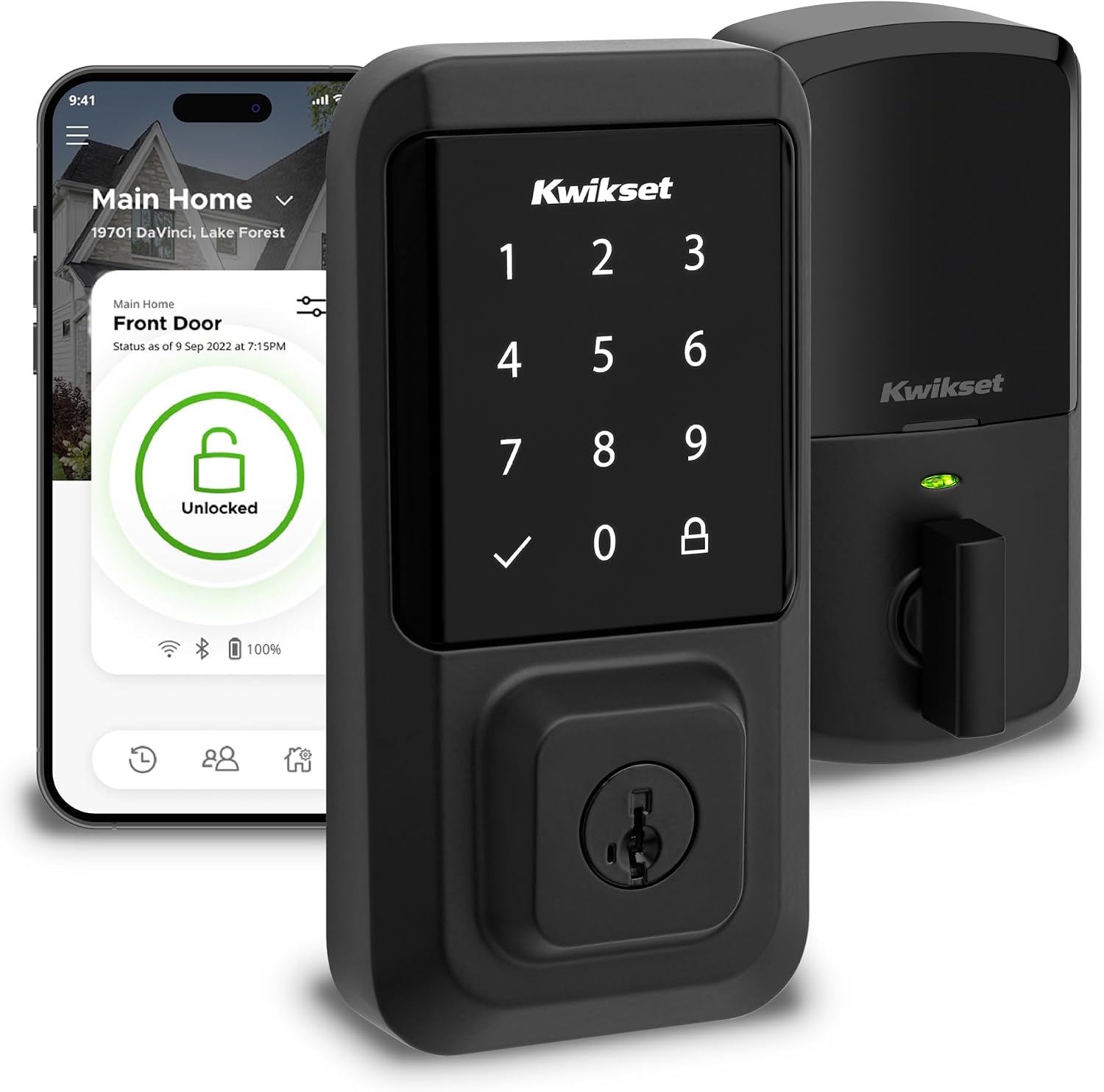
Key specs: Wi-Fi deadbolt, no hub; touchscreen with SecureScreen; app, code and key entry; up to 250 user codes; SmartKey keyway; ANSI Grade AAA; UL 20-minute fire rating; 4 AA batteries included; matte black
Buy this one if the answer to the remote-access question was yes. From the app you can lock and unlock from anywhere with an internet connection, manage up to 250 codes, schedule them, read the lock’s event history and take activity notifications. The scheduling earns its keep — Kwikset documents codes that work anytime, codes limited to a date range, codes limited to set weekdays and times, and codes usable once within 24 hours. That last one is the contractor code.
The touchscreen adds one thing the button model does not: SecureScreen, which shows random digits you must touch before entering your code, so the smudge pattern on the glass does not give it away. Kwikset publishes ANSI Grade AAA, a UL 20-minute fire rating, an alarm after three wrong codes, a tamper-resistant interior cover and a secure mode that disables the keypad. Alexa and Google Assistant both work hub-free — our guide to smart locks for Google Home compares ecosystems.
✅ Pros
- No hub, no bridge, no second device — router, phone and lock is the whole list
- Up to 250 codes with real scheduling, including a single-use 24-hour code
- SecureScreen hides your code from the fingerprint pattern on the glass
- Alexa and Google Assistant work without adding a hub
❌ Cons
- Shortest battery life here, roughly half what the standalone models publish
- Needs a 2.4 GHz WPA2 network, which some router setups will not give you as shipped
- The app account is a dependency: Kwikset’s support notice records a December 2024 third-party outage that stopped owners logging in
- Kwikset states its app-compatible products work only in the United States and Canada
Kwikset Halo Keypad Wi-Fi Smart Lock — same brain, physical buttons
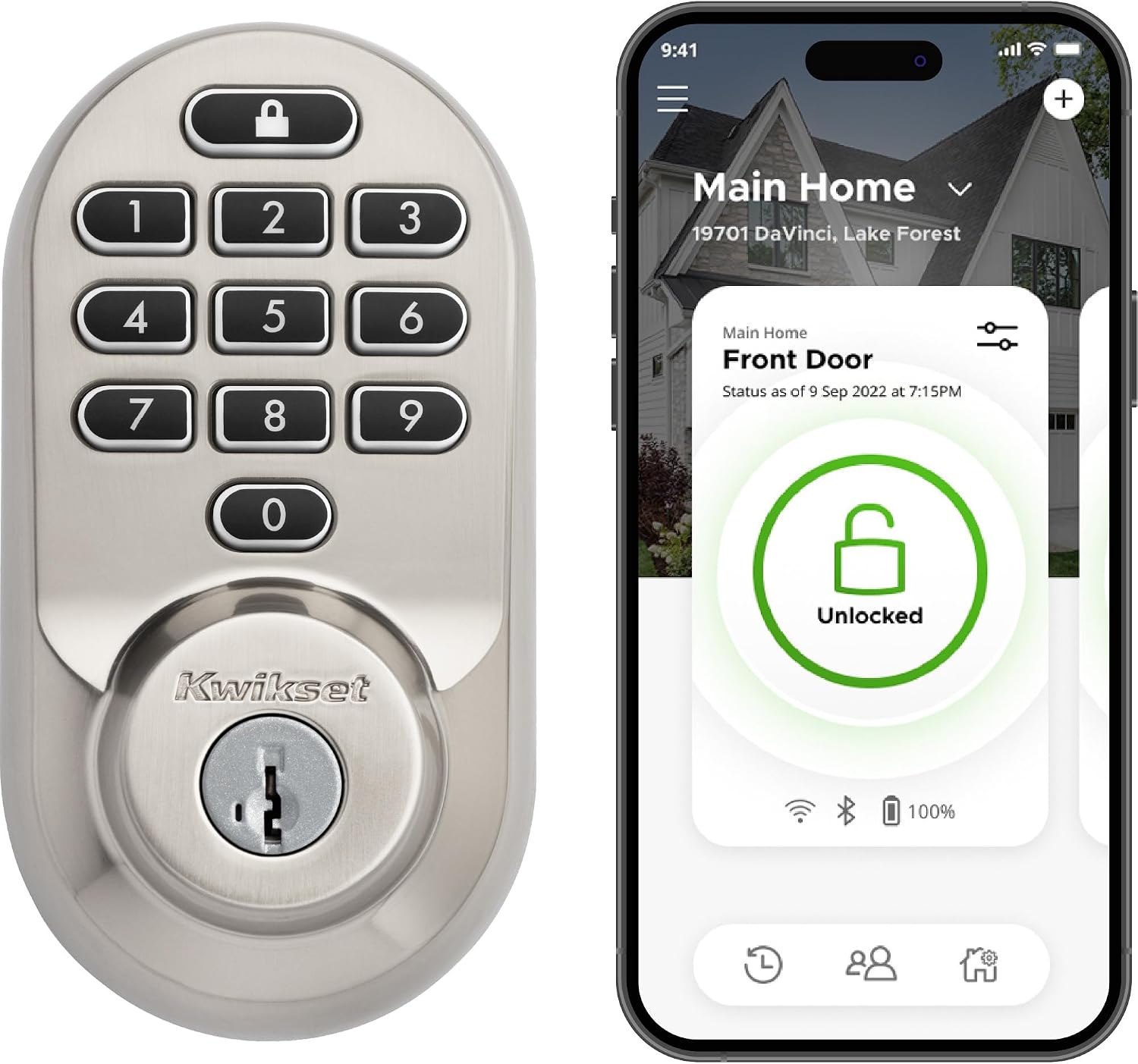
Key specs: Wi-Fi deadbolt, no hub; physical push-button keypad; app, code and key entry; up to 250 user codes; SmartKey backup keyway; ANSI Grade AAA; UL 20-minute fire rating; 4 AA batteries included; satin nickel
The honest version of this pick: the Halo Keypad and the Halo Touchscreen are the same lock with a different front. Kwikset publishes the same core specification for both — Wi-Fi with no hub, up to 250 user codes, ANSI Grade AAA, a UL 20-minute fire rating, four AA batteries included, and the same hub-free Alexa and Google Assistant support. Anyone telling you one is meaningfully more secure than the other is inventing a difference. The choice is the interface, not the capability.
Buttons beat glass in three real situations: cold weather and gloves, a door in direct sun where a screen washes out, and a household where someone finds a touchscreen fiddly. Glass wins if you want SecureScreen. If the electronics stop responding, the same Kwikset smart lock reset walkthrough covers both.
✅ Pros
- Identical published Wi-Fi capability to the Touchscreen, 250 codes and Grade AAA
- Physical buttons are easier with gloves, wet hands or poor eyesight
- SmartKey backup keyway included, same as the rest of the range
- Batteries included, which the standalone models do not do
❌ Cons
- The same battery penalty as every Wi-Fi model in the range
- No SecureScreen — Kwikset documents that as a touchscreen feature
- Choosing it over the Touchscreen is an interface call, not a specification upgrade
- Shares the Halo line’s weaker star average on current listings, discussed below
Kwikset SmartCode 260 Electronic Deadbolt — best when you do not want the lock online
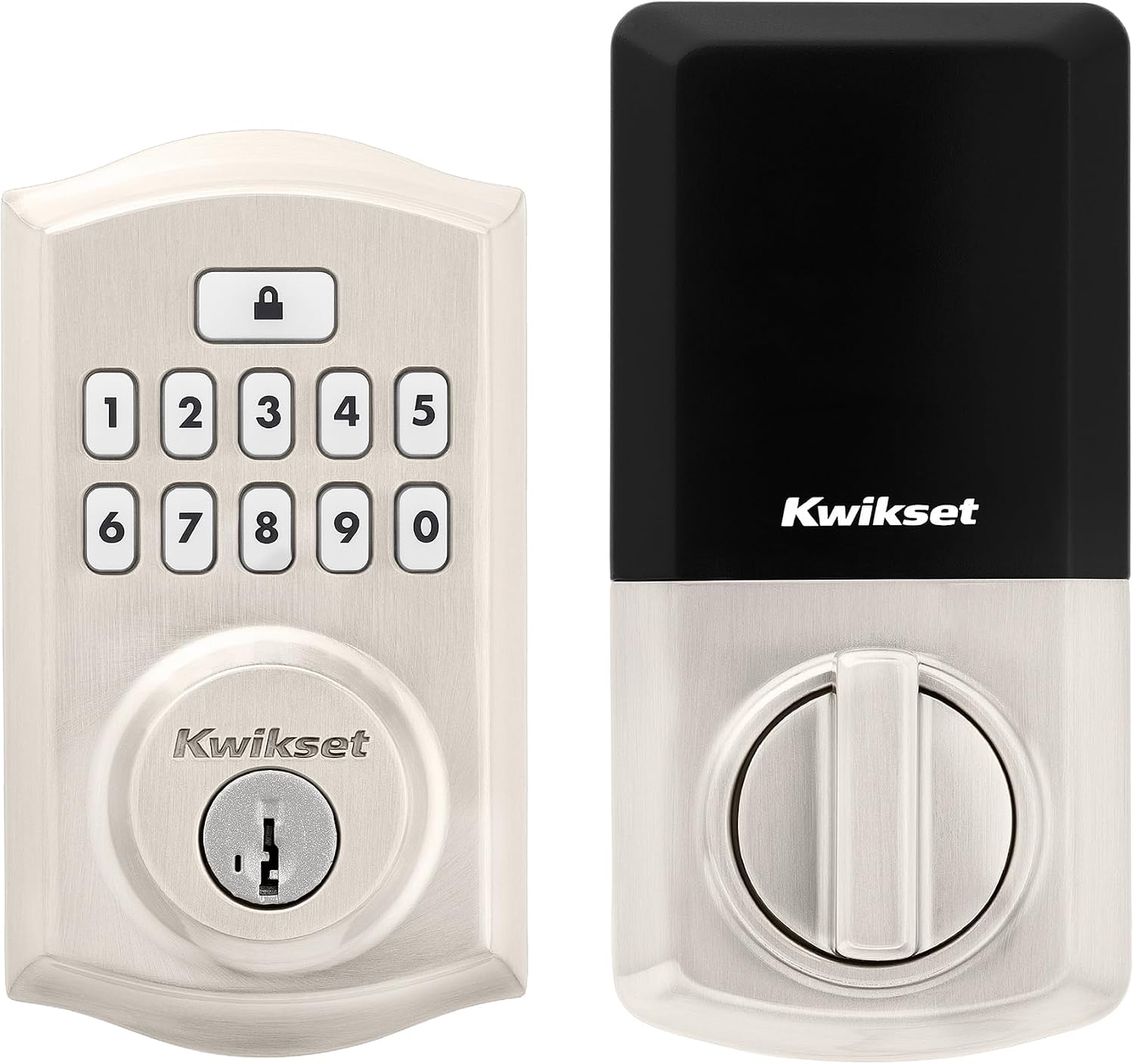
Key specs: Standalone keypad deadbolt, no app and no radio; 50 user codes plus 10 one-time and 1 programming code; auto-lock; vacation mode; intrusion alert; BHMA Grade 2 for security, durability and finish; SmartKey keyway; at least 12 months on 4 AA alkalines, not included
This is the pick we expect most readers actually want, and the one search results bury. No app, no hub, no radio. You program up to 50 user codes at the keypad, plus 10 one-time codes and a programming code that governs the rest. Auto-lock fires at 30 seconds, one, three, five or ten minutes; vacation mode disables the keypad while you are away; three consecutive wrong codes trigger an alarm and lock the keypad out for a minute.
You give up remote anything: no unlocking from work, no notification when your daughter gets home, no activity log. You get back a lock nothing on your network can break, rated at at least 12 months on alkalines and carrying BHMA Grade 2 for security, durability and finish — which Kwikset describes as up to 2.5 times stronger than Grade 3 certified locksets. Prefer a touchscreen front? The SmartCode 270 is the same idea one shelf over — Kwikset files it in its SmartCode Touchscreen deadbolts, also published at Grade 2 with 50 codes. For cross-brand options, our best keypad door locks guide covers the wider field.
✅ Pros
- Roughly double the published battery life of the Wi-Fi models
- Nothing to break in a network outage, a router swap or a service failure
- 50 codes plus 10 one-time codes outruns what most households need
- Higher published BHMA grade than the Powerbolt 250, plus full SmartKey re-keying
❌ Cons
- No app — every code is programmed standing at the door
- No activity log, so you cannot check whether anyone came in
- Batteries are not included, unlike the Halo models
- Auto-lock is the only automation; no geofence, no schedule-based locking
Kwikset Powerbolt 250 Keypad Deadbolt — the budget keypad, with a real caveat
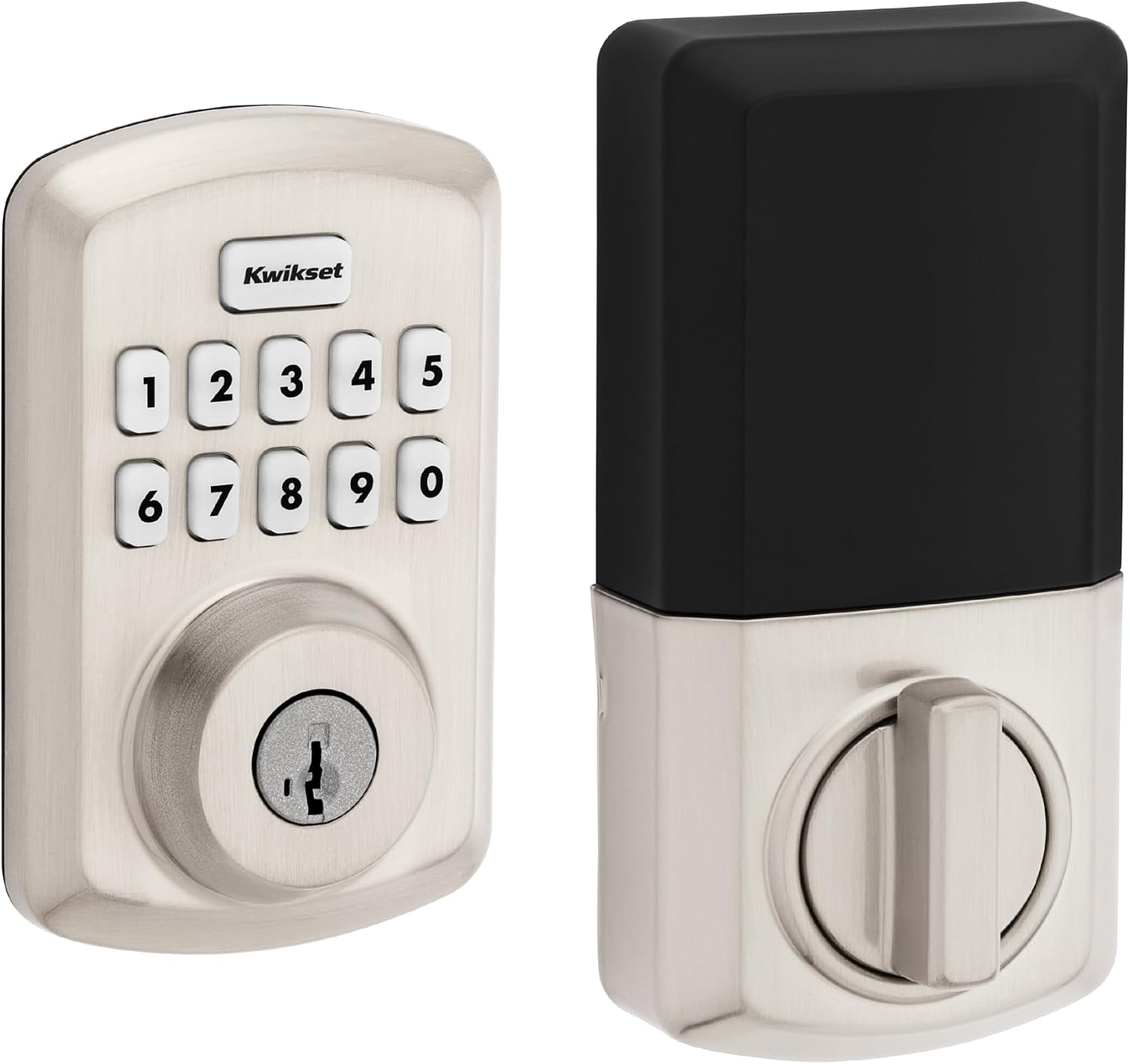
Key specs: Standalone 10-button keypad deadbolt, no app and no hub; 25 user codes plus 5 one-time; auto-lock; vacation mode; intrusion alert; LED-lit keypad; BHMA Grade 3; UL time rating listed as not rated; SmartKey keyway; 12 months on 4 AA alkalines, not included
This is where Kwikset’s ladder bottoms out, and it is a legitimate lock rather than a stripped shell. It keeps what matters: SmartKey re-keying, auto-lock, vacation mode, an intrusion alert after three wrong codes, and an LED-lit keypad for entering a code in the dark. Kwikset publishes 12-month battery life on four AA alkalines.
Now the caveats, because there are two and neither is in the marketing copy. Kwikset publishes this lock at BHMA Grade 3 for security, durability and finish, against Grade 2 for the SmartCode 260. And its specification table lists the UL time rating as not rated, where both Halo models and both SmartCodes carry a 20-minute fire rating. Code capacity is smaller too, and the warranty splits like the rest of the range: lifetime on mechanical parts and finish, one year on electronics. For a back door, a garage entry or a rental where cost leads, those are fair compromises. For the front door of a house you own, the step up is worth it. Our deadbolt installation walkthrough covers the door prep either way.
✅ Pros
- The lowest-cost route into SmartKey re-keying in this guide
- 12-month published battery life, matching the SmartCode 260’s class rather than the Halo’s
- LED-lit keypad, which the cheaper end of this category often drops
- Auto-lock, vacation mode and intrusion alert are all present
❌ Cons
- Published at BHMA Grade 3 rather than Grade 2
- UL time rating listed as not rated, where the other three picks carry 20 minutes
- The smallest code capacity in this lineup
- No app, no log, no path to adding one later, and no batteries in the box
What Halo Actually Needs From Your Wi-Fi
This section decides whether a Halo is a good purchase or a returned one. Kwikset’s support answer is one sentence and unusually specific: the home Wi-Fi network needs to be 2.4 GHz and password protected with WPA2 encryption. So a network broadcasting only on 5 GHz will not do, and neither will an open one.
The bigger issue is where the lock sits. Kwikset’s Wi-Fi troubleshooting page tells owners to ensure adequate coverage and signal strength at the lock’s location, and if there is not enough, to place a Wi-Fi extender or repeater between the router and the lock. A front door is usually among the furthest points from the router, so this is not a rare edge case. The same page notes the network must not be hidden, and that changing the network name or password requires a network reset on the Halo Keypad, Halo Touch and Halo Touchscreen rather than an in-app edit. The practical move is to stand at the door and check the signal where the hardware will actually live before committing.
One more detail is easy to miss and hard to unsee. Kwikset publishes a list of routers recommended for optimal battery performance, plus a short list it explicitly does not recommend because they may reduce battery life. A lock manufacturer publishing a router blocklist tells you how tightly Wi-Fi behavior and battery behavior are coupled here.
What the Radio Costs You in Batteries
Every connected lock pays for its radio in battery life, and Kwikset is unusually straightforward about the size of the bill.
The Runtime Trade, Straight From Kwikset
~6 mo
Halo, on a fresh set of four AA alkalines
12+ mo
SmartCode 260, on four AA alkalines
12 mo
Powerbolt 250, on four AA alkalines
20% then 10%
Levels at which a Halo shows a low-battery icon, then adds a tone
Figures as published by Kwikset per model. Real runtime varies with usage.
That gap is roughly a factor of two, and it is the most concrete cost of choosing a connected lock. If changing four AA batteries twice a year rather than once sounds trivial, it is. If it sounds like the difference between a lock you maintain and a lock that locks you out, that is a real reason to buy the SmartCode.
The more useful part of Kwikset’s battery guidance is what it blames first. Its battery-life page says even the slightest misalignment between the bolt and the strike plate hole causes friction, requiring more power to lock and unlock, and calls this by far the most common contributor to reduced battery life. The same page recommends non-rechargeable alkalines, suggests turning off lock sounds and the LED status indicator to cut draw, points at its battery-friendly router list, and asks you to confirm the lock is not loose on the door. In short: many Kwikset battery complaints are door problems, not lock problems. If yours drains fast, our guide to testing whether a smart lock battery is really dying separates a genuine failure from a misaligned strike.
Why One Kwikset Says AAA and Another Says Grade 2
Compare the specification tables on Kwikset’s own site and you hit something confusing. The Halo Touchscreen and Halo Keypad list an ANSI grade of AAA. The SmartCode 260 and 270 list Grade 2. The Powerbolt 250 lists Grade 3. Those are not four points on one scale, and treating them as one is this category’s most common mistake.
BHMA is the only organization accredited by the American National Standards Institute to develop and maintain performance standards for door hardware. Many of its standards define product grades of 1, 2 or 3, grade 1 highest. Separately, BHMA runs a residential certification program whose Secure Home label rates a lock in three categories — security, durability and finish — instead of issuing one number. A letter string like AAA is that three-part residential rating; Grade 2 comes from the numbered scale. Different questions.
So the upshot is not that AAA beats Grade 2 by a notch. Kwikset’s SmartCode 260 page makes a claim inside the numbered scale — Grade 2 as up to 2.5 times stronger than Grade 3 certified locksets — and that comparison is fair, because both sides sit on the same scale. Comparing a lettered rating to a numbered one is not. Our explainer on ANSI and BHMA lock grades unpacks why the residential program exists. Either way, BHMA certification is voluntary, and products without the Secure Home label have not been assured of third-party laboratory testing at all. If the mechanical side of the door matters most, our high-security deadbolt guide picks on that basis instead.
The Halo Rating Gap We Are Not Going to Smooth Over
Something in the retail data behind this guide appears in no Kwikset material. Across the current Amazon listings we pulled, both Halo Wi-Fi models sit at a visibly lower star average than the SmartCode 260, the SmartCode 270 and the Powerbolt 250 — on a substantially larger review base, which makes the gap hard to write off as a small-sample wobble. The flagship is the worst-reviewed part of the range, and we are not burying that in a footnote.
We cannot name the cause from listing data alone and will not guess. What we can do is point at what Kwikset documents that would plausibly produce it, all of which applies to the Wi-Fi models and none to the keypads. The Halo needs a 2.4 GHz WPA2 network specifically. It needs adequate signal at a door that is usually the far corner of the house, and may need an extender. Its battery life is roughly half the standalone models’. Kwikset publishes a router list for battery performance, including routers it recommends against. And the app is a live dependency — Kwikset’s own support notice on the Halo page records a December 2024 third-party service outage during which owners could not log in.
None of that makes the Halo a bad lock. It makes it a lock with more surfaces to go wrong, most of them in your house rather than in the lock. Buy it because you need remote access and have checked your network meets its requirements — not because it is the priciest model on the shelf. None of these locks needs a subscription, which our guide to smart locks without subscriptions notes is getting rarer.
Final Recommendation
Start with the Kwikset SmartCode 260. For most front doors it is the right lock, and the reasoning is not about saving money. It delivers what people actually buy a keypad lock for — nobody carries a key anymore — with 50 user codes plus 10 one-time codes, auto-lock, vacation mode and full SmartKey re-keying, at roughly double the battery life of the Wi-Fi models, and nothing a router change or cloud outage can break.
Choose the Kwikset Halo Touchscreen instead if you can name a specific person you need to let in while you are not there. Remote unlocking, scheduled and one-time codes and an activity log are real capabilities the SmartCode does not have. Before ordering, confirm two things: that your network broadcasts 2.4 GHz with WPA2, and that the signal is usable at the door rather than merely present in the hallway. If either fails, fix the network first or buy the SmartCode — a Halo on a marginal signal is the most predictable route to regretting the purchase.
Take the Halo Keypad over the Touchscreen only on interface preference — gloves, sunlight, or a household that dislikes touchscreens; the published specification is otherwise the same. Take the Powerbolt 250 for a secondary door, a rental or a garage entry, accepting Grade 3 and no UL time rating as the price of entry. Weighing this against a doorbell as the first upgrade to the entrance? Our doorbell versus smart lock comparison takes that question head on.
SafeBode does not yet run an in-house product testing program. This guide is built from manufacturer specifications, official support documentation, current retail listings and verified buyer feedback rather than hands-on testing, and we say so plainly rather than implying testing we have not done.
Frequently Asked Questions
Does the Kwikset Halo need a hub or bridge?
No. Kwikset is explicit that a Wi-Fi router, a smartphone and the lock are the entire requirement. That is what separates Halo from Kwikset’s Z-Wave and Zigbee models, which do expect a hub.
Do any of these Kwikset locks charge a subscription?
No. Code management, remote locking, notifications and the activity log on the Halo models are app features with no separate plan, and the keypad-only models have no service component at all.
Can I still use a key if the batteries die?
Yes. Every lock here is a keyed-one-side deadbolt with a SmartKey cylinder, so a physical key works regardless of battery or electronics state. That is the practical reason to prefer a keyed model over a fully keyless one.
What is the difference between the SmartCode 260 and the SmartCode 270?
Keypad style and product family: Kwikset files the 260 under its SmartCode Touchpad deadbolts and the 270 under SmartCode Touchscreen. Both are published at the same numbered BHMA grade, both hold 50 user codes and both carry a 20-minute UL rating, so it is a preference choice rather than a capability upgrade.
Will a Halo work if my internet goes down?
The keypad and the key keep working, because codes are stored on the lock itself. What stops is everything needing the internet: remote locking and unlocking, notifications, the activity log, and editing codes from the app while away.
Can I re-key a Kwikset SmartKey lock without the current key?
No. Kwikset states that re-keying requires both the currently working key and the SmartKey tool supplied in the package, and refers owners who have lost the key to a locksmith or its support team.
Can SmartKey re-key a lock from another brand?
No. Kwikset describes SmartKey as a patented cylinder design available only on its own products, so it cannot re-key a Schlage, a Yale or any other manufacturer’s lock.
Which Kwikset model is best for a rental property?
The keypad-only models usually suit rentals better: codes change at the door with no app account to transfer, batteries last about twice as long, and SmartKey lets the owner re-key at turnover while keeping every door on one key.
Sources
Show sources (14)
- [1] Kwikset — Halo Touchscreen Wi-Fi Enabled Smart Lock (model 939 WIFI TSCR), product page and specification table, kwikset.com/products/detail/halo-touchscreen-wi-fi-enabled-smart-lock
- [2] Kwikset — Halo Keypad Wi-Fi Enabled Smart Lock (model 938 WIFI KYPD), product page and specification table, kwikset.com/products/detail/halo-keypad-wi-fi-enabled-smart-lock
- [3] Kwikset — 260 SmartCode Traditional Electronic Deadbolt, product page, kwikset.com/products/detail/260-smartcode-traditional-electronic-deadbolt
- [4] Kwikset — Powerbolt 250 Transitional Keypad Electronic Lock, product page, kwikset.com/products/detail/powerbolt-250-transitional-keypad-electronic-lock
- [5] Kwikset Support — Will type of Wi-Fi network does Halo require?
- [6] Kwikset Support — How can I troubleshoot the Wi-Fi connection of my Halo smart lock?
- [7] Kwikset Support — How long will a fresh set of batteries last on the Halo deadbolt?
- [8] Kwikset Support — How can I extend the battery life of my smart lock?
- [9] Kwikset Support — Which routers are recommended for the Halo smart lock?
- [10] Kwikset — SmartKey Security, including the re-keying FAQ
- [11] Builders Hardware Manufacturers Association — ANSI/BHMA Standards: Product Grade Levels
- [12] BHMA Certified Secure Home — the residential security, durability and finish rating program
- [13] Kwikset — 270 SmartCode Contemporary Electronic Deadbolt, product page, kwikset.com/products/detail/270-smartcode-contemporary-electronic-deadbolt
- [14] Kwikset — Compare Smart Locks chart


