Keyless Entry Door Locks: Smart, Keypad and Fingerprint Locks Compared
Affiliate Disclosure: This article contains affiliate links. If you buy through these links, we may earn a commission at no extra cost to you. Our editorial opinions are our own and are not influenced by affiliate relationships. Read our full disclosure policy →
Contents
Quick Answer
The real decision with a keyless lock is not which brand — it is whether you want an app at all. A keypad-only deadbolt does the job with no WiFi, no account and no battery-hungry radio. Add WiFi only if you genuinely need to unlock the door when you are not standing at it.
Do you actually need the app?
This one question eliminates most of the market for most people. A connected lock lets you unlock remotely, check whether the door is locked from work, and issue temporary codes that expire. A keypad-only lock does none of that — and in exchange it has no account to be breached, no firmware to update, and batteries that last considerably longer because there is no radio running. If you are still deciding whether the lock is even the right first purchase, we weigh it against the other front-door upgrade in video doorbell vs. smart lock.
Keypad-only vs. connected
Keypad-only is enough if
- You just want to stop carrying a key
- Everyone who needs access lives there
- You would rather not add another account
- You want the longest possible battery life
Add WiFi if
- You let cleaners, dog walkers or guests in
- You want codes that expire on their own
- You want to check the lock from work
- It needs to talk to the rest of your smart home
Four keyless locks worth buying
Schlage Encode Smart WiFi Deadbolt — Best connected lock
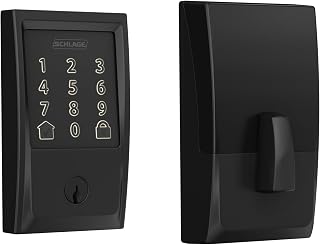
Key specs: built-in WiFi · no hub needed · keypad + app · Schlage Greenwich trim
The most-reviewed connected deadbolt on the market by a wide margin, and the WiFi is built in rather than needing a separate bridge — which is where most competitors add cost and another point of failure. If you ever need to clear its codes, our Kwikset reset walkthrough covers the procedure across the range.
✅ Pros
- WiFi built in, no hub or bridge to buy
- Far the largest review base in this category
- Keypad works normally if the internet is down
- Established lock brand, not a newcomer
❌ Cons
- Bulkier than a plain keypad deadbolt
- The radio shortens battery life against keypad-only
- Overkill if nobody ever needs remote access
TEEHO TE001 Keyless Entry Deadbolt — Best keypad-only

Key specs: keypad only · no app, no WiFi · auto-lock · front-door deadbolt
No app, no WiFi, no account. It replaces your key and stops there, which for a great many households is precisely the whole requirement. If the code-only route is the one you want, our keypad door lock roundup compares four app-free models on bolt hardware and code management.
✅ Pros
- Very large review base for a keypad lock
- Nothing to connect and nothing to breach
- Long battery life with no radio draw
- Auto-lock behind you
❌ Cons
- No remote access at all
- Codes must be added at the door itself
- No smart-home integration of any kind
Kwikset Powerbolt 250 Keypad Deadbolt — Best simple keypad from a major brand

Key specs: 10-button keypad · no app · one-touch locking · satin nickel
A straightforward ten-button keypad deadbolt from a mainstream lock manufacturer. One-touch locking on the way out is the detail people end up using most.
✅ Pros
- Established lock brand with wide parts availability
- One-touch locking as you leave
- No app or account required
- Straightforward keyed override
❌ Cons
- Ten buttons rather than a touchscreen
- No connectivity of any kind
- Fewer user codes than app-based rivals
Veise VE017 Fingerprint Smart Lock — Best if several people need different access

Key specs: fingerprint + keypad + app · WiFi · multiple unlock methods
Fingerprint, keypad and app in one unit. The fingerprint reader is the differentiator when children or older relatives find codes awkward.
✅ Pros
- Fingerprint, code and app all supported
- Useful where codes are hard to remember
- WiFi included
- Multiple unlock routes if one fails
❌ Cons
- Smaller review base than the established brands
- More features means more to go wrong
- Fingerprint readers can struggle in cold or wet conditions
Side by side
Check your door before you buy anything
A keyless lock is a straight swap for a standard deadbolt — but only if your door is standard. Five minutes with a tape measure now saves a return later, and these are the measurements that actually matter.
- Backset. The distance from the door edge to the center of the bore hole. Almost always 2⅜ or 2¾ inches. Most locks ship adjustable for both, but confirm.
- Door thickness. Standard is 1⅜ to 1¾ inches. Thicker doors need an extension kit, which is cheap but must be ordered separately.
- Bore hole diameter. Standard is 2⅛ inches. If yours is smaller, you are drilling — a different job than a swap.
- Which way the door swings. Most keyless locks handle both, but a few handed models do not.
- Strike plate condition. If the frame around it is soft or split, fix that first. The best lock on a failing frame fails at the frame.
Two more things worth checking while you have the tape measure out. If the existing deadbolt sits very close to a glass panel or a mail slot, a keypad model puts the code entry within reach of anyone who breaks that glass — a keyed-only or app-only lock is the safer choice there. And if the door is a vinyl or composite unit rather than timber, most of these will not fit at all: those use a multi-point locking mechanism along the whole door edge, not a single deadbolt, and need a different product entirely. Our renter guide covers the no-modification options if you cannot change the lock at all. If your concern is a child letting themselves out rather than a stranger letting themselves in, see our guide to child safety door locks, which deals with that problem door by door.
What the grade on the box means
Locks carry an ANSI/BHMA grade, and it is the closest thing to an objective comparison you get. The catch is that there are two different grading scales, and most buying guides quote the wrong one. Commercial hardware is graded 1, 2 and 3. Residential deadbolts and locksets are certified under ANSI/BHMA A156.40 and A156.39 and graded A, B or C — Best, Better and Good — in each test category, under BHMA’s Secure Home program.
So on a residential lock you are looking for an A or B rating, not a grade number. A is the highest and the sensible target for a front door; C still means the product passed certification. The grades are also awarded per category — security, durability and finish are scored separately, so a lock can be Best for security and merely Good for finish. What no grade tells you is anything about the electronics: it measures the lock mechanism, not the keypad, the app or the radio.
Which is worth remembering when comparing a well-known brand against a newer one: the grade may be identical, and the difference is in everything the grade does not cover. And if the recurring-fee question is what decides it for you, our guide to smart locks without a subscription covers the models that never ask for one.
Final Recommendation
Start with the TEEHO TE001. The whole argument of this guide is that the app is the part most people do not need, and this is the pick that tests it cheaply: a keypad deadbolt with no WiFi, no account and no radio quietly draining the batteries. If you have never actually stood somewhere else wishing you could unlock your front door, this is the lock to buy.
Buy the Schlage Encode instead only if remote access is a real, recurring need — a cleaner you let in on Tuesdays, a rental changeover, a family member who keeps getting locked out. That is a genuine reason to accept the WiFi radio and the shorter battery life that comes with it. “It would be nice to have” is not.
Two things would change that. If you want a keypad-only lock but would rather buy from a brand your local locksmith already stocks parts for, take the Kwikset Powerbolt 250. If several people need genuinely different access — and you want to know which one opened the door — the Veise VE017 is the only pick here that does it by fingerprint.
Whichever you choose, measure the door first. A lock that does not match your backset and door thickness is the one mistake none of these picks can absorb.
Frequently Asked Questions
What happens in a power cut?
Nothing. These are battery-powered, not mains-powered. A power cut only matters for the WiFi models, and only for remote access — the keypad still works at the door.
How long do the batteries last?
Keypad-only locks typically run far longer than connected ones because there is no radio drawing power. Either way, test before you are locked out.
Can I still use a key?
Yes on all four. Every one keeps a physical keyway as a fallback.
Do I need a locksmith, or can I fit one myself?
No. A deadbolt swap is a screwdriver job on a standard door. If it is your first, allow half an hour.
Will a keyless lock fit my existing door?
Almost certainly, if the door is standard. Check backset, thickness and bore diameter first — five minutes with a tape measure.
What ANSI grade should I buy for a front door?
Look for an A or B rating under BHMA’s residential Secure Home grading. Grade 1, 2 and 3 numbers belong to the commercial scale and are not what you will find on a residential lock.
Do these work if the batteries die completely?
All four keep a physical keyway as a fallback. Keep a key somewhere other than inside the locked house, and test the batteries before they reach that point.
Is a fingerprint lock worth it over a keypad?
Only if codes are the problem. A fingerprint reader helps where children or older relatives find codes awkward, and it gives you another way in if one method fails. The trade-off is that fingerprint readers can struggle in cold or wet conditions, so treat the keypad and the keyway as the real fallbacks.
Sources
Show sources (4)
SafeBode does not yet run an in-house product testing program. This guide is built from manufacturer specifications, current retail listings and verified buyer feedback rather than hands-on testing, and we say so plainly rather than implying testing we have not done.


