DIY Home Security Systems for Renters 2026: No-Drill Picks That Won’t Cost Your Deposit
Affiliate Disclosure: This article contains affiliate links. If you buy through these links, we may earn a commission at no extra cost to you. Our editorial opinions are our own and are not influenced by affiliate relationships. Read our full disclosure policy →
Table of Contents
Quick Answer
Every system on this list installs with adhesive strips, magnets, or plug-in components — no drill, no screws, no permanent marks on the walls. Our pick for most renters is the SimpliSafe 9-Piece Wireless Home Security System: it is the closest thing to a consensus top choice among independent reviewers, its sensors mount with peel-and-stick adhesive, and it does not lock you into a monitoring contract if you would rather self-monitor through the app.
That said, “best” here depends on what you actually need — a studio apartment with one entry point has different requirements than a two-bedroom with a balcony door and a roommate’s dog. The comparison table below breaks down the tradeoffs before we get into each system individually.
Editorial note: SafeBode has not purchased and physically tested these five systems yet — this comparison is built from verified manufacturer specifications and cross-checked against independent testing labs (cited throughout, with sources listed at the end).
Where a competitor’s own hands-on testing data is directly relevant, we say so and credit it. We will update this guide with our own testing notes once units are in hand.
Who This Guide Is For
 Good fit if you rent and cannot drill · Look elsewhere if you own and want a wired, whole-property system
Just need a single camera to keep an eye on one room — not a full multi-sensor system? Our Best Indoor Security Cameras 2026 guide compares standalone renter-friendly cameras for baby monitoring, pets, and no-subscription setups.
Own your home instead of renting, and want a setup that can grow past a single camera? Our Best Wireless Security Camera Systems 2026 guide compares four expandable multi-camera systems, including local-storage options with no monthly fee.
Own your home and want a full alarm system — entry sensors, a keypad, a real siren, not just a camera? See our Best DIY Home Alarm Systems 2026 guide for 4 picks you can permanently mount, with no drilling restrictions to work around.
At a Glance: Comparison Table
Check each product’s live Amazon listing for current pricing and plan details — see the Buy links in each product section below.
| System | Monitoring Options | Mounting Type | Smart Home Compatibility | Best For |
|---|
| SimpliSafe 9-Piece | Self-monitor free; professional monitoring optional | Peel-and-stick adhesive | Alexa, Google Assistant (no Apple HomeKit) | Most renters — broadest consensus pick |
| Ring Alarm 5-Piece (2nd Gen) | Self-monitor free; Ring Protect Pro optional | Peel-and-stick adhesive, battery-powered | Alexa (native); limited Google/Apple support | Households already using Alexa/Ring devices |
| Abode Iota All-in-One | Free self-monitoring tier; paid tiers optional | Adhesive-backed sensors | Apple HomeKit, Google Home, Alexa | Renters who want one all-in-one hub+camera unit and broad ecosystem support |
| Cove Secure Hub | Monitoring required for core alarm function | Peel-and-stick adhesive | Limited third-party smart home integration | Renters who want guided professional monitoring without a long contract |
| Wyze Home Monitoring Core Kit | 3 months included, then subscription required for full monitoring | Peel-and-stick adhesive | Works with existing Wyze Cam ecosystem | Tightest budget, renters already using Wyze cameras |
What “No-Drill” Actually Means
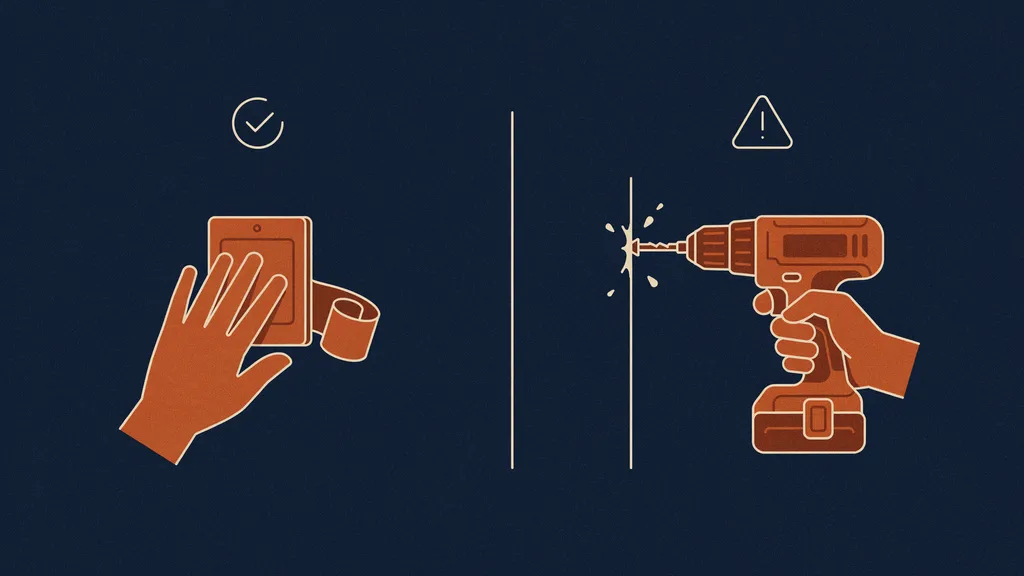 Adhesive mounting vs. drilled mounting — the difference that matters for renters.
Not every “wireless” security system is actually renter-safe.
“Wireless” usually just means the sensors do not need a wired connection to a control panel — it says nothing about how the sensor physically attaches to your door frame or window. Some wireless systems still ship with screw-mount brackets as the default, with adhesive as an afterthought accessory.
All five systems in this guide use adhesive as the primary, manufacturer-supported mounting method, not a workaround:
- SimpliSafe, Ring, Abode, and Cove all ship their entry sensors with adhesive backing pre-applied — you peel a liner and press the sensor to the frame, no tools involved.
- Wyze’s kit follows the same adhesive-first approach for its entry sensors and motion sensor.
- Hub/base station units (the “brain” of each system) typically sit on a shelf or counter and do not need to be mounted to anything at all.
- Cameras, where included, are usually either adhesive-mount or freestanding on an included stand — check each product’s specific camera-mounting option before assuming it is drill-free.
The practical tradeoff: adhesive mounts are removable and reversible, but the strength of the bond depends on your wall or frame surface.
Textured paint and certain vinyl trims hold adhesive less securely than smooth painted wood or metal. If you are on a textured or unusually finished surface, test a small piece of the adhesive strip in an inconspicuous spot first.
The 5 Best No-Drill Security Systems for Renters
1. SimpliSafe 9-Piece Wireless Home Security System
BEST OVERALL
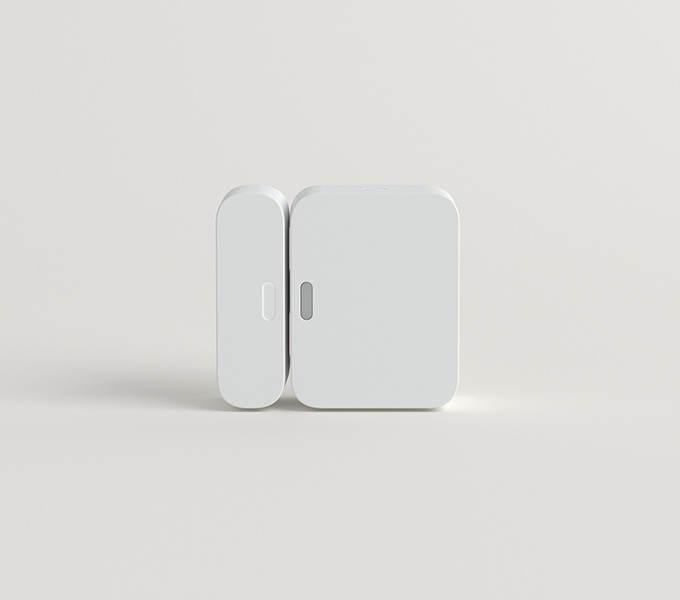
- Entry methods: Peel-and-stick adhesive sensors, no wiring or drilling
- Connectivity: WiFi, with cellular backup available on monitored plans
- Best for: Renters who want the option to self-monitor for free and only pay if they choose professional monitoring
What we like
- No long-term contract required, according to SimpliSafe’s own product documentation
- Free self-monitoring with real-time phone alerts — no forced subscription
What holds it back
- Canceling monitored service requires a phone call rather than in-app cancellation
- No Apple HomeKit support — works with Alexa and Google Assistant only
2. Ring Alarm 5-Piece Kit (2nd Gen)
BEST FOR ALEXA & RING HOUSEHOLDS

- Entry methods: Peel-and-stick adhesive sensors, battery-powered (no wiring)
- Connectivity: WiFi, with an optional cellular backup add-on
- Best for: Existing Alexa/Ring households wanting one connected ecosystem
What we like
- Free self-monitoring through the Ring app with real-time alerts, no subscription required
- Setup is guided step-by-step inside the Ring app
What holds it back
- Camera features and video history are gated behind a separate Ring Protect subscription
- Limited Apple HomeKit and Google Assistant support — this is an Alexa-first system
3. Abode Iota All-in-One Security Kit
BEST FOR APPLE HOMEKIT

- Entry methods: Adhesive-backed door/window sensors; the Iota hub itself is freestanding, no mounting required
- Connectivity: WiFi, with Z-Wave/Zigbee support for expanding with third-party smart home sensors
- Best for: Renters who want one all-in-one unit and the widest smart-home ecosystem compatibility
What we like
- A genuinely free self-monitoring tier with no time limit, per Abode’s own documentation
- The broadest smart-home support on this list: Apple HomeKit, Google Home, and Alexa
What holds it back
- Smaller installed base than SimpliSafe or Ring, so community troubleshooting resources and accessories are thinner
- SafeWise’s independent review notes “so-so camera quality” on the built-in Iota camera
4. Cove Secure Hub
BEST FOR GUIDED MONITORING

- Entry methods: Peel-and-stick adhesive sensors throughout
- Connectivity: WiFi and cellular options
- Best for: Renters who want a more guided, monitored experience without signing a multi-year contract
What we like
- No long-term contract is required to use Cove’s monitoring
- Peel-and-stick installation is consistently described as straightforward by independent reviewers
What holds it back
- No genuinely full-featured free self-monitoring path — budget for an ongoing monthly cost
- Third-party smart home integration is narrower than Abode’s
5. Wyze Home Monitoring Core Kit
BEST BUDGET PICK

- Entry methods: Peel-and-stick adhesive sensors
- Connectivity: WiFi
- Best for: Renters on the tightest budget, especially anyone already using Wyze cameras
What we like
- The most accessible entry point of the group, while still covering the core components (hub, keypad, motion sensor, two entry sensors)
- If you already own Wyze cameras, the monitoring app is one you may already have installed
What holds it back
- The current Amazon listing includes a professional-monitoring trial period with a subscription required to continue after that — read the listing terms before assuming ongoing monitoring is free
- Wyze disclosed a February 2024 incident in which about 13,000 users briefly received camera-event thumbnails from accounts that were not theirs, caused by a third-party caching-library bug; Wyze added an extra verification step afterward — if a past security incident is a dealbreaker, one of the other four systems may be a better fit
Protecting Your Security Deposit
The anxiety behind almost every “renter security system” search is really one question: will this cost me my deposit? Two things are worth understanding before you install anything.
What counts as damage: what actually counts as “damage” versus normal wear and tear varies by state and lease, but the general standard — as described in landlord-facing guidance — is that small, reversible marks from removable adhesive products typically fall under normal wear and tear, while holes from screws or drilled anchors more often do not.
That is the core distinction driving every product recommendation in this guide: adhesive-mounted sensors are designed to be removed cleanly, while drilled hardware leaves a permanent hole regardless of how carefully it is installed.
 Adhesive mounts protect your deposit — drilled anchors put it at risk.
Your rights as a tenant: HUD’s general guidance on resident rights and responsibilities emphasizes that tenants are expected to maintain the unit and avoid damage beyond normal wear and tear, but does not treat non-invasive, removable devices as inherently prohibited.
Your specific lease may have its own language about “alterations” or “installations” — when in doubt, the notification approach below (rather than either asking permission you may not technically need, or installing without any communication at all) is the lowest-friction middle ground.
Practical tips regardless of which system you choose:
- Test adhesive removal on a small, inconspicuous spot before committing to a permanent-feeling mount location
- Keep the original adhesive backing/box in case you need replacement strips when you move
- Take photos of your walls and door frames before installing anything, dated, as a simple record of pre-installation condition
- Avoid mounting sensors on painted trim that is already peeling or on wallpaper, where adhesive removal is more likely to take material with it
Renter’s Landlord Notification Template
Most standard leases do not require permission for non-invasive, removable devices like adhesive-mounted sensors — but proactively letting a landlord or property manager know is a low-cost way to avoid any confusion later, and it puts your good-faith effort on record.
Keep in mind: this is not legal advice, and it is not a substitute for reading your specific lease — it is a courtesy template you can adapt.
Sample message (text or email):
“Hi [Landlord/Property Manager name], just letting you know I’ve added a self-monitored home security system to the unit — it uses removable adhesive-mount sensors on doors and windows (no drilling, no permanent fixtures) and a portable base station. Everything is designed to come off cleanly if I move out. Wanted to flag it so it’s on record — happy to answer any questions.”
A few notes on using this:
- Send it in writing (text or email) rather than verbally, so there is a timestamped record
- You do not need to ask permission with this wording — it is a notification, not a request — but you can adapt it to a question if your lease specifically requires approval for “alterations”
- Keep a copy for your own records alongside the pre-installation photos mentioned above
We have not found this kind of ready-to-use template on any other apartment security guide we reviewed for this piece — most either do not address the landlord-communication question at all, or address it only in general terms without giving you actual wording to use. A portable door lock is the one piece of hardware that needs no landlord conversation at all, and our portable door lock guide covers which models actually work.
How to Choose the Right System for Your Situation
| If your situation is… | Best pick | Why |
|---|
| Studio or one-bedroom, single entry point | Wyze Core Kit or a SimpliSafe starter kit | Any of the five kits over-covers this footprint — pick on value |
| Multi-room apartment with a balcony or second entry | SimpliSafe or Abode | Both have larger expansion catalogs than Cove if you need more sensors later |
| Already an Alexa or Ring household | Ring Alarm | The most natively integrated option of the five |
| Already an Apple / HomeKit household | Abode Iota | The only one of the five with native HomeKit support |
| Want to avoid any ongoing subscription entirely | SimpliSafe, Ring, or Abode | All three offer genuinely functional free self-monitoring tiers |
| Tightest possible budget | Wyze Core Kit | The value pick of the group — but requires a subscription after the trial period, plus the privacy-history caveat noted above |
Still not sure a full system is the right category for your situation? Our full system vs. standalone camera decision guide walks through cost, renters insurance discounts, and apartment-specific factors like shared-building WiFi before you commit to either.
Final Recommendation
If you do not want to weigh all five, our pick is the SimpliSafe 9-Piece Wireless Home Security System. It is the one system that shows up as a top-tier pick across every independent review we cross-checked for this guide, its sensors are genuinely peel-and-stick with no tools required, and its free self-monitoring option means you are not forced into a subscription on day one. It will not be the right fit for every household — Apple HomeKit users in particular should look at Abode instead — but for the average renter asking “what can I install today without touching a drill,” it is the most complete, least fussy option on this list.
Weighing this against other options? See our DIY Systems hub for a full breakdown by situation.
FAQ
Do I need my landlord’s permission to install a security system?
Most standard leases do not require permission for non-invasive, removable devices like adhesive-mounted sensors, but this varies by lease and jurisdiction. Read your specific lease’s language on “alterations” or “installations,” and consider using the notification template above as a low-friction way to keep your landlord informed regardless.
Will adhesive sensors damage my walls or door frames?
Properly applied adhesive-mount sensors are designed to remove cleanly from most painted surfaces. Textured paint, certain finishes, and wallpaper carry more risk — test a small piece of the adhesive strip in an inconspicuous spot first, and see our security-deposit section above for more detail.
Can I take these systems with me when I move?
Yes — this is one of the main advantages of adhesive-mount, wireless systems over a wired install. All five systems in this guide are designed to be portable; you will typically need to re-pair sensors to the hub at your new address, which each manufacturer walks through in their app.
Do any of these systems require a monthly monitoring fee?
Not necessarily. SimpliSafe, Ring, and Abode all offer functional free self-monitoring tiers where you get phone alerts without paying anything ongoing. Cove is built around paid monitoring as its core model, and Wyze includes monitoring for an initial period before requiring a subscription.
What is the difference between self-monitoring and professional monitoring?
Self-monitoring means alerts go straight to your phone and you decide what to do. Professional monitoring means a monitoring center is alerted automatically and can dispatch emergency services on your behalf, typically for an ongoing fee.
Which of these works with Apple HomeKit?
Of the five systems in this guide, only Abode’s Iota natively supports Apple HomeKit. SimpliSafe and Ring both work with Alexa and Google Assistant but not HomeKit.
Is a DIY system as effective as a professionally installed one?
For apartment-scale coverage — a handful of entry points and one or two rooms — DIY adhesive-mount systems from established brands cover the same core functions (entry detection, motion detection, siren, app alerts) as a professionally installed system. The main tradeoff is typically in installation complexity and large-property/outdoor coverage, not core detection capability.
Sources
Show sources (6)


