Best PoE Switches for Security Cameras 2026: Watts, Ports, and the Budget Nobody Calculates
Affiliate Disclosure: This article contains affiliate links. If you buy through these links, we may earn a commission at no extra cost to you. Our editorial opinions are our own and are not influenced by affiliate relationships. Read our full disclosure policy →
Contents
Quick Answer
Buy for the total power budget, not the port count. A switch advertising eight or sixteen PoE ports is quoting how many cables it accepts, not how many cameras it can run — the wattage figure beside it is shared across every port at once. TP-Link’s 16-port TL-SG116P and Reolink’s 8-port RLA-PS1 both carry a 120 W budget, which means one of them can genuinely fill every port with a modern 4K camera and the other cannot. Add up the maximum draw of every camera you plan to connect, leave headroom, and buy the switch that clears that total. For most home 4K builds the TL-SG116P is the safest default.
The Number That Decides Everything Is Not the Port Count
There is a specific way a wired camera install goes wrong, and it almost never happens on day one. It happens on camera five, or camera nine. You add one more camera to a switch that still has free ports, and a different camera — not the new one — goes dark. Nothing is broken. The switch ran out of watts and shed a port to protect itself.
PoE switches are sold on two numbers: how many PoE ports they have, and how much power each port delivers. Both are true and neither is the constraint. The constraint is a third number in smaller type — the PoE power budget, the total wattage the switch’s supply can hand out across every powered port at once. TP-Link states the arithmetic plainly in its own technical write-up: total PoE capacity is shared across all active ports, and a 24-port switch with a 250 W budget cannot simultaneously deliver 25.5 W to all 24 ports.
Four Real Switches, Four Real Budgets
16 ports / 120 W
TP-Link TL-SG116P — 7.5 W per port if filled
8 ports / 120 W
Reolink RLA-PS1 — a genuine 15 W per port
8 ports / 62 W
TP-Link LS108GP — 7.75 W per port if filled
4 ports / 65 W
TP-Link TL-SG1005P — 16.25 W per port if filled
Same 802.3af/at standard on all four, same 30 W ceiling on any single port. The shared pool is the difference, and it is the number that limits how many cameras you can run. Figures from TP-Link and Reolink product specifications.
Two of those carry an identical 120 W budget across eight ports and sixteen — not an error, but a reflection of what each manufacturer expects the ports to feed. Crossing the line is not random either. TP-Link’s switches cut power to the lower-priority ports to protect the device from overload, while Reolink documents that the RLA-PS1 powers off ports one at a time starting from Port 8 until the total falls back under 120 W. The camera you lose is the one on the highest-numbered port — very often the one you added last.
802.3af, 802.3at and 802.3bt in Plain Terms
Three IEEE standards cover almost everything you will meet, and they are generations of one family rather than competing formats. Each roughly doubles the power at a single port, and all three run over ordinary Cat5e or better cable. Every tier quotes two wattages: what the switch puts onto the wire, and what survives the cable run to reach the camera.
| Standard | Common name | At the switch port | At the camera | Ratified | Cable pairs used |
|---|
| IEEE 802.3af | PoE | 15.4 W | 12.95 W | 2003 | Two of four |
| IEEE 802.3at | PoE+ | 30 W | 25.5 W | 2009 | Two of four |
| IEEE 802.3bt Type 3 | PoE++ / 4PPoE | 60 W | 51 W | 2018 | All four |
| IEEE 802.3bt Type 4 | PoE++ / 4PPoE | 90 W | 71.3 W | 2018 | All four |
Backward compatibility runs one way only, and that asymmetry is the practical takeaway. 802.3bt is fully backward compatible with the older 802.3af and 802.3at standards, so a newer switch happily powers an older camera at the lower wattage it asks for. The reverse fails: a 15.4 W PoE switch cannot supply a device that requires 60 W, and that device will either refuse to power on or run in a degraded state. So 802.3at is the floor today — plain 802.3af leaves nothing spare for the illuminators, spotlights and motorized lenses now standard on the cameras people buy.
What Security Cameras Actually Draw
This is where the budget calculation becomes real, and where most buying guides wave a hand and say cameras use somewhere between five and fifteen watts. You do not have to guess: Reolink publishes a per-model consumption table covering its whole PoE range.
| Rated draw | Reolink models in that band | What that class of camera is |
|---|
| Under 8 W | B400, D400, B800, D800, RLC-420, RLC-520 | Older fixed bullet and dome cameras, add-on NVR cameras |
| Under 10 W | RLC-410, RLC-422, RLC-511, RLC-522 | Earlier 5MP fixed and optical-zoom models |
| Under 12 W | RLC-810A, RLC-811A, RLC-820A, RLC-840A, RLC-1212A, TrackMix PoE, Doorbell PoE | The current mainstream: 4K and higher fixed cameras, dual-lens tracking cameras |
| Under 15 W | Duo 3 PoE, Elite XPro PoE | Very high resolution and dual-lens flagships |
| Under 20 W | RLC-423 | Pan-tilt-zoom cameras of the previous generation |
| Under 24 W | RLC-823 series, Duo Floodlight PoE | Current PTZ cameras, and floodlight cameras with high-output lighting |
Three times the draw between the bottom row and the top, from one manufacturer, on one PoE standard. A switch sized on the assumption that a camera is a camera will be wrong by a factor of three the moment a PTZ or floodlight model joins the system. Reolink also flags the variable no spreadsheet captures: consumption depends on the state of the infrared lights, spotlights, main chips and sensors at any moment.
Above these bands sits a class no switch on this page can run. TP-Link places PTZ cameras with heaters, wipers or extended infrared in the 30–60 W range, which is 802.3bt territory — a real category covering much of the outdoor PTZ hardware sold for cold climates. If the cameras are still an open question, our guide to PoE security cameras walks through which models fit which situation, and our 4K camera guide covers the extra draw that comes with higher resolution.
How to Work Out the Budget You Need
The calculation takes four minutes and saves an entire return. Do it before you choose the switch, not after the cameras arrive.
Sizing a PoE Switch in Four Steps
1
List every camera and find its rated maximum
Not the typical figure — the maximum. Manufacturers publish it, and Reolink’s table shows how much models differ.
2
Add the maximums together
Eight cameras rated under 12 W each is up to 96 W. Eight PTZ or floodlight models rated under 24 W is up to 192 W.
3
Add headroom for what comes later
Almost every install grows. Leaving a quarter of the budget unused means the next camera does not knock an existing one offline.
4
Check the per-port ceiling too
A 120 W budget does not help a 30 W camera on a switch whose ports cap at 15.4 W. Both numbers have to clear.
Step two is the one people skip, and it decides whether the switch you buy is the switch you need.
Worked through, the results are less generous than the marketing suggests. Eight current 4K fixed cameras rated under 12 W each come to a worst case of 96 W. That fits inside the RLA-PS1’s 120 W and the TL-SG116P’s, and not at all inside the LS108GP’s 62 W — a switch with the same eight PoE ports. The honest counterweight: those are worst-case figures. A fixed camera with its infrared off in daylight draws well under its rating, so eight-camera systems run happily on a 62 W switch for months and then trip at three in the morning in January.
Port Count vs. Realistic Camera Count
Here is the same set of switches expressed the way the box never expresses them. Each count is the published budget divided by the cameras’ rated maximum draw, capped by the number of PoE ports.
| Switch | PoE ports | Published PoE budget | Fixed 4K cameras (under 12 W) | PTZ or floodlight (under 24 W) |
|---|
| TP-Link TL-SG1005P | 4 | 65 W | 4 — port-limited, not power-limited | 2 |
| NETGEAR GS305EP | 4 | 63 W | 4 — port-limited, not power-limited | 2 |
| TP-Link LS108GP | 8 | 62 W | 5 of the 8 ports | 2 of the 8 ports |
| Reolink RLA-PS1 | 8 | 120 W | 8 — every port usable | 5 |
| TP-Link TL-SG116P | 16 | 120 W | 10 of the 16 ports | 5 of the 16 ports |
The LS108GP and RLA-PS1 rows are the pair worth staring at: identical port count, identical 802.3af/at standard, identical 30 W per-port ceiling — and one runs three more 4K cameras than the other because of a number most buyers never read. That does not make either a bad switch. Sixteen ports at 120 W is generous for a mixed network of door stations, access points and older cameras. It is simply not sixteen 4K cameras.
Unmanaged, Smart-Managed, or Neither
Almost every switch marketed for cameras is unmanaged: it powers up, it forwards traffic, there is nothing to configure and nothing to misconfigure. That is the right answer for most homes. The case for a smart-managed model is narrower than the marketing implies, but it is real, and it has very little to do with speed.
What You Give Up and What You Gain
🔌 Unmanaged — the default
- Plug it in and it works: no web interface, no password, nothing to break
- Cheaper for the same port count and the same power budget
- Some still offer hardware-button features with no software — the TL-SG116P has Extend, Priority and Isolation buttons plus PoE Auto Recovery
- No visibility into which port is drawing what
🛠 Smart-managed — the narrower case
- VLANs, so cameras sit on their own segment rather than alongside laptops
- Per-port PoE enable and disable, so a frozen camera is power-cycled from a browser
- PoE prioritization and per-port power limits, so you choose which camera survives a budget squeeze rather than letting port numbering decide
- PoE stays on through a firmware update or reboot
The prioritization point deserves more weight than it gets. On an unmanaged switch, the port that loses power in an overload is fixed by the manufacturer — lowest priority first on TP-Link’s models, highest port number first on the Reolink. On a managed switch you decide, so the front door camera can be the one that never drops. The VLAN argument, meanwhile, is stronger for larger installs than for a four-camera house: segmenting cameras away from personal devices is standard practice in business camera systems.
The NVR That Makes a Separate Switch Unnecessary
Before buying any of these, check the back of your recorder. Plenty of wired camera systems never need a standalone PoE switch at all, because the recorder already has PoE ports built in. Reolink’s RLN8-410 carries eight and the RLN16-410 sixteen, and those ports supply power to the plugged-in cameras directly — no second box, no second adapter, no second point of failure.
That route also brings something a standalone switch in this class cannot: visibility. Reolink’s NVRs display the power consumption in watts of each connected camera port and the real-time total, and can raise an on-screen warning or buzzer alert when the total PoE draw approaches or exceeds the adapter’s rated capacity — the budget calculation above, computed live, on the cameras you own.
The limits are arithmetic rather than compatibility. An NVR’s PoE ports draw on the same kind of shared pool a switch does, and Reolink notes that the recorder’s own hard drive and mainboard consume part of the adapter’s capacity before a single camera is connected. The port count is also fixed, so camera nine on an eight-port NVR needs a switch anyway. Which recorder you use is really a storage decision: our where security camera footage should live guide covers the recorder-versus-cloud tradeoff, and our microSD card guide explains recording locally on the camera itself as a second layer.
TP-Link TL-SG1005P — the two-to-four camera build
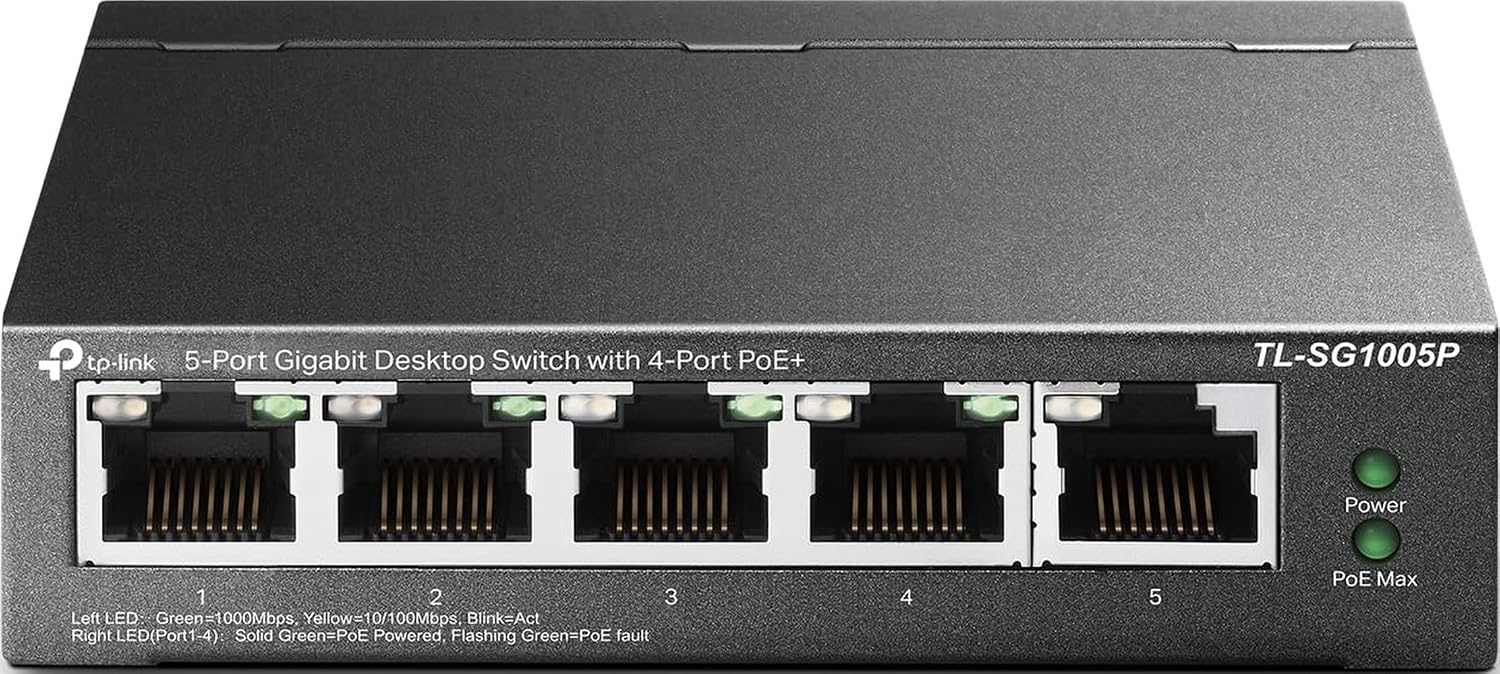
Key specs: 5-port gigabit desktop switch; ports 1–4 are IEEE 802.3af/at PoE+ at up to 30 W each; total PoE power budget 65 W; unmanaged; fanless shielded metal case
This is the pick when the honest answer to “how many cameras” is two, three or four, and it is by a wide margin the most-reviewed switch in this category on Amazon. Four of its five gigabit ports do 802.3af/at PoE+ at up to 30 W each, with a 65 W total budget and power management that cuts lower-priority ports if you exceed it; the fifth port is the uplink to your router or recorder. Sized against real cameras, 65 W comfortably covers four current 4K fixed models rated under 12 W, so here the port count is the limit and the power budget is not — exactly the relationship you want and rarely get.
✅ Pros
- Ports and budget are matched, so all four PoE ports stay usable with 4K cameras
- Gigabit on all five ports — no 100 Mbps compromise anywhere
- Unmanaged and fanless: no configuration, no noise, nothing to patch
❌ Cons
- Four PoE ports is a hard ceiling — no expansion path except a second switch
- Two PTZ or floodlight cameras rated under 24 W is roughly all the budget will take
- 802.3af/at only, so a camera needing 802.3bt is out of scope
Reolink RLA-PS1 — eight ports with a budget that covers them
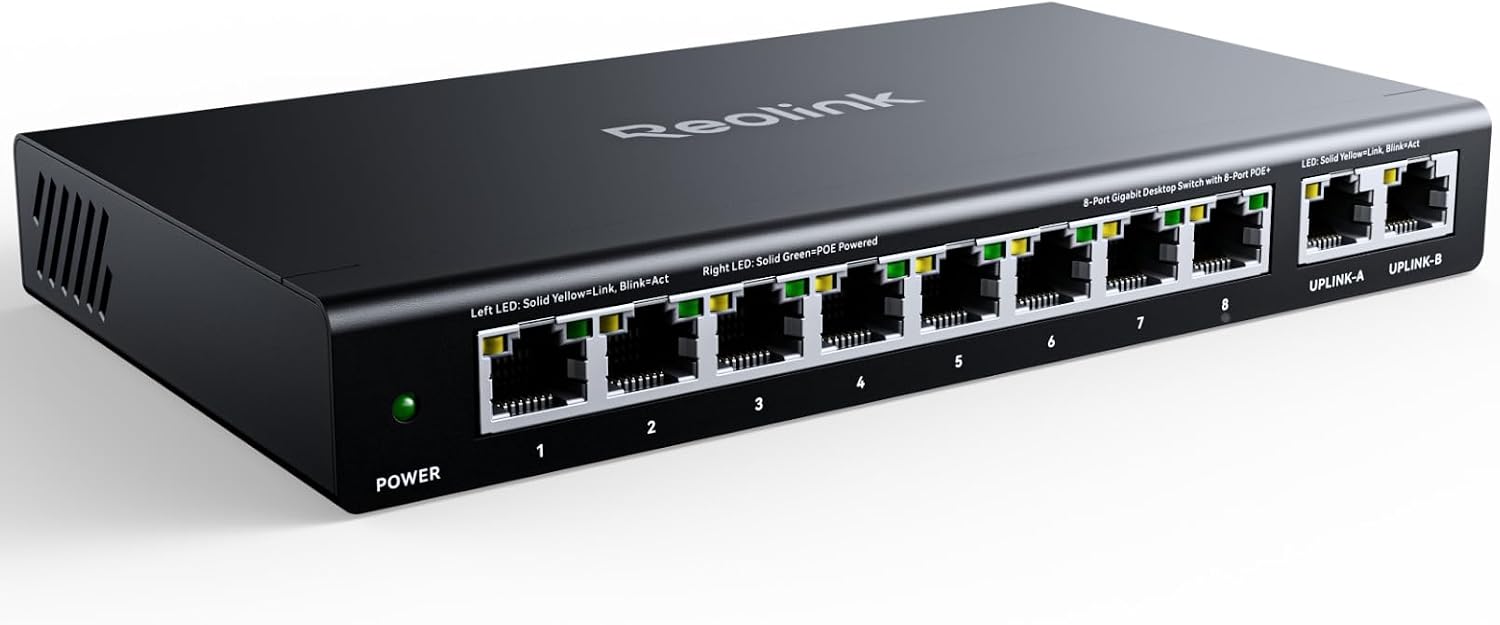
Key specs: 10-port switch: 8 PoE+ ports (10/100 Mbps) plus 2 gigabit uplinks; IEEE 802.3af/at at up to 30 W per PoE port; total PoE power budget 120 W across at most 8 powered devices
The reason this one is in the lineup is the row it occupies in the table above: eight PoE ports and a 120 W budget, the combination that actually lets you use all eight with current 4K cameras. Reolink specifies up to 30 W per PoE port across a 120 W total for at most eight powered devices, on the 802.3af/at standard, with the adapter in the box. Reolink is also unusually direct about failure behavior, documenting that ports shut down one at a time from Port 8 when the total is exceeded — knowing which camera you lose first is worth something. It is the tidy choice if you are already building around Reolink hardware, and our Reolink camera guide is where to start on the camera side.
✅ Pros
- The only 8-port pairing here where every port stays usable with 4K cameras
- A full 30 W per port, so a PTZ or floodlight camera on one port is not a problem
- Documented, predictable overload behavior rather than an unexplained dropout
❌ Cons
- An honest and important limitation: Reolink specifies the eight PoE ports as 10/100 Mbps — only the two uplinks are gigabit. Fine for camera streams, a real constraint if you wanted spare ports for a computer or network storage
- Unmanaged, so no VLANs and no per-port control
- Branded for one ecosystem, though 802.3af/at means it powers any compliant camera
- Thinner buyer feedback than the long-established TP-Link models
TP-Link TL-SG116P — the most ports, with the biggest caveat
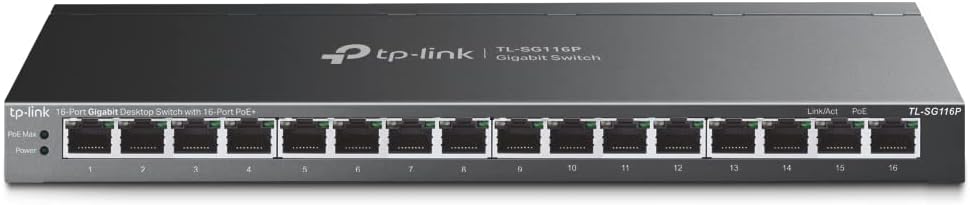
Key specs: 16-port gigabit desktop switch, all 16 ports IEEE 802.3af/at PoE+ capable; total PoE power budget 120 W; hardware buttons for Extend, Priority and Isolation modes plus PoE Auto Recovery; fanless
Sixteen gigabit ports, every one 802.3af/at PoE+ capable, and a total PoE power budget of 120 W. Read those two numbers together and the caveat writes itself: 120 W across sixteen ports is about ten current 4K cameras rated under 12 W, not sixteen. We are not going to pretend otherwise, because that gap is the most common misread in this category. What you are buying is a large, fully gigabit, fanless switch with real expansion room, plus hardware buttons that give you some of a managed switch’s behavior with none of its administration: Extend mode on ports 1–4, Priority mode on ports 1–4, Isolation mode, and PoE Auto Recovery across all sixteen. For a multi-building or warehouse-scale install where port count matters as much as wattage, that is a strong combination.
✅ Pros
- Sixteen gigabit PoE+ ports leaves genuine room to grow, including for access points and door stations that are not cameras
- Priority mode on ports 1–4 protects key cameras without a web interface
- Isolation mode segments ports without configuring a VLAN
❌ Cons
- The headline caveat: 120 W across 16 ports is roughly ten 4K cameras, not sixteen
- Fill it with PTZ or floodlight models and the realistic figure drops to about five
- The hardware buttons are fixed in what they do — not a substitute for real VLANs
NETGEAR GS305EP — when the cameras need their own lane
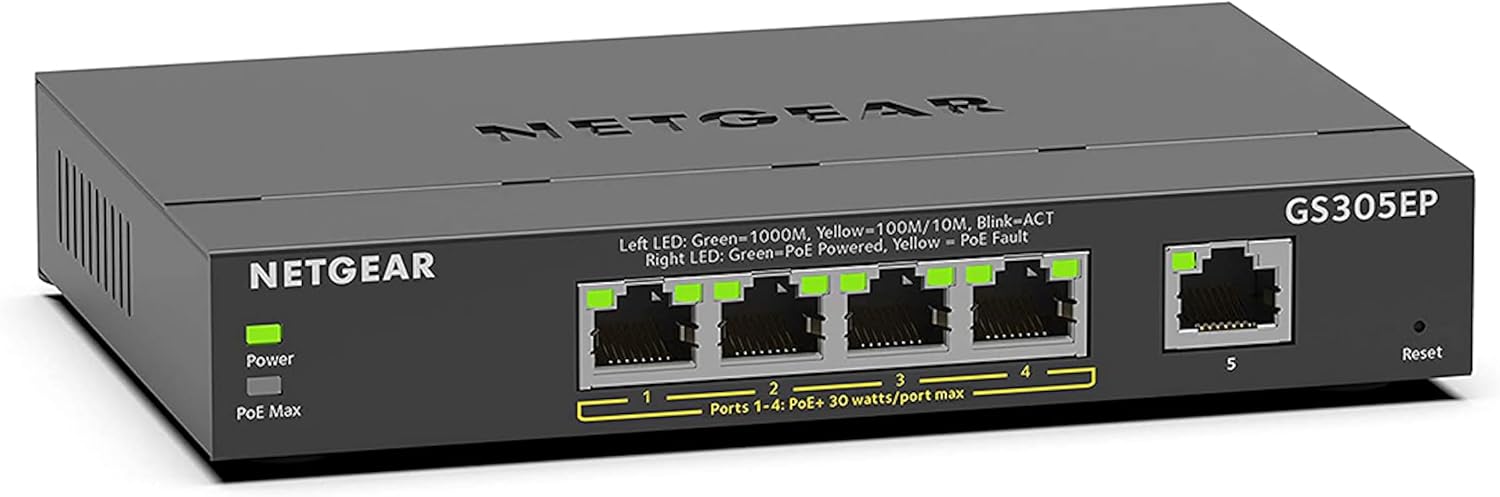
Key specs: 5-port gigabit Easy Smart managed switch; 4 IEEE 802.3at PoE+ ports; total PoE power budget 63 W; VLAN support, per-port PoE control, PoE prioritization and per-port power limits
This one is the odd one out on purpose. On raw capacity it is the TL-SG1005P’s twin — five gigabit ports, four of them 802.3at PoE+, a 63 W total budget — so you are not buying power here, you are buying control. It is an Easy Smart managed switch: VLAN support to put cameras on their own network segment, per-port PoE enable and disable, PoE prioritization, and per-port power limits. NETGEAR also keeps PoE flowing through a firmware update or software reboot, so administering the switch does not black out the cameras. If a camera locks up, you power-cycle its port from a browser rather than from a ladder — which alone justifies it for anything mounted somewhere awkward.
✅ Pros
- VLAN support genuinely isolates cameras from laptops, phones and guests on one cable run
- Remote per-port power cycling turns a roof-mounted camera reboot into a browser click
- You choose the PoE priority order instead of inheriting the manufacturer’s
❌ Cons
- Only four PoE ports at 63 W — you are paying for management, not capacity
- A web interface means a password to manage and firmware to keep current
- The same 802.3af/at ceiling as everything else here, so no help for an 802.3bt camera
Three Other Ways a PoE Camera Build Goes Wrong
1. The cable run is longer than you think. Standard Ethernet runs out at roughly 100 meters, and a camera at the far corner of a property can exceed that once the cable has gone up a wall, along a joist and back down. Some switches answer with an extend mode — TP-Link’s LS108GP and TL-SG116P reach up to 250 m that way — but read the footnote: TP-Link states plainly that ports under extend mode are downgraded to 10 Mbps, enough for one compressed stream and not much else. Planning routes before you drill, which our room-by-room placement walkthrough covers, is cheaper than discovering the limit afterward.
2. The port speed is not what the box implies. The word gigabit on a PoE switch listing sometimes describes only the uplink ports. Reolink specifies the RLA-PS1’s eight PoE ports as 10/100 Mbps with the two uplinks at gigabit. For camera traffic that is fine — but it matters if you meant to reuse a spare port for a computer or network storage.
3. The switch becomes the single point of failure. Every camera on a PoE switch depends on that one box and its one power supply — the structural tradeoff of wired systems generally, discussed further in our wired camera system overview. It is the argument for putting the switch on the same uninterruptible power supply as the recorder rather than on a random wall outlet, and for preferring a switch with automatic recovery: TP-Link builds PoE Auto Recovery into the LS108GP and TL-SG116P, which detects an unresponsive powered device and reboots it without anyone touching a cable.
Final Recommendation
Start with the arithmetic, not the product. Add up the maximum rated draw of every camera you plan to run, add the ones you will add next year, and only then look at switches — the Reolink consumption table is the most useful thing on this page, because it lets you do that with real numbers instead of a rule of thumb.
With that total in hand, the default pick for most people building a modern 4K wired system is the TP-Link TL-SG116P. Its 120 W budget covers around ten current 4K cameras, more than almost any house needs; every one of its sixteen ports is gigabit; and the spare ports absorb access points and door stations later without a second box. Buy it knowing it is a ten-camera switch with sixteen sockets.
Three things would change that answer. If your build is two to four cameras and will stay that way, the TL-SG1005P is enough switch. If you want cameras on their own network segment, or the ability to reboot a port remotely, the NETGEAR GS305EP buys control rather than capacity. And if you are building around Reolink hardware and want eight ports where all eight stay usable, the RLA-PS1 is the cleanest fit — provided the 10/100 Mbps PoE ports do not clash with other plans for those sockets.
One case sends you away from all four: a PTZ camera with a heater or extended infrared, which TP-Link places in the 30–60 W band requiring 802.3bt. And before buying anything, check whether your recorder already has PoE ports on the back — the cheapest switch is the one you did not need.
SafeBode does not yet run an in-house product testing program. This guide is built from manufacturer specifications, official support documentation, current retail listings and verified buyer feedback rather than hands-on testing, and we say so plainly rather than implying testing we have not done.
Frequently Asked Questions
How many cameras can an 8-port PoE switch really run?
That depends on its total power budget, not its port count. The two eight-port switches discussed here carry 62 W and 120 W; against 4K cameras rated at up to 12 W each, that is roughly five cameras on one and all eight on the other.
Do I need PoE+ or is plain PoE enough?
PoE+ (802.3at) is the sensible floor today. Plain PoE (802.3af) can run older or basic fixed cameras, but current models with infrared illuminators, spotlights or motorized lenses routinely need more than it delivers, and 802.3at costs very little more.
What actually happens if I exceed the power budget?
The switch sheds ports rather than damaging itself, in an order set by the manufacturer: TP-Link’s models cut the lowest-priority ports first, while Reolink’s RLA-PS1 powers down from Port 8 backward. Nothing announces it, so the symptom is one camera going offline for no visible reason.
Do I need a PoE switch at all if my NVR has PoE ports?
Usually not. You need a separate switch when you have more cameras than the recorder has ports, when a camera sits too far from the recorder, or when you want the cameras on your main network instead of the recorder’s own ports.
Can I use a normal switch plus PoE injectors instead?
For one or two cameras, yes. It stops making sense quickly: each injector is another box, outlet and power brick, with no shared budget management or per-port recovery. Past about three cameras a PoE switch is tidier and usually cheaper.
Do the PoE ports need to be gigabit for security cameras?
For the camera streams themselves, no. A compressed 4K stream uses a small fraction of even a 100 Mbps port, which is why several switches sold for cameras pair 100 Mbps PoE ports with gigabit uplinks. It matters only if spare ports will carry computers or network storage.
How far can a PoE camera be from the switch?
Standard Ethernet is good for roughly 100 meters of cable, measured along the actual route rather than as the crow flies. Some switches offer an extend mode reaching further, but TP-Link documents that ports in extend mode drop to 10 Mbps.
Will a PoE+ switch damage an older 802.3af camera?
No. The switch and the camera agree on a power class before any power flows, so a 30 W-capable port supplies an older camera only what it asks for. The failure runs the other way: an 802.3af switch cannot supply a camera that needs more than it can deliver.
Is a managed switch worth it for a home camera system?
For most homes, no. The genuine reasons are wanting cameras isolated on their own network segment, wanting to power-cycle an awkwardly mounted camera from a browser, or wanting to choose which camera survives a budget squeeze. Otherwise an unmanaged switch with a bigger power budget is better value.
Sources
Show sources (10)


