Best Business Security Camera Systems 2026
Affiliate Disclosure: This article contains affiliate links. If you buy through these links, we may earn a commission at no extra cost to you. Our editorial opinions are our own and are not influenced by affiliate relationships. Read our full disclosure policy →
Introduction: A Business Camera System Is a Different Purchase Than a Home One
A single indoor camera watching a living room and an 8-camera system covering a retail floor, stockroom, and parking lot solve genuinely different problems. Business security cameras need to cover more physical ground at once, survive being on 24/7 for years without a subscription lapse turning off recording, and — for a specific subset of businesses — comply with a federal procurement law most homeowners have never heard of. Every product in this guide is a multi-camera NVR (network video recorder) kit built around that reality, not a single smart camera repurposed for commercial use.
- Running a small retail store or single-location office? A compact 4-camera kit covering the entrance, register, and stockroom is usually enough — you don’t need 16 channels for one storefront.
- Managing a warehouse, multi-entry building, or growing footprint? Channel count and expansion room matter more than any single camera’s resolution.
- Covering a large perimeter — loading docks, parking lots, multiple building corners? Total camera count in the box is the number to optimize for, not NVR channel count alone.
- Do you hold, or plan to bid on, a federal contract or government-adjacent work? The equipment you buy is a compliance question, not just a purchasing one — see the NDAA section below before you buy anything.
This guide picks a specific system for each of those situations, then gives you a full comparison table, a plain-English NDAA compliance explainer, and a buying framework if your situation doesn’t map cleanly onto any single scenario. Cameras record; an alarm responds. Our guide to small business burglar alarm systems covers that other half of the purchase.
Quick Answer
For a single small storefront or office on a budget, the Reolink RLK8-800D4 is the strongest fit — 4 cameras is plenty for one location, and it’s the best-reviewed system in this guide by a wide margin. Growing past one entrance or planning to add cameras over time? The Swann AdvancedX 16-Channel gives you real expansion room from a 35-year-old dedicated security brand. Need to cover a full perimeter — loading dock, parking lot, multiple entrances — in one purchase? The GW Security 16-Channel ships with more individual cameras than anything else here. And if you want the option to add wireless cameras alongside wired ones later, the Lorex Fusion 16-Channel is built specifically for that hybrid setup.
Who This Guide Is For (and Who Should Skip It)
This guide is for you if:
- ✅ You need to cover a business location — retail floor, office, warehouse, or storefront — not a single home room
- ✅ You want multiple cameras recording to one local system, not several separate single-camera apps
- ✅ You’d rather pay once for hardware than commit to a recurring monitoring subscription
- ✅ You want a system that can be installed by a competent handyman or low-voltage installer, not just a DIY plug-in camera
Skip this guide if:
- ❌ You just need one camera for a single room — see our Best Indoor Security Cameras guide instead
- ❌ You want 24/7 professionally monitored dispatch, not self-monitored recording — that’s an alarm-monitoring service, not a camera system
- ❌ You need every camera on this list to be individually battery-powered and wireless — all four systems here are PoE (Power over Ethernet) wired for reliability, not battery-based
- ❌ You’re a federal contractor who needs full NDAA Section 889 compliance sign-off — read the compliance section below first, then verify directly with the manufacturer before purchasing
Best for Small Retail & Offices: Reolink RLK8-800D4
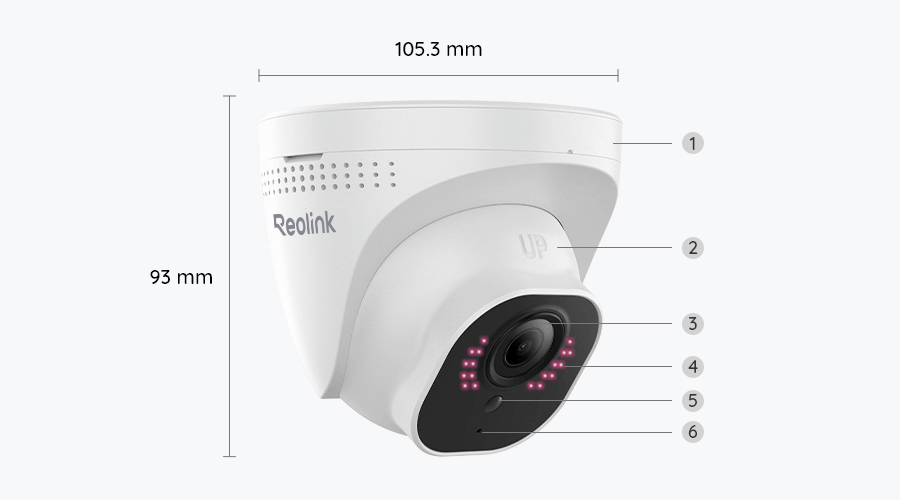
The RLK8-800D4 is an 8-channel NVR system that ships with 4 cameras — enough to cover a small storefront’s entrance, register area, stockroom, and back door without paying for capacity you won’t use. Each camera shoots 4K/8MP with a 100-foot night vision range and an 87-degree field of view, and the system ships with a 2TB hard drive pre-installed, expandable up to 16TB across two drive bays for months of continuous 24/7 recording.
Person and vehicle detection is built in at the camera level, which cuts down on false alerts from blowing signage or passing headlights outside a storefront window — a common complaint with cheaper motion-only systems. Reolink is also, by a wide margin, the most-reviewed brand across every search we ran for this guide, which matters for a purchase you’re trusting to run unattended for years — independent buying guides consistently list Reolink among the top picks for business-grade PoE systems specifically.
Pros
- By far the largest, most established review base of any system in this guide
- 4K/8MP resolution with person/vehicle AI detection built in, not bolted on later
- 2TB pre-installed, expandable to 16TB total across two drive bays
- Lowest price point of the four systems in this guide
Cons
- Only 4 cameras included — undersized for anything larger than a single small storefront
- No built-in spotlight or siren deterrent, unlike the Swann pick below
- Cameras only work with Reolink’s own PoE NVR — you can’t mix in a different brand’s cameras later
Best for Growing Multi-Entry Businesses: Swann AdvancedX 16-Channel

Swann has been building DIY video security specifically — not repurposed home gadgets — for over 35 years, and the AdvancedX line is its current business-grade tier. This kit ships with 8 cameras on a 16-channel NVR, meaning you can install 8 today and add 8 more later without replacing the recorder — genuine headroom for a business that’s outgrowing a single storefront or adding a second entrance.
Each camera includes an integrated spotlight delivering color night vision out to 50 feet, paired with smart video analytics that distinguish people from vehicles — useful for a parking lot or loading dock where you want an alert for a person approaching after hours, not every car that drives past on the street.
Pros
- 16-channel NVR with room to grow from 8 cameras to 16 without new hardware
- Integrated spotlight on every camera — active deterrence, not just passive recording
- 35-year dedicated security brand, not a general electronics manufacturer
- Free local storage on the included 2TB drive with no monthly fee required
Cons
- Smallest review base of the four systems in this guide — a newer product line with less track record
- 50-foot night vision range is shorter than Reolink’s and GW Security’s 100-foot rating
- Meaningfully more expensive than the Reolink pick for a system many small businesses won’t fully populate on day one
Best for Full-Perimeter Coverage: GW Security 16-Channel

GW Security’s 16-channel system ships with more individual cameras in the box than any other pick in this guide — enough to wrap a full building perimeter, a parking lot, and multiple interior zones in one purchase rather than buying a second kit later. Each 5MP camera includes a built-in microphone for audio alongside video, useful for capturing what was said during an incident, not just what was seen.
GW Security has built exclusively for the security-camera category since 2004, and every current product line is explicitly built and marketed as NDAA-compliant — see the compliance section below for why that specific claim is worth verifying yourself rather than taking any manufacturer’s word for it, even a compliant one — independent reviewers make the same point about self-reported compliance claims industry-wide, not just for GW Security. For a larger floor plate, our guide to warehouse and small-office camera systems covers sizing the recorder and storage to the space.
Pros
- Highest total camera count of any system in this guide — built for full-perimeter jobs
- Built-in microphone on every camera for audio alongside video
- 100-foot night vision range, tied for the longest in this guide
- Manufacturer markets every current product as NDAA-compliant
Cons
- Highest price of the four systems in this guide
- 5MP resolution is lower than the 4K/8MP cameras in the Reolink and Swann kits
- Always-on audio recording raises consent questions in shared or public-facing spaces — see the “Who These Systems Are NOT Right For” section
Best for Hybrid Wired + Wi-Fi Expansion: Lorex Fusion 16-Channel

Lorex’s Fusion line solves a specific problem the other three systems don’t: what happens when you want to add a camera somewhere a PoE cable can’t easily reach. The 16-channel NVR supports 8 wired PoE cameras plus up to 8 additional Lorex Wi-Fi Fusion devices recording to the same hard drive — useful for a business occupying an older building where running new cable to every corner isn’t realistic.
The included 6 bullet cameras carry an IP67 weatherproof rating (a step up from the more common IP66) and a 140-degree field of view — the widest single-camera coverage angle of any system in this guide, meaning fewer cameras can cover the same parking lot or loading dock frontage.
Pros
- Only system in this guide that mixes wired PoE and Wi-Fi cameras on one NVR
- Widest field of view per camera at 140 degrees
- IP67 weatherproofing, a step above the IP66 rating common elsewhere in this category
- Native Alexa and Google Assistant compatibility
Cons
- Smallest review base of the four systems in this guide
- Only 6 cameras included despite 16-channel NVR capacity — you’ll pay extra to fill out the remaining channels
- This exact configuration is sold through Lorex’s own sales team rather than being a standard one-click Amazon listing — expect a phone call as part of ordering
Full Comparison Table
| System | Best For | Cameras / Channels | Resolution | Storage | Buy |
|---|
| Reolink RLK8-800D4 | Small retail & offices | 4 cameras / 8 channel | 4K/8MP, 87° FOV | 2TB (up to 16TB) | Buy on Amazon |
| Swann AdvancedX 16-Channel | Growing multi-entry business | 8 cameras / 16 channel | 4K, 110° FOV | 2TB, expandable to 8TB | Buy on Amazon |
| GW Security 16-Channel | Full-perimeter coverage | 16 cameras / 16 channel | 5MP, wide angle | 4TB (up to 20TB) | Buy on Amazon |
| Lorex Fusion 16-Channel | Hybrid wired + Wi-Fi | 6 cameras / 16 channel | 2160p, 140° FOV | 2TB | Buy on Amazon |
NDAA Compliance: Why It Matters Even If You’re Not a Federal Contractor
NDAA Section 889 at a Glance
Who Must Comply
- Federal agencies
- Federal contractors & subcontractors
- Grant recipients & increasingly, state/local government work
Restricted Manufacturers
- Hikvision
- Dahua Technology
- Huawei, Hytera, ZTE
None of the four systems in this guide are made by a restricted manufacturer.
If your business never touches federal work, Section 889 doesn’t directly bind your camera purchase — but its reach has grown well past that original scope, and “NDAA-compliant” has become a meaningful quality signal across the entire business camera market, not just a niche checkbox.
GW Security explicitly markets its lineup as NDAA-compliant; Reolink, Swann, and Lorex fall outside the restricted list too — but a manufacturer’s own claim isn’t a substitute for verification. Confirm directly against the current FAR 52.204-25 text and your contract’s specific requirements before purchasing on that basis alone.
- If you hold or are bidding on federal work, treat NDAA compliance as a hard requirement, not a nice-to-have, and get compliance confirmed in writing from whoever you buy from.
- If you don’t do federal work, the practical reason to still care is resale and insurance value — a documented NDAA-compliant system is a safer long-term hardware investment if your business’s contract mix ever changes.
- Either way, ask your insurance carrier whether a documented business camera system qualifies for a commercial property or liability discount — many do, and it’s a conversation worth having before you buy, not after.
How to Choose the Right Business Camera System
If none of the four scenario picks above matches your situation exactly, these questions narrow it down fast.
| Question | Answer |
|---|
| How many physical locations need coverage right now? | One small storefront: Reolink’s 4-camera kit is enough. Multiple entrances or a growing footprint: start with a 16-channel NVR even if you don’t fill every camera slot on day one. |
| Do you need audio, not just video? | GW Security’s built-in microphones are the only pick here with audio as standard — but confirm your state’s audio-consent laws before relying on it (see the section below). |
| Is your building already wired, or will you need to add cameras somewhere cable can’t reach? | Fully wireable building: any system here works. Older building or a location you’ll need to expand into later without new cable runs: Lorex’s hybrid wired + Wi-Fi Fusion system is the only one built for that. |
| Do you hold or plan to bid on federal contracts? | Yes: NDAA compliance is a hard requirement — verify directly, don’t take a marketing claim at face value. No: any of the four systems here is a safe purchase either way. |
Who These Systems Are NOT Right For
A multi-camera NVR kit solves a specific problem. It’s the wrong purchase — or at least an incomplete one — in a few common situations. Fire detection is a separate, code-driven purchase for a business, covered in our guide to commercial fire alarm systems.
- You want 24/7 professional monitoring that dispatches police or a guard, not just recorded footage. That’s a monitored alarm service layered on top of cameras, not a feature any standalone NVR kit provides on its own — see our Ring Alarm System guide for what that layer actually looks like.
- You’re recording audio in a state with all-party consent laws and haven’t posted clear notice. Video recording of common business areas is broadly permitted, but audio recording (like the built-in microphones on the GW Security pick) is subject to stricter, state-by-state consent requirements — confirm your state’s law and post visible signage before relying on any camera’s audio feature.
- You need to monitor employee work areas specifically, not just entrances and public space. Employee monitoring carries its own separate legal and workplace-policy considerations beyond general business security — that’s a conversation for an employment attorney, not something a hardware buying guide can settle.
- You just need one camera in one room, not a multi-camera system. A full NVR kit is overbuilt and overpriced for that — see our Best Indoor Security Cameras guide instead.
- You’re securing a household, not a business or storefront. Residential wireless systems have different priorities — expandability and local vs. cloud storage tradeoffs, not channel count or NDAA compliance — see our Best Wireless Security Camera Systems 2026 guide instead.
- You just need a perimeter motion alert for a lot or driveway, not recorded footage. A standalone driveway alarm is a cheaper, simpler tool for that specific job than a full NVR camera kit — see our driveway alarm guide instead.
Final Recommendation
Camera count and channel headroom should drive this decision more than any single spec sheet number — buying too small means replacing the whole system in a year; buying too large means paying for empty NVR channels indefinitely. If you’re choosing blind with no specific scenario in mind, the Reolink RLK8-800D4 is the safest starting point for most small businesses: it’s the lowest-cost system here, the most-reviewed by a wide margin, and 4 cameras covers the large majority of single-location storefronts and offices without overbuying.
FAQ
Do I need a professional installer for these systems?
Not necessarily. All four systems in this guide are PoE-based, meaning each camera needs one Ethernet cable run back to the NVR. A competent handyman or low-voltage installer can typically handle this, and some business owners run the cable themselves. Professional installation adds cost but ensures cable runs are clean and cameras are mounted at effective angles and heights.
Do any of these systems require a monthly subscription?
No. All four systems record locally to an included hard drive with no subscription required for core recording and playback. Remote viewing via a phone app is included free with all four brands. Optional cloud backup subscriptions exist for some brands as an add-on, not a requirement.
How long does a 2TB or 4TB drive actually store footage for?
It depends heavily on resolution, number of cameras, and whether recording is continuous or motion-triggered only. As a rough guide, a 2TB drive running 4-8 cameras on motion-triggered recording typically holds several weeks to a couple of months of footage; continuous 24/7 recording on all channels fills the same drive considerably faster. Check each manufacturer’s own storage calculator for your exact camera count before buying.
Can I mix cameras from different brands on one NVR?
Generally no. Reolink, Swann, and GW Security’s kits in this guide are designed to work with their own PoE cameras on their own NVR. Some NVRs support ONVIF-standard third-party IP cameras, but compatibility varies by model and isn’t guaranteed — verify with the specific manufacturer before assuming you can mix brands.
Is audio recording legal in my business?
Video recording of common business areas is broadly permitted across the US, but audio recording is governed by state-level consent laws that vary significantly — some states require all parties to consent to being recorded, others only one. Confirm your specific state’s law and post visible signage before relying on a camera’s built-in microphone, and consider disabling audio recording entirely if you’re unsure.
Will a business camera system actually lower my insurance premium?
Many commercial property and liability insurers offer discounts for documented security systems, but the amount and eligibility criteria vary by carrier and policy. Ask your specific insurance provider what documentation they require (make/model, coverage areas, retention period) before assuming a discount applies.
Can I return or exchange any of these systems if they don’t fit my space?
Return policies and windows are set independently of this article by each retailer and manufacturer, and they change periodically — check the current return policy on Amazon or the manufacturer’s site directly before buying.
A note on our research approach: SafeBode has not purchased or installed any of the systems covered in this article, and we’re not going to pretend otherwise. We started with each manufacturer’s own current product pages and Amazon listing data for every spec, price tier, and camera count referenced above, then verified our NDAA compliance guidance directly against the federal government’s own Section 889 policy page and cross-checked burglary and theft cost figures against independent, FBI-sourced reporting.
Sources
Show sources (4)


