Best Yale Smart Locks 2026: Which Assure Model Fits Your Door
Affiliate Disclosure: This article contains affiliate links. If you buy through these links, we may earn a commission at no extra cost to you. Our editorial opinions are our own and are not influenced by affiliate relationships. Read our full disclosure policy →
Contents
Quick Answer
Yale’s range confuses people because the differences are mostly about how you open the door and which radio is inside, not about how secure the lock is. Start with the Assure Lock 2 Keypad with Wi-Fi: physical buttons, app control with no bridge to buy, and a backup key. Choose the Touch model if you want fingerprints, the Approach if you want to keep your existing deadbolt and keys, and the Plus if your household runs on iPhones. One thing applies to every model: Yale says use alkaline batteries only, and that lithium and rechargeable cells will not work effectively in these locks.
Yale Sells One Lock Four Ways
The Assure Lock 2 is not four products. It is one deadbolt sold in four combinations, and Yale’s own launch material says so: keyed and key-free touchscreen, keyed and key-free keypad. Every model is programmed through the Yale Access app and works out of the box with Bluetooth and Apple HomeKit technology. Yale also notes the whole line is up to 30 percent smaller than the locks it replaced, which matters more than it sounds on a narrow stile or a door with a storm door in front of it.
So the first decision is not which model. It is two simpler questions: do you want a keyhole at all, and how do you want to open the door when your phone is dead?
The Two Questions That Pick Your Yale Model
🔑 Keyed — there is still a keyhole
- Somebody in the household will not carry a phone or remember a code
- You want a physical backup that works with a flat battery
- A trusted neighbor or family member already holds a key
- You are replacing one of several locks and want them keyed alike
🚫 Key-free — no keyhole at all
- Nothing to pick, bump or snap — the most common attack surface is gone
- Nobody in the house carries keys any more anyway
- You are comfortable with a code and a spare battery pack as the fallback
- You want the cleanest exterior appearance
Keyed versus key-free is a genuine security tradeoff rather than a preference. A keyhole is the part of a smart lock a burglar can attack with hardware-store tools; it is also the thing that gets you in when everything electronic has failed. If you are still deciding between upgrading the lock and adding a camera at the door first, our doorbell-versus-lock comparison works through that order of operations.
The Swappable Module Is the Real Advantage
Here is the Yale feature worth actually paying for, and it is the one buried deepest in the listings. The radio is a removable module rather than a fixed part of the lock.
That has two consequences. First, you buy the connectivity you need today — Wi-Fi in the box on the models here — and can change it later without replacing the lock or redoing the installation. Second, Yale states that the Wi-Fi and Matter smart modules also work with its original Assure locks, so existing customers do not need to buy an entirely new lock to get upgraded connectivity. In a category where a discontinued app can strand perfectly good hardware, a lock whose network side is a replaceable part is a meaningfully better bet than one whose radio is soldered to its future.
The practical reading: if you already run a hub — a Z-Wave alarm panel, a Matter home — buy the lock for its keypad and fingerprint hardware, and treat the radio as a component you can change if your smart home does. Our Z-Wave versus Zigbee explainer covers which of those protocols is worth committing to for security hardware specifically. If Google Home is the platform you are building around, our guide to smart locks for Google Home covers which modules and protocols actually connect.
How to Choose the Yale Model Without Reading Twenty Listings
1
Pick the entry method
Push-button keypad, touchscreen, or fingerprint. This is what you will use every single day.
2
Decide on a keyhole
Keyed gives you a mechanical fallback. Key-free removes the lock’s most attackable part.
3
Check the module in the box
Wi-Fi included means no separate bridge to buy. Modules swap later if your setup changes.
4
Measure your door
Backset, door thickness and bore size decide fit long before features do.
Work in that order and the four-model lineup collapses into one obvious answer.
What Lock Grades Actually Mean on a Residential Door
Buying guides throw around “Grade 1” as though it settles the argument. On a home deadbolt it usually signals that the writer has the wrong standard in mind.
The Builders Hardware Manufacturers Association runs a residential certification program built on two standards specifically: ANSI/BHMA A156.39 for residential locksets and latches, and ANSI/BHMA A156.40 for residential deadbolts. Products certified under it are graded A, B or C — where C is Good, B is Better and A is Best — and, crucially, they are graded separately in three categories: security, durability and finish. A lock can be excellent at one and ordinary at another, which is exactly the nuance a single headline grade hides.
So when you see a residential lock described with a letter grade in three positions, that is the system in use. The numeric 1/2/3 scale people quote from commercial specifications is a different program aimed at different doors. Neither scale tells you whether the lock’s app is any good, which is where most real-world smart lock frustration actually lives.
| What you are comparing | Where it comes from | What it does not tell you |
|---|
| Letter grades A, B or C | BHMA residential certification | Anything about the app, the radio or battery life |
| Three separate scores | Security, durability and finish, rated individually | Which of the three matters most for your door |
| Wi-Fi, Z-Wave or Matter | The swappable module you chose | How secure the physical lock is — connectivity is not security |
| Keyed or key-free | The model variant you bought | How you get in when the batteries are flat |
Yale Assure Lock 2 Keypad with Wi-Fi — best overall
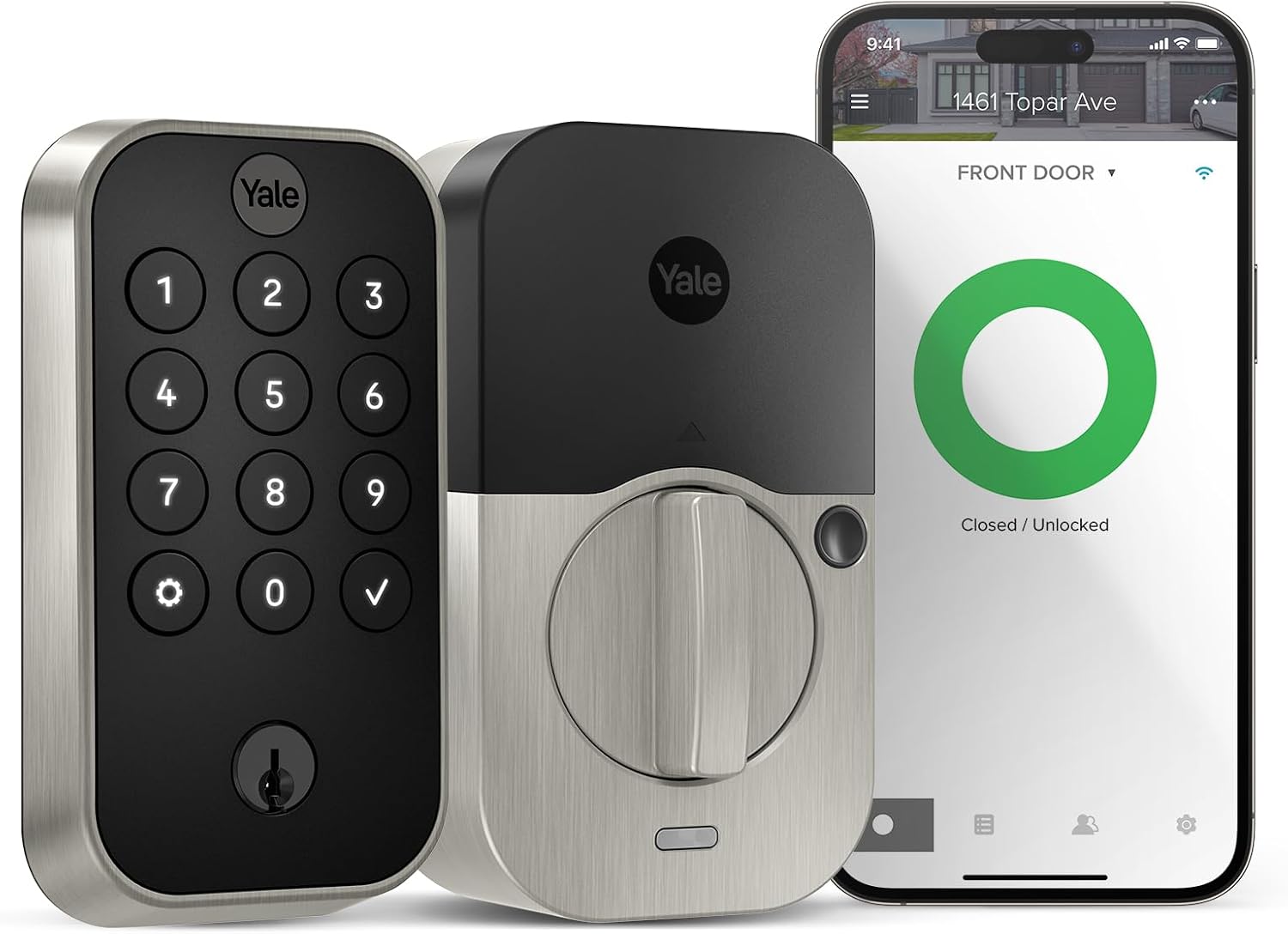
Key specs: Push-button keypad deadbolt with the Wi-Fi smart module included; auto-lock with DoorSense; backup key; Satin Nickel finish; programmed through the Yale Access app
This is the default Yale for most front doors. Physical push-buttons rather than a touchscreen — which matters in cold weather, with gloves, and for anyone who finds a flat glass panel unreadable in sunlight — plus the Wi-Fi module in the box, so there is no separate bridge to buy and no hub required for remote access. Auto-lock with DoorSense means the lock knows whether the door is actually closed before it throws the bolt, which is the difference between a lock that secures the door and one that shoots the bolt into the frame. It keeps a keyhole as a backup. If you want the same convenience without a subscription anywhere in the stack, our no-subscription smart lock guide covers how Yale compares with the alternatives on that specific point. If you already own the older Google-branded version, our guide to the Nest x Yale Lock explains how it differs from a regular Assure.
✅ Pros
- Wi-Fi module included — app access with no bridge and no hub
- Physical buttons stay usable in cold, wet and bright conditions
- DoorSense checks the door is genuinely shut before auto-locking
- Backup keyhole for the day the batteries die at the worst moment
❌ Cons
- The keyhole is also the part an intruder can attack mechanically
- Yale’s app is the only way to program it — no web interface
- Alkaline batteries only, per Yale’s own guidance
- Wi-Fi radios draw more power than Bluetooth-only locks
Yale Assure Lock 2 Touch Fingerprint with Wi-Fi — best for fingerprint entry
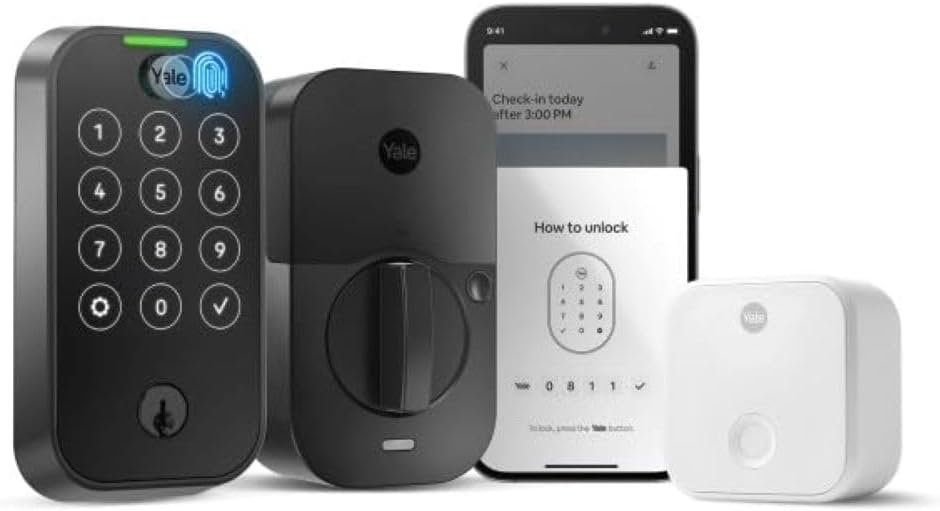
Key specs: Fingerprint deadbolt with touch keypad and the Wi-Fi module included; auto-lock with DoorSense; IPX5 rated; backup key; Black Suede finish
Fingerprint entry is the one upgrade people notice daily: no code to type, no phone to pull out, no key. This model adds a fingerprint scanner to the same Assure Lock 2 hardware, keeps the touch keypad as a fallback, includes the Wi-Fi module, and carries an IPX5 rating for weather exposure. It is genuinely the best of the four if your door is used by adults who will enroll their prints. Two honest caveats. Fingerprint readers struggle with wet, cold or dirty fingers far more than marketing admits, so the keypad fallback is not optional in practice. And this specific variant has a thin owner-feedback history compared with the long-established keypad models — you are buying on Yale’s specification rather than on a large body of user reports.
✅ Pros
- Fastest daily entry of the four — no code, no phone, no key
- Touch keypad remains as a fallback when a print does not read
- Wi-Fi module included, with DoorSense auto-locking
- IPX5 rating for a door that catches weather
❌ Cons
- Thin review history on this variant compared with the keypad models
- Fingerprint reading degrades with wet, cold or worn fingertips
- More electronics on the exterior side than the plain keypad
- Same alkaline-only battery requirement as the rest of the range
Yale Approach Retrofit Smart Lock — best for keeping your keys
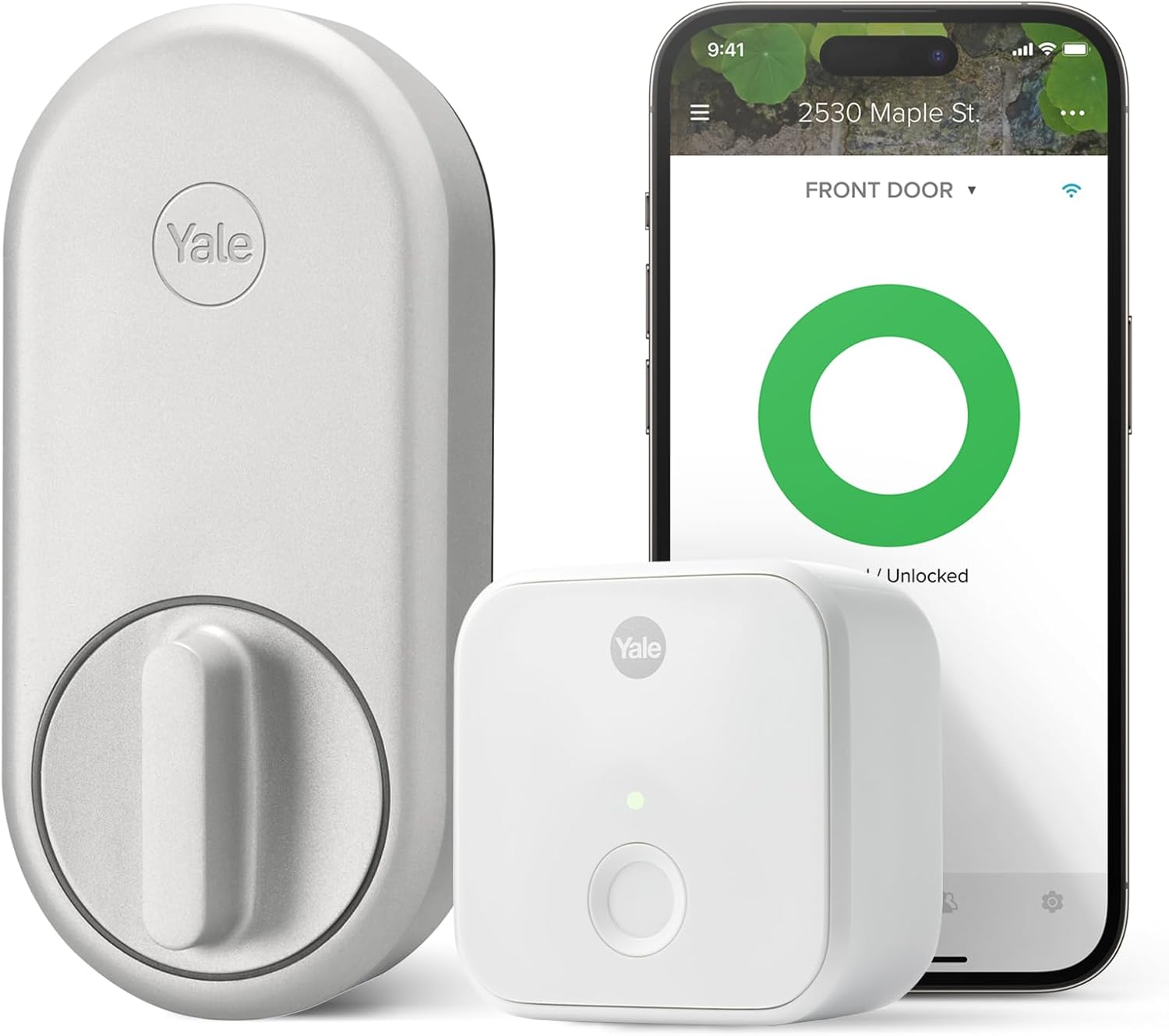
Key specs: Interior-only retrofit lock that fits over an existing single-cylinder deadbolt; unlimited virtual keys; app remote control through the Yale Access app; silver finish
The Approach is the odd one out and the right answer for a surprising number of readers. Rather than replacing the lock, it attaches to your existing deadbolt on the inside of the door — Yale describes it as a discreet, interior-only smart lock that does not change your front door’s appearance or your original keys. The exterior stays exactly as it is. That makes it the obvious pick for a rental where you cannot change the hardware, a door whose exterior finish you do not want to disturb, or a household that is not ready to give up keys. It ships with the Yale Connect Wi-Fi Bridge for remote control through the Yale Access app, and Yale sells a separate Bluetooth keypad that can be placed anywhere in range for code entry. Renters should read our no-drill renter guide alongside this one.
✅ Pros
- Keeps your existing deadbolt, exterior look and working keys
- Interior-only install — nothing changes on the outside of the door
- Unlimited virtual keys for guests, cleaners and family
- Keypad is a separate Bluetooth unit you can site where it suits you
❌ Cons
- Only as strong as the deadbolt already in the door — it adds control, not security
- Fits single-cylinder deadbolts; it is not a universal fit
- Yale states these devices operate only in the United States and Canada
- Two devices to power if you add the keypad
Yale Assure Lock 2 Plus with Apple Home Keys — best for Apple households
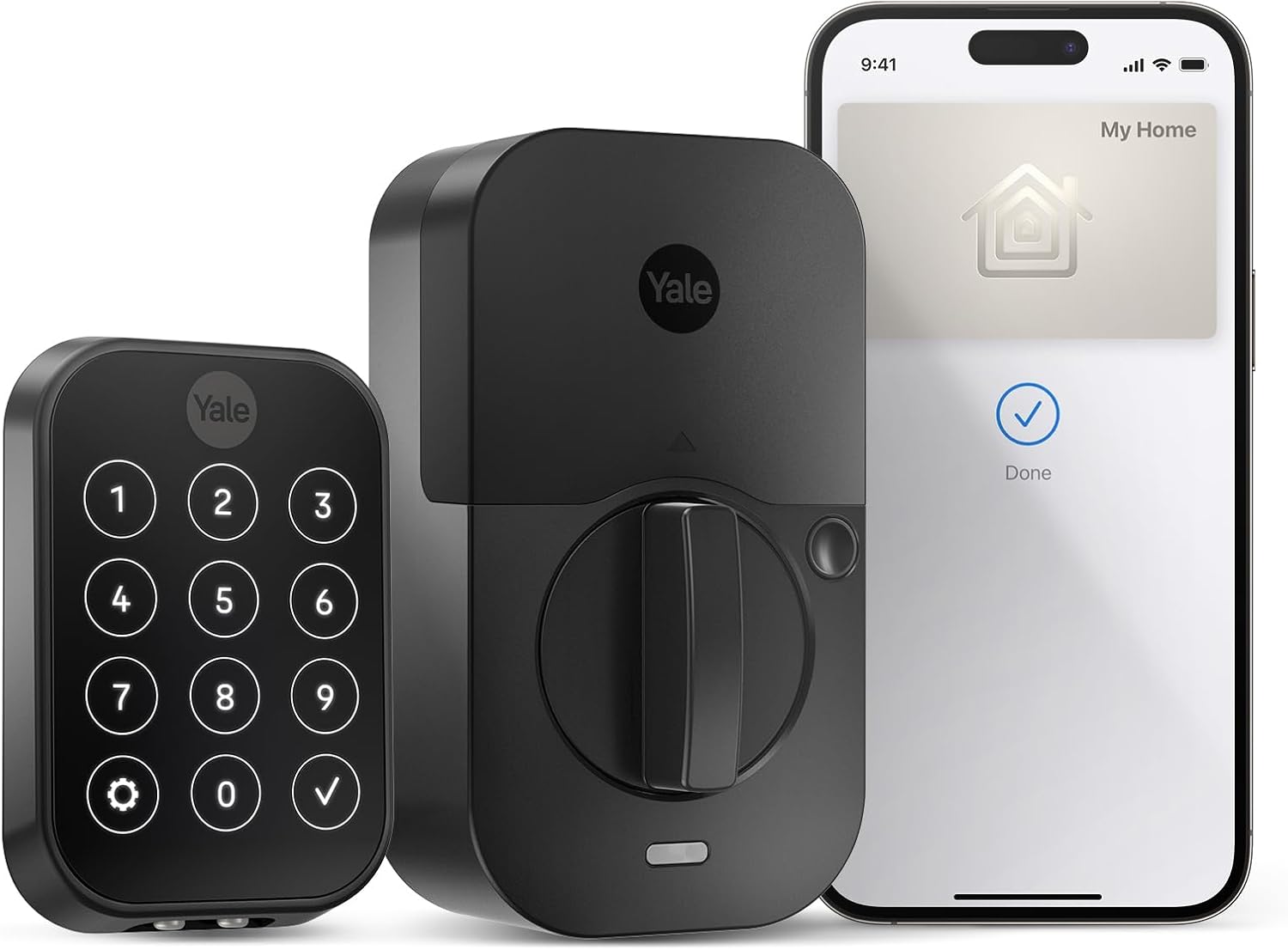
Key specs: Deadbolt supporting Apple home keys for tap-to-unlock with iPhone or Apple Watch; Wi-Fi module included; touchscreen keypad; Black Suede finish
If everyone in the house carries an iPhone or Apple Watch, this is the model that changes the daily experience most. Apple home keys let you unlock by holding the phone or watch near the lock — no app to open, no code, and it works even when the phone’s own battery is low enough to be in reserve power. Yale’s whole Assure Lock 2 line already works with Apple HomeKit technology out of the box; the Plus is the version that adds the tap-to-unlock hardware. The tradeoff is that this is the model whose best feature is unavailable to half the households that buy it. An Android user gets a competent touchscreen Wi-Fi lock and nothing more, which makes the premium hard to justify unless the iPhones outnumber the rest.
✅ Pros
- Tap-to-unlock with iPhone or Apple Watch — the fastest entry method of any model here
- Works with Apple Home natively rather than through a bridge
- Wi-Fi module included for remote access outside the home
- Touchscreen keypad as a fallback for guests and non-Apple users
❌ Cons
- The headline feature is worthless to Android users in the household
- Touchscreens read poorly in bright sun and with wet fingers
- Costs more than the plain keypad model for a convenience feature, not a security one
- Same alkaline-only battery rule as every other Yale lock here
The Battery Rule Yale States Plainly
This is the single most useful thing to know before you own one of these locks, and it contradicts what most people assume about batteries.
Yale’s support guidance is that for best performance, battery life and reliability, it recommends alkaline batteries only — and that extended-life, lithium and rechargeable cells will not work effectively in the lock. Yale also says to replace all the cells at once, from a brand-new pack, because mixing old and new batteries can cause them to leak and damage the lock. That last point is the one that turns a maintenance job into a repair bill.
It is worth being clear about why this instruction exists, because it runs against the usual advice to buy lithium. Rechargeable cells sit at a lower nominal voltage than alkaline ones, and some lithium cells sit slightly higher; a lock’s battery gauge and motor are calibrated around the alkaline curve. The result with the wrong cells is not usually a dead lock — it is a lock that reports low battery constantly, or one that fails to throw the bolt in cold weather while the app insists there is charge left. If yours is doing that already, our smart lock battery troubleshooting guide walks through telling a genuinely flat pack from a false warning.
Yale’s Own Battery Guidance, Condensed
Alkaline
The only chemistry Yale recommends for these locks
Not lithium
Yale says lithium and rechargeable cells will not work effectively
All at once
Replace the full set from a new pack, never mixed
Keep the key
On keyed models, the backup keyhole is your outage plan
Two of the four most common smart lock complaints – constant low-battery warnings and a bolt that will not throw – trace back to the wrong cells rather than a faulty lock.
Final Recommendation
Buy the Yale Assure Lock 2 Keypad with Wi-Fi. It is the model whose strengths show up every day rather than in a specification sheet: buttons you can use with gloves on, Wi-Fi in the box so there is no bridge to buy, DoorSense so auto-lock does not fire into an open doorway, and a keyhole for the day it all goes wrong. Fill it with alkaline cells from a fresh pack and leave it alone.
Three clear reasons to choose differently. If you cannot or do not want to change the exterior hardware — a rental, a heritage door, a household that still wants keys — the Approach is the only lock here that solves that, because it leaves the deadbolt and the keys exactly as they are. If the household is fully on iPhones, the Plus with Apple home keys is the one whose convenience you will actually feel. And if you want fingerprint entry, the Touch model delivers it, with the caveat that its review history is thinner than the keypad models and that you will still use the keypad on wet days.
Whichever you pick, remember what the letter grades on residential locks are measuring: security, durability and finish, scored separately under BHMA’s residential standards. Connectivity is not on that list. A lock’s radio decides how convenient it is; the bolt, the strike and the screws into the frame decide whether the door holds. If you are hardening a whole entry rather than upgrading one lock, our keyless entry overview and the Schlage lineup guide cover the alternatives worth comparing before you commit.
SafeBode does not yet run an in-house product testing program. This guide is built from manufacturer specifications, official support documentation, current retail listings and verified buyer feedback rather than hands-on testing, and we say so plainly rather than implying testing we have not done.
Frequently Asked Questions
Do Yale smart locks need a subscription?
No. The Yale Access app, remote control through the included Wi-Fi module and guest access are part of the product. Subscriptions on this site’s radar are camera and monitoring plans, not lock apps.
What is the difference between the Assure Lock 2 and the Assure Lock 2 Plus?
The Plus adds Apple home key support, which lets you unlock by holding an iPhone or Apple Watch near the lock. Everything else about the hardware family is shared, so on an Android household the Plus is paying extra for a feature nobody can use.
Can I change from Wi-Fi to Z-Wave or Matter later?
Yes, that is the design. The radio is a removable smart module rather than a fixed part of the lock, and Yale states the Wi-Fi and Matter modules also fit its original Assure locks, so an older lock can be upgraded rather than replaced.
Which batteries should I use?
Alkaline, and only alkaline. Yale’s own guidance is that extended-life, lithium and rechargeable cells will not work effectively in these locks, and that all cells should be replaced together from a new pack rather than mixed.
Will the Yale Approach fit my door?
It fits over most single-cylinder deadbolts and installs on the inside of the door only, so the exterior and your keys are untouched. It is not designed for mortise or rotary lock types, so check what is actually in your door before ordering.
Is a key-free lock less secure than a keyed one?
It removes the mechanical attack surface — there is no cylinder to pick, bump or snap — which is a real security gain. It also removes your fallback, so a key-free lock needs a plan for flat batteries, usually a spare set kept somewhere accessible.
Does the lock still work if the internet goes down?
Yes. Codes, fingerprints and keys work at the door regardless of your network. What you lose is remote control and notifications until the connection returns.
How long do the batteries last?
Months rather than years for most households, and it varies with how often the door is used, how cold it gets and which radio the module is running. Wi-Fi models draw more than Bluetooth-only ones, which is the tradeoff for not needing a bridge.
Sources
Show sources (4)
- [1] BHMA Certified — “Resources & FAQs,” securehome.org/resources-faqs
- [2] Yale Home — “Yale Home Launches Yale Assure Lock 2” press release, z-wavealliance.org
- [3] Yale Home — “Introducing Yale Home’s First Retrofit Smart Lock Solution: Yale Approach with Yale Keypad,” shopyalehome.com/blogs/yale-home-blog
- [4] Yale — “Recommended Batteries for Yale Smart and Digital Locks,” yalehome.com support

