Best Wireless Security Camera Systems 2026: Which Setup Fits Your Home
Affiliate Disclosure: This article contains affiliate links. If you buy through these links, we may earn a commission at no extra cost to you. Our editorial opinions are our own and are not influenced by affiliate relationships. Read our full disclosure policy →
Table of Contents
Why “Wireless System” Means Something Different Than “One Camera”
Most camera guides — including our own indoor camera roundup — compare single devices you buy once and mount. A “security system with wireless camera” search usually means something more specific: a setup built to grow. That means a base station or hub, room to add more cameras later without starting over, and a storage decision (local hard drive, local hub, or cloud subscription) that follows you for years, not just the first unboxing.
We picked 4 systems that represent 4 real, different answers to that storage-and-expansion question — not 4 versions of the same answer with different logos. If you only need one camera for one room, or you’re watching a rental where drilling isn’t an option, our renter-focused guide is a better starting point than this one. If you’re securing a storefront or office instead of a household, see our business camera systems guide. Before choosing any of these, our guide to testing your home WiFi before buying a wireless camera checks the signal where each camera will actually go.
Quick Answer
- Best overall: Arlo Pro (6th Gen) — the most polished app and the widest smart-home compatibility, if you don’t mind a cloud subscription for video history.
- Best for growing past 4 cameras: Night Owl 10-Channel System — the hub supports up to 10 cameras total, local storage, zero monthly fee.
- Best local-storage pick (if you’re in the eufy ecosystem): eufyCam S330 — 4K, facial recognition, no subscription, but requires a HomeBase 3 hub sold separately.
- Best budget complete kit: aosu C7L 4-Cam Kit — hub included out of the box, no subscription, lowest price of the four.
Who This Guide Is For (and Who Should Skip It)
This guide is for you if:
- ✅ You want to cover multiple entry points or a full property, not just one door or room
- ✅ You expect to add more cameras within a year or two and don’t want to replace your hub to do it
- ✅ You own your home (or have landlord approval for exterior mounting) — these are multi-camera outdoor-capable systems, not renter-friendly single units
- ✅ You have a clear preference on local vs. cloud storage, or want to understand the tradeoff before choosing
Arlo Pro (6th Gen)
BEST OVERALL
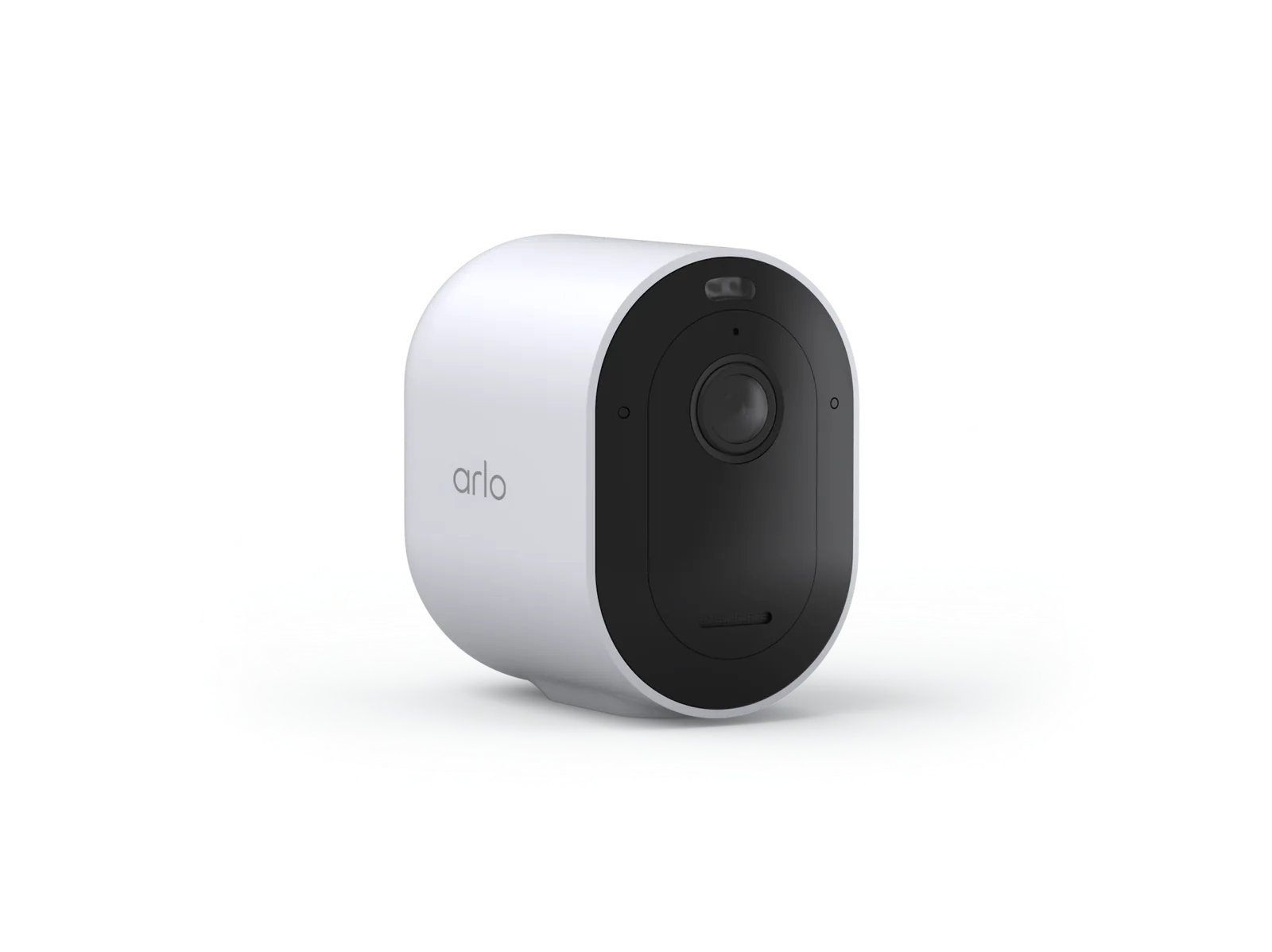
- Resolution: 2K HDR (1440p), 160° field of view
- Storage: Cloud only — 1-month trial included, subscription required after
- Best for: households that want the most polished app and widest smart-home support
The 4-camera kit we’re featuring (model VMC4070P) ships with a rechargeable, removable battery in each camera, a 160° field of view, 12x zoom, and color night vision to about 25 feet. Setup runs through dual-band Wi-Fi with no separate hub required for the cameras themselves. It carries an Amazon’s Choice badge and a 4.2-star rating across 416 reviews, and works with Alexa, Google Assistant, Apple Home, SmartThings, and IFTTT — the broadest smart-home compatibility of the four systems here.
The tradeoff is storage: this kit has no local recording option. Live view and motion alerts work without a subscription, but the 60-day cloud video history, AI-powered smart detections, and 24/7 emergency response all require a paid Arlo Secure plan after the included 1-month trial ends, per Arlo’s own product documentation.
Honest limitation: because there’s no local storage option on this kit, a lost internet connection means nothing gets recorded until the connection returns. Battery life is also a real-world variable rather than a fixed number — independent testing of battery-powered outdoor cameras generally finds 6 months to a year between charges, with heavier motion-detection activity in high-traffic spots draining batteries noticeably faster than the marketing figures suggest.
Pros
- Easiest app and setup experience of the four systems here
- Wide 160° field of view with 12x digital zoom
- Broadest smart-home platform support (Alexa, Google, Apple Home, SmartThings, IFTTT)
- Amazon’s Choice with a large, consistent review base (416 ratings)
Cons
- No local storage option — cloud subscription required for video history beyond live view
- Monthly subscription cost adds up over years of ownership
- Battery-powered design means periodic recharging, more often in high-traffic areas
Night Owl 10-Channel System
BEST FOR EXPANDING PAST 4 CAMERAS

- Resolution: 2K, 100-ft night vision
- Storage: 1TB local hard drive, hub expandable up to 10 cameras total
- Best for: households that want to start with 4 cameras and grow without buying a new hub
This kit (model BTWN81-F4-4L) ships with 4 plug-in Wi-Fi cameras and a 10-channel hub built around a 1TB hard drive. The headline feature is the hub itself: it’s rated for up to 10 cameras total, so a household that starts with 4 can add up to 6 more later without replacing the base unit. Cameras plug into a standard wall outlet for constant power rather than running on batteries, include 2-way audio and a built-in spotlight, and offer color night vision to about 100 feet. Setup runs through a Bluetooth-paired mobile app with no TV or monitor required. Recordings stay on the hard drive with no monthly fee and no internet dependency for local viewing or playback. It carries a 4.4-star rating across 68 reviews — the smallest review base of the four picks here, worth factoring in given the otherwise strong spec sheet.
Honest limitation: because these are plug-in cameras rather than battery or solar powered, each one needs to be within reach of a wall outlet (or a weatherproof extension cord) — that constrains placement more than the fully wireless options in this guide. It’s also the only system here built around a dedicated physical hub rather than a phone app alone, which some households will find reassuring and others will find like one more box to find room for.
Pros
- Local 1TB storage with zero monthly fee
- Hub expandable to 10 cameras total — no need to replace it as you grow
- Constant plug-in power means no battery swapping or recharging
- 2-way audio and a built-in spotlight on every camera
Cons
- Plug-in power ties camera placement to outlet access
- No cloud backup option if the physical hard drive is ever damaged or stolen
- Smaller review base than the other three picks (68 ratings)
eufyCam S330
BEST LOCAL-STORAGE PICK (EUFY ECOSYSTEM)

- Resolution: 4K with Starlight low-light night vision
- Storage: Local via HomeBase 3 hub (sold separately, not included with this listing)
- Best for: households already in the eufy ecosystem, or ready to buy a HomeBase-based starter kit
Worth stating plainly: this specific listing is a single add-on camera, not a standalone kit. Per eufy’s own product documentation, the S330 requires a HomeBase 3 hub to record or store any video and won’t work with the older HomeBase 2. If you don’t already own one, eufy sells bundled starter kits (camera plus hub together) at a higher price than this single-camera listing suggests — that’s the version most first-time buyers actually want.
Paired with a HomeBase 3, the specs are genuinely premium: 4K resolution with “Starlight” low-light night vision, an integrated “Forever Power” solar panel (rated to sustain the battery indefinitely with about 2 hours of daily direct sun), and facial recognition (“BionicMind,” claimed 99.9% accuracy) that distinguishes household members from strangers — worth knowing that enabling any camera’s face-recognition feature carries real privacy tradeoffs, since Illinois’ Biometric Information Privacy Act lets individuals sue directly over unconsented biometric collection. Video stays local on the HomeBase’s 16GB built-in storage (expandable to 16TB) with no monthly fee. IP67-rated, 4.1 stars across 4,289 reviews — the largest review base in this guide.
Honest limitation: budget for the HomeBase 3 as a separate purchase, or buy a bundled kit instead. It’s also 2.4GHz Wi-Fi only, and currently works with Alexa and Google Assistant but not Apple HomeKit.
Pros
- Best resolution and low-light performance of the four (4K with Starlight night vision)
- No monthly fee ever, with genuinely expandable local storage (up to 16TB)
- Solar panel is integrated into the camera body, not a separate accessory
- Facial recognition can meaningfully cut down on false alerts for known household members
Cons
- Requires a separate HomeBase 3 hub not included with this specific listing
- Facial recognition carries privacy tradeoffs worth understanding before enabling it
- 2.4GHz Wi-Fi only, no Apple HomeKit support yet
aosu C7L 4-Cam Kit
BEST BUDGET COMPLETE KIT

- Resolution: 2K QHD with 6x zoom
- Storage: 32GB local via included aosuBase hub, expandable to 1TB via microSD (sold separately)
- Best for: budget-conscious buyers who want a complete kit, hub included, out of the box
Unlike the eufyCam pick above, this is a genuinely complete kit: 4 solar-powered cameras and the aosuBase hub ship together, with 32GB of local storage built in and no subscription required at any point. Specs include 2K QHD resolution with 6x zoom, PIR-plus-AI human detection (a motion sensor paired with on-device AI meant to cut down on false alerts from wind or passing cars), full-color night vision, a built-in spotlight and siren for active deterrence, and IP65 weatherproofing. Storage expands up to 1TB with a microSD card, sold separately. It currently carries an Amazon’s Choice badge and a 4.3-star rating across 1,280 reviews — the largest review base of the two no-subscription picks in this guide.
Honest limitation: aosu is a newer, less-established brand than Arlo, eufy, or Night Owl — support resources and firmware update history are thinner, and the kind of long-term reliability data that exists for the more established brands here simply doesn’t exist yet for aosu. The 32GB built-in storage is also the smallest of any pick in this guide before adding your own microSD card.
Pros
- Genuinely complete kit — hub included, not sold separately
- Lowest price point of the four systems in this guide
- No subscription ever, with expandable local storage
- Built-in spotlight and siren for active deterrence, not just recording
Cons
- Newer brand with less of a track record than Arlo, eufy, or Night Owl
- Smallest out-of-box storage (32GB) before adding a microSD card
- Fewer smart-home integrations than Arlo (Alexa and Google Assistant only)
Full Comparison Table
| Product | Resolution | Storage | Subscription | Expandability | Buy |
|---|
| Arlo Pro (6th Gen) | 2K HDR | Cloud only (1-mo. trial) | Required for video history | Add cameras individually | Check Price |
| Night Owl 10-Channel | 2K | 1TB local hard drive | None | Up to 10 cameras on one hub | Check Price |
| eufyCam S330 | 4K | Local via HomeBase 3 (sold separately) | None | Add cameras to same HomeBase | Check Price |
| aosu C7L 4-Cam Kit | 2K QHD | 32GB local (exp. to 1TB) | None | Add cameras to same aosuBase | Check Price |
Local Storage vs. Cloud Storage
Three of the four systems in this guide store video locally with no subscription; only Arlo requires a cloud plan for video history. Neither approach is simply “better” — they protect against different risks.
| Factor | Local Storage | Cloud Storage |
|---|
| Monthly fee | None | Usually required for video history beyond live view |
| Records without internet | Yes | No — requires an active connection |
| Survives camera/hub theft or damage | No — footage is lost with the hardware | Yes — stored off-site |
| Where footage physically lives | On your own hardware, at home | On the manufacturer’s servers |
| Law-enforcement access | Typically requires coming to you directly | May be requested from the manufacturer |
| Used by (in this guide) | Night Owl, eufyCam (via HomeBase 3), aosu | Arlo |
One nuance worth flagging: Consumer Reports’ general guidance favors local systems with a separate hub or base station holding the storage, rather than a microSD card inside the camera itself — a hub tucked elsewhere in the house is harder to simply grab along with the camera. Night Owl and aosu already follow that hub-based pattern; eufyCam’s HomeBase 3 does too, once you’ve added it.
How to Choose
Who This Isn’t Right For
- You need exactly one camera, not a system — a single indoor or outdoor camera is cheaper and simpler; see our indoor camera guide.
- You just need to see who’s at the door, not a whole camera system — a dedicated doorbell is cheaper and purpose-built for that; see our wireless video doorbell guide.
- You’re renting and can’t permanently mount hardware — these systems assume some drilling or fixed mounting; see our renter-focused, no-drill guide instead.
- You’re securing a business or storefront, not a household — commercial coverage has different requirements (channel count, NDAA compliance for some buyers, multi-entry perimeter coverage); see our business camera systems guide.
- You specifically want a Ring-branded ecosystem — see our Ring camera guide for that lineup instead.
- You specifically want the Google Home/Nest ecosystem — see our Nest outdoor camera guide for that lineup instead.
- You just want advance notice of motion at the edge of your property, not video — a standalone driveway alarm is a cheaper, simpler tool for that specific job than a full camera system.
- You want a full alarm system with entry sensors and a keypad, not just cameras — see our DIY home alarm systems guide for that category instead.
If a subscription-free setup is the priority, it is worth comparing these against Blink — our Blink camera guide explains why the hub in the box, not the camera, decides whether you pay monthly.
Final Recommendation
Only need one camera rather than an expandable system, and want zero subscription cost specifically? Our Reolink Argus PT Solar deep dive covers exactly that single-camera, no-subscription case.
If you just want one clear answer: the Arlo Pro (6th Gen) is our overall pick for most households. It has the widest smart-home compatibility of the four, the most polished setup and app experience, and a strong, consistent review base (4.2 stars across 416 ratings). The cloud-subscription requirement for video history is a real tradeoff — if avoiding a monthly fee matters more to you than app polish, the Night Owl or aosu picks above are the better fit.
FAQ
Do I need a subscription for a wireless security camera system?
It depends on the system. Of the four in this guide, only Arlo requires a paid plan for video history beyond live view — Night Owl, eufyCam (once paired with a HomeBase 3), and aosu all record locally with no monthly fee. Check the storage method before buying if avoiding subscriptions matters to you.
What’s the real difference between a single camera and a "system"?
A system is built around a hub or base station designed to support multiple cameras from day one, with a storage decision (local or cloud) that scales as you add cameras. A single camera is a standalone device you buy and mount once, usually with its own separate storage or subscription per camera.
Can I mix and match brands within one system?
Generally no, not for the hub-based systems in this guide. Night Owl, eufyCam, and aosu cameras are each designed to pair only with their own brand’s hub. Arlo cameras connect via Wi-Fi rather than a proprietary hub, which gives slightly more flexibility, but you’re still working within the Arlo app and account ecosystem.
How long do wireless camera batteries actually last?
Real-world testing generally finds battery-powered outdoor cameras last 6 months to a year between charges, with heavy motion-detection activity in high-traffic spots draining batteries noticeably faster than manufacturer marketing figures suggest. Solar-assisted models like eufyCam and aosu can extend this significantly with consistent direct sunlight; plug-in systems like Night Owl sidestep the question entirely since they run on constant wall power.
Is local storage actually safer than cloud storage?
They protect against different risks. Local storage keeps footage out of a company’s servers and avoids a recurring fee, but a stolen or damaged hub can take your footage with it. Cloud storage survives hardware loss or theft but depends on an internet connection to record and typically requires an ongoing subscription. Neither is universally "safer" — it depends which risk concerns you more.
Do these systems need professional installation?
No — all four systems in this guide are designed for DIY installation. Night Owl and aosu cameras need to be near a power source (plug-in and solar-assisted, respectively); Arlo and eufyCam cameras are more flexible on placement since they run on rechargeable or solar-assisted batteries.
What happens to these cameras during a power or internet outage?
For local-storage systems (Night Owl, eufyCam, aosu), recording generally continues without internet as long as the camera and hub still have power, since footage saves to onboard storage rather than being uploaded live. For Arlo, an internet outage means no cloud upload and no video history for that period — live view and cloud recording both depend on connectivity. A power outage affects any plug-in camera (Night Owl) immediately; battery and solar-assisted cameras (Arlo, eufyCam, aosu) can keep recording on battery reserve even if household power is out.
A note on our research approach: SafeBode has not purchased or installed the systems compared in this guide. Every spec above comes from each manufacturer’s own product documentation and current Amazon listing data, cross-checked against independent coverage from outlets like Security.org and Consumer Reports (cited throughout). As our testing program develops, we’ll update this guide with genuine hands-on data and disclose that transition transparently.
Sources
Show sources (5)


