Best Night Owl Security Cameras 2026: Which System to Buy After the App Sunset
Affiliate Disclosure: This article contains affiliate links. If you buy through these links, we may earn a commission at no extra cost to you. Our editorial opinions are our own and are not influenced by affiliate relationships. Read our full disclosure policy →
Contents
Quick Answer
Buy the recorder generation that runs the Night Owl Protect app, not whichever kit is cheapest this week. Night Owl retired its older Pro, Lite and HD apps in 2026 and stopped supporting the products that depend on them, so app compatibility — not resolution — is the specification that decides how long a system stays useful. For most homes the 8-Channel 4K Bluetooth DVR kit is the right buy: wired power and video, 4K cameras, spotlights and sirens, and a hard drive already in the box. If you cannot run cable, the battery-camera Wi-Fi hub is the honest alternative, with the tradeoffs that come with batteries.
Start With the App, Not the Camera
Almost every Night Owl guide opens with resolution. That is the wrong first question this year. Night Owl has retired the mobile apps that older systems were built around, and a security camera whose app no longer receives updates is a different product from the one you bought.
The company’s own legacy support page is direct about it: beginning June 1, 2026 Night Owl discontinued support for its oldest apps and the products that rely on them, naming the Night Owl Pro, Night Owl Lite and Night Owl HD apps. Its App Sunset Support page lists the retirement of the Pro, Lite and HD apps as of May 30, 2026. The two dates sit a day apart because one describes the apps and the other describes support for them; the practical takeaway is the same. Still supported are Night Owl Protect, which the company calls its currently sold product generation, along with Night Owl Connect and the Night Owl X and XHD apps and their products.
Here is the part that gets misreported. A sunset does not brick the recorder. Night Owl states that the hardware system continues to function as designed and that a system may still work on its own without the mobile app, with the recorder connected to a monitor or television for live view and playback of stored recordings. What you lose is the remote half: phone alerts, off-site live view, and the app-side features that made the system feel modern. For a camera system, that is most of the reason people buy one.
Four Checks Before You Buy Any Night Owl System
1
Identify the app
Confirm the kit pairs with Night Owl Protect, the generation Night Owl describes as currently sold and supported.
2
Match features to your model
The Protect app itself warns that not all features apply to all models — check that yours gets the alert types you want.
3
Decide wired or battery
Wired means drilling and cable runs. Battery means recharging. Neither is a small detail once installed.
4
Size the drive to the mode
Continuous recording eats storage far faster than event recording, and the recorder’s default behavior is to overwrite the oldest footage.
Working through these in order is the difference between a system that lasts and one that is orphaned by the next app transition.
None of this makes Night Owl a bad buy. It makes it a brand where buying the current generation matters more than usual, because the company has now shown, on the record, what happens to older generations. Treat a heavily discounted older kit with suspicion rather than as a bargain. Our guide to where security camera footage should live covers what each storage destination survives.
Three Different Night Owl Systems Wear the Same Badge
The single biggest source of buyer confusion is that Night Owl sells three architectures under one brand, and shoppers compare them as if they were tiers of the same product. They are not tiers. They install differently, they fail differently, and they suit different houses.
A wired DVR kit sends video over coaxial cable to a recorder with a hard drive inside. A Power over Ethernet NVR sends video and power down a single network cable per camera. A Wi-Fi hub with battery cameras skips cable entirely and stores to a card or drive at the hub. Night Owl also builds hybrid recorders — its FTD2 series specification sheet lists sixteen wired BNC inputs alongside four Wi-Fi inputs on the same recorder — which is why a single kit can grow in two directions at once.
| Wired DVR | PoE NVR | Wi-Fi hub, battery cameras |
|---|
| Cable per camera | Coaxial video, plus power | One network cable carries both | None to the camera |
| Install effort | High — drilling and cable routing | High, but one cable per run | Low — mount and pair |
| Ongoing upkeep | Essentially none | Essentially none | Recharging each camera on a cycle |
| Depends on home Wi-Fi | No, for recording | No, for recording | Yes — weak signal means dropped clips |
| Storage in the box | Hard drive pre-installed | Hard drive pre-installed | microSD card at the hub |
| Best suited to | Owner-occupied homes, permanent install | Larger properties and long runs | Renters, brick walls, temporary setups |
If you are renting, or if the answer to “can I drill through that wall” is no, the wired rows above are not a compromise you should talk yourself into. Our wireless camera system guide covers that path across brands, and our room-by-room placement walkthrough is worth reading before you decide how many cameras you actually need — most homes need fewer than the eight-camera kits imply.
What “No Monthly Fees” Actually Covers
Night Owl markets hard on no monthly fees, and the claim is largely fair — but it is narrower than it sounds, and the boundary is worth knowing before you buy.
What is genuinely free is the local recording. Footage lands on the hard drive or memory card that ships in the box, and Night Owl’s published specifications for its DVR line describe a pre-installed drive with no subscription attached to recording or playback. Live view and playback through the app are part of the product, not an add-on.
What is not free is cloud. The Night Owl Protect app listing spells out that you can access recordings saved to the Night Owl Protect Cloud if your product is linked to a Night Owl Protect Cloud monthly subscription plan. That is an optional layer, not a requirement — but it is the layer that protects your footage if somebody walks off with the recorder itself, which is the one scenario local-only storage handles badly. If you are weighing that against a subscription camera brand, our home security cost breakdown lays out where the money actually goes over several years. If you would rather watch on a dedicated screen than through any app, our roundup of security cameras with a monitor covers that route.
Local Storage vs the Optional Cloud Plan
✅ Covered with no subscription
- Continuous or event recording to the included drive or card
- Live view and playback in the Night Owl Protect app
- Motion alerts for supported detection types on supported models
- 2-way audio, siren and preset voice messages where the model supports them
❌ Needs the paid Protect Cloud plan
- Access to recordings stored in the Night Owl Protect Cloud
- Any off-site copy that survives the recorder being stolen
- Retention beyond whatever the local drive holds before it overwrites
Night Owl 8-Channel 4K Bluetooth DVR Kit — best overall
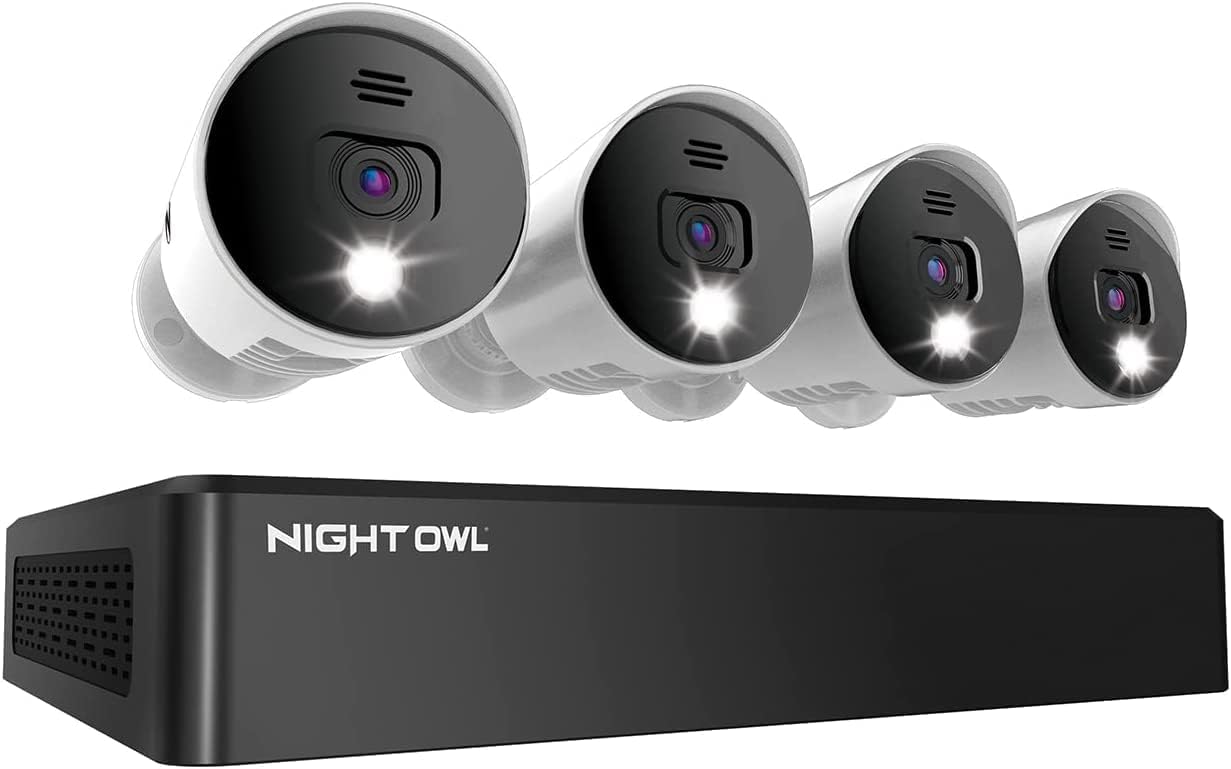
Key specs: 8-channel 4K Bluetooth DVR with a 1TB hard drive pre-installed; four wired 4K spotlight cameras; audio alerts and built-in sirens; indoor/outdoor rated cameras
This is the kit most homes should start with. It is a wired 4K system: four cameras, coaxial runs back to an 8-channel recorder with a 1TB drive already installed, and spotlights plus sirens on the cameras themselves so the system can respond to an event rather than only witness it. Because it is wired, nothing here depends on your home Wi-Fi holding up at the far corner of the property, and there are no batteries to rotate. The Bluetooth in the name is a setup convenience — it makes pairing the recorder with the phone app less painful than typing device codes. Four channels sit unused at 4 cameras, which is the point: this is the version to buy if you might add a camera or two later without replacing the recorder.
✅ Pros
- Wired video and power, so recording does not depend on Wi-Fi reaching the camera
- 4K cameras with spotlights and sirens — active deterrence, not just a record of what happened
- Hard drive included, and Night Owl’s DVR line records locally with no subscription
- Eight channels on a four-camera kit leaves real room to expand
❌ Cons
- Installation is a genuine afternoon of drilling and cable routing, or a paid installer
- Cameras are fixed once mounted — no repositioning without redoing the run
- A stolen recorder takes the footage with it unless you add the paid cloud plan
- 4K on eight channels fills a 1TB drive quickly on continuous recording
Night Owl FTD4-81-4L DVR Kit — best entry kit
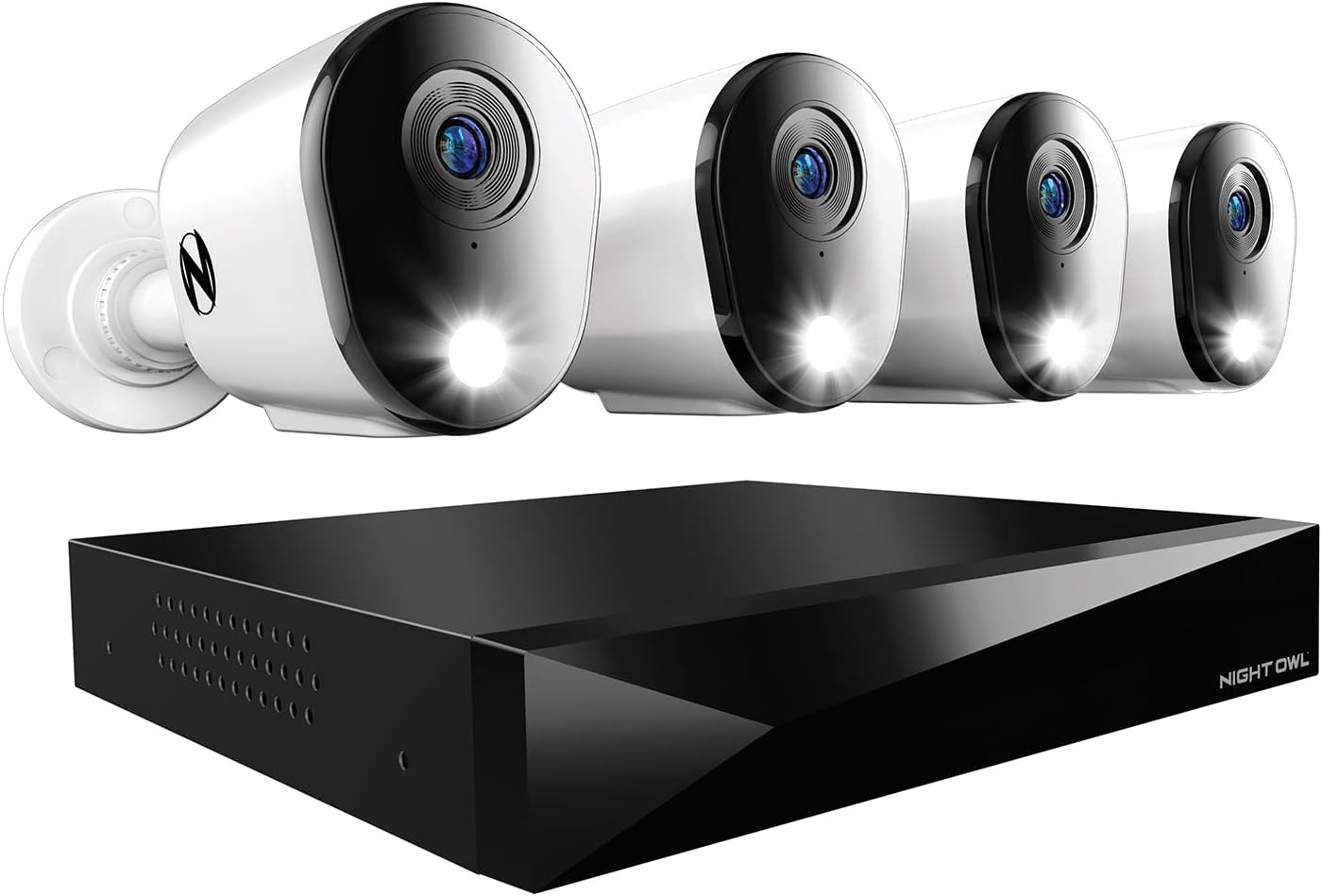
Key specs: 8-channel DVR with a 1TB hard drive; four wired spotlight cameras; accepts up to 8 BNC cameras plus 4 Wi-Fi devices on the same recorder; 2-way audio and siren
The FTD4 series is the sensible floor of the range rather than a stripped-out version of it. You get the same wired architecture, the same local recording, 2-way audio and a siren, and a 1TB drive — with the resolution stepped down from the 4K kit. It carries Amazon’s Choice for this search, which is worth exactly as much as it sounds: an indication it is the easy one to buy, not a quality verdict. What makes it interesting is the hybrid recorder. Night Owl’s FTD series specification sheet describes recorders that accept wired BNC cameras and Wi-Fi cameras at the same time, so an entry kit here can later grow with battery cameras in places you were never going to run cable.
✅ Pros
- Lowest-cost route into a wired, locally recorded Night Owl system
- Hybrid recorder accepts wired and Wi-Fi cameras together
- 2-way audio, preset voice messages and siren on the supported cameras
- Same no-subscription local recording as the more expensive kits
❌ Cons
- Lower resolution than the 4K kit — detail at distance is where that shows
- Still a wired install, with all the labor that implies
- Deterrence features vary by camera model, and the app itself notes not all features apply to all models
- 1TB rather than 2TB, which shortens how far back you can look
Night Owl 8-Channel Wi-Fi Hub with Battery Cameras — best without wiring
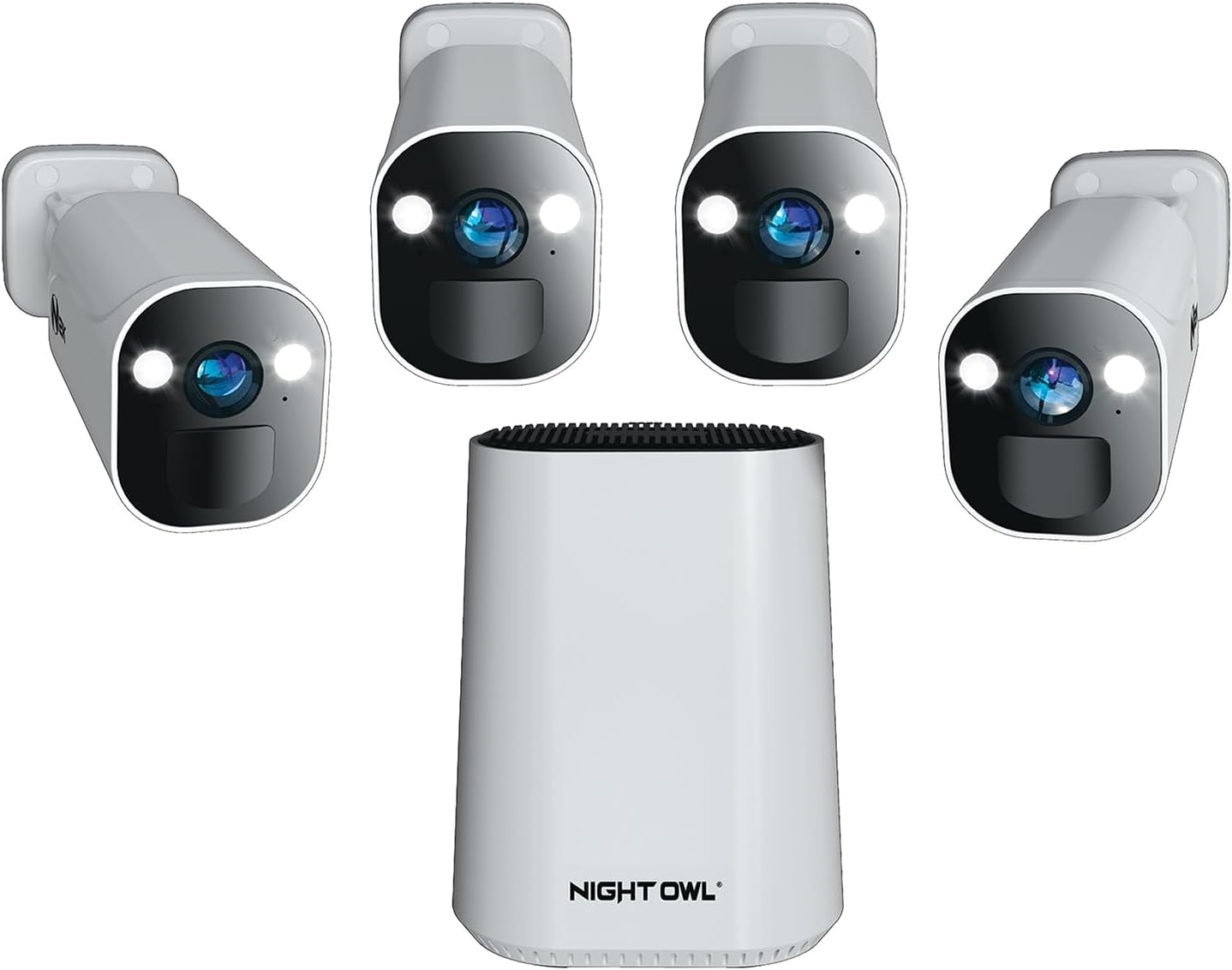
Key specs: 8-channel Wi-Fi security hub; four battery-powered 2K indoor/outdoor spotlight cameras; 2-way audio; 64GB microSD card included; expandable to 8 cameras
This is the kit for the house where cable is not happening: a Wi-Fi hub, four battery-powered 2K spotlight cameras and a 64GB card at the hub, expandable to eight cameras. Mount it, pair it, done. The honest tradeoff is that everything now runs through your home network and a battery. Signal strength at the camera’s actual mounting spot — not at your router — is what determines whether clips arrive, so it is worth testing the Wi-Fi where the camera will hang before you commit. A 64GB card is also a fraction of the storage the DVR kits ship with, which pushes this system toward event recording rather than continuous. If you like the wire-free idea but want the recharging problem to go away, solar-charged cameras are the other way to solve it.
✅ Pros
- No drilling, no coaxial, no cable runs — the only Night Owl kit a renter can realistically use
- Cameras can be repositioned freely, indoors or out
- 2K spotlight cameras with 2-way audio, and a card included at the hub
- Expandable to eight cameras on the same hub
❌ Cons
- Batteries need recharging on a cycle, per camera, forever
- Recording depends on Wi-Fi actually reaching each camera
- 64GB is far less headroom than the 1TB and 2TB drives in the wired kits
- Battery cameras record events rather than running continuously, so gaps between clips are normal
Night Owl 4K Wired and Wi-Fi NVR System — best for a large property
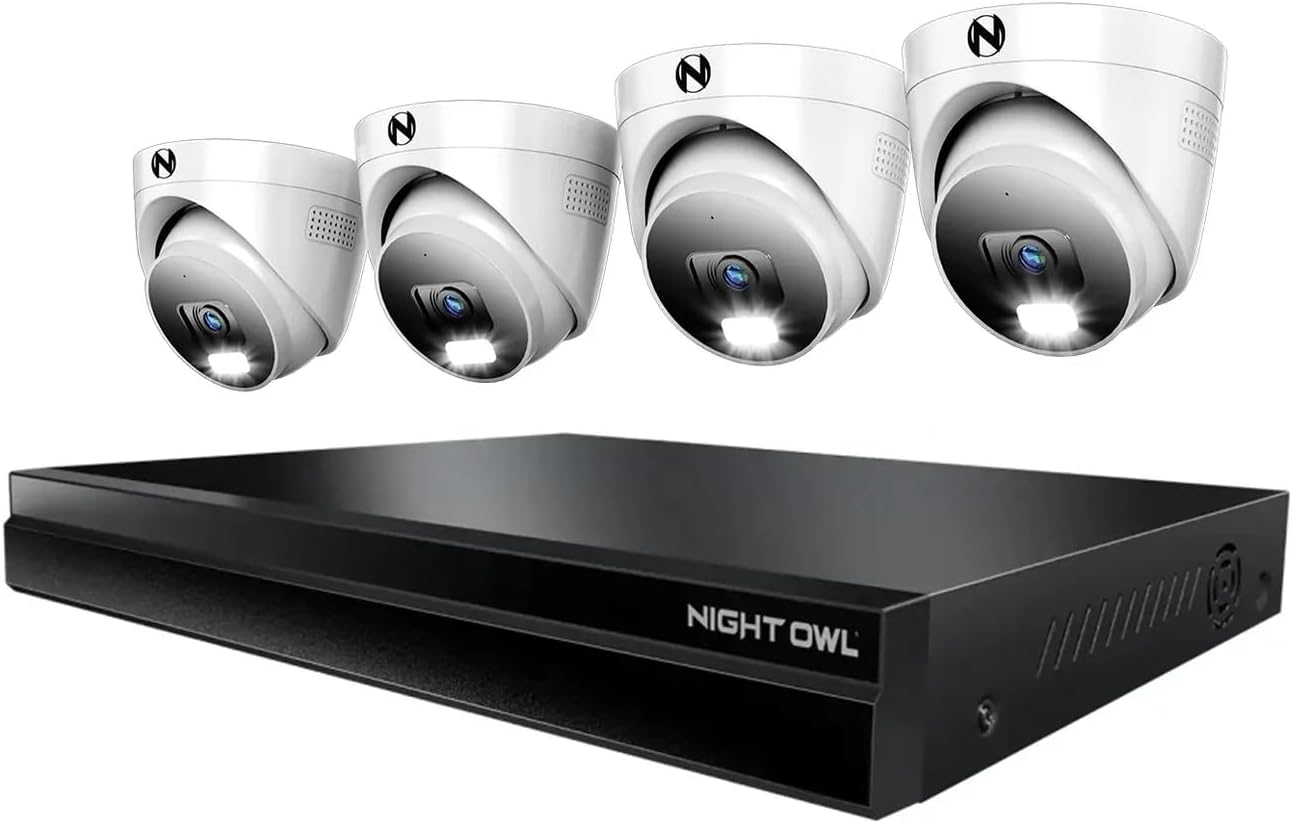
Key specs: 4K (8MP) NVR with 2TB storage; 8 Power over Ethernet channels plus 16 Wi-Fi channels; four wired dome cameras included; supports up to 24 devices in total
This is the one to look at if the property is big or the runs are long. It is a 4K NVR with 2TB of storage, four wired dome cameras in the box, and — the number that matters — eight Power over Ethernet channels plus sixteen Wi-Fi channels, supporting up to 24 devices in total. Power over Ethernet means one network cable carries both video and power to each camera, which is markedly easier to run than separate video and power lines, and dome cameras are the harder shape to knock out of alignment. One honest caveat: this is a recent listing with a thin review history compared with the long-standing DVR kits, so you are buying on specification rather than on a large body of owner feedback. If you are covering a commercial site rather than a home, our business camera system guide weighs compliance and multi-entry coverage that a residential kit does not address.
✅ Pros
- One cable per camera for both power and video — the cleanest wired install of the four
- 24 total devices across wired and Wi-Fi channels, so it grows with the property
- 2TB of storage, double the drive in the entry kits
- Dome cameras resist being knocked out of aim
❌ Cons
- Newer listing with a thin owner-feedback history — specification-led buy
- The most involved installation of the four kits
- Overkill for a small home that will never pass four or five cameras
- Wi-Fi channels still depend on network coverage where those cameras hang
How Long the Hard Drive Actually Keeps Footage
“1TB included” tells you nothing on its own. What determines how far back you can look is the interaction of three settings, and Night Owl’s own documentation covers all three.
First, the recording mode. Night Owl’s FTD series specifications list two modes: event recording, driven by human detection and vehicle detection, and continuous recording. Continuous captures everything and fills a drive at a predictable, relentless rate. Event recording captures only what triggers a rule, which can stretch the same drive across weeks instead of days — at the cost of anything the detection logic misses.
Second, the overwrite setting. Night Owl’s troubleshooting documentation states that with overwrite set to auto, the drive keeps recording once full by recording over older footage, and that with the option off the recorder stops recording when the drive is full. Auto is the default and the right setting for almost everyone — but it means your retention window is fixed and silently rolling. If an incident happened three weeks ago and your drive holds ten days, that footage is already gone.
Third, resolution and channel count. Four 4K cameras generate far more data than four 1080p cameras, and eight cameras generate twice what four do. This is why the 4K kit and the 2TB NVR belong together in the same sentence, and why buying a 4K system with the smallest drive is a false economy.
The Three Settings That Set Your Retention Window
Event
Detection-driven recording stretches a drive furthest
Continuous
Records everything, fills the drive at a fixed rate
Auto
Default overwrite — oldest footage is replaced, silently
Off
Recorder simply stops when the drive is full
Check your overwrite setting once, at install. It is the single setting most likely to be wrong when you need footage.
Where Night Owl Falls Short
We would rather say this plainly than bury it in a pros list. Three limitations are real and documented, and all three are worth knowing before you spend.
The app transition is a track record, not a one-off. Night Owl has now formally retired three apps and ended support for the products tied to them. The company is handling it reasonably — it publishes what is affected, states that hardware continues to work locally, and offers upgrade options and loyalty incentives to affected customers — but a buyer should price in that the remote features of any given generation have a horizon.
Feature coverage is uneven across the range. The Protect app lists human, face and vehicle detection, 2-way audio, siren and preset voice messages, filtered playback search and 2-step verification — then adds the caveat that not all features apply to all models. That is honest of them, and it also means a feature you read about in a review may simply not exist on the kit you are looking at. Check the specific model rather than the brand.
A camera system is evidence, not response. No Night Owl kit summons anyone. It records, it lights up, it sounds a siren, and then it is up to you. That is not a criticism unique to this brand, but it is the gap people are surprised by, and the reason the difference between monitored alarms and verified response is worth understanding before assuming cameras alone cover you. Recorded video is, however, exactly the kind of evidence that verified-response policies accept — which is an argument for cameras, just not the argument most people think they are making.
Final Recommendation
Start with the Night Owl 8-Channel 4K Bluetooth DVR Kit. It is the version of Night Owl that plays to the brand’s actual strength — wired reliability and local recording with no subscription attached — at a resolution that still resolves a face at the end of a driveway, with four spare channels for the cameras you will inevitably want later. Set overwrite to auto and pick event recording unless you have a specific reason to capture every hour.
Three things would properly change that answer. If you cannot run cable — renting, brick walls, a listed building — buy the battery-camera Wi-Fi hub instead and accept the recharging as the price of not drilling. If the property is large or the cable runs are long, the Power over Ethernet NVR with 2TB and 24-device capacity is the one that will not need replacing in two years. And if the budget simply does not stretch, the FTD4 entry kit gives up resolution but not the architecture, which is the right thing to compromise on.
What should not change is the first check. Whichever kit you pick, confirm it runs the Night Owl Protect generation before you pay. A discounted older system is discounted for a reason, and in this brand that reason is now a matter of public record.
SafeBode does not yet run an in-house product testing program. This guide is built from manufacturer specifications, official support documentation, current retail listings and verified buyer feedback rather than hands-on testing, and we say so plainly rather than implying testing we have not done.
Frequently Asked Questions
Do Night Owl cameras require a monthly subscription?
No, not for local recording. Footage records to the hard drive or memory card that ships with the system, and live view and playback in the Night Owl Protect app are part of the product. A paid plan only comes into it if you want recordings stored in Night Owl’s cloud, which is optional.
Will my older Night Owl system stop working now that the app was retired?
The recorder itself keeps working. Night Owl states that the hardware continues to function as designed and that you can connect the recorder to a monitor or television to view live video and play back stored recordings. What stops is the mobile side — remote viewing and phone alerts through the retired apps.
Which Night Owl app should a new system use?
Night Owl Protect. The company describes it as its currently sold product generation, and it is the app that continues to receive updates. Night Owl Connect and the X and XHD apps also remain supported.
How many days of footage will a 1TB drive hold?
It depends on resolution, camera count and recording mode, so no single number is honest. Continuous recording at 4K across several cameras burns through a drive in days; event-only recording on the same drive can stretch to weeks. Set your expectations from the mode, not the drive size.
What happens when the hard drive fills up?
With the overwrite option set to auto — the default — the recorder keeps going by writing over the oldest footage. If overwrite is switched off, the recorder stops recording once the drive is full, which is how people end up with no footage of the thing they wanted.
Can I mix wired and Wi-Fi cameras on one Night Owl recorder?
On the hybrid recorders, yes. Night Owl publishes specifications for recorders that take wired BNC camera inputs and Wi-Fi camera inputs at the same time, which is how a wired kit can later pick up battery cameras in spots where cable was never going to reach.
Is Night Owl better than a subscription camera brand?
It is better at a specific thing: keeping footage on your own hardware with no recurring bill. Subscription brands generally have more polished apps, broader smart-home integration and off-site copies of your video by default. Which matters more is a genuine preference, not a ranking.
Do the cameras still record if the internet goes down?
On the wired DVR and NVR systems, yes — recording happens at the recorder, not in the cloud, so an internet outage costs you remote access rather than the footage. Battery Wi-Fi cameras are more exposed, because they depend on the network to reach the hub in the first place.
Sources
Show sources (5)
- [1] Night Owl Support — “Night Owl Legacy Product and App Support Page,” support.nightowlsp.com/en/support/solutions/articles/68000023700
- [2] Night Owl SP — “App Sunset Support,” nightowlsp.com/collections/app-sunset-support
- [3] Night Owl Protect app listing, Apple App Store (Night Owl SP, LLC), apps.apple.com/us/app/night-owl-protect/id1478095333
- [4] Night Owl Support — “DVR / NVR Troubleshooting,” support.nightowlsp.com/en/support/solutions/articles/68000004387
- [5] Night Owl SP — “FTD2 Series System Features and Specifications,” nightowlsp.com/pages/ftd2-series-system-features-and-specifications


