Best Indoor Security Cameras 2026: For Pets, Kids, and Renters
Affiliate Disclosure: This article contains affiliate links. If you buy through these links, we may earn a commission at no extra cost to you. Our editorial opinions are our own and are not influenced by affiliate relationships. Read our full disclosure policy →
Introduction: One Indoor Camera Doesn’t Fit Every Room
Most “best indoor security camera” roundups rank four or five cameras against each other on a single scorecard and hand you a winner. That approach breaks down fast once you know what the camera is actually watching. A camera in a nursery has different requirements than one covering a living room while you’re at work, and a camera you’re installing in a rented apartment has a constraint — no drilling, no permanent mounts — that a homeowner never has to think about.
- Watching a baby or toddler? Sound detection for crying and a physical privacy shutter for nap time and diaper changes matter more than resolution.
- Renting, or sharing a space with roommates? No-drill, plug-in setup and a camera you can take with you at move-out beat a camera that’s slightly sharper.
- Checking in on a dog or cat during the day? Two-way audio and a wide field of view for tracking movement across a room matter more than 4K detail.
- Already living in a Google Home or Amazon Alexa household? Ecosystem compatibility determines how much of the camera’s functionality you’ll actually use day to day — see our Nest vs. Ring ecosystem comparison if Nest and Ring are your two finalists.
Not sure a single camera is even the right category for your apartment, versus a full monitored system? Our full system vs. standalone camera decision guide walks through cost, renters insurance discounts, and monitoring before you buy either.
This guide picks a specific camera for each of those four situations rather than forcing one “best overall” answer, then gives you a full comparison table and buying framework if your situation doesn’t map cleanly onto any single scenario. If you are deciding whether you need a dedicated pet camera on top of one of these, our pet camera vs security camera guide answers that.
Quick Answer
If you’re monitoring a baby or young kids, the Arlo Essential Indoor (3rd Gen) is the strongest fit — it’s built around exactly that use case, down to the audio detection for crying and an automated privacy shield for nap time. Renting or don’t want a subscription hanging over you? The Wyze Cam v4 records to a local memory card at no extra cost and moves apartment to apartment with you. For casual pet check-ins with two-way audio, the Ring Indoor Cam (2nd Gen) is the most widely used and highest-rated of the four. And if your household already runs on Google Home, the Nest Cam Indoor (Wired, 3rd Gen) is the natural fit.
Who This Guide Is For (and Who Should Skip It)
This guide is for you if:
- ✅ You need to monitor one room — a nursery, living room, or home office — not a whole property
- ✅ You’re renting and can’t drill into walls or existing wiring
- ✅ You want to check on kids, pets, or an elderly parent during the day
- ✅ You’d rather spend a few minutes comparing four specific cameras than read a 15-camera ranking
Skip this guide if:
- ❌ You need to cover a yard, driveway, or exterior — none of these four cameras are weatherproof. See our Ring camera guide for outdoor models, or our driveway alarm guide if you just need a motion alert, not video
- ❌ You want a full multi-room or whole-property system for your own home, not a single indoor camera — see our Best Wireless Security Camera Systems 2026 guide for expandable multi-camera setups. Running a small business, not a household? See our Best Business Security Camera Systems guide instead
- ❌ You need professional monitoring that dispatches emergency responders — that’s an alarm-system feature, not a standalone camera one
- ❌ You have zero tolerance for any camera ever touching a cloud server, under any circumstance — see the storage section below before buying any of these
Best for Kids & Baby Monitoring: Arlo Essential Indoor (3rd Gen)

Arlo built the Essential Indoor (3rd Gen) around child and infant monitoring specifically — it’s listed in Amazon’s baby monitor category, not just general home security, and the feature set backs that up. It records at 2K resolution with a 130-degree field of view, wide enough to cover a full nursery or playroom from one corner-mounted position, plus 12x digital zoom for checking detail without physically moving the camera.
The standout feature for this use case is the Automated Privacy Shield — a software-controlled lens cover you can trigger from the Arlo app, letting you black out the camera during diaper changes or once a toddler is old enough to notice and object to being watched. It also listens for specific sounds, not just motion: crying, screaming, barking, and even smoke or CO alarm tones, each triggering a distinct alert rather than one generic “motion detected” push notification.
Pros
- Automated Privacy Shield for on-demand camera blackout
- Sound-specific detection (crying, barking, smoke/CO alarms), not just generic motion
- 130° field of view covers a full room from one mount point
- Plug-in power — no battery to recharge on a camera you want running continuously overnight
Cons
- Night vision is black-and-white only, with a 25-foot range
- The included Arlo Secure trial runs one month — after that, cloud video history and AI-powered person/animal recognition require a paid subscription
- Smallest review base of the four cameras in this guide, since the 3rd Gen model is a newer release
Best for Renters & No Commitment: Wyze Cam v4
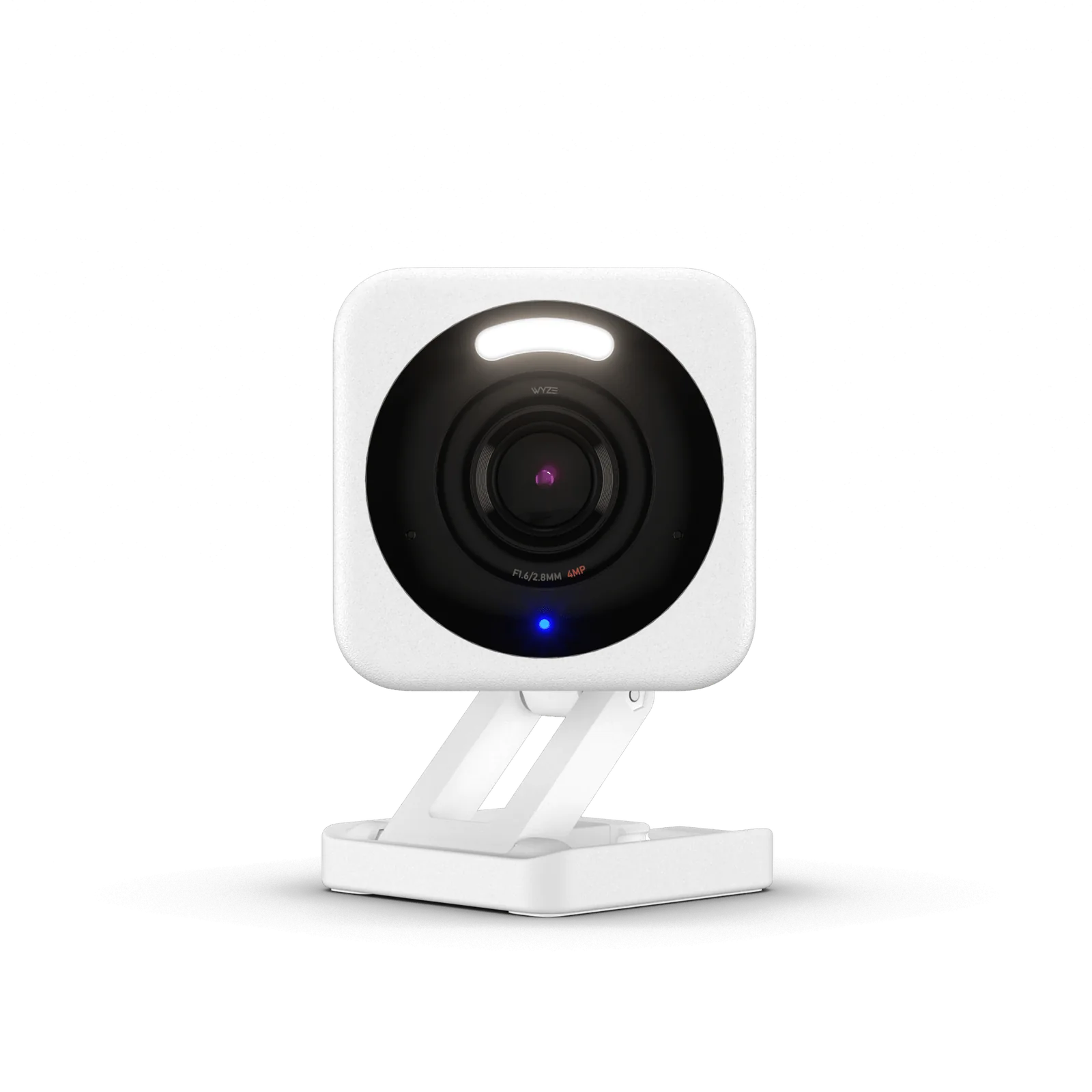
The Wyze Cam v4 is the camera to buy if you don’t want a subscription decision hanging over you at all. If a full no-drill security setup — not just one indoor camera — is what you’re after, our DIY Home Security Systems for Renters guide covers the broader picture. It records in 2.5K QHD to a local microSD card (up to 256GB) with true 24/7 continuous recording at no extra cost — cloud backup exists as an optional paid add-on, but nothing about the camera’s core function depends on you ever paying Wyze a monthly fee. That matters most for renters who might be reassessing their security setup every time a lease ends.
It’s magnetically mounted rather than screwed in, powered over a 6-foot USB cable, and rated IP65 for weather resistance — which doesn’t make it an outdoor camera, but does mean it tolerates a spot near a drafty window or an unheated porch entry better than the other three cameras in this guide. Dual night vision (infrared plus a color low-light sensor) and a 72-lumen motion-activated spotlight with a 99dB siren round out the deterrent features.
Independent lab testing backs up the image-quality claim specifically — TechGearLab’s hands-on review found the 2.5K image ‘genuinely sharp, with faces clearly legible at typical room distances,’ outperforming several pricier competitors on video quality alone.
Pros
- Full 24/7 local recording with no subscription required, ever
- Lowest price point of the four cameras in this guide
- Magnetic mount — no screws, easy to move at every lease renewal
- Built-in spotlight and 99dB siren, unusual at this price tier
Cons
- No automatic offsite backup unless you pay for Wyze’s cloud plan — a lost or stolen microSD card takes your footage with it
- Requires buying your own microSD card separately for local storage
- No smoke/CO audio detection like the Arlo pick above
Best for Pets: Ring Indoor Cam (2nd Gen)

The Ring Indoor Cam (2nd Gen) is by far the most-reviewed and highest-rated camera in this guide on Amazon, and its compact, table-friendly design is a genuinely good fit for keeping an eye on a dog or cat from a shelf, counter, or side table rather than a wall mount. Live View and color night vision let you check in visually any time, and two-way audio means you can actually talk to a anxious dog during a thunderstorm or call a cat off the counter remotely.
We cover Ring’s full camera and doorbell lineup — including the outdoor models this guide intentionally excludes — in our dedicated Ring camera guide. If you’re already inside the Ring/Alexa ecosystem for other devices, that consistency is worth factoring in alongside the pet-monitoring fit here.
Pros
- By far the largest and most established review base of the four cameras here
- Manual privacy cover — a physical swivel shutter, not just a software toggle
- Compact tabletop design suited to shelf or counter placement
- Deep Alexa integration, including Echo Show video streaming
Cons
- 1080p resolution — noticeably behind the 2K/2.5K resolution of the other three picks
- No local storage option at all — recorded video history requires a paid Ring Protect subscription, full stop
- Independent reviewers consistently flag this no-subscription-no-history limitation as Ring’s single biggest recurring complaint across its camera lineup
Best for Google Home Households: Nest Cam Indoor (Wired, 3rd Gen)

If your household already has a Google Home hub, Nest thermostat, or Google speakers, the Nest Cam Indoor (Wired, 3rd Gen) is the pick that folds into what you already have instead of running alongside it in a separate app. It shoots 2K video with color night vision and two-way audio, and Google’s “intelligent alerts” distinguish between people, animals, and general motion — useful for filtering out a cat setting off notifications every ten minutes.
It’s also the newest release of the four, launching with Google Home and Gemini integration built in from day one rather than added later, and it holds a strong Amazon rating despite its smaller, newer review base.
Nest includes 6 hours of free event-preview clips and a 1-month Google Home Premium trial at purchase, so you’re not locked out of any history from day one — but full video history, person and package recognition, and extended clip length all sit behind a paid plan after that free window. Our full Nest Cam Indoor comparison covers how this model differs from the 2nd Gen and the battery version.
Pros
- Deepest native Google Home / Gemini integration of any camera in this guide
- Intelligent alerts distinguish people, animals, and general motion
- 2K color night vision and two-way audio
- Wired power — no battery cycle to manage
Cons
- Highest price of the four cameras in this guide
- Most of Nest’s smartest features — familiar-face recognition, extended video history — sit behind a Google Home Premium subscription
- Little value if nobody in the household already uses Google Home or Assistant
Full Comparison Table
| Camera | Best For | Resolution | Storage | Buy |
|---|
| Arlo Essential Indoor (3rd Gen) | Kids & baby monitoring | 2K (1440p), 130° FOV | Cloud, 1-month trial included | Buy on Amazon |
| Wyze Cam v4 | Renters, no subscription | 2.5K QHD, 115.8° FOV | Local microSD (256GB), cloud optional | Buy on Amazon |
| Ring Indoor Cam (2nd Gen) | Pets, casual check-ins | 1080p HD | Cloud only, Ring Protect required for history | Buy on Amazon |
| Nest Cam Indoor (Wired, 3rd Gen) | Google Home households | 2K | Cloud, Google Home Premium for full history | Buy on Amazon |
Local vs. Cloud Storage: What Actually Happens to Your Footage
 Local storage keeps footage on a memory card inside your home. Cloud storage sends it to the manufacturer’s servers, usually behind a subscription.
Three of the four cameras in this guide — Arlo, Ring, and Nest — depend on a cloud subscription for saved video history; only the Wyze Cam v4 gives you full local recording with no subscription at all. That distinction matters more for an indoor camera than an outdoor one, because indoor cameras by definition watch the inside of your home: bedrooms, nurseries, living rooms. The FTC’s consumer guidance on securing home cameras specifically recommends confirming your feed is encrypted and locking down exactly which accounts and devices can view it remotely before you ever mount an indoor camera.
That guidance isn’t hypothetical. In 2023, the FTC settled with Ring over allegations that the company failed to restrict internal employee access to customer camera footage, including footage from indoor cameras pointed at sensitive spaces — the FTC’s complaint specifically cited an employee who viewed thousands of recordings over several months, and the settlement required Ring to pay $5.8 million and delete improperly retained video and data. Ring has since changed those internal access controls, but the case is a useful, concrete reminder that “cloud storage” means a company’s employees and systems sit between you and your own footage, not just you and a hard drive. Where you are legally allowed to point a camera, and whether it can record audio, is a separate question, covered in our guide to security camera laws.
- If local-only storage is a hard requirement for you, the Wyze Cam v4 is the only camera in this guide that meets it out of the box.
- If you’re fine with cloud storage but want to minimize exposure, use a unique account password, enable two-factor authentication on the camera’s app account, and review each brand’s data-retention and employee-access policy before buying — not after.
- Either way, change your home WiFi router’s default admin password and enable WPA2/WPA3 encryption — a compromised router is a more common entry point than a compromised camera account.
How to Choose the Right Indoor Camera
If none of the four scenario picks above matches your situation exactly, these questions narrow it down fast.
| Question | Answer |
|---|
| Renting or own the property? | All four cameras here are plug-in or battery-based with no drilling required, but the Wyze Cam v4’s magnetic mount is the easiest to remove cleanly at move-out. |
| Watching a baby, a pet, or an empty room? | Sound-specific detection (Arlo) matters most for a baby. Two-way audio (Ring) matters most for a pet. Neither matters much for a simple empty-room check. |
| Subscription tolerance? | Zero tolerance: Wyze Cam v4 only. Fine with a monthly fee for extended video history and AI features: any of the other three. |
| Existing smart home ecosystem? | Heavy Alexa household: Ring. Heavy Google Home household: Nest. Neither: Wyze or Arlo both work as standalone apps without requiring a hub. |
Who Indoor Cameras Are NOT Right For
An indoor camera solves a specific, narrow problem. It’s the wrong purchase — or at least an incomplete one — in a few common situations.
- You actually need to cover your home’s exterior. None of the four cameras in this guide are weatherproof enough for consistent outdoor use — see our Ring camera guide or our Nest outdoor camera guide for outdoor-rated models.
- You want a system that detects an actual break-in, not just records one after the fact. A standalone camera notifies and records; it doesn’t sound an alarm or contact a monitoring center the way a dedicated security system does — see our Ring Alarm System guide for that layer.
- You share a household with people who haven’t consented to being recorded. Roommates and co-habitants in shared living spaces (not just your own bedroom) raise consent questions state law treats differently — see our wireless video doorbell guide for a full breakdown of which states require all-party consent before mounting a camera anywhere shared.
- You need multi-room coverage on day one. Buying one camera at a time to test fit in a specific room, then expanding, is usually cheaper and lower-risk than committing to a multi-camera bundle upfront.
Wyze has expanded well beyond the single model featured here. Our full Wyze camera comparison covers the 2.5K v4, the pan-and-tilt Pan v3 and the light-socket Bulb Cam, and explains what a Cam Plus subscription actually adds.
Final Recommendation
There isn’t one right answer here — that’s the point of splitting this guide by scenario instead of forcing a single ranking. But if you’re choosing blind with no specific use case in mind, the Wyze Cam v4 is the safest general-purpose pick: it’s the least expensive camera in this guide, it never forces a subscription decision on you, and 2.5K resolution with dual night vision covers the large majority of single-room monitoring needs without compromise.
FAQ
Can I use an indoor camera outdoors under a covered porch?
Not recommended, even under cover. None of the four cameras in this guide carry a weatherproof rating adequate for sustained outdoor exposure to temperature swings and humidity. Use a camera built and rated for outdoor use instead.
Do any of these cameras work without WiFi?
No. All four cameras in this guide require a WiFi connection for live viewing, alerts, and app control, regardless of whether video is stored locally or in the cloud.
Is the Wyze Cam v4’s local storage actually free forever, with no catch?
The camera and its 24/7 local recording to a microSD card have no recurring fee. You do need to buy a microSD card separately (not included), and Wyze’s optional cloud backup and AI detection features are a separate paid add-on if you want them — but the core recording function itself carries no subscription requirement.
Can I legally record a nanny, dog walker, or house cleaner with these cameras?
Video recording in common areas of your own home is generally permitted in the US, but audio recording is subject to stricter state-level consent laws that vary significantly — some states require all parties to consent to being audio-recorded. Check your specific state’s law before relying on a camera’s two-way audio or audio-detection features to record someone without telling them.
Which of these cameras is best if I want to eventually add outdoor cameras from the same brand?
Ring and Arlo both have the broadest outdoor camera lineups to expand into later within the same app and account. Wyze also sells outdoor-rated models. Nest’s outdoor lineup is comparatively smaller as of 2026.
Do I need a Ring Protect plan to use the Ring Indoor Cam at all?
No — live viewing and real-time motion notifications work without any subscription. A Ring Protect plan is only required if you want to save and review video footage after the fact. Our Ring Protect Plan guide breaks down exactly what each tier includes.
Can I return or exchange any of these cameras if they don’t fit my room?
Return policies and windows are set independently of this article by each retailer and manufacturer, and they change periodically — check the current return policy on Amazon or the manufacturer’s site directly before buying.
A note on our research approach: SafeBode has not purchased or installed any of the cameras covered in this article, and we’re not going to pretend otherwise. We started with each manufacturer’s own current product pages and Amazon listing data for every spec, price tier, and rating referenced above, then cross-checked brand-level patterns against independent comparison sources including VettedHomeGear and Alarm Reviews, verified our privacy and storage guidance directly against the FTC’s own consumer security guidance and enforcement record, and confirmed specific product claims against Consumer Reports and TechGearLab’s hands-on lab testing where available.
Already have cameras but not sure the placement is actually working for you? Our room-by-room camera placement walkthrough covers priority order, height and angle, and the spots most people get wrong.
Sources
Show sources (6)


