Best Aqara Smart Locks 2026: Matter, Apple Home Key, and Which One Skips the Hub
Affiliate Disclosure: This article contains affiliate links. If you buy through these links, we may earn a commission at no extra cost to you. Our editorial opinions are our own and are not influenced by affiliate relationships. Read our full disclosure policy →
Contents
Quick Answer
What separates Aqara’s locks is not the fingerprint reader or the keypad — it is the radio inside. The U100 is the sensible default, but it talks Zigbee, so it needs an Aqara hub to do anything beyond the door. The B50 is the only one with Wi-Fi built in and no bridge required. The U400 unlocks as you walk up, using Ultra-Wideband, and runs Matter over Thread. The U300 is the only lever-handle model, for doors with no separate deadbolt. Check the radio, not the listing headline — that decides what else you have to buy.
The Spec That Actually Decides Which Aqara Lock You Buy
Most lock roundups sort by price. That does not work for Aqara, where two locks costing roughly the same can leave you in completely different situations six months later — one working fine alone, the other refusing to unlock remotely until you buy a second device. The variable is the radio, and Aqara’s range spans three of them.
Read this part slowly, because it is the most common way people buy the wrong Aqara lock. The current Amazon listing headlines for the U100 and U50 both describe them as “Matter Over Thread.” Aqara’s own specification sheet says otherwise: the U100’s connectivity line reads “Bluetooth 5.0 and ZigBee 3.0, NFC”, and the U50’s spec panel says the same and adds a plain “Hub Required: YES”. Those are Zigbee locks. They appear inside Matter ecosystems only because an Aqara Zigbee hub bridges them — Aqara states on the U100’s page that an Aqara Zigbee 3.0 hub is required for automations, remote unlocking and Matter support.
The locks that genuinely run Matter over Thread are the U300 and U400, and that is not a claim you have to take on faith: the Connectivity Standards Alliance, which runs Matter certification, lists the U300 as a certified end product and records its Transport Interface as “Thread, Bluetooth”. If you have never had to think about the difference, our protocol explainer covers why these two low-power mesh radios behave so differently in a house.
Two Very Different Reasons an Aqara Lock Needs a Hub
🔗 Zigbee locks (U50, U100) — need an Aqara bridge
- The lock speaks Zigbee, which no phone or ecosystem understands natively
- An Aqara Zigbee 3.0 hub exposes it to Matter, Apple Home, Alexa and Google
- Without that hub you keep local unlocking but lose remote unlock and automations
- It has to be an Aqara hub — a HomePod or Nest Hub will not do this job
🧵 Thread locks (U300, U400) — need a Thread border router
- The lock speaks Thread and Matter, which every major ecosystem understands
- It needs a Thread border router, not a brand-specific bridge
- Apple lists HomePod mini, HomePod (2nd gen) and Apple TV 4K as Thread-enabled
- Google says Thread-based Matter devices need a border router to finish setup
That difference has a cost attached. A Thread border router is hardware plenty of households already own without knowing it — a HomePod mini or Apple TV 4K in the living room solves that half outright. An Aqara Zigbee bridge is something you buy specifically for this lock. Then there is the B50, which sidesteps both by putting Wi-Fi in the lock.
What Apple Home Key Actually Does at the Door
Home Key is the headline feature on nearly every Aqara lock, and worth spelling out plainly: the real behavior is better than most descriptions suggest, and the one genuine limitation is rarely mentioned. A home key is a credential living in the Wallet app. Apple’s documentation is specific about how it gets there — while you pair a supported lock in the Home app, a home key is added to Wallet automatically, and every resident of your household receives one. At setup you choose Express Mode, which unlocks with no Face ID prompt, or Require Face ID or Passcode. Apple also notes that not all Home app-compatible locks support home key — which is why this is worth checking model by model, not brand by brand.
What Happens When You Hold Your iPhone to the Lock
1
The key is issued
Pairing a supported lock in the Home app adds a home key to Wallet automatically, for every member of the household.
2
You choose the friction
Express Mode unlocks with no Face ID prompt; the alternative requires Face ID each time.
3
You hold the phone near the lock
With Express Mode on, holding the iPhone or Apple Watch near the lock opens the door — no app, no waking the screen.
4
It survives a flat battery, briefly
Power reserve keeps Express Mode credentials usable up to five hours after the iPhone needs charging.
Sourced from Apple’s own Home Key and Express Mode documentation, not a product listing.
That last step deserves an honest correction, because manufacturers routinely overstate it. Aqara’s U400 page says you can unlock “even when the devices are powered off”, and the U300 page uses similar wording. Apple is more precise: power reserve works for up to five hours with some Express Mode credentials once your device needs charging, and if you deliberately switch the iPhone off it is not available at all. The honest version is “it survives a dead battery for a few hours,” not “it works on a phone you turned off.”
None of it carries a monthly fee, which is worth stating because it is unusual here. If avoiding a subscription is the whole reason you are shopping, our roundup of locks with no ongoing fees covers the wider market.
The Aqara Lock Range, Side by Side
Five current models, sorted by the thing that matters. Every entry comes from Aqara’s own specification page for that lock.
| Model | Radio | What it needs to reach your phone | Fingerprint | Battery (manufacturer rating) | Weather |
|---|
| U50 deadbolt | Zigbee 3.0, Bluetooth 5.0, NFC | An Aqara Zigbee hub; the panel says Hub Required: Yes | No — keypad, card and key only | 4 AA, up to 6 months | IPX5 |
| U100 deadbolt | Zigbee 3.0, Bluetooth 5.0, NFC | An Aqara Zigbee hub for automations, remote unlock and Matter | Yes — 50 prints, stored locally | 4 AA, beyond 8 months | IP65 keypad |
| B50 deadbolt | Wi-Fi 6 (2.4 GHz only), Bluetooth 5.3 | Nothing for the Aqara app, Alexa or Google | No — keypad, app, voice and key | 4 AA, up to 6 months | IPX3 |
| U300 lever | Thread, Bluetooth 5.1, NFC | A Thread-enabled Matter controller | Yes — built into the handle | 4 AA, up to 10 months | IPX4 |
| U400 deadbolt | Matter over Thread, Bluetooth, NFC, Ultra-Wideband | A Thread-enabled home hub; UWB needs an Apple one | Yes — 50 prints | Rechargeable lithium-ion, up to 6 months | IP65 outer panel |
One row needs a caveat. Aqara describes the U100 and U50 as complying with the same safety standard as BHMA Level 3 — language about the residential grading scheme rather than a commercial ANSI grade, and the two are easy to confuse. Our guide to lock grading explains what those residential levels do and do not promise.
Aqara Smart Lock U100 — the one most people should start with
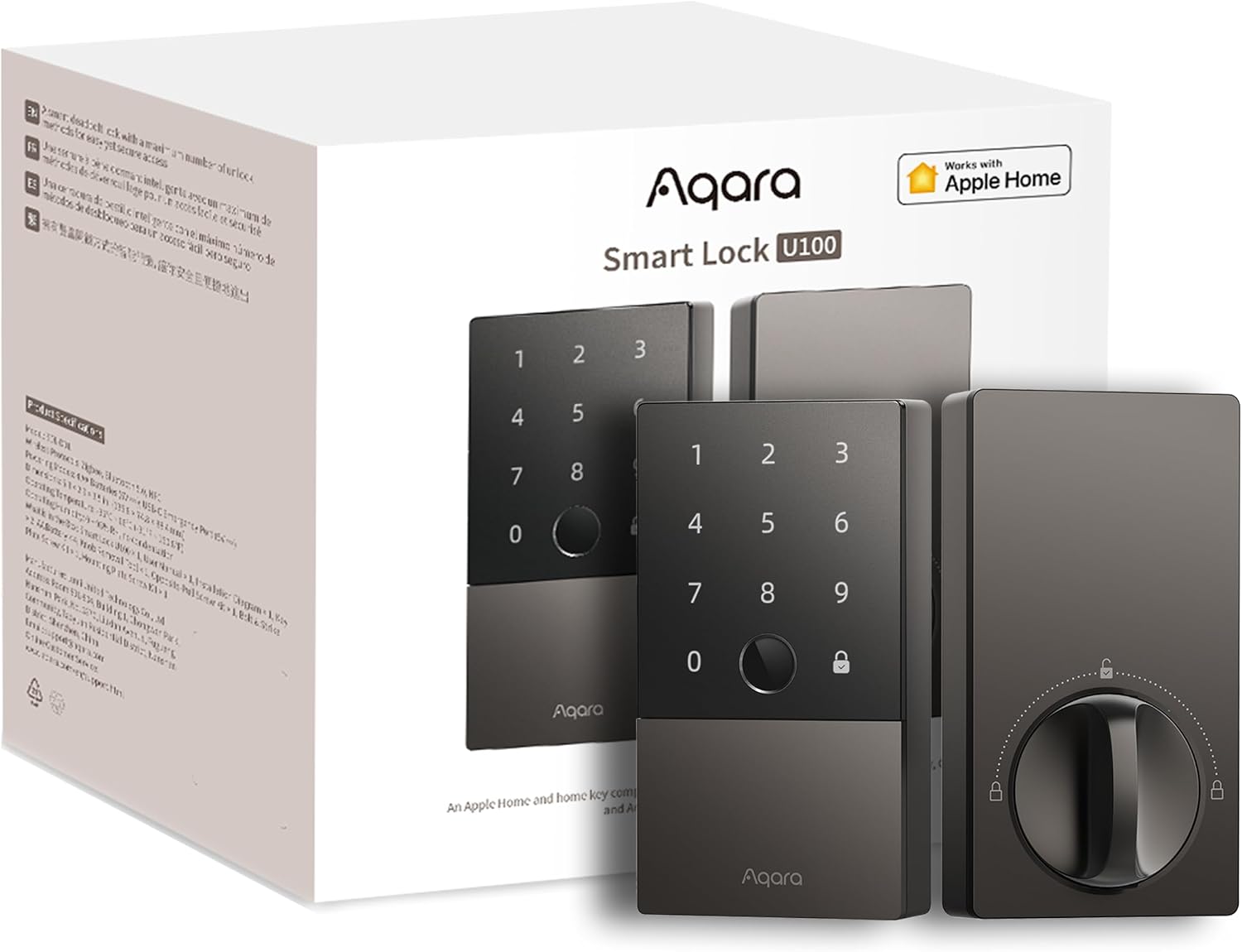
Key specs: Zigbee 3.0, Bluetooth 5.0 and NFC; fingerprint reader that stores up to 50 prints locally; touchscreen keypad; four AA batteries rated beyond eight months of daily unlocking; IP65-rated keypad; zinc body; USB-C emergency power port; Aqara states it complies with the same safety standard as BHMA Level 3
Buy this one unless another model solves a problem you actually have. It is a full replacement deadbolt with a touchscreen keypad and a fingerprint reader storing up to 50 prints on the lock rather than in a cloud account, and Aqara rates its four AA batteries beyond eight months of daily unlocking — genuinely long for a lock with a biometric sensor. Apple Home Key is supported. The caveat is the one this article is built around: it is a Zigbee lock, and Aqara says an Aqara Zigbee 3.0 hub is required for automations, remote unlocking and Matter. Locally it works fine alone. The moment you want to check from work whether you locked it, you need the hub — so budget for both. Confirm your door takes a standard deadbolt rather than a lever set first; our deadbolt installation walkthrough covers the measurements.
✅ Pros
- Fingerprint reader stores prints on the lock rather than in a cloud account
- Longest AA battery rating of the Aqara deadbolts — beyond eight months
- IP65-rated keypad and zinc body, so it handles an exposed front door
- Apple Home Key, so an iPhone or Apple Watch held to the keypad opens it
❌ Cons
- A Zigbee lock, not Matter over Thread, whatever the listing headline says
- Remote unlock, automations and Matter all require buying an Aqara hub as well
- Deadbolt only, so it does nothing for a door whose only hardware is a lever
Aqara Smart Lock B50 — the one that skips the hub
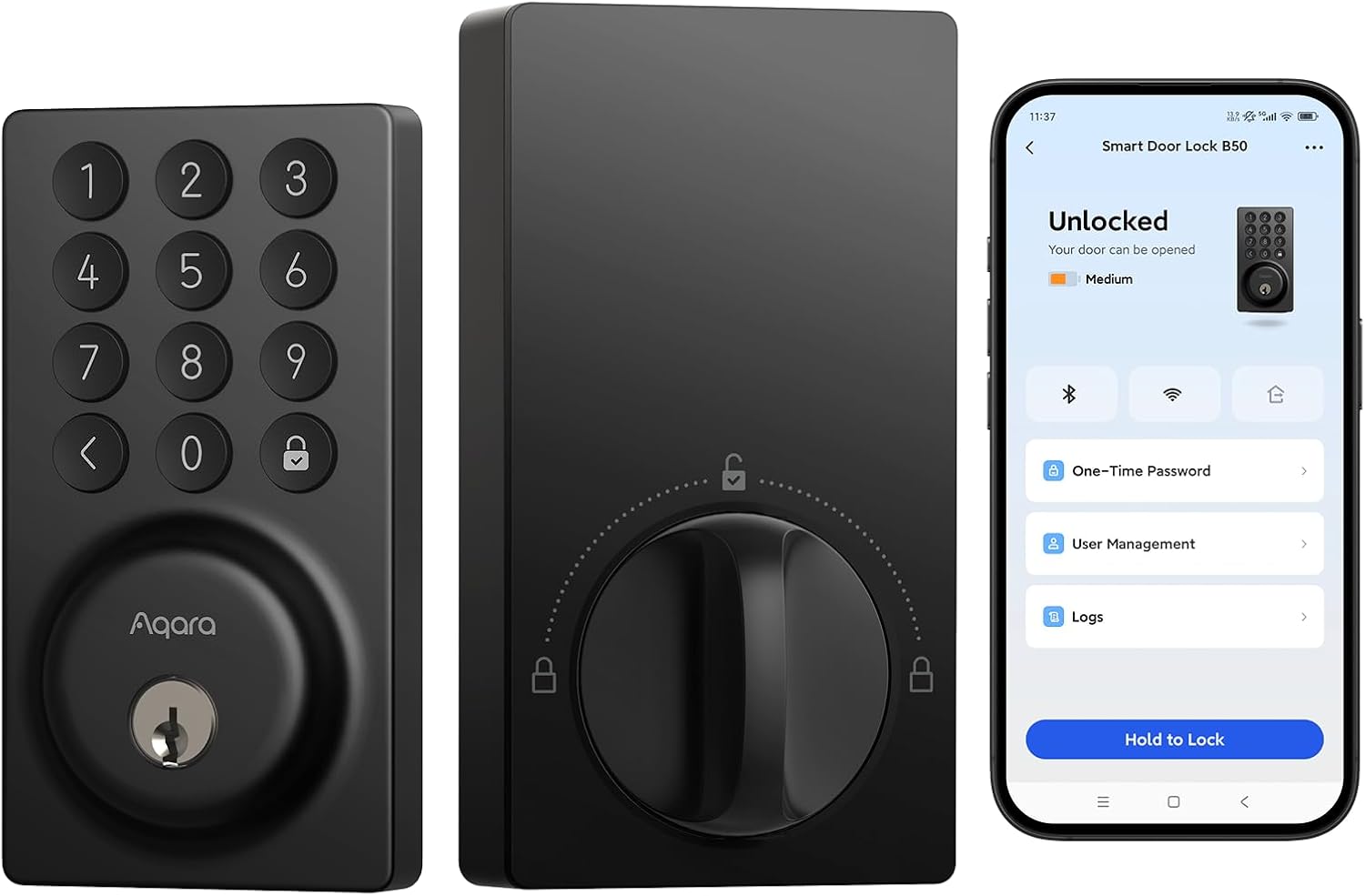
Key specs: Built-in Wi-Fi 6 on the 2.4 GHz band plus Bluetooth 5.3, with no bridge required for the Aqara Home app, Alexa or Google Home; touchscreen keypad; four AA batteries rated up to six months; USB-C emergency charging port; IPX3 weather rating; rekeyable cylinder; Matter only through a compatible Aqara hub
The B50 is the most interesting lock here precisely because it is the least ambitious. It puts Wi-Fi 6 inside the lock, and Aqara is unusually blunt about what that buys: with built-in Wi-Fi and no bridge required, you can lock, unlock and view lock activity from anywhere using the Aqara Home app, Alexa or Google Home. No hub, no bridge, no border router. Now the honest part, and it is a real trade. The B50 has no fingerprint reader, and it does not reach Apple Home or Matter on its own — Aqara says Matter arrives only by pairing it with a compatible Aqara hub, currently the M3, G5 and M100. So the lock needing no hub for its own features is also the one needing a hub for the feature in this article’s title. If you are an iPhone household set on Home Key, this is not your lock.
✅ Pros
- Genuinely no hub or bridge for remote lock, unlock and activity history
- Works with Alexa and Google Home out of the box, with no extra hardware
- USB-C emergency charging and a rekeyable cylinder, so it can match keys you already carry
❌ Cons
- No fingerprint reader — keypad, app, voice, physical key and offline codes only
- No Apple Home Key and no Matter unless you add an Aqara M3, G5 or M100 hub
- 2.4 GHz Wi-Fi only, so a router pushed hard toward 5 GHz makes setup awkward
- IPX3 is the lightest weather rating here — fine under a porch, less so fully exposed
- Newest model by a wide margin, with a review base still in the dozens rather than the thousands, so long-term reliability reports are thin
Aqara Smart Lock U400 — the one that opens before you touch it
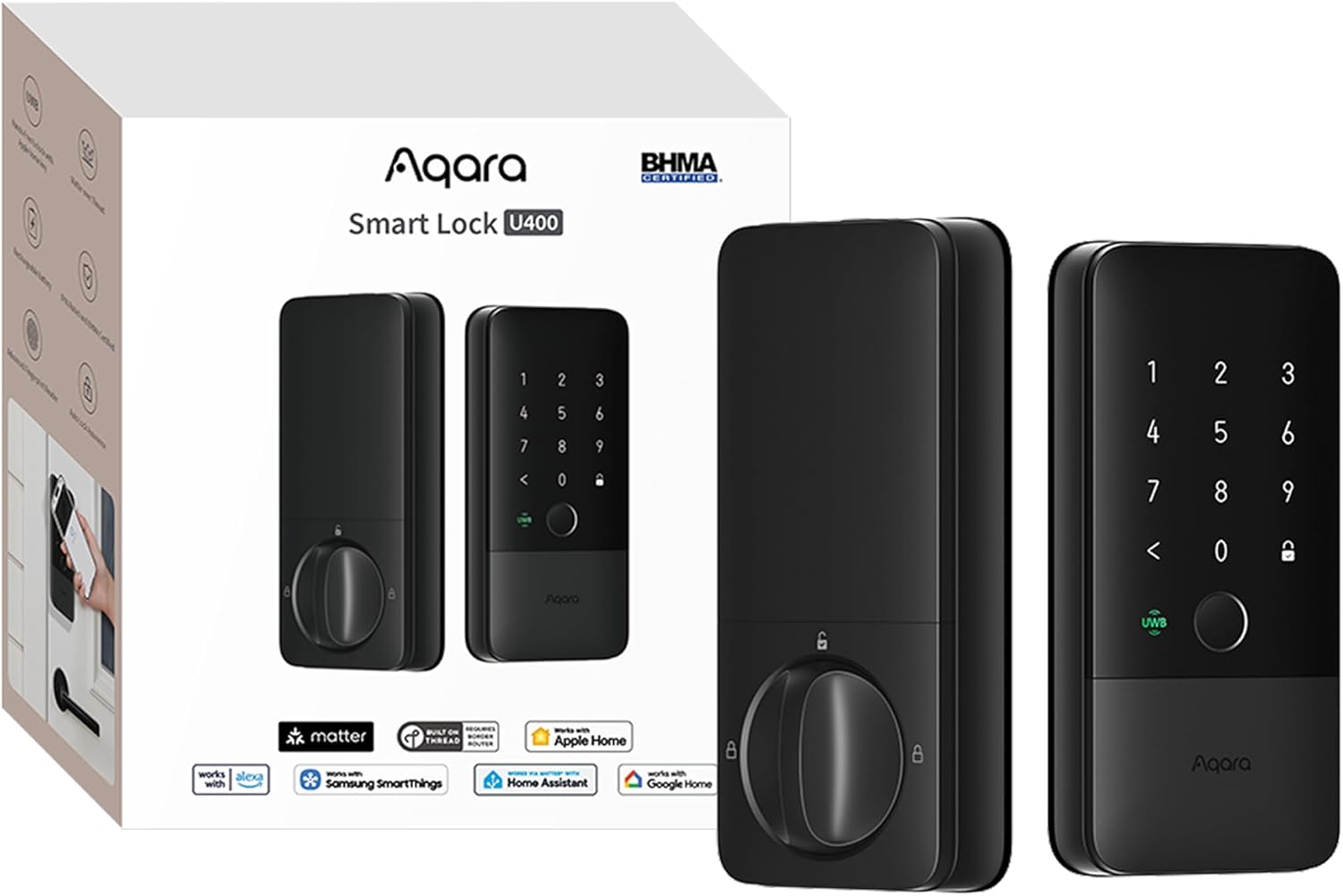
Key specs: Matter over Thread plus Bluetooth, NFC and Ultra-Wideband; hands-free UWB unlocking on approach and tap-to-unlock with Apple Home Key; fingerprint reader storing up to 50 prints; rechargeable removable lithium-ion battery rated up to six months per charge; IP65-rated outer panel; Aliro certified
The reason to want the U400 is Ultra-Wideband. Rather than tapping a phone to the keypad, the lock measures range and angle to work out where you are and whether you actually intend to come in, then unlocks as you approach. Aqara is careful about the conditions and so are we: UWB unlocking works with select iPhone and Apple Watch models and requires a Thread-enabled Apple home hub such as a HomePod mini or Apple TV 4K. On a non-Apple household you still get Matter over Thread, Home Key and the fingerprint reader — just not the hands-free trick that justifies the price. It is also Aliro certified, carrying the Alliance’s mobile access credential standard, built so readers and phones from different manufacturers work together at the door — a bet on aging well, not a feature you can use today.
✅ Pros
- Hands-free UWB unlocking that judges intent from range and angle, not just proximity
- Real Matter over Thread, so it joins Apple Home, Google Home, Alexa and SmartThings with no Aqara bridge
- Aliro certified — an early commitment to cross-vendor credentials at the door
- Rechargeable removable lithium-ion battery rated up to six months per charge
❌ Cons
- The headline UWB feature is Apple-only in practice and needs a Thread-enabled Apple hub
- A rechargeable pack rather than AA cells, so no loose batteries from a drawer at midnight — though it is removable, so a charged spare solves it
- Most expensive lock in the range, and its main advantage disappears on a non-Apple household
- Aliro’s cross-ecosystem promise is not something you can act on yet
Aqara Smart Lock with Handle U300 — the one for a door with no deadbolt
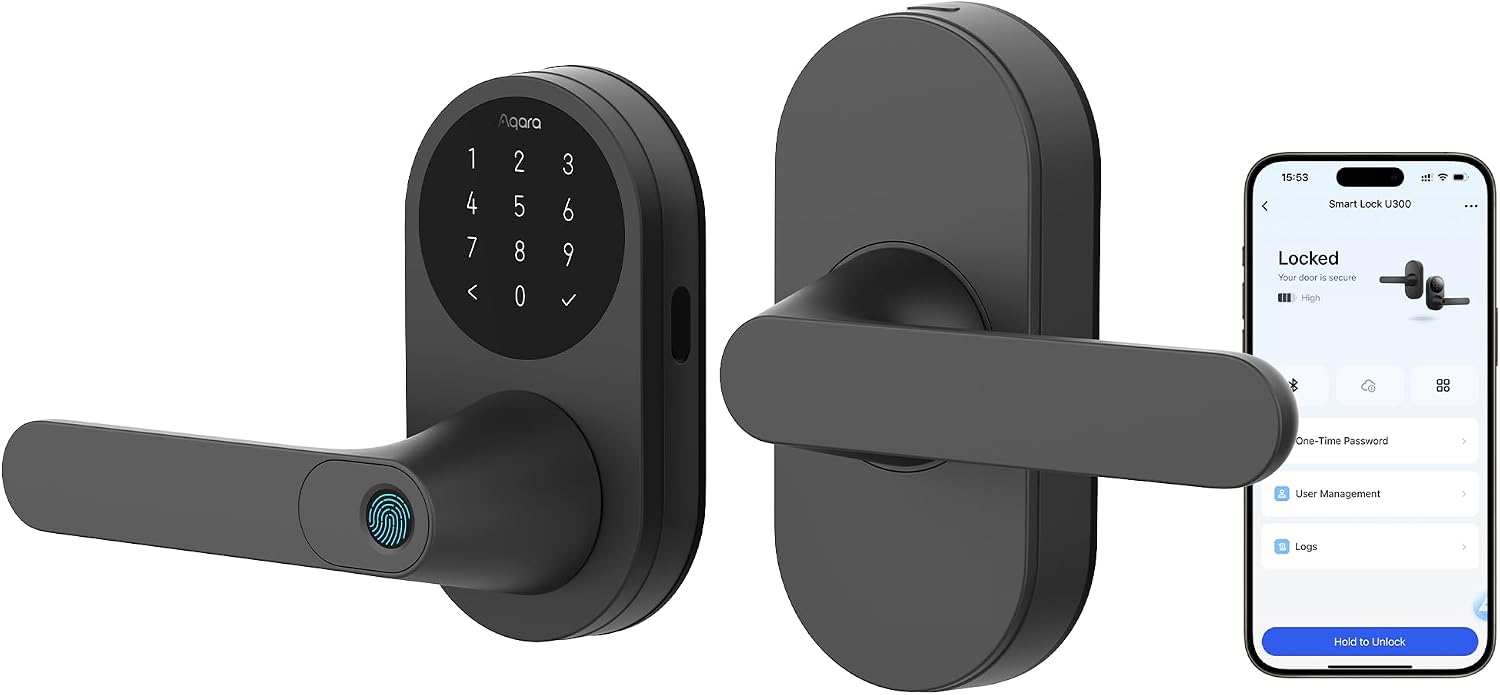
Key specs: Thread, Bluetooth 5.1 and NFC, running Matter over Thread; fingerprint reader built into the handle itself; touchscreen keypad, PIN codes, NFC cards and mechanical keys; four AA batteries rated up to ten months; IPX4 outer panel rated down to -22 degrees Fahrenheit; fits a 2 3/8-inch or 2 3/4-inch backset, left or right handed
Every other lock here assumes your door has a deadbolt above the handle. Plenty do not — garage entry doors, home-office doors, side and back doors frequently carry a lever set and nothing else. The U300 is Aqara’s answer, and the Alliance’s listing describes it as Aqara’s first lever lock, explicitly aimed at applications like garage entry doors. The fingerprint reader sits in the handle, so gripping the door is the unlock gesture — a better idea than reaching for a keypad with an armful of groceries. It runs Matter over Thread with a Transport Interface the Alliance records as “Thread, Bluetooth”, carries Apple Home Key, and Aqara rates its four AA batteries up to ten months, the longest here. Check the fit carefully: it takes a 2 3/8-inch or 2 3/4-inch backset and handles left or right hung doors.
✅ Pros
- The only lever-handle lock Aqara makes, for doors with no separate deadbolt
- Fingerprint reader built into the handle, so gripping the door is the unlock action
- Longest battery rating in the range at up to ten months on four AA cells
- Genuine Matter over Thread with Home Key, verified in the Alliance’s own listing
❌ Cons
- A lever set is inherently easier to defeat than a deadbolt — this is a convenience upgrade, not a security upgrade over a graded deadbolt
- IPX4 is a splash rating rather than a jet-spray one, so it wants some shelter
- Needs a third-party Thread-enabled Matter controller for full ecosystem integration
- Narrow fit window — wrong backset or a metal door and it will not mount
- Small review base so far, so durability reports on the handle mechanism are limited
Where the U50 Fits, and Where It Does Not
The U50 is the model we did not give a slot to, and it is worth saying why. On paper it looks like a cheaper U100: same Zigbee 3.0, Bluetooth 5.0 and NFC combination, same Aqara hub requirement, same BHMA Level 3 claim, same USB-C emergency unlock, batteries rated up to six months and an IPX5 rather than IP65 housing. The real difference is that it has no fingerprint reader at all — Aqara’s own list of unlocking methods is keypad, NFC card, physical key, app and voice. For some households that is fine or preferable, since a code is easier to hand a dog walker than a fingerprint enrollment, and our keypad-focused guide makes that case properly. But if you are choosing on price alone, you are trading away the sensor, not a few months of battery life. Aqara also sells a retrofit U200 that mounts over an existing deadbolt cylinder rather than replacing it — worth knowing for renters, though we have not featured it here.
Which Controller You Need, by Ecosystem
What you already own decides what an Aqara lock really costs.
| You already own | U50 / U100 (Zigbee) | U300 / U400 (Thread) | B50 (Wi-Fi) |
|---|
| A HomePod mini, HomePod (2nd gen) or Apple TV 4K | Still needs an Aqara Zigbee hub as well | Already covered — Apple lists these as Thread-enabled | Fine for Alexa and Google; Apple Home still needs an Aqara hub |
| A Google or Nest speaker or display | Still needs an Aqara Zigbee hub | Needs a Thread border router to finish setup | Works with Google Home directly, no extra hardware |
| An Amazon Echo | Still needs an Aqara Zigbee hub | Needs a Thread-enabled Matter controller for that ecosystem | Works with Alexa directly, no extra hardware |
| Nothing yet | Buy the lock plus an Aqara Zigbee hub | Buy the lock plus a Thread border router | Buy the lock. That is the whole shopping list |
Read the bottom row across and the decision takes shape. From zero, the B50 is the only single-purchase lock here. From an Apple household with a HomePod mini already plugged in, the U400 or U300 costs nothing extra and gives you the better protocol. From a Google household the math shifts again, and our Google Home lock guide compares how the major brands behave inside that ecosystem specifically.
Three Things to Check Before You Order
Smart lock returns are overwhelmingly about fit and infrastructure, not a bad lock.
The Numbers Worth Knowing Before Checkout
3
Different radios across Aqara’s current lock range — Zigbee, Thread and Wi-Fi
5 hrs
How long Apple’s power reserve keeps a home key usable on a drained iPhone
1
Aqara locks needing no additional hardware at all: the B50
10 mo
Longest manufacturer battery rating in the range, on the U300
All figures from Apple’s or Aqara’s own documentation.
Measure the door, not the old lock. The deadbolt models need a standard deadbolt bore, and the U300 is fussiest, since a lever set must match both backset and handing. Decide what happens to your keys. The B50 supports rekeying, so it can match keys you already carry; the others ship with their own. If your door has a double-cylinder deadbolt needing a key on the inside too, that is a separate decision worth understanding first, with real fire-safety implications.
Plan for the batteries. Every lock here except the U400 runs on four AA cells with a USB-C emergency port outside, so a flat battery is an inconvenience rather than a lockout. The U400’s pack is removable, so a charged spare swaps in. Cold shortens all these ratings — the U300 is rated down to -22 degrees Fahrenheit — so the warning signs of a failing set are worth more than the month count.
Final Recommendation
Start with the Aqara Smart Lock U100. It is the best-balanced lock Aqara makes — local fingerprint storage, the longest AA battery rating of the deadbolts, an IP65 keypad and Apple Home Key — and its compromises are easiest to live with once you know them. Go in understanding it is a Zigbee lock, and that remote unlocking and Matter both need an Aqara hub alongside it. Buy both together rather than discovering the second purchase after installation.
Three things should push you off that default. If you want one purchase and no hub of any kind, buy the Aqara Smart Lock B50 and accept giving up the fingerprint reader and Apple Home Key to get there. If a HomePod mini or Apple TV 4K is already in the house, the Aqara Smart Lock U400 delivers hands-free entry with no bridge to buy. And if the door has a lever handle and no deadbolt, the Aqara Smart Lock with Handle U300 is the only model here that will physically fit it.
One thing that should not push you off it: a listing headline. Find the manufacturer’s own specification panel and read the connectivity line first. If you are still deciding whether a lock is even the right first upgrade, our doorbell-versus-lock comparison is the better place to start, and our Yale roundup is a useful contrast with a traditional lock brand.
SafeBode does not yet run an in-house product testing program. This guide is built from manufacturer specifications, official support documentation, current retail listings and verified buyer feedback rather than hands-on testing, and we say so plainly rather than implying testing we have not done.
Frequently Asked Questions
Do I need an Aqara hub to use an Aqara smart lock?
It depends on the model. The U50 and U100 are Zigbee locks needing an Aqara Zigbee hub for remote unlocking, automations and Matter, though they still work locally without one. The U300 and U400 need a Thread border router rather than an Aqara-branded hub, and many homes already have one. The B50 needs nothing for its own app, Alexa and Google features.
Does Apple Home Key still work if my iPhone battery is dead?
For a while. Apple’s power reserve keeps Express Mode credentials usable for up to five hours after the phone says it needs charging. It does not work if you deliberately power the iPhone off. Treat it as a safety net for a bad afternoon, not a permanent backup.
What is a Thread border router, and do I already have one?
It bridges a low-power Thread mesh onto your normal home network. Apple lists HomePod mini, HomePod second generation, and Apple TV 4K second and third generation as Thread-enabled, and several Google and Amazon devices act as one too. If you own any of them, the Thread-based Aqara locks need no extra hardware.
Which Aqara locks have a fingerprint reader?
The U100, U300 and U400 do. The U50 and B50 do not — those two are keypad, card, app and key devices. That surprises people, since the fingerprint sensor is the feature most associated with the brand, and it is the biggest functional gap between the U50 and U100.
Can I use an Aqara lock with Google Home or Alexa instead of Apple Home?
Yes, but by different routes. The B50 connects to Alexa and Google Home directly. The Thread models join through Matter, which every major ecosystem supports provided it has a Thread-enabled controller. The Zigbee models reach all of them too, but only after an Aqara hub bridges them across.
Is the U100 really a Matter over Thread lock?
No. Its retail listing headline says so, but Aqara’s own specification sheet lists its connectivity as Bluetooth 5.0 and Zigbee 3.0 with NFC, and says an Aqara Zigbee hub is required for Matter support. It can appear inside a Matter ecosystem, bridged by that hub — a meaningfully different thing from being a native Thread device.
Where are my fingerprints actually stored?
On the lock. Aqara states that fingerprint data on the U100 is stored locally rather than uploaded — the arrangement you want, since a biometric that never leaves the hardware cannot be exposed by a breach of someone’s cloud account.
What happens if the batteries die while I am out?
Every model here has a backup. The AA-powered locks carry a USB-C port on the outer panel, so a power bank and cable wake the lock long enough to let you in, and all ship with physical keys as well.
Is a smart lever lock as secure as a smart deadbolt?
No, and that is true of lever sets generally rather than anything specific to Aqara. A lever latch is inherently easier to defeat than a deadbolt throw. The U300 is the right answer for a door that only has a lever — not an argument for replacing a working deadbolt with one.
Sources
Show sources (12)


