Best Wireless Video Doorbells 2026: No-Subscription Options Compared
Affiliate Disclosure: This article contains affiliate links. If you buy through these links, we may earn a commission at no extra cost to you. Our editorial opinions are our own and are not influenced by affiliate relationships. Read our full disclosure policy →
Table of Contents
Why the Subscription Question Matters More Than the Brand
Every wireless video doorbell on the market does roughly the same core job: it sees who’s at your door and lets you talk to them from your phone. What actually separates these 4 picks isn’t camera quality — it’s what happens to the footage after it’s recorded, and whether you pay monthly for the privilege of keeping it. 3 of the 4 doorbells below store video locally with no subscription required for basic recording; one — Ring, still the best-known name in the category — requires a paid Ring Protect plan to save or review anything beyond a live look. Neither approach is wrong, but they lead to very different long-term costs and privacy tradeoffs, so we’ve built this guide around that split rather than a single “best overall” ranking.
Independent cost comparisons back up how big that gap can get: over several years, a doorbell with an ongoing monthly subscription can end up costing roughly double a comparable no-subscription model with a higher upfront price. If you specifically want a smart lock instead of a camera, or you’re comparing the two, see our video doorbell vs. smart lock guide first.
Quick Answer
- Best overall / best ecosystem: Ring Battery Doorbell — the most familiar name, the largest accessory and smart-home ecosystem, but recording requires a subscription.
- Best for package protection: eufy Security Video Doorbell E340 — dual cameras cover both visitors and packages left on the ground, no subscription required.
- Best budget / most affordable: Wyze Battery Video Doorbell — Amazon’s Choice, the sharpest resolution of the 4, free local recording included.
- Best for wired installs: Reolink Video Doorbell WiFi — no battery to charge, includes a free chime, local storage with no subscription.
Who This Guide Is For (and Who Should Skip It)
This guide is for you if:
- ✅ You want a doorbell camera specifically, not a general-purpose security camera
- ✅ You’re weighing whether a subscription is actually worth it, not just picking whatever’s popular
- ✅ You want real local-storage options, not just cloud-only recording
- ✅ You need a WiFi doorbell that doesn’t require a proprietary hub for basic use
Ring Battery Doorbell
BEST OVERALL / BEST ECOSYSTEM
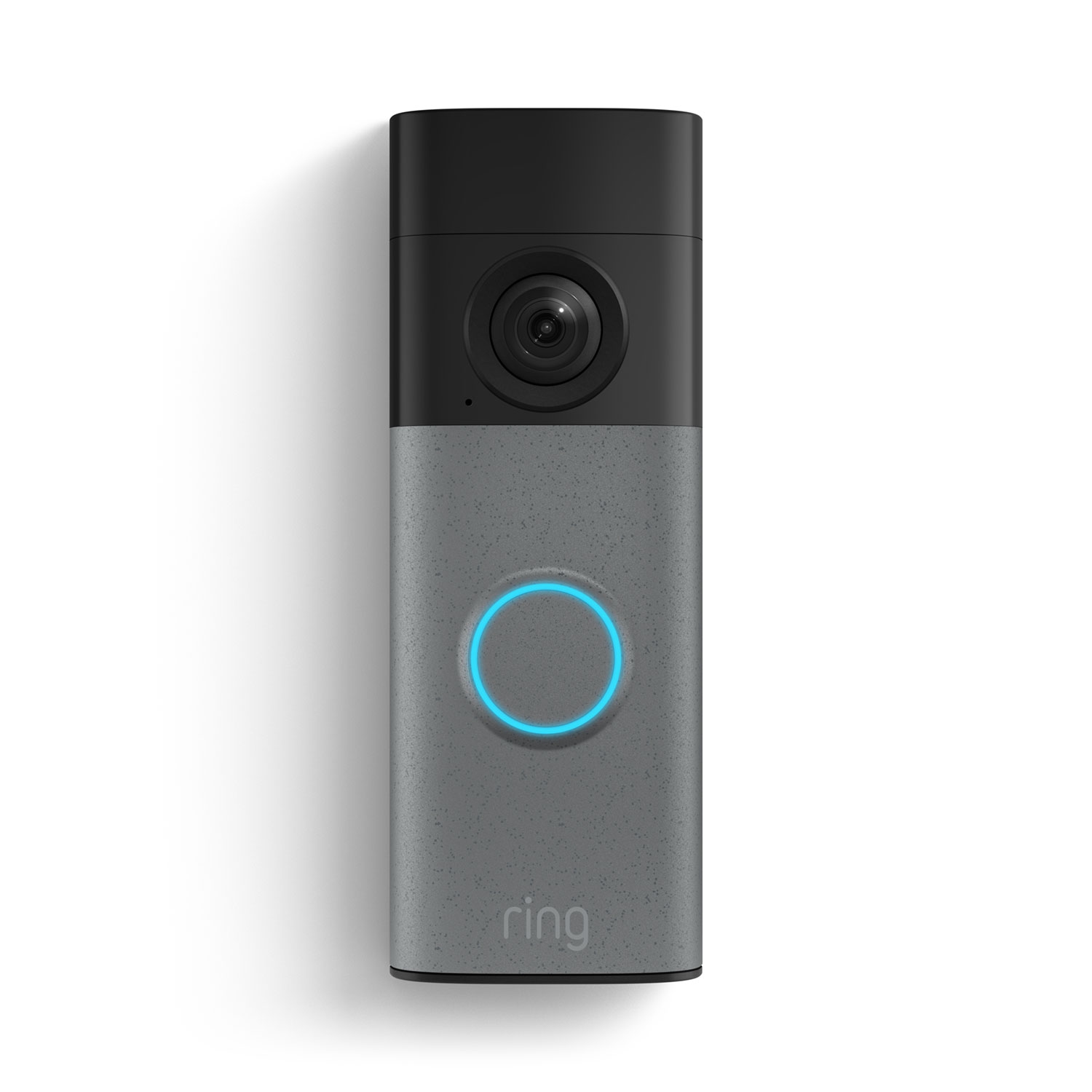
- Resolution: Retinal 2K wide-angle video, up to 6x enhanced zoom
- Power: Built-in rechargeable battery, detaches for charging via USB-C
- Best for: households already using Alexa or other Ring devices
Ring remains the name most people recognize in this category, and the current Battery Doorbell (newest model) is a real upgrade over older Ring doorbells: Retinal 2K video, up to 6x enhanced zoom, and a removable battery you charge over USB-C rather than pulling the whole unit off the wall for hours. It has the highest customer rating and the largest review base of the 4 picks here. Live View and Two-Way Talk work for free, and it integrates with Alexa and the broader Ring accessory ecosystem (chimes, floodlights, alarm systems) more deeply than any competitor here — if you’ve already read our Ring camera guide or our Ring Alarm guide, this doorbell slots into the same app and ecosystem.
Honest limitation: this is the one doorbell in this guide with no local-storage option at all. Recording, reviewing footage, and AI-powered alerts all require a paid Ring Protect subscription — without one, you only get real-time Live View and motion notifications, with nothing saved to look back on later. That’s a real ongoing cost the other 3 picks don’t have.
Pros
- Deepest smart-home ecosystem of any pick — chimes, alarms, floodlights, Alexa
- Sharpest zoom range (up to 6x) of the 4 doorbells here
- Highest customer rating of the 4 picks, with the largest review base
- Removable, USB-C rechargeable battery — no full unit removal needed
Cons
- No local storage option — recording requires a Ring Protect subscription
- Ongoing monthly cost the other 3 picks in this guide don’t have
- Without a subscription, you get live view only, nothing saved to review later
eufy Security Video Doorbell E340
BEST FOR PACKAGE PROTECTION

- Resolution: 2K FHD, dual cameras (front-facing plus downward-angled)
- Power: Removable battery or hardwired, 8GB built-in local storage
- Best for: households that get frequent deliveries and want package-level detail
The E340 is the only doorbell in this guide with 2 cameras built in: one faces outward at head height to identify visitors, the other angles down to show what’s sitting on your doorstep — genuinely useful if packages are a bigger concern than who’s ringing the bell. 2K FHD video, color night vision, and 8GB of local storage built into the doorbell itself, with no subscription required for basic recording and playback. It carries a strong customer rating with the largest review base of the 4 picks, and independent reviewers have specifically called it out as a strong no-subscription pick for exactly this package-detection use case.
If you want a place for parcels to be left as well as a camera view, compare the fit, anchoring and courier access requirements in our package delivery box guide.
Honest limitation: that built-in 8GB is genuinely small — it fills up and starts overwriting older clips faster than a doorbell with expandable storage would. Real expansion means buying eufy’s separate HomeBase 3 hub, which adds meaningfully to the total cost. It also doesn’t support Apple HomeKit, only Alexa and Google Assistant.
Pros
- Only dual-camera pick — sees visitors and packages separately
- 8GB local storage built in, no subscription required for basic use
- Largest review base of the 4 picks
- Works wireless or hardwired, your choice
Cons
- 8GB built-in storage is small and fills up faster than expandable options
- Real storage expansion requires a separately-sold HomeBase 3 hub
- No Apple HomeKit support
Wyze Battery Video Doorbell
BEST BUDGET / MOST AFFORDABLE

- Resolution: 1536×1536 HD+, 150°×150° head-to-toe field of view
- Power: Wire-free (up to 6 months battery life) or hardwired
- Best for: budget-conscious buyers who still want strong video quality
Wyze has built its whole brand around no-subscription-required smart home gear, and the Battery Video Doorbell is the least expensive doorbell in this guide by a wide margin while still shipping the sharpest resolution of the 4 (1536×1536 HD+, versus 2K on the others). Amazon’s Choice, with a solid customer rating. Basic motion recording saves locally to a microSD card (sold separately, up to 256GB) with no monthly fee required, and a voice-deterrence feature can audibly warn visitors they’re being recorded.
Honest limitation: “no subscription” applies fully to basic motion recording, but it’s not the whole picture — smarter alerts that distinguish people, pets, and vehicles specifically require a paid Cam Plus plan, a nuance independent reviewers have flagged as worth knowing before you buy. Without a microSD card installed, there’s also no local recording at all, only live view.
Pros
- Lowest price of the 4 picks, by a meaningful margin
- Sharpest resolution of the 4 (1536×1536 HD+)
- Amazon’s Choice for this category
- Free local recording with a microSD card, no subscription required
Cons
- Smart person/pet/vehicle detection requires a paid Cam Plus subscription
- No local recording at all without a separately-purchased microSD card
- Smallest review base of the 4 picks so far
Reolink Video Doorbell WiFi
BEST FOR WIRED INSTALLS

- Resolution: 2K, 4:3 wide aspect ratio (135° horizontal × 100° vertical)
- Power: Hardwired only, 2.4/5GHz dual-band WiFi
- Best for: existing doorbell wiring, no interest in battery charging
The only hardwired-only doorbell in this guide, which cuts both ways: no battery ever needs charging or swapping, but installation means connecting to existing doorbell wiring rather than a quick stick-on mount. 2K video in a taller 4:3 aspect ratio gives more head-to-toe visibility than the wider, shorter frame most doorbells use. It carries a solid customer rating. Storage is local via a microSD card (up to 256GB) with no subscription required, and it ships with a free Reolink Chime included in the box — the other 3 picks either need your existing mechanical chime or sell one separately.
Honest limitation: because it’s hardwired-only, it’s not an option if you don’t already have doorbell wiring or don’t want to install any — renters especially should check with a landlord first. Dual-band WiFi is a genuine plus, but the setup process leans more technical than the wire-free picks above.
Pros
- No battery to ever charge or swap
- Taller 4:3 aspect ratio for better head-to-toe framing
- Free Reolink Chime included in the box
- Local microSD storage, no subscription required
Cons
- Requires existing doorbell wiring — not an option for every home
- More technical installation than the 3 wire-free picks above
- Renters should confirm with a landlord before wiring anything in
Full Comparison Table
| Product | Resolution | Power | Local Storage | Subscription Required? | Buy |
|---|
| Ring Battery Doorbell | Retinal 2K | Battery (USB-C) | None | Yes, for recording | Check Price |
| eufy E340 | 2K FHD, dual cam | Battery or wired | 8GB built-in | No, for basic use | Check Price |
| Wyze Battery Doorbell | 1536×1536 HD+ | Battery or wired | microSD (sold separately) | No, for basic recording | Check Price |
| Reolink Video Doorbell WiFi | 2K, 4:3 wide | Wired only | microSD (sold separately) | No | Check Price |
Audio Recording and Consent Laws
Every doorbell in this guide records audio by default, not just video — and that has real legal implications depending on where you live. Most U.S. states are “one-party consent,” meaning it’s legal to record a conversation as long as one participant (you, the homeowner) knows about it. A smaller group of states require every person being recorded to consent, which changes the legal picture for a doorbell with an always-on microphone.
Two-Party (All-Party) Consent States, 2026
As of 2026, 12 states require every person being recorded to consent before audio is captured: California, Connecticut, Delaware, Florida, Illinois, Maryland, Massachusetts, Montana, New Hampshire, Oregon, Pennsylvania, and Washington. In these states, a doorbell that records audio continuously — not just during a two-way conversation — carries more legal exposure than in the rest of the country.
The practical protection: posting visible signage that states audio and video recording is in progress is the standard way owners address this. If a visitor sees a clear notice and chooses to continue talking anyway, courts generally treat that as implied consent. This isn’t legal advice for your specific situation — if you live in one of these 12 states and have concerns, a local attorney can confirm what applies to you.
All 4 doorbells in this guide let you disable audio recording entirely in their respective apps if you’d rather not deal with the question at all — you lose two-way talk, but video-only recording carries none of the same consent complexity.
How to Choose
Who This Isn’t Right For
Final Recommendation
If you just want one clear answer: the Ring Battery Doorbell is our overall pick, mainly because of how much it plugs into — Alexa, Ring chimes, Ring alarm systems, and the largest accessory ecosystem of any doorbell brand. Its strong customer rating and the largest review base of the 4 picks here back that up. But go in with eyes open about the subscription requirement: if you’d rather not pay monthly for the ability to review your own footage, the eufy E340 is the strongest no-subscription alternative above, and the Wyze Battery Doorbell gets you sharper resolution for meaningfully less money.
Weighing this against other options? See our Video Doorbells hub for a full breakdown by situation.
FAQ
Do I need a subscription to use these video doorbells?
Only for the Ring Battery Doorbell — live view is free, but saving or reviewing footage requires a Ring Protect plan. The eufy, Wyze, and Reolink picks all support local recording without any required subscription, though Wyze’s smarter AI detection (person/pet/vehicle) is an optional paid add-on.
Which of these doorbells doesn’t need a subscription at all?
The Reolink Video Doorbell WiFi comes closest — local microSD recording with no optional paid tier at all in its core feature set. The eufy E340 is close behind, with a paid HomeBase 3 hub only needed if you want more storage than the built-in 8GB.
Is it legal to record audio on my doorbell without asking visitors?
In most states, yes — one-party consent means your own knowledge of the recording is enough. In the 12 two-party consent states (see the Audio Recording and Consent Laws section above), visible signage that recording is in progress is the standard practical protection, though it isn’t a substitute for legal advice if you have specific concerns.
Can I use a battery-powered doorbell if I don’t have existing doorbell wiring?
Yes — that’s exactly the point of the Ring, eufy, and Wyze picks in this guide. All 3 mount without any wiring and run on a rechargeable battery. The Reolink pick is the exception; it’s hardwired-only and needs existing doorbell wiring.
Which doorbell has the best video resolution?
The Wyze Battery Video Doorbell technically has the highest resolution number (1536×1536 HD+), though the other 3 picks’ 2K video is also sharp in practice. eufy’s dual-camera setup gives it an edge for seeing packages specifically, which resolution alone doesn’t capture.
Do any of these work with Apple HomeKit?
None of the 4 doorbells in this guide currently support Apple HomeKit — all 4 work with Alexa, and eufy and Wyze also support Google Assistant. If HomeKit compatibility is a requirement, that’s worth checking directly against the manufacturer’s current specs before buying, since compatibility can change with firmware updates.
What happens to my recordings if my Wi-Fi goes down?
For the 3 no-subscription picks (eufy, Wyze, Reolink), local storage means recording can continue even without an internet connection, as long as the doorbell still has power. For the Ring Battery Doorbell, recording and cloud storage depend on an active internet connection, since there’s no local-storage option. If a Ring doorbell won’t reconnect after your Wi-Fi comes back, see our Ring doorbell reset guide for the power-cycle and factory-reset steps.
A note on our research approach: SafeBode has not purchased or installed the doorbells compared in this guide. Every spec above comes from each manufacturer’s own product documentation and current Amazon listing data, cross-checked against independent coverage from outlets like SafeHome.org and Security.org (cited throughout). As our testing program develops, we’ll update this guide with genuine hands-on data and disclose that transition transparently.
Sources
Show sources (4)


