Wyze Video Doorbell 2026: Which Model, and What Cam Plus Gates
Affiliate Disclosure: This article contains affiliate links. If you buy through these links, we may earn a commission at no extra cost to you. Our editorial opinions are our own and are not influenced by affiliate relationships. Read our full disclosure policy →
Contents
Quick Answer
Wyze sells four current video doorbells, and the one that decides the most is not resolution but storage. Three of the four take a microSD card and record locally for free. The Wyze Wireless Video Doorbell Pro does not, and Wyze says so in three separate support documents — which makes it the one model where declining Cam Plus genuinely costs you recorded video. For most buyers the Wyze Battery Video Doorbell is the right starting point: it installs anywhere, it takes a card, and it works wired or wire-free. If you already have doorbell wiring, the cheaper Video Doorbell v2 is sharper than anything else Wyze makes.
What Cam Plus Actually Gates
The decision on a Wyze doorbell is not the price. It is what the hardware still does if you never pay the subscription — and Wyze answers that in a document it updated recently enough that much of what you will read elsewhere is out of date.
Wyze’s current “About Cam Plus” page, updated January 30, 2026, splits the feature set into two explicit lists. Every user, paying or not, gets motion and sound alerts, alarm sound detections, live stream viewing, timelapse recording, 24/7 local recording with a microSD card, and cloud storage that the page labels image only. Subscribers additionally get AI detection of people, pets, vehicles, packages and sounds; complete video capture of motion and sound events; 14 days of rollover video cloud storage; and Wyze Web View.
The Line Wyze Draws
🆓 Free on every Wyze doorbell
- Live stream, any time, with no cooldown
- Motion and sound alerts pushed to your phone
- 24/7 local recording to a microSD card, on the models that have a slot
- Cloud storage, but as a still image rather than a video clip
- Timelapse recording and alarm sound detection
💳 Only with Cam Plus
- Person, pet, vehicle, package and sound detection
- Complete video capture of the motion or sound event, not a thumbnail
- 14 days of rollover video kept in the cloud
- Wyze Web View, for watching from a computer
- An offsite copy that survives the doorbell being stolen
The practical translation is narrower than “you need a subscription.” Without Cam Plus the doorbell still rings, still streams live, still pushes an alert, and still records continuously to a card if it has a slot. It stops doing two things: telling you what it saw, and keeping a copy anywhere but the doorbell itself. Wyze’s own storage comparison notes a 32 GB card holds about four days of footage against 14 days in the cloud, and makes the argument plainly: the cloud is your backup if the camera is stolen. A thief who takes the doorbell takes the card inside it.
Wyze’s older pages still describe a more generous free tier. The Video Doorbell v2’s overview, updated October 2024, still advertises “Free 12-Second Video Recordings” with up to 14 days of cloud storage for clips on every doorbell press. The Cam Plus page is over a year newer and says free cloud storage is image only. Two Wyze documents disagree, the newer governs, and the sensible move is to confirm current terms when you buy — the same discipline we apply to Ring’s subscription tiers, which have been renamed and re-scoped more than once.
The Model Where That Question Actually Bites
If the free tier is a live stream plus a local card, the single most important spec on a Wyze doorbell is whether it has a card slot at all. Three of the four current models do. One does not, and it is the one with “Pro” in the name.
This is not an inference. Wyze states it in three separate documents. The doorbell comparison chart lists the Video Doorbell Pro’s storage as “Cloud Only”. The article titled “Which Wyze Cams have local storage?” places it in the No Local Storage column alongside the discontinued original doorbell, noting that nearly every other Wyze camera does have a slot. And the footnotes to Wyze’s Cam Plus versus microSD comparison say it outright: the Wyze Video Doorbell and Wyze Video Doorbell Pro do not support local recording.
Meanwhile the Pro’s overview page opens with “See more than ever before, with no hidden fees,” then tells you further down to upgrade to Cam Plus for real-time person and package alerts and full-length cloud video. Both statements are true and nothing is concealed. The combined effect is that the Pro is the one Wyze doorbell where declining the subscription leaves you with a live view, a push alert and a still image, and no card slot to fall back on. On the other three, Cam Plus is an upgrade. On the Pro it is closer to the recording function itself.
The resolution figures point the same way. Wyze’s chart puts the Pro at 1440 x 1440, the Battery Video Doorbell at 1536 x 1536, and the wired v2 at 2K, or 2048 x 1536. Work out the pixel counts and the Pro has the fewest of the three current models, roughly two-thirds of what the cheapest wired model captures. That is not a defect: the Pro covers 150 degrees horizontally and vertically against the v2’s 135 by 103, spreading a smaller pixel budget across a wider scene. It is just not the trade the word “Pro” leads buyers to expect.
Every Wyze Doorbell, Side by Side
Every figure below comes from Wyze’s own doorbell comparison chart, updated December 2025, with the original Video Doorbell included because it still turns up in search results. Prices move constantly, so there are none here — check the current listing.
| Model | Resolution | Field of view | Power | Chime | Local storage |
|---|
| Video Doorbell v2 | 2K (2048 x 1536) | H 135°, V 103° | Wired only | Works with your existing chime | Yes, microSD |
| Battery Video Doorbell | HD+ (1536 x 1536) | H 150°, V 150° | Battery or wired | Existing or auxiliary | Yes, microSD |
| Duo Cam Doorbell | Front 2K, lower camera 1920 x 1080 | Front H 132°, V 100°; lower H 121°, V 60° | Battery or wired | Works with your existing chime | Yes, microSD |
| Wireless Video Doorbell Pro | 1440 x 1440 | H 150°, V 150° | Battery or wired | Auxiliary chime included | No — cloud only |
| Video Doorbell (original) | 1080p | H 88°, V 122° | Wired only | Auxiliary chime | No — cloud only |
The source material is not as tidy as the table makes it look. The chart lists the Battery Video Doorbell at 1563 x 1563, while its tech-spec sheet and product overview both say 1536 x 1536 — the chart appears to have transposed two digits, so we used the figure two documents agree on. Its field of view is 150 by 150 degrees on the chart and overview, but 180 diagonal with 148 horizontal and vertical on the tech-spec sheet. The numbers on the box are approximate.
Wyze Battery Video Doorbell — the default answer
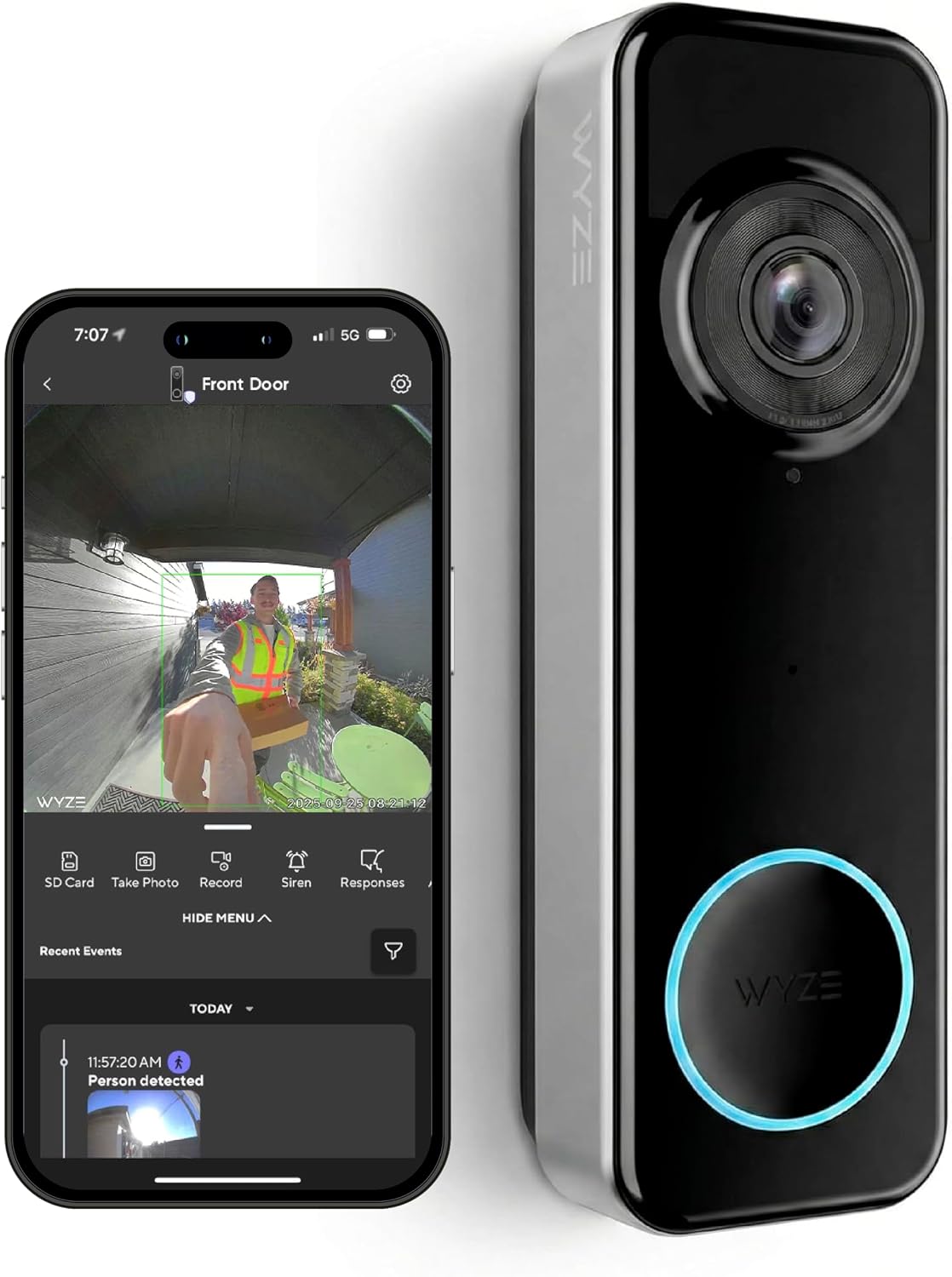
Key specs: 1536 x 1536 HD+ at a 1:1 aspect ratio; 150 degree horizontal and vertical view; 6,400 mAh non-removable battery rated 3-6 months, or hardwired at 12-24V AC; microSD up to 256 GB; color night vision; 90 dB siren; 2.4 GHz Wi-Fi; IP65
Flexibility rather than any one spec is what wins this. It runs wire-free on a 6,400 mAh internal battery Wyze rates at three to six months, or hardwires to an existing 12-24V AC doorbell circuit for continuous power. It takes a microSD card up to 256 GB in exFAT format, so free local recording is available whether or not you subscribe. The 1:1 sensor is the right shape for a doorbell: a 150 by 150 degree view puts a delivery box on the mat inside the frame rather than below it. It also has the widest chime options in the range — a Chime Controller for your existing mechanical chime, a Universal Wi-Fi Chime, or a compatible Wyze Cam pressed into service. Weighing it against other brands rather than its siblings? Our wireless video doorbell roundup puts it next to Ring, eufy and Reolink.
✅ Pros
- Battery or hardwired, so it fits a house with doorbell wiring and one without
- microSD up to 256 GB means recording without a subscription
- 150 by 150 degree 1:1 view captures a package on the doormat, not just a torso
- IP65 and rated from -4 to 122 degrees Fahrenheit, so a cold porch is not a problem
❌ Cons
- 2.4 GHz Wi-Fi only — the Duo Cam and the Pro are both dual-band
- Hardwiring it needs a Wyze Chime Controller, sold separately
- Wyze’s own documents disagree on its resolution and field of view (see the table footnotes)
- Non-removable battery, so charging means taking the doorbell off the wall
Wyze Video Doorbell v2 (Wired) — the sharpest picture

Key specs: 2K video at 2048 x 1536; 135 degree horizontal and 103 degree vertical view; hardwired only, works with an existing mechanical chime; 24/7 continuous local recording to microSD; 3-6 seconds of pre-roll; motion-activated voice deterrence
If you already have working doorbell wiring, this is the one to buy, and it is also the cheapest of the four. At 2048 x 1536 it is the highest-resolution doorbell Wyze makes, and because it is permanently powered it does what battery doorbells cannot: genuine 24/7 continuous local recording to a microSD card rather than clips around motion events. Wyze is blunt that this is a wired product — its overview states the v2 is not wireless and not battery-powered, and connects to your existing wiring and chime. That last part is a real convenience: your hallway chime keeps working, so there is no auxiliary chime to buy or find an outlet for. It also gets three to six seconds of pre-roll before each motion event and an optional voice prompt warning visitors they are being recorded. Check what your transformer is putting out before you order — our doorbell transformer voltage guide covers how to measure it and what to do if it is undersized.
✅ Pros
- Highest resolution in the Wyze doorbell range at 2048 x 1536
- True 24/7 continuous local recording to a card, not just event clips
- Drives your existing mechanical chime, so nothing extra to buy or plug in
- By a wide margin the largest buyer-review base of any Wyze doorbell
❌ Cons
- Wired only. Wyze states plainly it is not wireless and not battery-powered
- Narrowest field of view of the current models at 135 by 103 degrees
- Its product page still advertises the older free 12-second clip terms that the newer Cam Plus page contradicts
- No use at all in a rental or a condo with no doorbell wiring
Wyze Duo Cam Doorbell — the package problem

Key specs: Two cameras: a 2K front camera plus a downward camera at 1920 x 1080; front view 132 by 100 degrees, lower camera 121 by 60; removable battery or hardwired; Wyze Wi-Fi Chime included; 24/7 local recording when hardwired; dual-band 2.4 and 5 GHz Wi-Fi
The Duo Cam solves something a single doorbell camera genuinely cannot. Even a 1:1 sensor at standard mounting height looks out and slightly down, which frames a person well and a parcel against your door badly. Wyze’s answer is a second camera pointing straight down: a 2K front camera for visitors and a 1920 x 1080 lower camera aimed at the mat. It installs wire-free in about a minute, or hardwires for an extra six seconds of recording length and 24/7 continuous recording with a card. It is dual-band, and it is the only model that includes a Wyze Wi-Fi Chime in the box — one Wyze notes works with every Wyze camera and doorbell, not just this one. If package theft is the actual reason you are shopping, pair it with the lighting advice in our camera placement walkthrough, because a camera that cannot resolve a face in the dark records a crime rather than deterring one.
✅ Pros
- A dedicated downward camera frames the doormat, which one wide lens cannot
- Wi-Fi chime included, and it works with the rest of the Wyze range
- Dual-band 2.4 and 5 GHz Wi-Fi
- Removable rechargeable battery, so you can swap and charge without dismounting
❌ Cons
- The lower camera is 1080p, not 2K like the front one
- 24/7 continuous recording needs hardwiring; on battery you get event clips only
- The priciest of the four, and the one most likely to be overkill
- Front field of view is 132 by 100 degrees, narrower than the Battery model’s 150 by 150
Wyze Wireless Video Doorbell Pro — the one to think hardest about

Key specs: 1440 x 1440 at a 1:1 aspect ratio; 150 degree horizontal and vertical view; battery rated up to 180 days, or hardwired for 6 extra seconds of recording; dual-band 2.4 and 5 GHz Wi-Fi; IP65; Wyze Chime Pro included; cloud storage only, no microSD slot
The caveat goes first because it is the whole story: this doorbell has no microSD card slot and cannot record locally at all. Everything else about it is genuinely good. It is the easiest of the four to install, going up wire-free in seconds with no screws into brick. Wyze rates the battery at up to 180 days, the longest claim in the range. It is dual-band and IP65 weather-resistant, and unlike the Battery model it ships with a Wyze Chime Pro in the box. Hardwiring is supported and adds up to six seconds of recording length. For a renter who cannot drill and would rather not think about it again for half a year, that is a genuinely attractive package — our no-drill renter security guide covers the rest of that setup. Just go in knowing recorded video here means a Cam Plus subscription, indefinitely, with no local fallback.
✅ Pros
- Wire-free install in seconds, with a chime included in the box
- Longest battery claim of the four at up to 180 days
- Dual-band 2.4 and 5 GHz Wi-Fi, useful if your 2.4 GHz band is congested
- Widest view alongside the Battery model at 150 by 150 degrees
❌ Cons
- No local storage of any kind — recorded video requires a subscription
- Fewest pixels of the three current models at 1440 x 1440
- Marketed with the line “no hidden fees” on the same page that points you to Cam Plus
- A much smaller buyer-review base than the v2, so long-term reliability is less well evidenced
How to Pick in Four Questions
Four questions settle this faster than any spec sheet, and they are worth answering in this order, because the first one eliminates two models on its own.
Answer These in Order
1
Do you have doorbell wiring?
If yes, the wired v2 is sharper and cheaper than anything else here and drives your existing chime. If no, you are choosing between the Battery model, the Duo Cam and the Pro.
2
Will you pay every month?
If no, rule out the Pro entirely — it cannot record locally. If yes, its cloud-only design stops being a liability.
3
Is your real problem packages?
A single lens at door height frames people well and parcels poorly. Only the Duo Cam adds a second camera aimed down at the mat.
4
How far is the door from the router?
The Battery model is 2.4 GHz only. The Duo Cam and the Pro are dual-band, which helps if your 2.4 GHz band is crowded rather than weak.
The second question is the one people answer wrong, usually by assuming they can add a card later.
The fourth question deserves more weight than it usually gets. A doorbell sits at the outside edge of the house, often behind brick or stucco, which is exactly where home Wi-Fi is weakest — and a doorbell that drops off the network records nothing to the cloud and pushes no alert. Measure the signal at the mounting spot before you order, not after; our guide to testing Wi-Fi first covers how.
Wyze’s Security Record, Stated Plainly
Wyze has had more than one incident in which customers could see into other customers’ homes.
The largest was in February 2024. An Amazon Web Services outage knocked Wyze devices offline, and as cameras reconnected the company hit a security failure that showed thousands of customers thumbnails from cameras belonging to other users, some of whom tapped through to video that was not theirs. Wyze attributed it to a third-party caching library that, under the load of every device reconnecting at once, mixed up the mapping between device IDs and user IDs; it apologized, added verification layers before connecting a user to a video, and bypassed caching for device-to-user checks. It was not the first. A separate incident the previous September let some customers reach other users’ live video, and led the New York Times’ Wirecutter to pull its recommendation of Wyze cameras.
The February 2024 Incident in Numbers
13,000+
customers shown thumbnails from cameras that were not theirs
1,504
of them tapped through, some reaching other people’s video
Under 0.3%
of all users affected, by Wyze’s own account
2
incidents of this general kind within roughly five months
Figures as reported by GeekWire and Recorded Future News, both citing Wyze’s statements to customers.
How much weight that carries is a judgment call, and here is ours. Two points cut in Wyze’s favor: it disclosed both incidents and quantified the second in detail rather than minimizing it, and the cause it described is a caching failure rather than an intrusion by an outside attacker. Two cut against: a repeat of the same category of failure within roughly five months suggests the first fix was incomplete, and a cross-account leak is precisely the failure mode that matters most for a camera pointed at your door.
The practical response is not necessarily to avoid the brand. It is to prefer the models that keep footage on a card in your house rather than exclusively in someone else’s cloud — on this lineup, the Battery model, the v2 or the Duo Cam over the Pro. That is the same reasoning behind our indoor camera guide: the less footage that leaves your house, the smaller the consequence when a vendor has a bad weekend. For the rest of the range on the same terms, our Wyze camera guide covers the cameras.
Final Recommendation
Buy the Wyze Battery Video Doorbell: it is the only model here that takes a card and runs on either battery or mains, so it never makes you choose between recording and not paying.
At this price the more useful question is not which Wyze doorbell to buy but whether to buy one at all, so check yourself against the disqualifying cases first. Do not buy any of these if:
- You want recorded video without a subscription and without fitting a card. Wyze’s free cloud tier is image only. On the three models with a slot, the card is the recording; on the Pro there is no slot at all, so recorded video means Cam Plus indefinitely.
- You need the footage to survive the doorbell being stolen, without paying monthly. Local recording sits on a card inside the unit, and a thief takes the card with the doorbell.
- A cross-account exposure is a dealbreaker. Two incidents of that kind within roughly five months is a pattern, whatever the cause behind each one.
- Your Wi-Fi is weak at the door rather than merely crowded. A doorbell that drops off the network records nothing to the cloud and pushes no alert, and dual-band does not fix a distance problem: 5 GHz penetrates exterior walls worse than 2.4 GHz.
- You need the spec sheet to be right. Wyze’s own documents contradict each other on the Battery model’s resolution and field of view, and on what the free tier includes. Confirm current terms at the point of purchase.
If none of those apply, three situations route elsewhere in the range. Existing wiring and a mechanical chime: the Wyze Video Doorbell v2 (Wired), cheaper and sharper, and the only one recording 24/7 continuously to a card. Parcels rather than people: the Wyze Duo Cam Doorbell‘s second downward camera, which nothing else here substitutes for. No drilling, longest battery, Cam Plus already decided on: the Wyze Wireless Video Doorbell Pro, on that condition and not otherwise.
What should not decide this is the model name. On Wyze’s own published figures the doorbell called Pro has the fewest pixels of the three current models and is the only one with no local storage at all.
Frequently Asked Questions
Do Wyze doorbells work without a subscription?
Yes, with a real caveat. Live streaming, push alerts and local microSD recording all work without paying. What a subscription adds is AI labeling of what was detected, full-length event video, and a cloud copy. On the Wireless Video Doorbell Pro, which has no card slot, declining the subscription leaves you without recorded video entirely.
Which Wyze doorbell has the best video quality?
The wired Video Doorbell v2, at 2048 x 1536. It is also the cheapest of the four. The trade-off is that it covers a narrower field of view than the battery models and cannot be installed without existing doorbell wiring.
Can I add a microSD card to the Wyze Video Doorbell Pro later?
No. It has no card slot, so this is not something you can retrofit. Wyze documents this in three separate support articles. If local recording matters to you, choose a different model rather than planning to add it afterward.
How long does the Wyze Battery Video Doorbell last on a charge?
Wyze rates it at three to six months of normal use from its 6,400 mAh battery, with a full charge taking about six hours. Real figures depend heavily on how much traffic passes your door and how cold it gets, since cold weather reduces usable battery capacity. The battery is not removable, so recharging means taking the doorbell off its mount.
Will a Wyze doorbell ring my existing chime?
The Video Doorbell v2 and the Duo Cam Doorbell work with an existing mechanical chime directly. The Battery Video Doorbell can, but needs a Wyze Chime Controller, sold separately. The Pro uses an auxiliary chime, which is included in its box.
Which Wyze doorbells record 24/7 rather than only event clips?
The wired Video Doorbell v2 does it out of the box, because it is permanently powered and takes a microSD card. The Duo Cam Doorbell can too, but only when it is hardwired rather than running on its battery, and only with a card fitted. Battery power and continuous recording do not mix well, which is why the wire-free models fall back to clips around motion events.
Is Wyze safe to use after its security incidents?
That is a personal risk judgment rather than a technical yes or no. Wyze disclosed both incidents and described the cause of the larger one in detail, but two cross-account exposures within months is a real pattern. If you buy Wyze, we would choose a model that stores footage on a card in your house rather than one that depends entirely on the cloud.
Does a Wyze doorbell need 5 GHz Wi-Fi?
No, and for a doorbell it is often the wrong band anyway. The Battery Video Doorbell is 2.4 GHz only; the Duo Cam and the Pro can use either. Since 2.4 GHz travels through exterior walls better than 5 GHz, the slower band is frequently the more reliable choice at a front door.
Sources
Show sources (11)
- [1] Wyze Support — “About Cam Plus,” updated January 30, 2026, support.wyze.com/hc/en-us/articles/360046278491
- [2] Wyze Support — “How do Cam Plus and a microSD card compare?” updated May 14, 2026, support.wyze.com/hc/en-us/articles/7372980709275
- [3] Wyze Support — “Wyze Doorbell Comparison Chart,” updated December 24, 2025, support.wyze.com/hc/en-us/articles/30110041494427
- [4] Wyze Support — “Which Wyze Cams have local storage?” updated March 4, 2026, support.wyze.com/hc/en-us/articles/38509585484315
- [5] Wyze Support — “Wyze Battery Video Doorbell Tech Specs,” updated October 23, 2025, support.wyze.com/hc/en-us/articles/42474680967835
- [6] Wyze Support — “Introducing Wyze Battery Video Doorbell,” updated October 30, 2025, support.wyze.com/hc/en-us/articles/42467817614363
- [7] Wyze Support — “About Wyze Video Doorbell v2,” updated October 18, 2024, support.wyze.com/hc/en-us/articles/19767071591963
- [8] Wyze Support — “Introducing Wyze Duo Cam Doorbell,” updated November 4, 2024, support.wyze.com/hc/en-us/articles/30060320846363
- [9] Wyze Support — “About Wyze Video Doorbell Pro,” updated June 4, 2024, support.wyze.com/hc/en-us/articles/4408364241947
- [10] Taylor Soper, GeekWire — “Wyze security cam incident that exposed images to other users impacts more than 13,000 customers,” February 19, 2024
- [11] Recorded Future News (The Record) — “Wyze security incident allowed strangers to see into some users’ homes,” February 2024
SafeBode does not yet run an in-house product testing program. This guide is built from manufacturer specifications, official support documentation, current retail listings and verified buyer feedback rather than hands-on testing, and we say so plainly rather than implying testing we have not done.


