eufy Video Doorbell 2026: Which Model, and What Free Local Storage Covers
Affiliate Disclosure: This article contains affiliate links. If you buy through these links, we may earn a commission at no extra cost to you. Our editorial opinions are our own and are not influenced by affiliate relationships. Read our full disclosure policy →
Contents
Quick Answer
Every current eufy doorbell records locally and none of them charge a monthly fee to do it. What the slogan hides is that “local” means three genuinely different things: video lives on the doorbell (E340, Dual 2K Wired), on a microSD card you buy yourself (C31, C30), or on a HomeBase hub that has to be in the box or already in your house (S220, Dual battery). Pick the wrong one and “no subscription” still costs you a hub or a memory card on day one. For most buyers the E340 is the right answer, because its 8GB sits inside the doorbell and nothing else has to be bought or plugged in.
“No Subscription” Is Three Different Answers
eufy has built its whole identity on not charging you monthly, and the claim holds up. What does not hold up is treating it as one uniform feature across the lineup. eufy’s own doorbell comparison table lists a different storage arrangement for almost every model, and the differences are not cosmetic – they change what you have to buy, where the footage physically sits, and what happens if that one box is stolen.
There are three architectures. On the doorbell: the E340 and the Dual 2K (Wired) each carry 8GB of eMMC storage inside the unit, and eufy’s spec sheet for the E340 gives the video storage location as the doorbell itself. On a card you supply: the C31 and C30 record to a microSD card of up to 128GB, and eufy’s comparison table marks that card as excluded from the box. On a hub: the S220 and the Dual battery model store 16GB on a HomeBase, which means the doorbell alone records nothing – the hub is the storage.
Where a eufy Doorbell Actually Puts the Video
8GB
On the doorbell itself, on the E340 and the Dual 2K (Wired)
16GB
On a HomeBase hub, on the S220 and the Dual battery model
128GB
Maximum microSD on the C31 and C30, card not included
4 of 6
Doorbells in eufy’s storage table that cannot subscribe to cloud backup at all
Figures are eufy’s own, from its published doorbell comparison and storage-methods tables.
That last number is the one that reframes the whole category. People assume eufy is cheap to own because you decline a subscription. For most of its doorbells there is nothing to decline. eufy’s storage-methods table lists six doorbell families, and for four of them – the Video Doorbell (Wired), the 2K battery model, the Dual battery model and the Dual (Wired) – the cloud backup column reads simply “No”. eufy’s own cloud backup page names the products that can subscribe, and the doorbells on that list are the 1080p battery model and the Slim, which happen to be the two that store on a Wi-Fi chime rather than on the doorbell or a hub. Local storage is not a preference eufy offers on these models. It is the only thing on the menu.
This cuts both ways, and it is the honest version of the pitch. You are never going to be upsold, which is a real contrast with the way a Ring Protect plan gates recorded video on competing hardware. You also have no off-site copy. If someone pries the doorbell off the wall on a model that stores on the doorbell, the recording of them doing it leaves with them. eufy does list a paid cloud backup tier for the devices that support it, priced per device with an unlimited-device option, all plans holding a rolling 30 days – but note that it cannot be canceled in the app. eufy’s own page states the subscription has to be canceled by contacting support with the serial number of the camera. That is worth knowing before you start one.
The Lineup, Sorted by Where the Video Goes
eufy’s model names are a mess of generations – S220, C30, E340, “Dual,” “Slim,” plus part numbers like T8214 and E8203 that only appear in support documents. Sorting them by storage instead of by name makes the lineup legible. Everything below is drawn from eufy’s published doorbell comparison table and its storage-methods compatibility list.
| Model | Power | Where video is stored | HomeBase needed? | Cloud backup offered? |
|---|
| Video Doorbell E340 | Battery (180-day rating) or wiring, 8-24V 10VA+ | 8GB inside the doorbell | No, optional | Not listed |
| Video Doorbell C31 | Battery (180-day rating) or wiring, 8-24V 10VA+ | microSD up to 128GB, card excluded | No, optional | Not listed |
| Video Doorbell C30 | Battery only (120-day rating) | microSD up to 128GB, card excluded | No, optional | Not listed |
| Video Doorbell Dual 2K (Wired) | Wiring only, 16-24VAC 30VA+ | 8GB inside the doorbell | Not supported | No |
| Video Doorbell 2K (Battery), sold as S220 | Battery (180-day rating) or wiring, 8-24V 10VA+ | 16GB on the HomeBase | Yes, required | No |
| Video Doorbell Dual (Battery) | Battery (180-day rating) or wiring, 8-24V 10VA+ | 16GB on the HomeBase | Yes, required | No |
| Video Doorbell Slim | Battery only (120-day rating) | microSD in the included Wi-Fi chime | No | Yes |
| Video Doorbell 2K Pro | Wiring only, 16-24VAC 30VA+ | 32GB inside the doorbell | No | Not listed |
The Slim and the 1080p battery model are the only doorbells eufy lists as cloud-eligible, and they are also the two whose storage sits in a separate Wi-Fi chime that needs its own SD card. The wired-only rows carry a real installation prerequisite: 16-24VAC at 30VA or above is a meaningfully stiffer demand than the 8-24V at 10VA the battery-capable models accept when hardwired. If you do not know what your existing transformer puts out, our doorbell transformer voltage guide is the check to run before you order a wired-only model.
eufy Video Doorbell E340 — storage on the doorbell itself
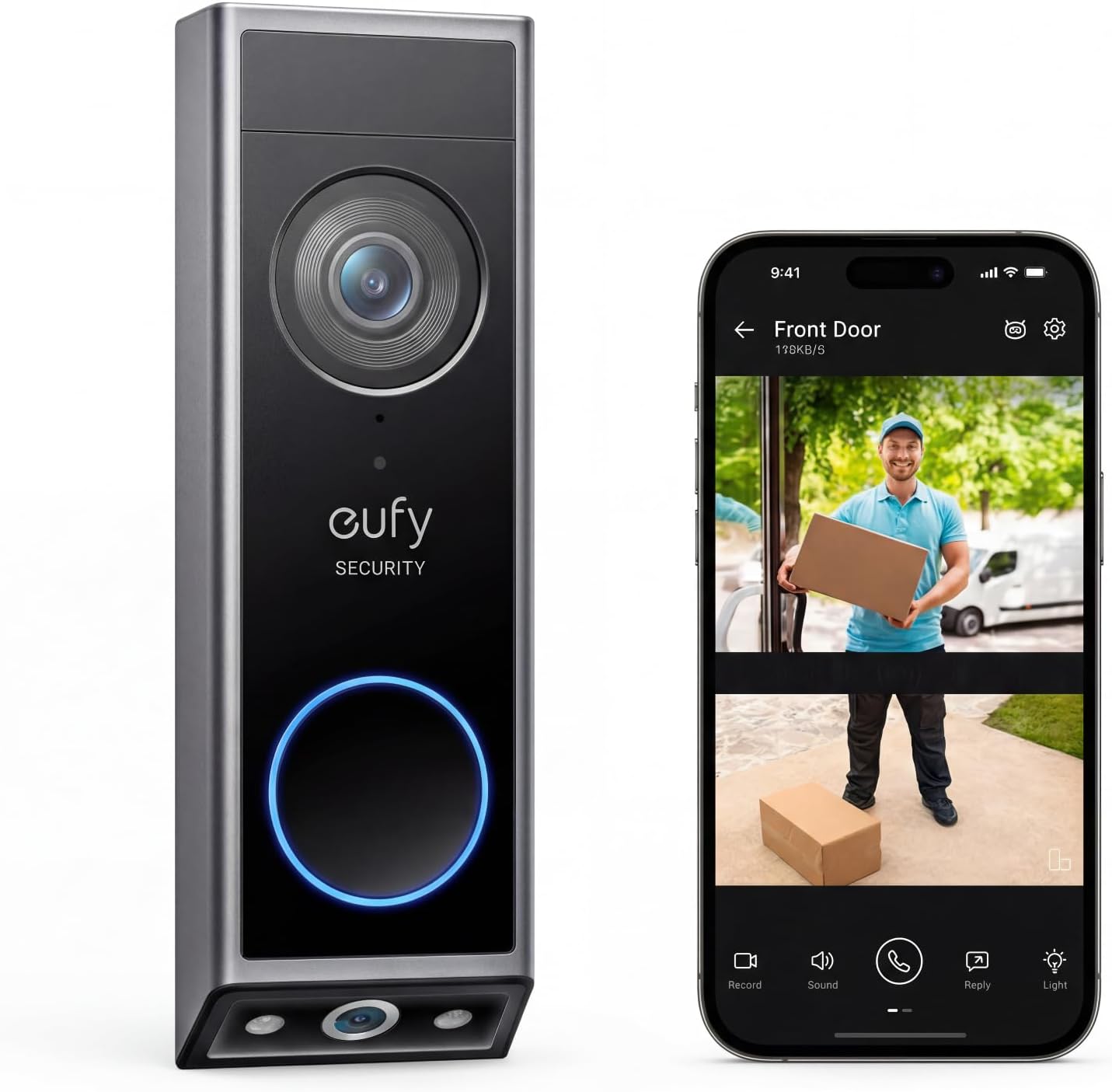
Key specs: Dual cameras – a 2K main camera plus a second 1080p camera aimed at the doorstep; 8GB eMMC storage inside the doorbell itself; runs on its built-in battery or on existing doorbell wiring; IP65; works with or without a HomeBase 2 or S380
Buy this and nothing else has to arrive with it. eufy states plainly that the E340 can operate independently once it is connected to your home wireless router, with a HomeBase 2 or S380 supported but not required. Its 8GB of eMMC storage lives inside the doorbell, and eufy’s spec sheet lists the video storage location as the doorbell. The second camera is the part that actually earns its place rather than padding a spec list – it points down at the step, so a package left below the main camera’s frame is still in shot. On the paperwork, eufy’s two published references for this model do not agree on the main sensor’s exact pixel count, with the comparison table and the dedicated spec page giving different figures. Both agree on the thing this article turns on, which is 8GB stored on the doorbell. If you are weighing eufy against other brands rather than against itself, our wireless video doorbell roundup puts the E340 up against Ring, Wyze and Reolink.
✅ Pros
- Nothing else to buy – no hub, no memory card, no plan
- Dual camera genuinely covers the doorstep, not just the visitor’s face
- Runs on battery or on existing wiring, so it fits houses with and without doorbell wires
- Optional later expansion onto a HomeBase 2 or S380 if you add eufy cameras
❌ Cons
- 8GB is the smallest on-doorbell allocation in the lineup apart from the 4GB legacy models
- Storage on the doorbell means a stolen doorbell takes its own footage with it
- eufy’s own documentation is inconsistent on the main camera’s exact resolution
- eufy does not list this model as cloud-backup eligible, so there is no off-site copy
eufy Video Doorbell C31 — storage on a card you supply

Key specs: Single 2K camera; records to a microSD card of up to 128GB that eufy lists as not included; battery or existing doorbell wiring; continuous recording and pre-recording, both of which eufy documents on the C31 only; optional expansion onto a HomeBase 2 or HomeBase 3
The C31 is the model to buy if event clips are not enough for you. eufy documents continuous recording and pre-recording on the C31 and explicitly not on the C30, which is the single clearest difference between two doorbells that otherwise read almost identically. Storage is a microSD card of up to 128GB, and the doorbell encrypts each clip with AES 256-bit encryption before writing it locally. Connect it to a HomeBase 2 or HomeBase 3 instead and it records there, which is how you get past the card’s ceiling – HomeBase 3 adds hard drive expansion on top of its own 16GB. For scale, eufy puts 16GB of local storage at roughly 180 days of recording at thirty 20-second clips a day, so a large card is a long archive. One more thing eufy is refreshingly direct about: the desktop web portal streams live video and does not require a subscription.
✅ Pros
- Continuous recording and pre-recording, which the C30 does not have
- Card capacity up to 128GB, far beyond any fixed on-doorbell allocation
- AES 256-bit encryption applied locally before the clip is written
- Can be moved onto a HomeBase 2 or 3 later without replacing the doorbell
❌ Cons
- The microSD card is not in the box – eufy lists it as excluded, so “no subscription” still starts with a purchase
- Continuous recording is realistically a hardwired-only feature; running it on battery is not what the 180-day rating describes
- No ONVIF support, so it will not feed a third-party NVR
- Single camera, so no dedicated package view the way the E340 and Dual have
eufy Video Doorbell Dual 2K (Wired) — storage on the doorbell, wiring required

Key specs: Dual cameras – 2K main plus a second 1080p camera for packages on the step; 8GB eMMC inside the doorbell; existing doorbell wiring only, rated 16-24VAC at 30VA or above; indoor chime included; no HomeBase support and no cloud backup option; IP65
If your house already has doorbell wiring and you never want to think about a battery again, this is the model. It is also the cleanest illustration of eufy’s local-only stance anywhere in the range. Asked directly whether it supports cloud service, eufy’s answer is a flat no: the Video Doorbell Dual (Wired) supports local storage on the device only, with a built-in 8GB eMMC that eufy estimates holds around 30 days of footage at thirty 30-second clips a day, and eufy adds that the use of local storage is free. eufy’s storage-methods table backs that up with three columns of “No” for NAS and cloud. The retail listing goes further and states outright that HomeBase is not supported. There is no upgrade path here, and no hidden one either – what is in the box is what you get, forever.
✅ Pros
- Genuinely zero recurring anything – eufy documents local storage as free and cloud as unavailable on this model
- Wired power means no battery to recharge and no cold-weather runtime worry
- Dual camera with a dedicated package view down at the step
- Indoor chime included, so you are not buying a chime separately
❌ Cons
- Requires existing wiring at 16-24VAC and 30VA or above – the stiffest power demand in the lineup
- No HomeBase support and no cloud backup, so 8GB is a hard ceiling with no expansion route
- An older design than the E340 and C31, and eufy’s comparison table lists it without the pre-buffer the newer models have
- Nothing to fall back on during a power cut, unlike the battery-capable models
eufy Video Doorbell S220 Kit — storage on the hub

Key specs: Single 2K camera; built-in 6500mAh battery that eufy rates at 180 days, or existing doorbell wiring rated 8-24V at 10VA or above; records to the 16GB storage on the included HomeBase rather than to the doorbell; IP65
The S220 is here as the clearest example of the third architecture, and as a warning about how it is sold. eufy lists this model’s video storage location as 16GB on the HomeBase, not on the doorbell. The doorbell is a camera and a radio; the hub is the recorder. That is a perfectly sound design – the hub sits indoors where a thief cannot reach it, which is the one real security advantage on-doorbell storage does not have – but it means the product only works as a system. eufy sells this doorbell in two forms, a Kit that includes the HomeBase and a cheaper add-on unit that does not. The add-on is aimed at people who already own a HomeBase; buy it without one and you have a doorbell with nowhere to record. The ASIN linked here is the Kit, with the hub included. If you are already running eufy cameras on a HomeBase, the add-on is the sensible buy instead.
✅ Pros
- Footage lives on a hub indoors, so stealing the doorbell does not steal the recordings
- eufy rates the 6500mAh battery at 180 days, its top battery figure in this range
- The HomeBase also acts as the chime and extends coverage to other eufy devices
- Installs with no wiring at all, which suits renters and houses with no doorbell wires
❌ Cons
- The doorbell records nothing on its own – the HomeBase is not optional on this model
- Buying the add-on version by mistake leaves you with no storage at all
- No cloud backup offered for this model either, so a hub failure is a total loss
- An older 2K single-camera design with no dedicated package view
The Costs That Are Not a Subscription
“No monthly fee” is true and it is also not the whole ledger. Two of the three storage architectures need a second purchase before the doorbell can record anything, and neither purchase is a subscription, which is exactly why the marketing does not mention them. Here is the honest split between what eufy really does give you for nothing and what you may still have to buy.
Free Forever vs. Still Costs Money
✅ Genuinely free, no plan required
- Recording and playback from local storage – eufy states the use of local storage is free
- Live view and event history in the eufy app, on every model in the table above
- The desktop web portal livestream, which eufy confirms needs no subscription
- On-device human and face detection, which eufy lists as a hardware feature across the doorbell range
💸 Not a subscription, but still a purchase
- A microSD card for the C31 or C30 – eufy lists the card as excluded
- A HomeBase for the S220 or Dual battery model, unless you buy a Kit that includes one
- A hard drive, if you want to expand a HomeBase 3 beyond its own 16GB
- A separate chime on models where an indoor chime is not in the box
None of this makes eufy expensive. Independent coverage of eufy’s camera line makes the same point from the other direction: local storage comes with the hardware, and the cloud plans that do exist are optional add-ons rather than the price of admission. The point is only that “no subscription” and “no further spending” are different claims, and eufy is happy to let buyers hear the second one. If your reason for choosing local storage is that you do not want footage of your household sitting on someone else’s servers, the same reasoning we apply in our indoor camera guide applies here, and it points at the on-doorbell and hub models rather than the two cloud-eligible ones.
One practical constraint that catches people out regardless of model: eufy’s comparison table lists every doorbell in the range as 2.4GHz Wi-Fi only. A modern router that hides both bands behind a single network name will happily let a setup fail in a way that looks like a faulty doorbell. Running through our walkthrough for testing Wi-Fi at the mounting spot before you drill anything is fifteen minutes well spent.
The Cloud Upload Episode, and What Changed After It
For about two months across the turn of 2023, the local-storage claim this whole article rests on did not fully hold. Here is the sequence, and where it landed.
How the eufy Encryption Episode Actually Unfolded
1
November 2022 — the finding
Security consultant Paul Moore showed a eufy Doorbell Dual uploading thumbnail images of faces to AWS while cloud storage was switched off, and camera streams playing live in VLC with no authentication
2
Days later — Anker’s first answer
Anker said the thumbnails were briefly and securely hosted on an AWS server to drive push notifications, called the failure to disclose that an oversight, and promised clearer wording in the app and its marketing
3
January 31, 2023 — the real admission
After roughly two months of pressure, Anker conceded that eufy cameras did not offer the native end-to-end encryption it had marketed, and that the streams had genuinely been unencrypted
4
The remediation
Every eufy camera moved to WebRTC, encrypted by default, which stops streams playing in third-party media players; outside security firms brought in to audit; an official bug bounty program stood up
Sequence as reported at the time; Anker’s own statements are quoted in both sources.
Weighing It Both Ways
✅ Counts in eufy’s favor
- The remediation was specific engineering work — a protocol change, external audits and a bug bounty — rather than a statement of regret
- What failed was an overclaim about encryption and notification plumbing, not footage being harvested or sold
- The local-storage architecture never depended on the marketing: eufy’s own support docs still put the recording path on an 8GB chip, a microSD card or a hub in your hallway
❌ Counts against
- It spent roughly two months defending the marketing before conceding the central point
- The claim it got wrong — end-to-end encryption — is the exact one the brand is built on
- The thumbnails that reached AWS included images of faces, on a device bought specifically to keep video off the cloud
Our conclusion: the hardware is still worth buying and the marketing is not worth believing. That is why every architectural claim in this guide is sourced to eufy’s own support documentation rather than to the slogan on the box — on these models, cloud backup is not merely declined but not offered. That is a structural property of the product rather than a promise, and it is the same discipline worth applying to any wireless camera system that advertises local storage.
Final Recommendation
Settle where you want the video to physically sit before anything else, because it is the one property of these doorbells you cannot change after the box is open. Resolution you can live with; an architecture that needs a hub you do not own, you cannot.
Inside the doorbell, nothing else to buy. This is where most buyers should land, and it means the eufy Video Doorbell E340: 8GB inside the unit, a HomeBase supported but explicitly not required, and a choice of battery or wired power so it fits whatever your front door already has. The second camera aimed at the step is a real function rather than a spec-sheet flourish. If your house has doorbell wiring at 16-24VAC and 30VA or above and you would rather never charge a battery, the eufy Video Doorbell Dual 2K (Wired) is the same architecture on mains power – with the trade that 8GB is a permanent ceiling and there is no expansion route off it at all.
On a card you supply. The eufy Video Doorbell C31, with the microSD in the same order, because eufy lists the card as excluded. This is the only route that gets you continuous recording and pre-recording, which eufy documents on the C31 and not on the C30, and the only one where you set the storage ceiling instead of the manufacturer.
On a hub indoors. The eufy Video Doorbell S220 Kit, and buy it for one reason: it is the only design here where a thief who pries the doorbell off the wall leaves the recording of himself doing it sitting in your hallway. The cost is that the hub is not optional – without it the doorbell records nothing.
Two mistakes this lineup is shaped to produce, both avoidable at the point of order: buying the C30 expecting the C31’s recording behavior, and buying an S220 add-on unit without already owning a HomeBase.
Frequently Asked Questions
Do eufy video doorbells really work with no monthly fee?
Yes, and on most models there is not even a plan to decline. eufy’s own storage-methods list marks cloud backup as unavailable for four of the six doorbell families it covers, so local recording is the only option rather than the free tier of something larger.
Which eufy doorbell needs a HomeBase?
The S220 and the Dual battery model both store their video on a HomeBase rather than on the doorbell, so the hub is required. The E340, C31 and C30 all work without one, and the Dual 2K (Wired) does not support a HomeBase at all.
Does the eufy E340 come with a microSD card or need one?
Neither. The E340 has 8GB of storage built into the doorbell. The models that use a microSD card are the C31 and C30, and eufy lists that card as not included, so factor it into the purchase.
What is the difference between the eufy C31 and the C30?
Recording behavior. eufy documents continuous recording and pre-recording on the C31 only. The C30 is battery-only with a shorter rated battery life, while the C31 can also run on existing doorbell wiring.
Can I add a hard drive to store more eufy doorbell footage?
Only by way of a HomeBase 3, which supports hard drive expansion on top of its own built-in storage. A doorbell that records to its own internal chip cannot be expanded at all.
What happens to my footage if someone steals the eufy doorbell?
It depends entirely on which storage architecture your model uses. On the E340 and the Dual 2K (Wired), the recordings sit inside the doorbell, so a thief who pries the unit off the wall takes the evidence of doing it with them. On the S220 and the Dual battery model the video is written to a HomeBase indoors, which survives. Because eufy does not offer cloud backup on any of these four models, there is no off-site copy to fall back on either way – which is the one genuine argument for the hub-based design over the simpler ones.
Is eufy safe to use after the cloud upload story?
Anker acknowledged the problem and named specific fixes, including moving cameras to encrypted WebRTC streaming and commissioning outside security audits. Whether that restores your confidence is a personal call, but the local-storage architecture on the models in this guide is documented in eufy’s own support pages rather than resting on a marketing claim.
Will a eufy doorbell work on a 5GHz network?
No. eufy’s comparison table lists the entire doorbell range as 2.4GHz Wi-Fi only. If your router presents both bands under one network name, that is a common cause of a setup that fails for no apparent reason.
Sources
Show sources (11)
- [1] eufy Support – “Differences Between All eufy Doorbells,” service.eufy.com/article-description/Differences-Between-All-eufy-Doorbells
- [2] eufy Support – “Storage Methods Compatibility for eufySecurity Device,” service.eufy.com/article-description/Storage-Methods-Compatibility-for-eufySecurity-Device
- [3] eufy Support – “Does the Video Doorbell Dual (Wired) support Cloud Service?” service.eufy.com/article-description/Does-the-Video-Doorbell-Dual-Wired-support-Cloud-Service
- [4] eufy Support – “Video Doorbell C31/C30: Storage Information FAQ,” service.eufy.com/article-description/Video-Doorbell-C31-C30-Storage-Information-FAQ
- [5] eufy Support – “Video Doorbell C31/C30: Recording Features FAQ,” service.eufy.com/article-description/Video-Doorbell-C31-C30-Recording-Features-FAQ
- [6] eufy Support – “Introducing Cloud Backup,” service.eufy.com/article-description/Introducing-Cloud-Storage
- [7] eufy Support – “Does the Video Doorbell E340 Require a HomeBase to Work?” service.eufy.com/article-description/Does-the-Video-Doorbell-E340-Require-a-HomeBase-to-Work
- [8] eufy Support – “Understanding the Specifications of the Video Doorbell E340,” service.eufy.com/article-description/Understanding-the-Specifications-of-the-Video-Doorbell-E340
- [9] MacRumors – “Anker’s Eufy Cameras Caught Uploading Content to the Cloud Without User Consent,” November 29, 2022, macrumors.com/2022/11/29/eufy-camera-cloud-uploads-no-user-consent/
- [10] MacRumors – “Anker Admits Eufy Cameras Did Not Offer End-to-End Encryption as Promised, Pledges to Do Better,” January 31, 2023, macrumors.com/2023/01/31/anker-eufy-camera-security/
- [11] Security.org – “eufy Camera Systems: Costs and Plans,” security.org/security-cameras/eufy/
SafeBode does not yet run an in-house product testing program. This guide is built from manufacturer specifications, official support documentation, current retail listings and verified buyer feedback rather than hands-on testing, and we say so plainly rather than implying testing we have not done.


