Best Smart Locks for Airbnb 2026: Codes That Expire on Checkout
Affiliate Disclosure: This article contains affiliate links. If you buy through these links, we may earn a commission at no extra cost to you. Our editorial opinions are our own and are not influenced by affiliate relationships. Read our full disclosure policy →
Contents
Quick Answer
For a short-term rental the deciding feature is remote code management, and that means built-in Wi-Fi rather than Bluetooth. The ULTRALOQ U-Bolt Pro WiFi is the host default: it connects directly to your home Wi-Fi with no separate hub, shares access remotely, and keeps a log of who entered and exactly when. Choose the Bolt SE if you want the widest set of entry methods — fingerprint, up to 50 passcodes, app, web portal, eKey, voice and two mechanical keys. And plan the failure case before the first booking, because a lock that fails at 11pm is a guest standing outside.
Bluetooth-Only Locks Do Not Work for This
This eliminates most of the smart lock market before you compare anything else, and it is the mistake first-time hosts make most often.
A Bluetooth lock requires you to be physically near it to change anything. That is fine for a home, where you are the person using it. It fails completely for a rental, where the whole workflow is: a booking arrives, a code is created for those dates, the guest arrives while you are somewhere else entirely, and the code stops working after checkout. Every step of that assumes remote access.
What a Rental Actually Requires
✅ Non-negotiable for hosting
- Remote code creation without visiting the property
- Enough code slots for your booking volume
- An access log showing who entered and when
- A physical key backup for when everything else fails
❌ Deal-breakers
- Bluetooth-only, requiring you to be at the door
- A hub you have to buy and keep powered separately
- A small code limit that fills up over a season
- No mechanical override at all
The hub question deserves a note. Some locks reach the internet only through a separate bridge, which is one more device to power, one more thing to fail, and one more thing a guest can unplug looking for an outlet. Built-in Wi-Fi with no extra hub required removes that failure mode entirely, which is why it is the first thing to check on any listing. The one situation where a bridge-dependent lock still earns a look is a door you are not allowed to modify at all — a condo association that controls the hardware, say. A retrofit like the SwitchBot Lock Ultra mounts over the existing deadbolt without replacing it and adds guest codes through its keypad, but its remote access runs through SwitchBot’s separate hub — exactly the extra box this section warns about — so for a standard door, the built-in Wi-Fi picks above remain the answer.
Count the Codes Before You Count the Features
The specification that quietly decides whether a lock suits hosting is how many passcodes it will hold, and it varies enormously across otherwise similar products.
Code Capacity Across the Picks
50
passcodes on the ULTRALOQ Bolt SE
50
fingerprints stored, on the same lock
100
custom passcodes on the TEEHO TE019
Per stay
one code per booking is the workflow
A busy listing turns over codes faster than most homeowners ever will.
Do the arithmetic against your own turnover. A property with weekly bookings creates roughly fifty codes a year before you count cleaners, maintenance and your own access. Locks differ in whether an expired code frees its slot automatically or has to be deleted by hand, and on a busy listing that housekeeping detail becomes a recurring chore.
Fingerprint capacity is a different story and mostly irrelevant for a rental. Fifty stored fingerprints is a genuinely useful number for a household or a small business with regular staff, and close to useless for guests you will never meet. Do not pay for biometrics on a listing property unless your cleaners and maintenance people are the ones using it — which is a legitimate case, just not the guest-facing one.
The Access Log Is the Feature Hosts Actually Use
Ask hosts which smart lock feature they use most and the answer is rarely the fingerprint reader. It is the log.
ULTRALOQ’s U-Bolt Pro describes exactly this: lock, unlock, share access, and see a log of who entered and exactly when, remotely through the app. In a rental that single feature answers a surprising number of recurring questions. Did the cleaner actually come? Did the guest arrive early? Did anyone enter between checkout and the next arrival? Was the property occupied on the night a neighbor complained?
Because each guest has their own code, the log is attributable rather than anonymous — an entry maps to a specific booking rather than to “someone opened the door.” That is what converts it from a curiosity into a management tool, and it is why one-code-per-stay is worth the small administrative overhead over reusing a single code.
It is also a privacy consideration worth being deliberate about. A log tells you when your guests came and went, which is information about them, not just about your property. Local rules and platform policies on guest privacy vary and change, so treat what you collect and how long you keep it as a decision rather than a default — the same care the site applies to what cameras may record.
The Four Picks Side by Side
| Lock | Connectivity | Codes | Extras | Best for |
|---|
| ULTRALOQ U-Bolt Pro WiFi | Built-in Wi-Fi, no hub | App-managed | Access log, door sensor included | The default host choice |
| ULTRALOQ Bolt SE Wi-Fi (Matter over Thread) | Wi-Fi, Matter over Thread | Up to 50 | Fingerprint, web portal, eKey, 2 keys | Mixed guest, cleaner and owner access |
| Lockly Secure Pro Wi-Fi | Wi-Fi | App-managed | PIN Genie shuffling keypad, 3D fingerprint | Exposed doors and shared entrances |
| TEEHO TE019 Smart Keypad Lock With Handle | App; gateway sold separately | Up to 100 | Handle set, 2 backup keys | Budget, with the gateway caveat |
ULTRALOQ U-Bolt Pro WiFi — the host default
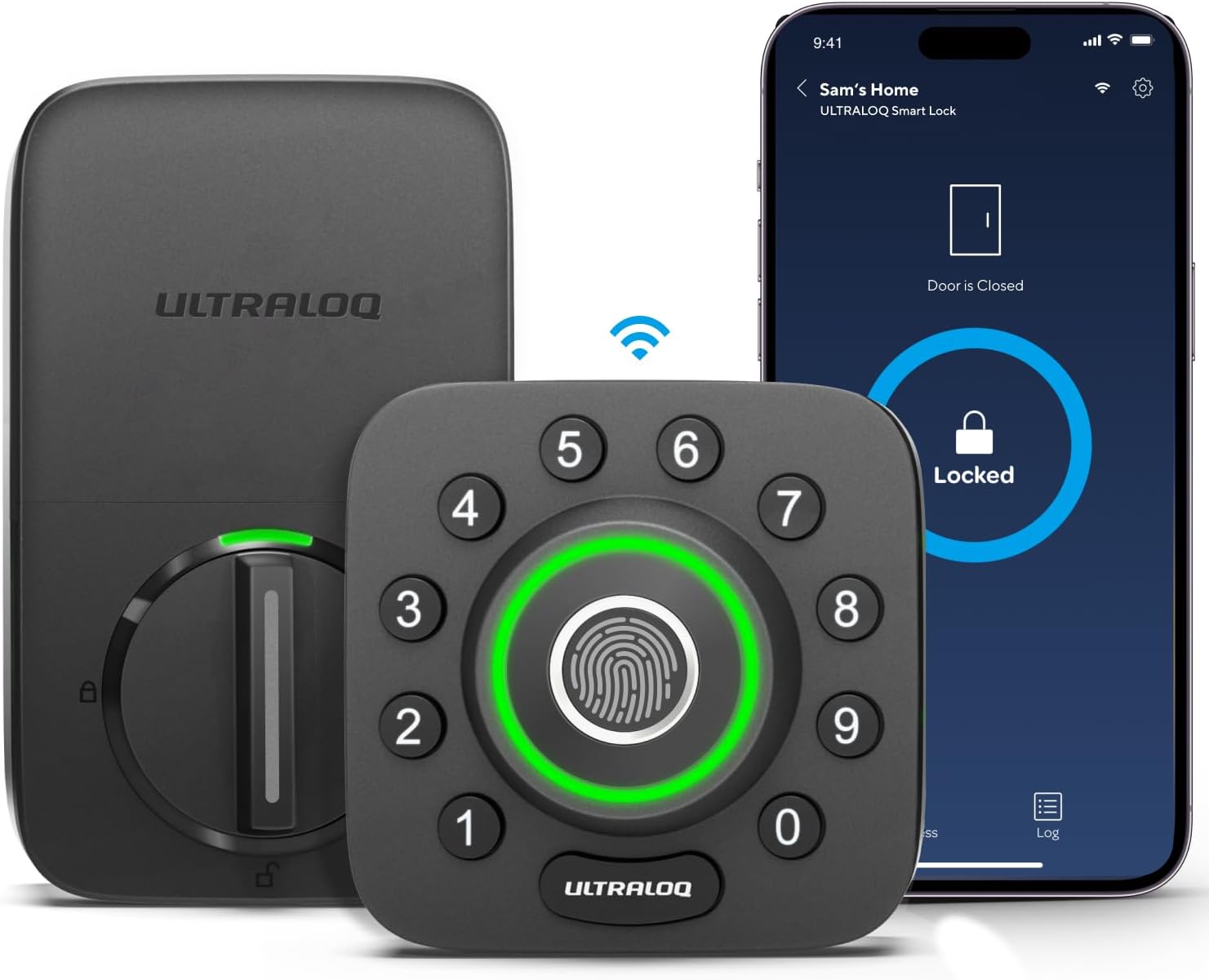
Key specs: Built-in Wi-Fi with no separate hub required; lock, unlock and share access remotely from the app, with an access log showing who entered and exactly when; supplied with a door sensor
The one to buy if you want the hosting workflow to just work. Built-in Wi-Fi means it connects directly to the property’s network with no extra hub, which removes the single most annoying failure mode in this category — a bridge that a guest unplugs or that quietly drops off the network. It handles the full remote loop: lock, unlock, share access and review a log of who entered and exactly when, all from the app. The supplied door sensor is more useful for a rental than it sounds, because it distinguishes “the lock engaged” from “the door is actually closed” — a guest pulling a door to without it latching is a common and expensive mistake.
✅ Pros
- Built-in Wi-Fi with no separate hub required
- Full remote lock, unlock and access sharing
- Access log attributing entries to a time
- Door sensor included, catching an unlatched door
- Large review base for a smart lock
❌ Cons
- Wi-Fi locks consume more battery than Bluetooth-only ones
- Depends on the property’s network staying up
- No fingerprint reader, unlike the Bolt SE
- Keypad codes are visible to anyone watching the door
ULTRALOQ Bolt SE Wi-Fi (Matter over Thread) — the most access methods
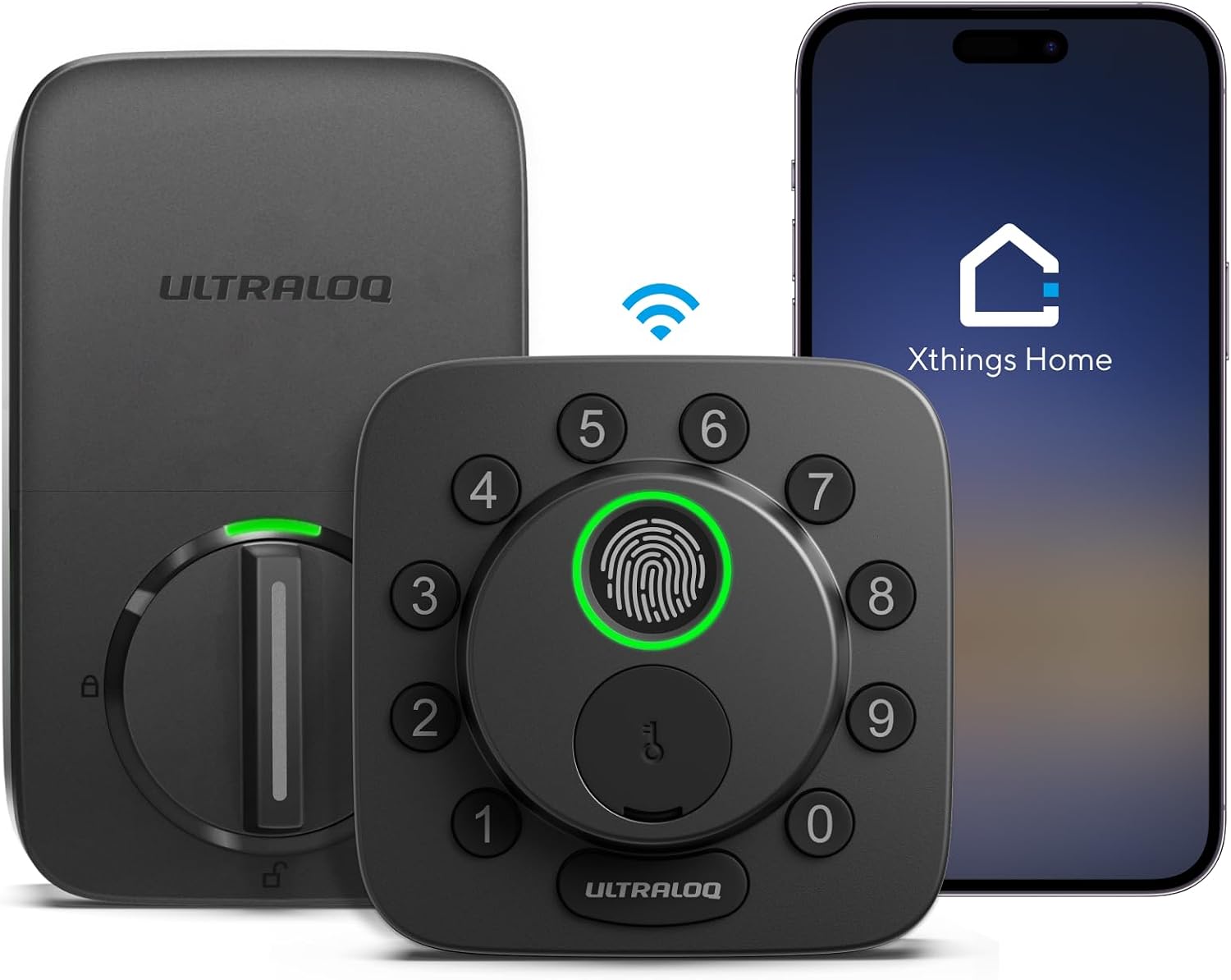
Key specs: Seven access methods: fingerprint ID storing up to 50 prints, up to 50 passcodes, smartphone app on Android and iOS, a web portal, eKey and code sharing, voice control via Siri, Alexa or Google Assistant, and two mechanical keys; Matter over Thread
Choose this when different people need different kinds of access. It supports seven methods: fingerprint ID storing up to 50 prints, up to 50 passcodes, the smartphone app on Android and iOS, a web portal, eKey and code sharing, voice control through Siri, Alexa or Google Assistant, and two mechanical keys. For a property with guests on codes, a cleaner on a fingerprint, and you on an app, that breadth is genuinely useful rather than spec-sheet padding. Matter over Thread is the forward-looking part — it makes the lock portable across smart home platforms rather than locked to one app’s future.
✅ Pros
- Seven access methods covering every user type
- Up to 50 passcodes and 50 fingerprints
- Matter over Thread for cross-platform compatibility
- Web portal as well as the mobile app
- Two mechanical keys as a physical fallback
❌ Cons
- Thread benefits need a border router in the property
- Fingerprint capacity is largely wasted on guest turnover
- More features means more that can confuse a guest at 11pm
- Smaller review base than the U-Bolt Pro
Lockly Secure Pro Wi-Fi — the code-privacy option
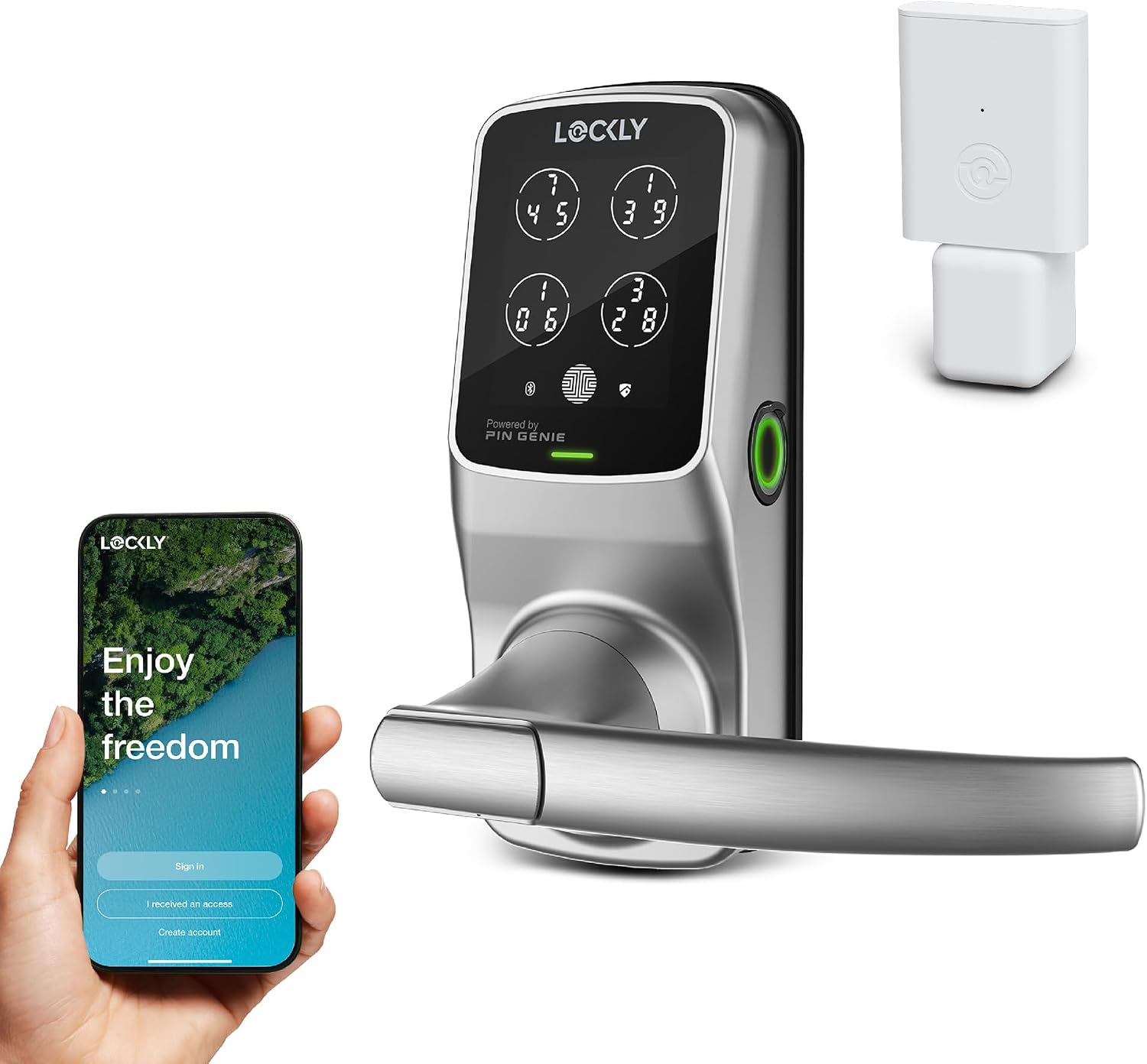
Key specs: Patented PIN Genie keypad that shuffles digit positions to resist shoulder-surfing and fingerprint smudge attacks; 3D biometric fingerprint sensor; app control, voice commands and physical keys; supplied with a handle
Worth choosing for one specific and genuinely clever feature. Lockly’s patented PIN Genie keypad shuffles where the digits appear each time, which defeats the two most common ways a door code leaks: someone watching over a guest’s shoulder, and the smudge pattern that builds up on the four keys a fixed code actually uses. On a rental with a street-facing door, a shared corridor or a busy entrance, that is not a theoretical concern. It also carries a 3D biometric fingerprint sensor, app control, voice commands and physical keys, and comes as a handle set rather than a bare deadbolt.
✅ Pros
- PIN Genie shuffling keypad resists shoulder-surfing and smudges
- 3D biometric fingerprint sensor
- App, voice and physical key access as well
- Supplied with a handle, so it replaces both parts of the door
❌ Cons
- A shuffling keypad is slower and confuses some first-time guests
- Smaller review base than the ULTRALOQ locks
- More complex hardware means more to go wrong on a rental door
- Handle sets constrain which doors it fits
TEEHO TE019 Smart Keypad Lock With Handle — budget, with a caveat
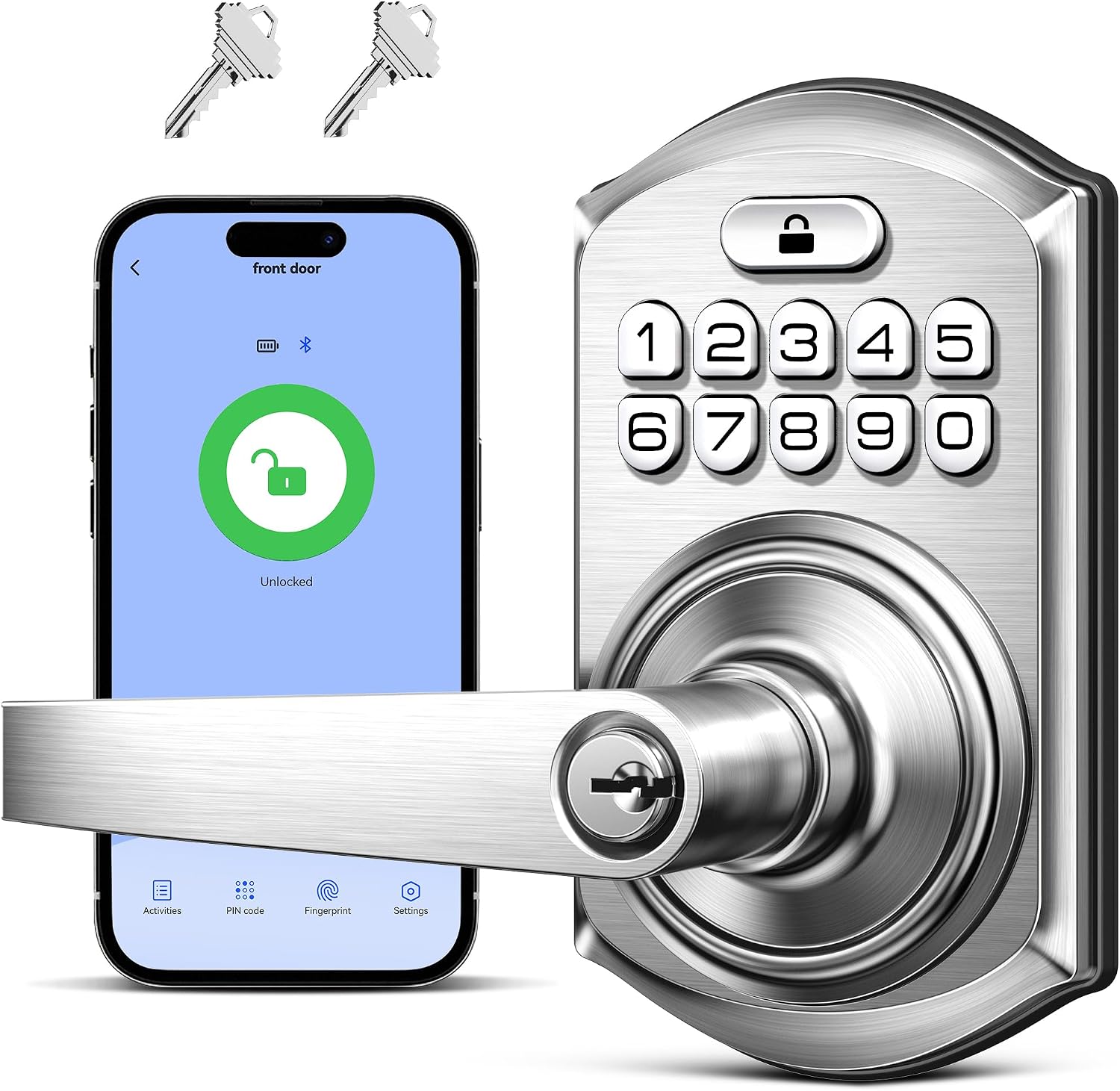
Key specs: Four access methods: app, up to 100 custom passcodes, and two backup keys; voice control via Alexa or Google Assistant requires a Wi-Fi gateway sold separately; supplied as a handle-and-deadbolt set
The cheapest route here, and it is genuinely usable for hosting provided you read one line of the specification carefully. It offers four access methods — app, up to 100 custom passcodes, and two backup keys — and 100 codes is the largest capacity of the four, which suits a high-turnover listing. The caveat: voice control via Alexa or Google Assistant requires a Wi-Fi gateway that is sold separately. Check carefully what remote functionality on your listing depends on that gateway, because a lock whose remote features arrive in a second box is not the no-hub proposition the U-Bolt Pro is.
✅ Pros
- Up to 100 custom passcodes, the highest capacity here
- Supplied as a handle-and-deadbolt set
- Two backup keys included
- The most affordable entry into hosted keyless access
❌ Cons
- Gateway sold separately for voice control
- Verify which remote features need that gateway before ordering
- Less established brand than ULTRALOQ or Lockly
- No fingerprint option
Plan for the Lock Failing, Because It Will
A smart lock on your own house failing is an inconvenience. On a rental it is a guest standing in the dark messaging you, and it is the scenario worth planning before the first booking rather than during it.
The Four Things to Have Ready
1
A mechanical key, somewhere reachable
Three of these locks include physical keys. Store one in a mounted combination lockbox rather than hiding it.
2
A battery routine, not a battery warning
Wi-Fi locks draw more power than Bluetooth ones. Replace on a schedule between bookings, not when the app complains mid-stay.
3
A local contact who can attend
A cleaner, a neighbor, a co-host. Remote code management does not open a door whose batteries are flat.
4
A written guest instruction with a photo
Most “the lock is broken” messages are a guest pressing the wrong thing in the dark. A photo of the keypad with the sequence marked resolves most of them.
Every one of these is free. None of them is the default.
The lockbox point is worth expanding, because it is where hosts most often improvise badly. A key hidden under a mat at a property strangers have the address of is materially worse than the same key at a private home — the address is published. A mounted combination box with a code you change is the right answer, and our key lockbox guide covers which to buy and where to put it. Our piece on why hiding a key fails explains why the improvised alternative is not one.
Final Recommendation
Buy the ULTRALOQ U-Bolt Pro WiFi. Built-in Wi-Fi with no hub removes the most common failure point, remote access sharing matches the actual hosting workflow, and the access log is the feature you will use every week rather than the one that sells the lock.
Choose the Bolt SE instead if guests, cleaners and owners all need different access types, or if you want Matter over Thread so the lock outlives one app ecosystem.
Choose Lockly Secure Pro for an exposed door — street-facing, shared corridor, busy entrance. The shuffling keypad is the only feature here that addresses code leakage, which is the realistic way a rental code gets misused.
What would change our answer: if you host one property occasionally rather than several regularly, a keypad lock without Wi-Fi plus a mounted lockbox covers it for far less money, and our keypad lock guide is the better starting point. Remote management earns its cost at volume; below that it is a convenience you are paying a subscription of complexity for. And whichever route you take, the door itself has to be worth locking — a smart lock in a weak frame is covered in our high-security deadbolt guide.
SafeBode does not yet run an in-house product testing program. This guide is built from manufacturer specifications, official support documentation, current retail listings and verified buyer feedback rather than hands-on testing, and we say so plainly rather than implying testing we have not done.
Frequently Asked Questions
Do I need a Wi-Fi smart lock for a rental?
Effectively yes. The hosting workflow — create a code for a booking, have it work while you are elsewhere, and stop working after checkout — requires remote access. Bluetooth-only locks need you at the door, which defeats the purpose.
How many access codes does a rental lock need?
Work from your turnover: weekly bookings mean roughly fifty codes a year before cleaners and maintenance. The picks here range from app-managed capacity up to 100 custom passcodes, and it is worth checking whether expired codes free their slot automatically.
Can smart lock codes expire automatically?
Time-limited and scheduled codes are the core hosting feature, and the reason to buy a Wi-Fi-connected lock rather than a basic keypad. Confirm the specific scheduling options in the manufacturer’s app before committing, since implementations differ.
Should I use fingerprints for guests?
Generally no. Enrolling a fingerprint requires the person to be at the door with you, which is the opposite of remote check-in. Fingerprints make sense for cleaners and maintenance staff you see regularly, and codes make sense for guests.
What happens if the lock’s batteries die mid-stay?
That is the scenario to plan for before the first booking: a mechanical key in a mounted lockbox, a local contact who can attend, and a battery routine between stays rather than a reaction to a warning. Wi-Fi locks draw more power than Bluetooth ones.
Is a shuffling keypad worth it?
On an exposed door, yes. A fixed code leaves a wear pattern on the keys it uses and can be watched from across a street. A keypad that moves the digits each time defeats both, at the cost of being slower for guests.
Do I need a hub for a smart lock?
Not with the right lock. Some models reach the internet only through a separate bridge, which is another device to power and another thing a guest can unplug. Built-in Wi-Fi with no hub avoids that entirely.
Can I see who entered and when?
Yes on locks with an access log, and this is the feature hosts use most. Because each guest has their own code, entries are attributable to a booking rather than anonymous — which also makes it information about your guests, so treat retention as a deliberate choice.
What about the guest who cannot work the lock?
It is more common than lock failure. A written instruction with a photo of the keypad and the sequence marked resolves most cases, and it costs nothing to prepare before the first booking.
Sources
Show sources (4)
- [1] ULTRALOQ — U-Bolt Pro WiFi, current retail listing specifications (ASIN B0C61DKKL8)
- [2] ULTRALOQ — Bolt SE Wi-Fi, current retail listing specifications (ASIN B0FQC6VCDW)
- [3] Lockly — Secure Pro Wi-Fi, current retail listing specifications (ASIN B0DSC8R53W)
- [4] TEEHO — TE019 Smart Keypad Door Lock, current retail listing specifications (ASIN B0G42YY1LQ)


