Best Lorex Cameras 2026: Why the Recorder Decides Everything Else
Affiliate Disclosure: This article contains affiliate links. If you buy through these links, we may earn a commission at no extra cost to you. Our editorial opinions are our own and are not influenced by affiliate relationships. Read our full disclosure policy →
Contents
Quick Answer
If you want the thing Lorex is actually good at, buy a recorder. The 4K 8-Channel NVR System with 6 cameras is the complete version of that, and the V-Series 4K NVR on its own is the cheaper way in if you would rather add cameras a few at a time. Expand later with the 4K IP bullet, but check compatibility first — Lorex says outright that not all its products work together. If you are not willing to run cable, the 2K indoor pan-tilt Wi-Fi camera is the only pick here that needs no recorder, and buying Lorex for that alone gives up most of the reason to buy Lorex.
The Real Lorex Decision Is Not the Camera
Most camera guides rank four products and let you pick by resolution. That framing does not work for Lorex, because Lorex sells two fundamentally different kinds of product under one logo and the wrong one will disappoint you no matter how good the sensor is.
One kind is a recorder-based system: cameras wired back to a network video recorder (NVR) or digital video recorder (DVR) that sits in a closet with a hard drive in it. The other is a standalone Wi-Fi camera that behaves like every other consumer camera you have seen. Lorex is genuinely distinctive at the first and merely competitive at the second.
So the question to settle before you look at a single spec sheet is not “which Lorex camera?” It is “am I buying a recorder?” That single answer determines your storage model, your monthly cost, your app, which cameras you are allowed to add later, and whether your weekend involves a drill. Everything else follows from it.
What a Recorder Actually Buys You
Lorex states the payoff directly on its own recorder pages: footage records to the built-in surveillance hard drive “with no monthly fees or required cloud subscriptions.” Independent reviewers describe the same arrangement in the same terms — Security.org’s verdict is that Lorex cameras record locally through DVRs and NVRs, which makes cloud subscriptions optional rather than mandatory.
That is a real structural difference, not a marketing line. On a subscription camera, the recording lives on someone else’s server and your access to it is a monthly renewal. On a Lorex recorder, the footage is on a drive in your house, and Lorex’s recorders ship with a surveillance-grade drive built for 24/7 use that you can swap for a larger one — dual-bay models take a second drive to expand capacity or mirror the first.
The second thing you get is continuous recording. Most battery and Wi-Fi cameras record clips around motion events, which means the useful footage is whatever the detection algorithm decided to keep. A recorder writes around the clock. When something happens at the edge of a frame, or ten minutes before the event you care about, that difference stops being academic.
Recorder System vs. Standalone Wi-Fi Camera
Local
footage stays on a drive you own
24/7
continuous recording, not motion clips
No fee
cloud plans optional, not required
Cable
one Ethernet run per camera
This is the trade in one line: a recorder buys you ownership and continuity, and charges you in installation effort rather than in monthly payments.
The Two Costs Nobody Puts on the Box
Both of these are real, both are documented by Lorex or by independent testers rather than inferred, and both are easier to accept before you buy than after six cameras are mounted.
First: it is a wiring job. An NVR uses IP cameras connected over Ethernet with Power-over-Ethernet, so one cable carries both power and video to each camera; a DVR uses analog cameras on coaxial cabling. Either way, a cable has to physically get from the recorder to every camera position. When Security.org installed a Lorex system, the work involved drilling and snaking wire through a ceiling, and they recommend professional installation for anyone not comfortable with that. That is not a knock on Lorex — it is what a wired system is.
Second: “Lorex” is not one compatible ecosystem. This is the trap that catches people a year later, when they go to add a camera. Lorex’s own compatibility page says it plainly: “Not all Lorex products work together,” and “A camera that works with one Lorex recorder may not work with another.” Different product lines use different recorder platforms, camera technologies and firmware, and Lorex tells you to confirm your model number and app compatibility before adding cameras or replacing a recorder.
The app split makes the same point visible from the outside. Lorex Connect is the app for the latest wired and Wi-Fi products; Lorex Classic covers the Fusion product line; Lorex Pro is aimed at commercial and small-business systems. Which one you use is decided by what you own, not by preference. In practice this means your recorder choice is an ecosystem choice, and a bargain camera from a different generation can be an expensive mistake.
Before You Add Any Camera to a Lorex Recorder
✅ Check these first
- The recorder’s model number, and which app supports it
- Whether the camera is IP/PoE or analog/coaxial — they are not interchangeable
- That the camera is listed as compatible with your specific recorder, not just “Lorex”
- Free channels on the recorder (an 8-channel unit stops at eight wired cameras)
❌ Assumptions that cost money
- “Both say Lorex, so they will work together” — Lorex says otherwise
- “4K camera, 4K recorder, close enough” — platform matters, not just resolution
- “I will sort the app out later” — the recorder decides the app
- “I can add Wi-Fi cameras to any recorder” — only Fusion recorders take both
That last row is worth expanding, because it is the one genuinely flexible option in the range. Lorex Fusion recorders are built to take wired and Wi-Fi cameras, video doorbells and floodlights on the same system, with continuous recording to the recorder’s hard drive and no monthly fees. If you know some positions will never get a cable, a Fusion-capable recorder is the version of this decision that leaves you a way out. Business premises change the sums, which our guide to warehouse security camera systems works through.
The Four Lorex Picks Compared
Lorex 4K 8-Channel NVR System with 6 Cameras — Best Complete System
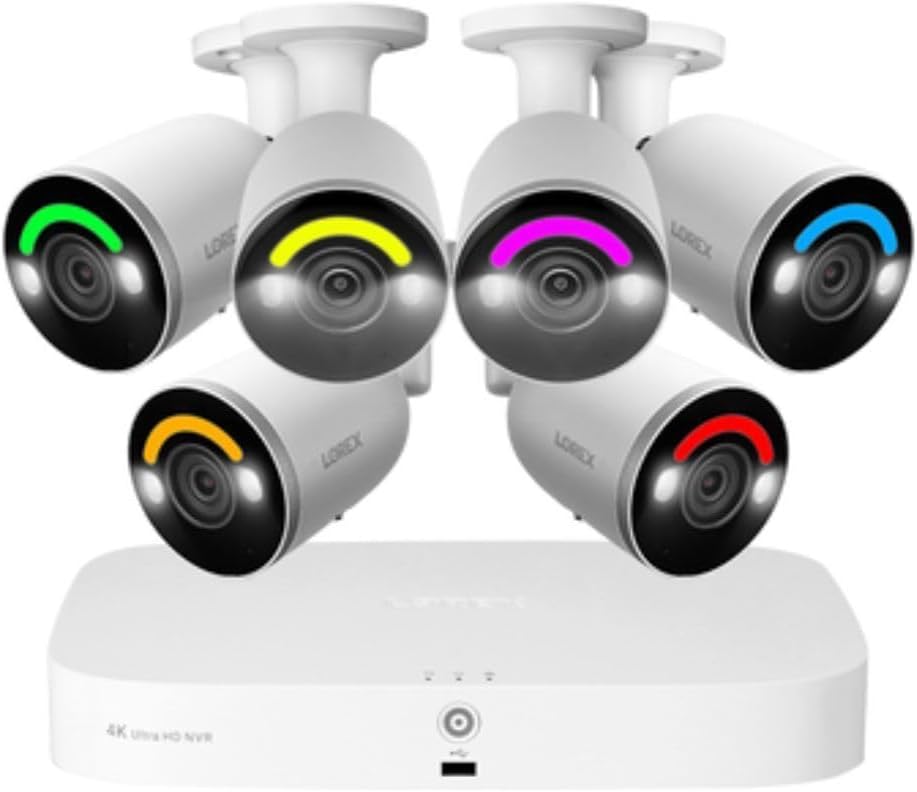
Key specs: 4K 8MP IP cameras · 8-channel NVR · 2TB drive · 150 ft night vision · smart deterrence · Fusion capable
This is Lorex doing the thing only Lorex and a handful of rivals do: six 4K cameras and an 8-channel recorder with a 2TB drive, bought once, with no subscription attached to getting your own footage back. Six cameras is the number where a house stops having blind spots — front, back, both sides, driveway and one more for whichever approach worries you. The recorder is Fusion capable, which matters more than it sounds: it leaves the door open to adding Wi-Fi cameras later for positions that will never take a cable. Two spare channels also means you are not immediately boxed in.
✅ Pros
- Six 4K cameras and the recorder in one purchase — nothing else to buy
- 24/7 continuous recording to a drive you own, no required subscription
- 2TB pre-installed, and Lorex recorders take larger drives
- Fusion capability keeps a wireless expansion path open
❌ Cons
- Six cameras means six cable runs — expect drilling
- The recorder needs a permanent home near power and your router
- 4K footage fills a drive quickly; plan capacity before you need it
- No professional monitoring — you are the one reviewing alerts
Lorex V-Series 4K 8-Channel NVR (Recorder Only) — Best Starting Point

Key specs: 8-channel 4K network video recorder · 1TB drive · Lorex Connect app · AI detection · whisper-quiet · no cameras included
Buying the recorder on its own sounds like the harder path and is often the smarter one. It lets you wire two cameras this month at the positions that actually matter, live with them, and add the rest when you know where the gaps are — rather than committing to six mounting positions on day one and discovering that two of them watch a hedge. Eight channels gives you room to grow into, the 1TB drive can be upgraded, and it runs on Lorex Connect, the app line for Lorex’s current products. The catch is unavoidable and worth stating: it ships with no cameras, so this is the start of a shopping list, not the end of one.
✅ Pros
- Lets you build the system in stages instead of one commitment
- Eight channels, so a small start still has room to expand
- Drive is upgradable when 1TB stops being enough
- Runs on Lorex Connect, the current-generation app line
❌ Cons
- No cameras included — on its own it records nothing
- Total cost lands higher than a bundled kit for the same camera count
- You must match every future camera to this recorder specifically
- Newer platform, so fewer long-term owner reports than older Lorex lines
Lorex 4K IP Add-On Bullet Camera — Best Add-On Camera

Key specs: 4K metal bullet · PoE, requires a recorder · two-way talk · color night vision · siren and warning lights · IP67
A 4K metal bullet with two-way talk, color night vision and a siren with warning lights, which is the useful combination for a position where you want to speak to somebody and make it obvious they have been seen. It is IP67 rated for outdoor mounting and takes power and video down a single PoE run. The important thing about this camera is the thing printed on its own listing: it requires a recorder. It is not a standalone product and will not do anything by itself. Before you buy it, confirm it is compatible with your specific recorder rather than assuming the brand name is enough — Lorex is explicit that a camera working with one of its recorders may not work with another.
✅ Pros
- 4K detail with color night vision, not just infrared
- Siren and warning lights make it an active deterrent, not just a witness
- Two-way talk from the camera position
- Single PoE cable carries both power and video
❌ Cons
- Requires a recorder — useless on its own
- Compatibility must be checked against your exact recorder model
- Another cable run, with the drilling that implies
- Fixed position and fixed field of view once mounted
Lorex 2K Dual-Lens Indoor Pan-Tilt Wi-Fi Camera — Best Without a Recorder

Key specs: 2K dual lens · indoor pan and tilt · auto-tracking · color night vision · siren · two-way talk · privacy mode · Lorex Classic app
This is the honest counterweight to everything above. It is an indoor Wi-Fi camera with dual lenses, pan and tilt with auto-tracking, a siren, two-way talk and a privacy mode, and it needs no recorder, no cable run and no closet. For a nursery, a living room or a back room where you want eyes and nothing more, it does the job the day it arrives. It is also the most-reviewed Lorex product in this guide by a wide margin, which counts for something. But be clear about what you are buying: a standalone Wi-Fi camera from Lorex competes on the same ground as every other Wi-Fi camera, and the local-recording, no-subscription advantage that makes Lorex worth choosing lives in the recorder. It also sits on the Lorex Classic app rather than Connect.
✅ Pros
- No recorder, no cable, no install job — set it up in minutes
- Pan, tilt and auto-tracking cover a room rather than a rectangle
- Privacy mode and a built-in siren, unusual at this tier
- Much larger owner review base than the newer Lorex lines
❌ Cons
- Indoor only — not a substitute for outdoor coverage
- Gives up the recorder advantage that is the main reason to pick Lorex
- Depends on Wi-Fi quality at the mounting spot, unlike a wired camera
- Lorex Classic app, so it does not sit alongside Connect-based systems
The Install Job, Honestly
If you have only ever mounted a battery camera, the wired path is a different category of work. It is very doable for a competent DIYer and genuinely miserable for someone who is not, which is why Security.org’s own testers, who do this professionally, still recommend professional installation for anyone unfamiliar with running cable. Here is what you are actually signing up for.
What Installing a Wired Lorex System Involves
1
Decide the camera positions
Do this before you buy anything. Cable length and drilling difficulty are decided here, not at checkout.
2
Find a home for the recorder
It needs mains power, a wired connection to your router and somewhere ventilated. Every camera cable terminates here.
3
Run one cable per camera
PoE means a single Ethernet run carries power and video to each camera. This is the part that involves drilling and ceilings.
4
Mount, aim and configure
Set the recorder up, aim each camera on the live view, then set detection zones so you are not alerted by traffic and branches.
The order matters. Deciding positions last is the mistake that turns a weekend into two.
Two positions are worth planning before you buy rather than discovering afterwards: any camera that has to cross open ground, and any position on a detached building. Our camera placement guide works through the priority order for coverage, and it is a better tool for this than a tape measure. If a run turns out to be impossible, the realistic answers are a Fusion-capable recorder that also accepts Wi-Fi cameras, or a solar camera for a spot with no power at all.
Who Lorex Is and Is Not For
An Honest Fit Check
✅ Lorex suits you if
- You want footage stored locally with no required subscription
- You want continuous recording, not motion clips
- You own the property and can run cable, or will pay someone to
- You want a system that scales to six, eight or more cameras
❌ Look elsewhere if
- You rent, or cannot drill through walls and ceilings
- You want a camera working ten minutes after it arrives
- You want professional monitoring and police dispatch
- You want a small ecosystem of doorbells and smart-home devices
Those exclusions are real, and each has a better answer elsewhere on this site. If cable is off the table, our wireless camera systems guide covers the brands built around that constraint, and it is worth checking your signal at the mounting position first with our Wi-Fi test walkthrough. If what you actually want is entry sensors and a siren rather than footage, cameras are the wrong product category entirely and our DIY alarm systems guide is the right starting point. And if this is for a shop or an office rather than a house, our business camera systems guide covers Lorex alongside its direct rivals in that setting.
Final Recommendation
Buy the 4K 8-Channel NVR System with 6 cameras if you have decided you want the recorder and you would rather solve the whole property in one purchase. It is the version of Lorex that justifies choosing Lorex: local storage, continuous recording, no subscription standing between you and your own footage, and a Fusion-capable recorder that does not trap you if one position turns out to be uncablable.
Buy the V-Series 4K NVR on its own instead if you are not sure how many cameras you need — which, honestly, is most people before they have lived with one. Add the 4K IP bullet as you go, checking compatibility against your recorder model each time rather than trusting the brand name. And if after all this you know you are never running cable, buy the 2K indoor pan-tilt camera with clear eyes, or compare the brands that are built for wire-free from the start — because at that point Lorex’s real advantage is not the one you would be paying for.
One closing note on cost, since none of this is cheap up front: a recorder system front-loads the spending and then stops, while a subscription camera does the reverse. Which is better depends entirely on how long you keep it, and our home security cost breakdown lays that arithmetic out.
Frequently Asked Questions
Do Lorex cameras require a monthly subscription?
Not with a recorder. Lorex states that its recorders store footage on a built-in surveillance hard drive with no monthly fees or required cloud subscriptions, and independent reviewers describe cloud plans on Lorex systems as optional rather than mandatory. Standalone Wi-Fi cameras are a different situation — check the specific listing for how that model stores recordings.
What is the difference between a Lorex NVR and a DVR?
An NVR works with IP security cameras connected over Ethernet using Power-over-Ethernet, so one cable carries power and video. A DVR works with analog cameras on coaxial cabling. They are not interchangeable: an IP camera does not plug into a DVR, and the cable type is decided by which recorder you buy.
Will any Lorex camera work with any Lorex recorder?
No, and Lorex says so directly. Its compatibility page states that not all Lorex products work together and that a camera working with one Lorex recorder may not work with another, because product lines differ in recorder platform, camera technology and firmware. Confirm your model number and app before adding a camera.
Which Lorex app do I need?
It depends on what you own rather than what you prefer. Lorex Connect supports the latest Lorex wired and Wi-Fi products, Lorex Classic covers the Fusion product line, and Lorex Pro is aimed at commercial and small-business systems. Your recorder effectively picks the app for you.
Can I mix wired and Wi-Fi cameras on one Lorex system?
Only on a Fusion recorder. Lorex Fusion is specifically built to connect wired and Wi-Fi cameras, video doorbells and floodlights to the same system with continuous recording to the recorder’s hard drive. If a couple of positions will never take a cable, buy a Fusion-capable recorder from the start.
Does a Lorex system record 24/7 or only on motion?
A recorder-based system records continuously to its hard drive rather than saving only motion clips. That is one of the main practical reasons to choose a recorder: you can go back to any moment, not just the moments a detection algorithm decided to keep.
How hard is a wired Lorex system to install yourself?
Harder than a battery camera and easier than rewiring a house. Every camera needs a cable run back to the recorder, which in practice means drilling and feeding wire through walls or ceilings. Reviewers who install these systems for a living still suggest professional installation for anyone who has not done that kind of work before.
Is Lorex better than Ring or Arlo?
They answer different questions. Lorex is built around a recorder, local storage and continuous footage, and it charges you in installation effort. Ring and Arlo are built around fast wire-free setup and lean on cloud plans for recordings. If you want a camera up this afternoon, Lorex is the wrong brand; if you want years of footage on your own drive with no renewal, it is arguably the right one.
Sources
Show sources (5)
SafeBode does not yet run an in-house product testing program. This guide is built from manufacturer specifications, official support documentation, current retail listings and verified buyer feedback rather than hands-on testing, and we say so plainly rather than implying testing we have not done.


