Blink Video Doorbell 2026: What You Get at This Price
Affiliate Disclosure: This article contains affiliate links. If you buy through these links, we may earn a commission at no extra cost to you. Our editorial opinions are our own and are not influenced by affiliate relationships. Read our full disclosure policy →
Contents
Quick Answer
Buy the standard Blink Video Doorbell kit, then make one deliberate decision about storage. The Sync Module Core in that box cannot save clips locally at all, so recording means a subscription. And if you buy the cheaper add-on with no hub and mount it on batteries alone, the doorbell runs in Event Response Mode — live view and two-way audio only work if you tap the notification within 60 seconds. The one configuration that gets you an on-demand doorbell with no monthly fee is this doorbell plus a Sync Module 2 and a USB flash drive.
What the Low Price Actually Buys
The Blink Video Doorbell is among the cheapest name-brand video doorbells on the market, and the hardware is not where the compromise lives. You get a head-to-toe vertical view suited to a doorway, two-way audio, and a battery life Blink rates at up to two years on two AA lithium cells. That figure comes with a condition worth carrying into the rest of this guide: Blink states it as “when paired with a Sync Module,” with default settings and normal use. The Sync Module is about to matter more than once.
The compromise sits where most buying guides never look. What this doorbell can do is not fixed by the model you buy — it is decided by two things in the box and on your wall. First, whether it is connected to a Sync Module or existing chime wiring at all. Second, which Sync Module that is. It matters here more than anywhere else in Blink’s range, because the Video Doorbell is the only Blink device Blink lists as not requiring a Sync Module — and the freedom to skip the hub is what creates the trap.
Event Response Mode: The 60-Second Doorbell
Blink has a name for what the doorbell becomes with no Sync Module and no chime wiring: Event Response Mode. The documentation is direct — the doorbell enters that mode if you choose not to add it to a Sync Module or connect it to compatible chime wiring.
In that state, live view and two-way audio are only available by tapping the motion or doorbell-press notification within 60 seconds of it reaching your phone. Miss the window and you cannot open the camera; you cannot decide at lunchtime to check the porch. Scheduling and privacy zones are unavailable, and you cannot manually refresh the thumbnail. That is still a real doorbell — it rings, it alerts, and if you are quick you can talk to whoever is there. It is not a security camera in any meaningful sense, and that gap is the biggest reason people regret a cheap Blink doorbell purchase.
Three Ways to Leave Event Response Mode
1
Wire it to the chime
Connect to compatible existing doorbell wiring. Free if the wiring is already there.
2
Add a Sync Module you own
Already running Blink cameras? Add the doorbell to that existing system.
3
Buy a Sync Module 2
The only route that also unlocks subscription-free local recording.
Blink documents all three as automatic exits from Event Response Mode. Only the third also solves storage.
This is also why the cheaper add-on version — identical doorbell, no hub in the box — is the right buy in exactly one situation: you already own a Sync Module. For a first-time Blink buyer choosing it on price, it is the version that lands you in Event Response Mode on day one.
Wired vs. Battery: What Actually Changes
Wiring is the free fix, and this part is widely misunderstood. Blink specifies compatible chime wiring of 16 to 24 volts AC, and states that connecting it lets the doorbell trigger your existing in-home mechanical chime and extends battery life to up to two years. Read that last part carefully: the doorbell stays battery-powered even when it is wired. The wiring is not a power supply that replaces the cells. For a Blink doorbell that runs on mains power with no batteries at all, you want the Wired Doorbell 2K+ further down this page.
Battery-Only vs. Wired: The Honest Difference
🔋 Battery only, no Sync Module
- Runs in Event Response Mode
- Live view and two-way audio only within 60 seconds of a notification
- No scheduling, no privacy zones
- Your existing indoor chime does not ring
🔌 Wired to existing chime wiring
- Exits Event Response Mode automatically
- On-demand live view any time, not just for 60 seconds
- Rings your existing mechanical chime
- Still battery-powered — wiring does not remove the AA cells
If there is no wiring at your door, that second column is not available to you at any price, and a Sync Module becomes the only route to a normal doorbell experience. Renters especially should check for existing wiring before ordering — our wireless video doorbell guide covers what a no-drill install realistically looks like.
The Sync Module Decides Your Monthly Cost
Adding a Sync Module fixes Event Response Mode. It does not automatically fix storage, and that is the second gate. The standard kit ships with a Sync Module Core, and Blink states plainly that local storage and clip backup are not available for it — the Core supports cloud storage with an active subscription plan or trial. So the most-bought version of this doorbell gives you on-demand live view but cannot keep a single recording without a plan.
Subscription-free recording requires a Sync Module 2 with a USB flash drive. Blink specifies a Type-A USB drive in a supported format — ExFAT recommended — with a capacity between 1 GB and 256 GB and at least 375 MB free, and names the Video Doorbell among the devices that support local storage.
What Each Hub Configuration Actually Gets You
No module
Event Response Mode, 60-second window
Core
on-demand live view, but no local storage at all
Module 2 + USB
on-demand live view and clips with no plan
ExFAT, 1–256 GB
the drive spec Blink requires for local storage
Sources: Blink Support. The hub, not the doorbell, sets your recurring cost — which is why the cheapest kit is not the cheapest ownership.
The same module question runs through Blink’s whole range; our Blink camera guide applies it to the cameras. If you are weighing this against a subscription-first ecosystem instead, our breakdown of what Ring’s plan actually costs is the honest comparison point.
The Three Blink Doorbells Compared
| Model | Power | Video | Sync Module | Best for |
|---|
| Video Doorbell | Battery, or wired to chime | 1080p | Not required, but Core is included | Most buyers |
| Wired Doorbell 2K+ | Continuous hardwired | 2K | Not required | Homes with doorbell wiring |
| Battery Doorbell 2K+ | Battery | 2K | Required | Sharper video where wiring is impossible |
Blink Video Doorbell (Sync Module Core Included) — The Standard Kit
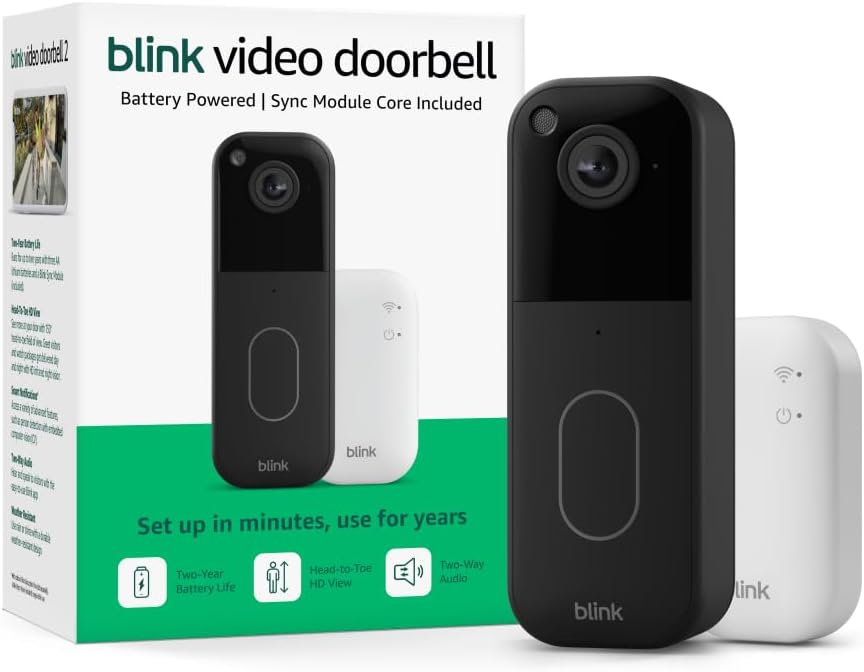
Key specs: 1080p head-to-toe view · two AA lithium cells · battery or wired install · two-way audio · Sync Module Core in the box
The version most people should buy. The bundled Sync Module Core means it never enters Event Response Mode, so live view works on demand rather than in a 60-second scramble. It has also been on sale longest, so buyer feedback on it is far deeper than on the newer 2K+ models. Settle one thing before ordering: the Core in this box cannot store a clip locally in any configuration, so if avoiding a monthly fee was the point, budget for a Sync Module 2 as well.
✅ Pros
- Solves Event Response Mode out of the box — on-demand live view
- Head-to-toe vertical view suits a doorway better than a wide landscape frame
- Installs on batteries or existing chime wiring
❌ Cons
- Sync Module Core cannot do local storage or clip backup
- Recording therefore requires an active subscription or trial
- 1080p — fine at a doorway, weaker across a driveway
- Still battery-powered even when wired to the chime
Blink Wired Doorbell 2K+ — The Wired 2K+

Key specs: 2K head-to-toe video · continuous hardwired power · no Sync Module required · needs Alexa or a Blink Chime for in-home alerts
The pick if your door already has doorbell wiring. It runs on continuous hardwired power rather than batteries, and Blink lists it as not requiring a Sync Module. The step from 1080p to 2K matters more at a front door than people expect, because a doorway camera is the one most likely to be asked to identify a specific face rather than just prove someone was present. Its current Amazon listing states plainly that an Alexa device or a separately sold Blink Chime is required for in-home alerts.
✅ Pros
- Continuous hardwired power — no batteries to manage at all
- 2K is a real step up for identifying faces at a doorway
- Blink lists no Sync Module as required
❌ Cons
- Requires existing doorbell wiring — not an option for many renters
- Needs an Alexa device or a separately sold Blink Chime for in-home alerts
- Blink’s local storage page does not name the 2K+ doorbells among supported devices
- Much shorter track record than the 1080p Video Doorbell
Blink Battery Doorbell 2K+ — The Battery 2K+

Key specs: 2K video · enhanced audio · battery powered · Sync Module required · Sync Module Core in the box
The 2K sensor without the wiring requirement, which sounds like the obvious answer and is not quite. Blink’s requirements page lists the Battery Doorbell 2K+ as requiring a Sync Module, unlike the 1080p Video Doorbell — so the hub-free path that exists on the older model is not available here. It ships with a Core, which brings the storage limitation with it. Early buyer feedback is also more mixed than on the long-established 1080p doorbell, and we would rather say so than pretend a new product arrives fully proven.
✅ Pros
- 2K video without needing any doorbell wiring
- Enhanced audio over the 1080p generation
- Works on demand out of the box, no wiring needed
❌ Cons
- Blink lists a Sync Module as required for this model
- Ships with a Core, so local storage still is not available
- Blink’s local storage page does not name the 2K+ doorbells
- Early buyer feedback is more mixed than on the established 1080p model
Where It Honestly Falls Short
Two things deserve stating plainly, including the one that costs us a sale. First, storage: the version most people buy cannot record anything without a subscription, and the fix is a second purchase. Anyone who chose Blink because it was the cheap, no-fee option should price the doorbell and a Sync Module 2 together. The value story still holds up well that way — but it is a different number than the one on the listing.
Second, clips are event-based, not continuous. There is no 24/7 stream to scrub back through, and the doorbell will occasionally miss the very start of an event while it wakes. That is normal for battery doorbells rather than a Blink failing, but position mitigates it more than any spec does — our camera placement walkthrough covers where a doorway camera should be aimed.
Who It Fits and Who Should Skip It
Be Honest About the Fit Before You Order
✅ A good fit if
- You want a capable doorbell at the lowest realistic entry cost
- You have existing chime wiring, or will buy a Sync Module 2
- You are already in the Alexa ecosystem
- You want the option of no monthly fee and will buy the right hub to get it
❌ Look elsewhere if
- You want 24/7 continuous recording rather than event clips
- You need to identify faces well beyond the doorstep
- You expect it to work fully on batteries with nothing else bought
- You want a doorbell that is part of a full alarm system with sensors
A doorbell is one sensor at one door, not a security system. If the goal is whole-home coverage, our DIY home alarm systems guide is the better starting place — and testing your Wi-Fi at the mounting spot is worth twenty minutes before you mount anything, because a weak signal at the door is the most common cause of a doorbell that misses events.
Final Recommendation
For most homes, buy the standard Blink Video Doorbell kit and settle storage at the same time. If you have existing 16–24V AC chime wiring, wire it — that alone gets on-demand live view and rings your indoor chime at no extra cost. If you want recordings without a monthly plan, add a Sync Module 2 and a USB drive within Blink’s stated spec, and treat the Core in the box as a spare rather than the answer.
If your door has permanent wiring and you want the best image Blink offers there, the Wired Doorbell 2K+ is the stronger long-term choice; the Battery Doorbell 2K+ covers the same resolution where wiring is impossible, remembering Blink lists a Sync Module as required for it. Decide the hub question before you order, not after the doorbell is on the wall. To weigh this against the other major doorbell ecosystem, start with our Ring hardware comparison.
Frequently Asked Questions
Does the Blink Video Doorbell need a Sync Module?
No — Blink lists it as not requiring one, which is unusual in the range. But without a Sync Module and without chime wiring it runs in Event Response Mode, where live view and two-way audio only work if you tap the notification within 60 seconds.
Can the Blink Video Doorbell record without a subscription?
Yes, but not with the hub in the standard kit. Blink states local storage and clip backup are not available for the Sync Module Core. Subscription-free recording needs a Sync Module 2 with a Type-A USB drive, ExFAT recommended, between 1 GB and 256 GB with at least 375 MB free.
Does wiring the doorbell mean it stops using batteries?
No, and this catches people out. Blink states the doorbell remains battery-powered even when connected to chime wiring; the wiring extends battery life to up to two years and lets it ring your existing mechanical chime. For battery-free operation you need the Wired Doorbell 2K+.
Is the Battery Doorbell 2K+ the same as the Video Doorbell?
No. It is newer and higher-resolution, and Blink’s requirements page lists it as requiring a Sync Module while the 1080p Video Doorbell does not. The hub-free option on the older doorbell is not available on the 2K+ battery model.
Does the Blink Video Doorbell record continuously?
No. Blink doorbells are event-based — they record clips when the button is pressed or motion is detected, not a continuous 24/7 stream. If continuous recording is a requirement, a hardwired camera system with a recorder is a better fit.
Will the doorbell ring my existing indoor chime?
Only if you connect it to compatible chime wiring, which Blink specifies as 16 to 24 volts AC. Wired that way it triggers your existing mechanical chime as well as your phone. On a battery-only install there is no in-home ring at all — the notification is the only alert, which is exactly the gap people notice first.
I already own a Sync Module. Should I buy the cheaper add-on version?
Yes, and that is the one situation where it is the right buy. It is the identical doorbell with no hub in the box, so adding it to a module you already run gets you on-demand live view immediately. A first-time Blink buyer choosing that version on price is the case that goes wrong: it lands you in Event Response Mode on day one.
Does adding a Sync Module 2 mean I never pay a subscription?
For recording, yes — a Sync Module 2 with a compliant USB drive saves clips locally with no plan attached, and that is the only configuration in this range that does. The Sync Module Core in the standard kit cannot store anything locally at any setting, so with that hub a plan is the only way to keep a recording at all.
Sources
Show sources (5)
SafeBode does not yet run an in-house product testing program. This guide is built from manufacturer specifications, official support documentation, current retail listings and verified buyer feedback rather than hands-on testing, and we say so plainly rather than implying testing we have not done.


