Best eufy Cameras 2026: Which Model Fits Your Home
Affiliate Disclosure:
This article contains affiliate links. If you buy through these links, we may earn a commission at
no extra cost to you. Our editorial opinions are our own and are not influenced by affiliate
relationships. Read our full disclosure policy →
Contents
Quick Answer
eufy’s whole pitch is that footage stays on the
camera and you never pay a monthly fee. That is true across the range, so the real question is not
which eufy is best — it is which one suits the spot you are covering. For most
outdoor spots the SoloCam S220 is the sensible default. Indoors, the
Indoor Cam
E30. If you want the camera to actually deter someone, the
Floodlight
E340. Covering a whole property at once, the C37 4-cam kit. Our room-by-room placement guide covers which spots earn a camera first.
What “no subscription” actually means here
Most camera brands store your footage on their servers and charge you
monthly for the privilege. eufy stores it on the camera or on a HomeBase in your house. That is a
real difference, and it is the reason people choose the brand — but it is worth being precise
about what you gain and what you give up.
Local storage vs. cloud, honestly
What you gain
- No monthly fee, ever
- Footage never leaves your house
- Cameras keep recording if your internet drops
What you give up
- If the camera is stolen, its footage goes with it
- No off-site copy unless you make one
- Storage is finite — old clips get overwritten
eufy SoloCam S220 — Best for most outdoor spots
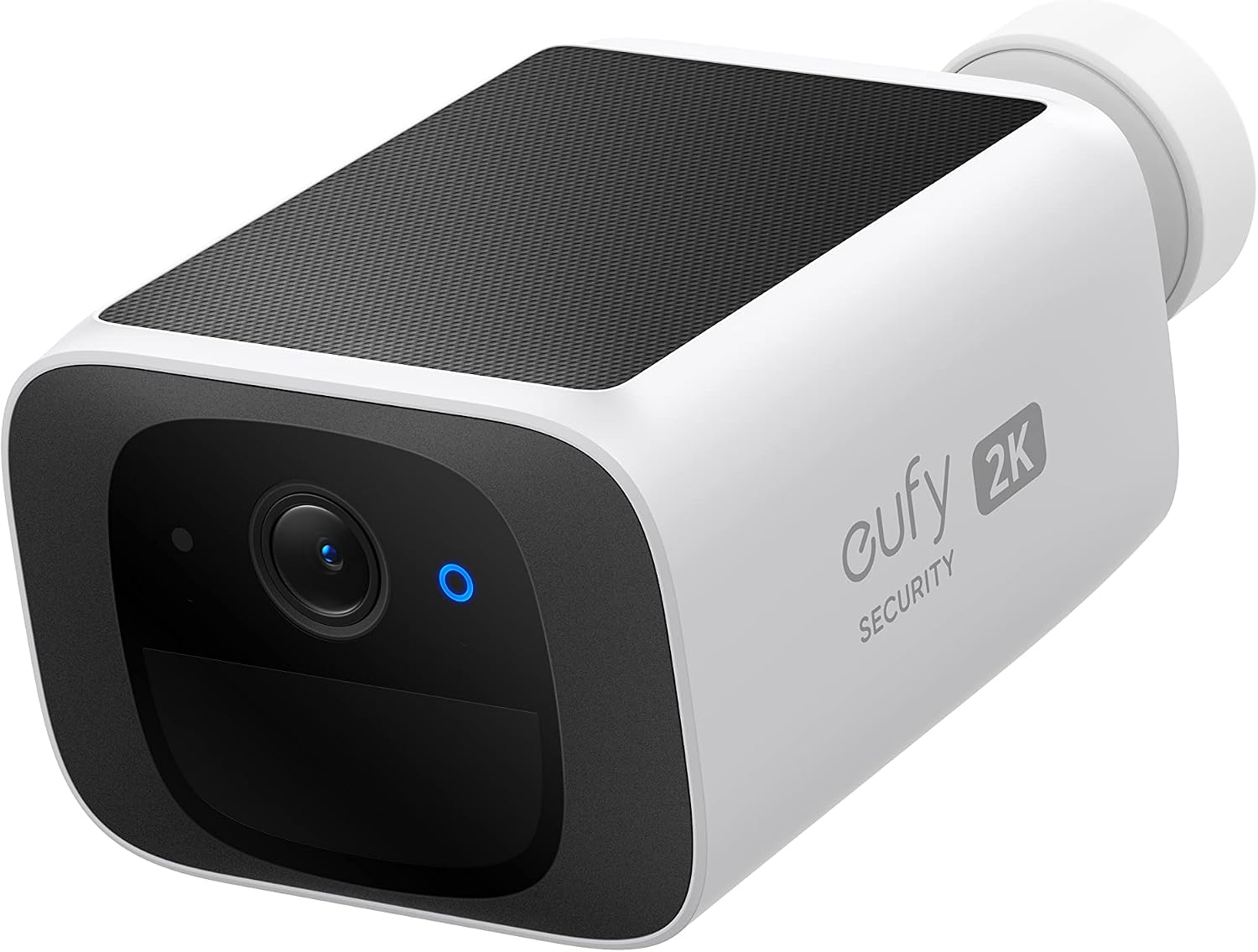
Key specs: 2K · solar powered · 8GB built-in · no subscription · HomeBase 3 compatible
The most-reviewed camera in eufy’s outdoor line by a wide margin, which matters more than a spec sheet when you are choosing hardware that has to survive a winter. Solar keeps it running without a cable, and footage stays on the camera itself.
✅ Pros
- Largest review base of any eufy outdoor camera
- Solar power means no wiring and no battery swaps
- Storage is built in — nothing to pay monthly
- Works standalone or with a HomeBase 3
❌ Cons
- 2K, not 4K — fine for identification, not for reading plates
- Solar needs genuine daily sun; shaded walls will need the USB cable
- Fixed lens: it sees what you point it at, and nothing wider
eufy Indoor Camera E30 — Best indoors

Key specs: 4K · pan & tilt · AI tracking · two-way audio · works with HomeKit
Sharper than most indoor cameras at this size, and the pan-and-tilt head means one unit covers a whole room instead of one corner of it. HomeKit support is the differentiator if your household already runs on Apple.
✅ Pros
- 4K indoors is genuinely more detail than the usual 2K
- Pan and tilt covers a full room from one mount
- HomeKit support, which most rivals at this size skip
- 24/7 recording without a subscription
❌ Cons
- Indoor only — no weather rating at all
- A moving camera indoors is a privacy question worth thinking about
- Needs mains power, so placement is limited by sockets
eufy Floodlight Camera E340 — Best for deterrence

Key specs: dual-lens · 360° pan & tilt · 8× zoom · 2000 lumens · Wi-Fi 6 · wired
The only pick here that actively intervenes rather than just recording. Light is a deterrent in a way a lens is not, and the dual-lens design keeps a wide view while the second lens zooms on whatever moved.
✅ Pros
- 2000 lumens is real light, not a token LED
- Dual lens holds a wide view and a zoomed view at once
- Wired, so no battery or solar anxiety
- 24/7 continuous recording
❌ Cons
- Hardwiring means either existing light wiring or an electrician
- Once mounted it is not moving — get the position right first time
- Overkill for a small balcony or a covered porch
eufyCam C37 4-Cam Kit — Best whole-home kit

Key specs: 4 cameras · 2K · 360° pan/tilt auto-tracking · solar · 64GB local storage
Four cameras and the storage to feed them, bought once. If you are covering front, back, drive and side in one go, buying a kit is materially cheaper than four separate cameras and leaves you with one app and one storage pool.
✅ Pros
- Covers a whole property in a single purchase
- Auto-tracking follows movement rather than watching a fixed box
- 64GB included — no subscription, no separate hub to buy
- Solar across all four cameras
❌ Cons
- Newest model here, so the review base is still small — worth knowing
- Four solar cameras means four spots that each need real sun
- More than most homes need if two angles would do
All four side by side
| Camera | Best for | Key specs |
|---|
| eufy SoloCam S220 | Best for most outdoor spots | 2K · solar powered · 8GB built-in · no subscription · HomeBase 3 compatible |
| eufy Indoor Camera E30 | Best indoors | 4K · pan & tilt · AI tracking · two-way audio · works with HomeKit |
| eufy Floodlight Camera E340 | Best for deterrence | dual-lens · 360° pan & tilt · 8× zoom · 2000 lumens · Wi-Fi 6 · wired |
| eufyCam C37 4-Cam Kit | Best whole-home kit | 4 cameras · 2K · 360° pan/tilt auto-tracking · solar · 64GB local storage |
What the HomeBase actually does
Every eufy camera here records on its own, which is the point. But eufy also sells a HomeBase hub, and whether you need one is the question most buyers get wrong in both directions — some buy it unnecessarily, others skip it and lose footage they cared about.
The hub does three things the cameras cannot do alone. It stores footage indoors, away from the camera itself. It expands storage far beyond what fits inside a camera. And it keeps recording when a camera is knocked offline, because the connection runs through the hub rather than straight to your router.
- Skip the hub if one or two cameras cover everything you care about, and the built-in storage is enough for the clips you actually review.
- Buy the hub if a camera sits somewhere it could be taken — a front wall, a gate, a driveway. Footage on a stolen camera is gone with it.
- Buy the hub if you are running four or more cameras. Managing storage per camera stops being practical past about three.
- Buy the hub if your Wi-Fi is weak at the camera’s position. Routing through a hub is more forgiving than a direct connection.
Storage capacity and expansion limits vary by model and hub generation. This is the same trade every local-storage camera brand asks you to make, and it is the honest counterweight to the no-subscription argument: you own your footage, which also means nobody else is keeping a copy for you.
Who should not buy a eufy camera
Three situations where a different brand is genuinely the better answer.
- You want the deepest smart-home integration. Ring and Nest both go further here. We compare those two directly in our Nest vs. Ring guide.
- You want professional monitoring with dispatch. eufy is a camera brand, not an alarm company. If you want someone watching, look at monitored alarm systems instead.
- You need guaranteed off-site backup. Local storage means the footage lives in your house. That is the feature, and for some people it is the flaw.
Final Recommendation
If you are buying one eufy camera, make it the SoloCam S220. It covers the spot that matters most on almost every house — an outdoor approach — and it delivers the brand’s actual promise, which is footage stored on the camera with no monthly fee attached.
Buy the Floodlight Camera E340 instead if you want the camera to change behaviour rather than just record it. A light that comes on is a deterrent; a lens nobody notices is evidence. Those are different jobs, and it is worth being honest about which one you are actually buying.
Indoors, the Indoor Camera E30 is the straightforward answer. If you are covering an entire property in one purchase rather than adding cameras one at a time, the eufyCam C37 4-Cam Kit works out better than four separate cameras.
Do not buy any of them if you need professional monitoring with dispatch, or guaranteed off-site backup. Local storage is eufy’s defining feature, and for those two requirements it is the wrong tool entirely.
Frequently Asked Questions
Do eufy cameras really work without a subscription?
Yes. Every camera here records to built-in storage or to a HomeBase you
own. A paid plan exists and adds cloud backup, but none of the core functions — recording,
alerts, live view, two-way audio — are locked behind it.
What happens to my footage if someone steals the camera?
You lose it, unless it was also saved to a HomeBase indoors. This is the
genuine trade-off of local storage and the main argument for pairing outdoor cameras with a
HomeBase rather than relying on the camera’s own storage.
Is solar enough to keep a camera running all year?
In a genuinely sunny spot, yes. In shade, under an eave, or through a
northern winter, no — expect to run a cable at some point. Test the spot before you commit to
mounting there, the same way you would test
the Wi-Fi at the camera’s actual position.
How does eufy compare to Ring or Nest?
Ring and Nest are cloud-first and subscription-led; eufy is local-first and
subscription-optional. If you want the deepest smart-home integration, the other two are ahead. If
you want to stop paying monthly, eufy is the reason to switch. We compare the two big ecosystems
in our Nest vs. Ring guide.
Do I need a HomeBase for every camera?
No. Each camera here records on its own. The HomeBase adds indoor storage, more capacity and better resilience — useful, not compulsory.
Can someone steal the footage by stealing the camera?
On a camera storing locally, yes. That is the main practical argument for pairing outdoor cameras with an indoor HomeBase.
Do eufy cameras work with Alexa or Google Assistant?
Most support both for basic commands. Support varies by model, so check the specific camera’s listing rather than assuming across the range.
What happens when the storage fills up?
Older clips are overwritten. That is normal for local storage — plan around how far back you would ever actually want to look.
Sources
Show sources (3)
- [1] eufy Security — official product documentation and HomeBase specifications, us.eufy.com
- [2] Amazon product listings — model configuration and compatibility, retrieved August 2026
- [3] SafeBode’s own coverage of local vs. cloud storage in wireless camera systems
SafeBode does not yet run an in-house
product testing program. This guide is built from manufacturer specifications, current retail
listings and verified buyer feedback rather than hands-on testing, and we say so plainly rather
than implying testing we have not done.


