Ring Chime vs Chime Pro: Do You Need One at All?
Affiliate Disclosure: This article contains affiliate links. If you buy through these links, we may earn a commission at no extra cost to you. Our editorial opinions are our own and are not influenced by affiliate relationships. Read our full disclosure policy →
Contents
Quick Answer
The Chime and the Chime Pro answer two different questions, and confusing them is how people overspend. A Chime makes your Ring doorbell audible inside the house without a phone. A Chime Pro does that and extends your wifi signal to your Ring devices. Before you buy either, check whether you need anything: Ring’s Alexa Announcements already make an Echo speaker chime and announce a doorbell press, at no subscription cost. Buy a Chime only if you have an audibility problem. Buy a Chime Pro only if you have a connectivity problem.
The Two Different Problems People Confuse
Search results for “Ring Chime” tend to treat the Chime and the Chime Pro as a good/better pair, as though the Pro is simply a louder Chime. It is not. Ring’s own setup documentation groups them because they install the same way — all three plug into a wall outlet and play a customizable alert when motion is detected or someone rings your doorbell. What separates them is not volume. It is that the Chime Pro also acts as a wifi extender for your Ring devices, with dual-band 2.4 GHz and 5 GHz connectivity and a built-in nightlight.
So the real question is not “which chime is better.” It is “which of two unrelated problems do I actually have?” One is a sound problem: the doorbell works fine, you just cannot hear it from the back of the house without looking at a phone. The other is a signal problem: the doorbell is at the far edge of your router’s range, so live view is slow, notifications lag, or the device drops offline. A Chime fixes the first and does nothing for the second. Buying the Pro to fix a sound problem means paying for a radio you will never use.
Which Problem Do You Actually Have?
🔊 A sound problem — a Chime helps
- You get the phone notification, but only when you are holding the phone
- Nobody hears the door when the TV is on or you are upstairs
- Your current setup does not give you an indoor alert you can hear. Whether a battery doorbell can use an existing chime depends on its exact model and wiring.
- You want the rest of the household alerted, not just whoever owns the phone
📶 A signal problem — a Chime will not help
- Live view takes several seconds to open, or fails
- Notifications arrive late, or the doorbell shows as offline in the Ring app
- The doorbell is on the opposite side of the house from the router
- Video is choppy or drops to a lower quality than the device is rated for
If you ticked items in both columns, the Chime Pro is the one product that addresses both at once, and that is the case where it genuinely earns its premium. If you ticked items in only the right-hand column and do not care about indoor sound at all, a chime of any kind is the wrong purchase — you want a wifi fix, and we cover that below. It is worth testing the wifi at the doorbell’s actual mounting spot before you decide, because guessing which column you are in is how people end up returning hardware. If an old wired doorbell has gone silent instead, the cheapest culprit is usually the button, which our button replacement guide tests before you buy anything.
Start Here: Do You Need Anything at All?
This is the part most buying guides skip, because it does not sell anything. A large share of Ring owners already have an audible doorbell alert and have not switched it on.
If you own any Echo speaker, you already have a chime. Ring’s Alexa Announcements connect your Ring and Echo devices so that Alexa tells you when someone presses your doorbell or motion is detected. The Echo flashes, makes a chiming sound and announces that someone is at the door; Echo devices with a screen also show a live view from the doorbell for 15 seconds after a press. Ring states plainly that basic doorbell press and motion announcements do not require a subscription — only the person and package detection announcements need a Ring plan. Three settings have to be right on each Echo: communication turned on, announcements turned on, and Do Not Disturb turned off. If you have an Echo in the kitchen and another in the bedroom, that is a whole-home chime you have already paid for.
If your doorbell is hardwired, check your original in-home chime first. Ring publishes a tested compatibility list of in-home chime kits, and many wired installs keep ringing the mechanical chime box that was already in the hallway. That list also carries a real exclusion worth knowing before you buy: Ring states that the Ring Video Doorbell Wired and the Peephole Cam (Door View Cam) are not compatible with in-home chime kits, and points owners of those models to a Chime or Chime Pro instead. If you own one of those two, the “use the chime you already have” route is closed to you.
Four Checks Before You Add Anything to a Cart
1
Check for an Echo
Any Echo in a room you actually sit in can announce doorbell presses with no subscription.
2
Check your wiring
Hardwired doorbell? Your original in-home chime may already ring, unless you own a Wired or Peephole Cam.
3
Check the app first
Check whether alerts arrive promptly. Delayed alerts need troubleshooting; they do not, by themselves, establish that weak Wi-Fi is the cause.
4
Only then pick a device
Sound problem, buy a Chime. Signal problem, fix the wifi. Both, the Chime Pro is the single-box answer.
Working through these in order is what separates a needed purchase from a returned one.
Two honest caveats on the Echo route. First, announcements are region-limited — Ring lists support in the United States, United Kingdom, Canada, Mexico, Germany, France, Italy and Spain, so it is not universal. Second, an Echo announcement is a spoken sentence rather than a short chime tone, and in a loud room a sentence is easier to miss than a two-note ding. That is a real preference difference, not a technicality. If you are still choosing the doorbell and you have working wiring, our wired video doorbell guide covers the models that never need charging.
Chime, Chime Plus and Chime Pro Side by Side
Ring documents all three as plug-in devices that play a customizable alert on a doorbell press or motion event. Ring’s device compatibility list describes the Chime (3rd Gen) and the Chime Pro identically — each is listed as compatible with all existing Ring doorbells and Ring security cameras. The table below is built from what Ring publishes, plus what the current retail listings state.
| Echo you already own | Chime | Chime Plus | Chime Pro |
|---|
| Audible alert indoors | Yes, spoken announcement | Yes, chime tone | Yes, chime tone | Yes, chime tone |
| Extends wifi to Ring devices | No | No | No | Yes, dual-band 2.4 and 5 GHz |
| Built-in nightlight | No | No | Yes, per the retail listing | Yes |
| Needs a Ring subscription | No, for basic press and motion alerts | No | No | No |
| Ring lists it as working with all Ring doorbells and cameras | Not applicable | Yes | Yes, plus three Ring sensors | Yes [3, 5] |
| Occupies a wall outlet | No, if already plugged in | Yes | Yes | Yes |
The row that decides most purchases is the second one. Wifi extension is the only capability the Chime Pro has that the plain Chime does not, aside from the nightlight. If that row does not describe a problem you have, you are looking at the cheaper device.
Ring Chime (Newest Model) — the default answer
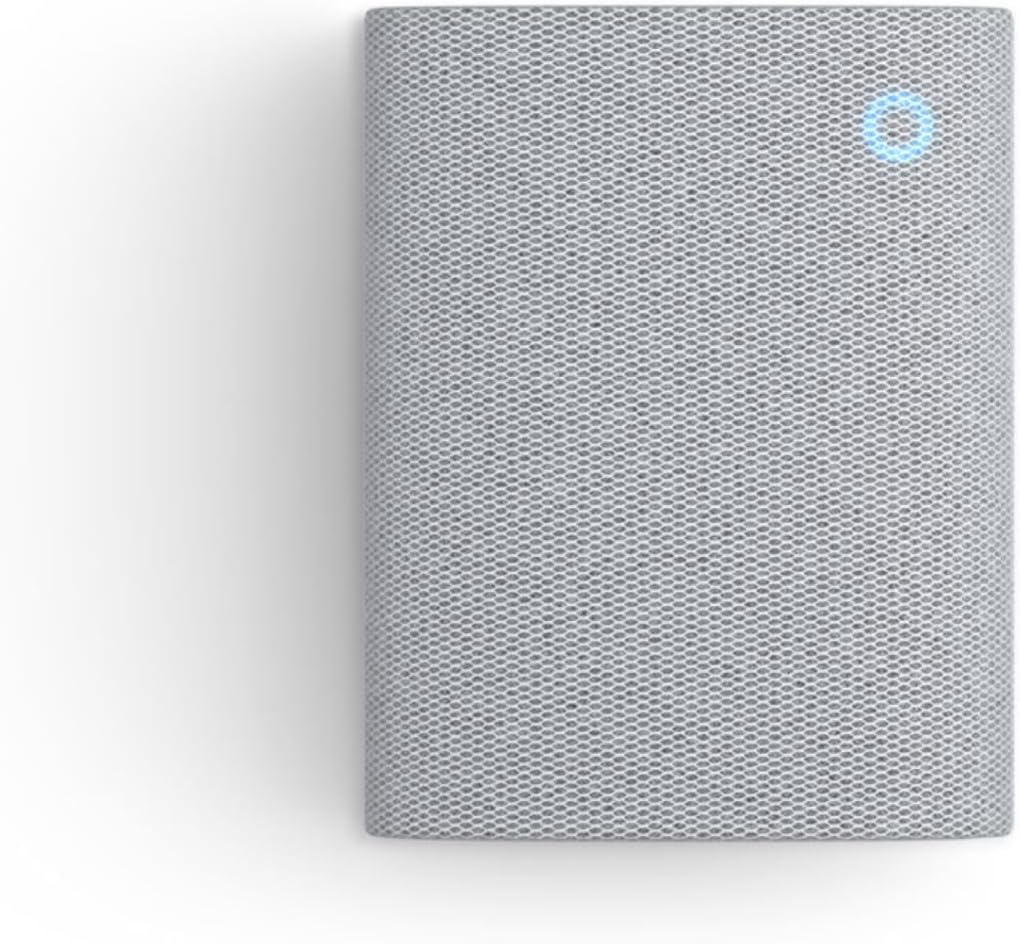
Key specs: Plug-in indoor chime for Ring doorbells and cameras; enhanced audio for real-time alerts; wifi and Bluetooth connectivity for setup; customizable tones; white finish
This is the pick for the overwhelming majority of readers who need anything at all: your Ring doorbell works, your wifi is fine, and you simply want the house to hear the door. It plugs into an outlet and plays a customizable tone on a doorbell press or motion event. Ring’s compatibility list names the Chime (3rd Gen) as working with all existing Ring doorbells and Ring security cameras, so it is not tied to a particular doorbell generation. It is also the current Amazon’s Choice item for this search, which matters less than the compatibility line but does mean it is the easy one to actually get hold of. If you are still choosing the doorbell itself, our wireless video doorbell guide covers that decision separately.
✅ Pros
- Fixes the audibility problem completely, and for the whole household rather than one phone
- Ring lists Chime compatibility across all existing Ring doorbells and cameras
- No subscription is involved in making it ring
- Plug-in setup — no wiring, no drilling, and it moves with you
❌ Cons
- Does nothing whatsoever for a weak wifi signal — that is the Pro’s job
- Consumes a wall outlet in whichever room you want covered
- Redundant if you already keep an Echo in that room
- One unit covers one part of the house; a large or multi-story home may want two
Ring Chime Plus (Newest Model) — the night-light version

Key specs: Plug-in indoor chime with a built-in night-light; crisp audio alerts for select Ring devices; customizable tones; plug-in setup; white finish
The Chime Plus sits between the two, and it is the pick if you want a hallway or landing night-light out of the same outlet. Ring’s setup guide covers Chime Plus alongside the Chime and Chime Pro as a plug-in alert device, and its retail listing describes a built-in night-light and customizable tones. The retail listing describes it as covering select Ring devices, which reads like a limitation. Ring’s own device compatibility list says otherwise, and it is worth checking directly rather than inferring from marketing copy: the list gives the Chime Plus as compatible with all existing Ring doorbells, Ring security cameras, and three Ring sensors — the Window & Door Sensor, the Outside Door Sensor and the Motion Detector (3rd Gen). That is a wider entry than the plain Chime’s, which names doorbells and cameras only. So compatibility is not the thing that decides between these two. The night-light is.
✅ Pros
- Adds a genuine second function — the night-light — to an outlet you were using anyway
- Same plug-in install and same customizable alert behavior as the rest of the range
- Cheaper route to a nightlight than stepping all the way up to the Pro
❌ Cons
- The extra sensor compatibility only matters if you own Ring Alarm sensors; in a doorbell-only household this is the plain Chime with a light on it
- Still no wifi extension, so it does not solve the signal problem
- If you do not want a night-light, you are paying more than the plain Chime for nothing
The Chime Pro Problem We Ran Into
We build these guides around products a reader can actually buy through the link we provide, and the Chime Pro is where that broke down. Ring still documents it fully — its support page describes it as extending your wifi signal to boost network performance for Ring video doorbells and cameras, with dual-band 2.4 GHz and 5 GHz connectivity, a built-in nightlight and adjustable volume, compatible with all Ring video doorbells and security cameras. Ring’s device compatibility list backs that up, and the setup guide notes you choose which Ring devices to associate with the Chime Pro during setup. The product is real and Ring sells it directly.
What we could not do is find it. Across three separate Amazon US catalog searches run for this article on August 16, 2026 — for “ring chime,” for “Ring Chime Pro” and for “ring chime pro wifi extender” — the Chime Pro did not appear in the results at all. What did appear was the current-generation Chime and Chime Plus, plus doorbell bundles pairing a doorbell with a Chime. We are not going to invent an ASIN to fill the slot, and we are not going to point you at a listing we have not confirmed is the product Ring documents.
So the honest position is this. If you want the Chime Pro specifically, buy it from Ring directly — we have no affiliate link to offer you and we would rather say so than send you to a lookalike. If what you actually need is the wifi half of what it does, the section below is the practical alternative, and it is very likely the better-value one, because a chime that extends wifi is a more expensive way to buy an extender than an extender is. That is a recommendation that costs us the sale on this article’s most expensive product, and it is still the right one. And if your problem is a doorbell that does not ring at all, our doorbell troubleshooting guide splits the circuit in half with one quick test.
TP-Link RE315 AC1200 Wi-Fi Extender — the wifi half, honestly

Key specs: Dual-band 2.4 GHz and 5 GHz wifi range extender; rated up to 1,200 Mbps; manufacturer rates coverage to roughly 1,600 sq ft and 32 devices; one Ethernet port; EasyMesh compatible
Read this section with one thing clear: this is not a chime and it will never make a sound. It is here because the Chime Pro’s genuinely distinguishing feature is wifi extension, and a compatible dual-band extender may improve coverage for devices in that part of the house. The result depends on the router, placement and the signal it receives; it is not a guaranteed fix for delayed alerts. Pair it with a plain Chime if you also want indoor sound, and you have reproduced what the Pro does as two boxes. Position it roughly halfway between the router and the doorbell rather than next to the doorbell itself; an extender can only rebroadcast the signal it receives. Our Ring doorbell installation guide covers the network step of setup in more detail.
✅ Pros
- Attacks the actual root cause — weak signal at the doorbell — rather than masking it
- Dual-band 2.4 and 5 GHz, so it serves the 2.4 GHz band Ring doorbells rely on
- Benefits every device in that dead zone, not just Ring hardware
- Has an Ethernet port, so it can also hardwire a nearby device
❌ Cons
- Not a chime. No audible doorbell alert of any kind — you would still need a Chime for that
- Two boxes and two outlets instead of the Pro’s one
- An extender halves throughput on a shared band; a mesh node is better in a large home
- If your signal is already strong at the door, this fixes nothing
Where a Chime Still Beats an Echo
Having argued that many readers need nothing, it is worth being fair about where the Chime is genuinely the better tool than the Echo you already own.
A Chime is a single-purpose device, and that is its advantage. It does not need communication and announcement settings enabled, it does not need Do Not Disturb left off, and it will not go quiet because someone changed an Alexa setting. It plays a short tone rather than a spoken sentence, which cuts through household noise better. It also does not require you to keep a microphone-equipped smart speaker in a room where you would rather not have one — a real consideration for bedrooms and home offices, and the same privacy reasoning we apply in our indoor camera guide. And in a house with no Echo at all, the comparison is moot: the Chime is simply the cheapest route to an audible doorbell.
The Echo route wins on cost when you already own the speaker, on coverage when you own several, and on information — a screen-equipped Echo shows live video for 15 seconds after a press, which no Chime can do. Neither route requires a subscription for basic alerts, so this is not a decision that pushes you toward a Ring plan one way or the other.
Final Recommendation
Check for an Echo first. If you have one in a room you use, switch on Alexa Announcements and spend nothing. If you have a hardwired doorbell that is not a Wired or Peephole Cam, check whether your original in-home chime still rings before buying anything.
If neither applies and you need indoor sound, the Ring Chime (Newest Model) is the right purchase. It is the cheaper of the two and, on Ring’s own compatibility list, covers the same doorbells and cameras the Chime Plus does — the Plus adds a night-light and three Ring sensors, so choose it only if one of those is something you actually want. If your problem is signal rather than sound, do not buy a chime at all — fix the wifi, with a dedicated extender or a mesh node. And if you want the one box that does both, that is the Chime Pro, which you will currently have to buy from Ring directly rather than through us.
For related decisions, our Ring camera lineup guide covers which Ring hardware fits which situation, and our reset walkthrough is the first stop if a chime pairs but then stops responding.
Frequently Asked Questions
Does a Ring Chime need a subscription to work?
No. The Chime plays its alert as a function of the hardware pairing with your Ring device. A Ring plan governs video recording and review, not whether a chime sounds.
Can one Chime cover a whole house?
One unit covers the area it can be heard in, which in practice means one floor or one wing. Households that want coverage upstairs and downstairs generally use two, or lean on Echo speakers already sitting in those rooms.
Will a Chime work if my internet is down?
No. The doorbell reaches the Chime over your network, so an internet or router outage stops the alert. A hardwired doorbell driving its original mechanical in-home chime is the only setup here that keeps ringing without a working network.
Is the Chime Pro discontinued?
Not according to Ring, which still publishes full support documentation and sells it directly. What we found is that it did not surface in our Amazon US catalog searches for this article on August 16, 2026, which is a distribution observation rather than an end-of-life announcement.
Can I use a third-party wifi chime with a Ring doorbell instead?
Several are marketed that way. We have not verified any of them against a current Ring doorbell, so we are not recommending one here; the compatibility Ring itself publishes only covers its own chimes and the tested in-home chime kits.
Does the Chime Pro replace my router?
No. It extends an existing wifi signal for Ring devices rather than serving as your network’s access point, so you still need a working router.
My hardwired doorbell already rings an indoor chime. Do I need a Chime at all?
Probably not. Many wired installs keep ringing the original mechanical chime box in the hallway, and Ring publishes a tested compatibility list of in-home chime kits. The exception is worth knowing before you shop: Ring states that the Video Doorbell Wired and the Peephole Cam are not compatible with in-home chime kits, and points owners of those two models to a Chime or Chime Pro instead.
Does a Chime work with Ring cameras, or only doorbells?
Cameras too. Ring’s device compatibility list names the Chime as working with all existing Ring doorbells and Ring security cameras, and its setup guide has you choose which devices to associate with the chime during setup. So a motion event on a camera can sound it, not just a doorbell press — which is worth thinking about before you associate every camera you own with it.
Sources
Show sources (5)
SafeBode does not yet run an in-house product testing program. This guide is built from manufacturer specifications, official support documentation, current retail listings and verified buyer feedback rather than hands-on testing, and we say so plainly rather than implying testing we have not done.


