Nest Doorbell 2026: Battery or Wired, and Which One Your Wiring Allows
Affiliate Disclosure: This article contains affiliate links. If you buy through these links, we may earn a commission at no extra cost to you. Our editorial opinions are our own and are not influenced by affiliate relationships. Read our full disclosure policy →
Contents
Quick Answer
Your wiring picks the model, not your budget. If you have a working doorbell transformer rated 16-24 V AC and 10-40 VA, buy the wired 3rd-gen Nest Doorbell: it is the only one of the three with Google’s 2025 2K sensor, and wired models are the only Nest doorbells eligible for 24/7 video history at all. If you have no usable wiring, the battery model is your only Nest option, and you should go in knowing Google states plainly that 24/7 video history is not available on it even if you connect it to doorbell wires. Google’s 2025 refresh was wired-only, so a no-wiring buyer is choosing 2021 hardware.
The Wiring Question Comes Before the Model Question
Google has drawn a hard line through the middle of this lineup, and it runs through your house rather than through the spec sheet. Two of the three current models cannot be installed at all without doorbell wiring that meets a specific electrical rating, and the third one is the only escape hatch if yours does not meet it. Everything else — resolution, field of view, which AI features you get — is downstream of that one fact about your house.
It gets sharper than that. Google’s documentation lists which devices support 24/7 video history — continuous recording rather than clips of detected events. Every wired Nest Doorbell is on the supported list; the battery model is on the unsupported list, with the exclusion holding “even with optional wired installation”. So wiring does not just decide which box you open. It decides whether the most substantial paid feature in the range is available to you at all.
Scope that before you go any further, because it is not a feature every household needs. Event clips already answer the ordinary questions: who rang, what was delivered, who picked it up. 24/7 history answers a different one — what happened during the stretch the motion detector never classified as an event. If you have never wanted that, the wiring check below is about video quality and recharging, and you can weigh the three models on those terms alone. If you have, it is the whole purchase, and the section on what the battery model gives up is the one to read.
Which Situation Are You Actually In?
🔌 You have doorbell wiring
- An existing button on the door frame that rings a chime somewhere inside
- A chime box you can hear — mechanical (two or more wires) or digital (wires plus batteries)
- A transformer you can find and read the rating on
- Reading 16-24 V AC and 10-40 VA on that transformer
🔋 You do not have usable wiring
- No doorbell button at the door at all, common in apartments and newer townhomes
- A chime that runs on batteries alone with no wires — Google states these do not work with Nest doorbells
- Wiring that exists but reads below 16 V AC or below 10 VA
- A rental where running new low-voltage wire is not on the table
The left column opens the whole lineup to you. The right column is not a dead end, but it narrows your Nest choice to one product. Google does list a third path for the right-hand column: an indoor power adapter that runs a wired doorbell from a wall outlet with a cable routed to the door, alongside having a professional install a transformer or simply buying the battery model. The adapter route is real and underpublicized, but it means a visible cable through a wall or door frame, which not every household will accept.
The number that matters is printed on the transformer, a small block usually mounted near the breaker panel, on the side of the furnace, or on a basement or attic junction box. This is the step people skip, and then the doorbell arrives without enough power to run. Google names the symptom: when the transformer cannot supply enough power, the doorbell shows a blinking yellow light on the front. That is a wiring diagnosis, not a faulty unit, and returning the doorbell will not fix it.
The Four-Step Wiring Check, Before You Order Anything
1
Find the transformer
Look near the breaker panel, on the furnace, or on a basement or attic junction box. The rating is printed on the body of the block.
2
Read the rating
You want 16-24 V AC and 10-40 VA. Google names that exact range as the requirement for the wired 2nd-gen and 3rd-gen doorbells.
3
Check the chime too
A mechanical chime with two or more wires works. So does a digital chime with wires and batteries. A chime running on batteries alone with no wires does not.
4
Decide from what you found
In range: buy wired. Under-rated: an electrician swaps the transformer, or use the indoor power adapter, or buy the battery model.
Google’s guidance on the swap itself is unambiguous: it names contacting a licensed electrician as the best way to be sure the correct transformer is installed.
One flag for anyone who has swapped a doorbell before and expects this to be familiar: Google requires the wired Nest Doorbell to be used with the chime connector included in the box whenever it is attached to a wired chime. That part is not optional and not interchangeable with the equivalent piece from an older Nest Hello, which long-time owners tend to discover mid-install. Our doorbell transformer voltage guide covers the ratings and what an under-powered transformer does to a camera doorbell.
The Four Numbers That Decide This Purchase
16-24 V AC
Transformer voltage both wired Nest doorbells require
10-40 VA
Power rating required alongside that voltage
10 days
Longest 24/7 video history offered, wired doorbells only
0 days
24/7 video history on the battery model, wired or not
The last two are the pair most buyers do not see until after the box is open.
The Three Nest Doorbells Actually on Sale
Google refreshed its camera line in October 2025, moving the indoor cam, the outdoor cam and the doorbell to 2K HDR video. The important detail for this article is what was not in that refresh: no new battery doorbell was announced. The wired doorbell got a new square 2048×2048 sensor and a 166-degree diagonal view, and the battery model stayed where it has been since 2021. If you cannot wire, you are not choosing between two current generations. You are choosing the older one.
| Wired, 3rd Gen | Battery | Wired, 2nd Gen |
|---|
| Power source | Wired only, 16-24 V AC transformer | Rechargeable battery, wiring optional and only trickle charges it | Wired only, same transformer requirement |
| Video | 2K HDR, 2048×2048 square frame | 960×1280 in a 3:4 vertical frame | HD in a tall frame, below the 3rd gen’s 2K |
| Field of view | 166-degree diagonal | 145-degree diagonal | 145-degree diagonal |
| 24/7 video history | Yes, up to 10 days on the paid Advanced tier | No, and not even when wired | Yes, up to 10 days on the paid Advanced tier |
| Works with no doorbell wiring | Only via the indoor power adapter | Yes, out of the box | Only via the indoor power adapter |
| Ongoing maintenance | None | Periodic recharging, more often in cold weather | None |
Nest Doorbell (Wired, 3rd Gen) — the one to buy if your wiring allows it
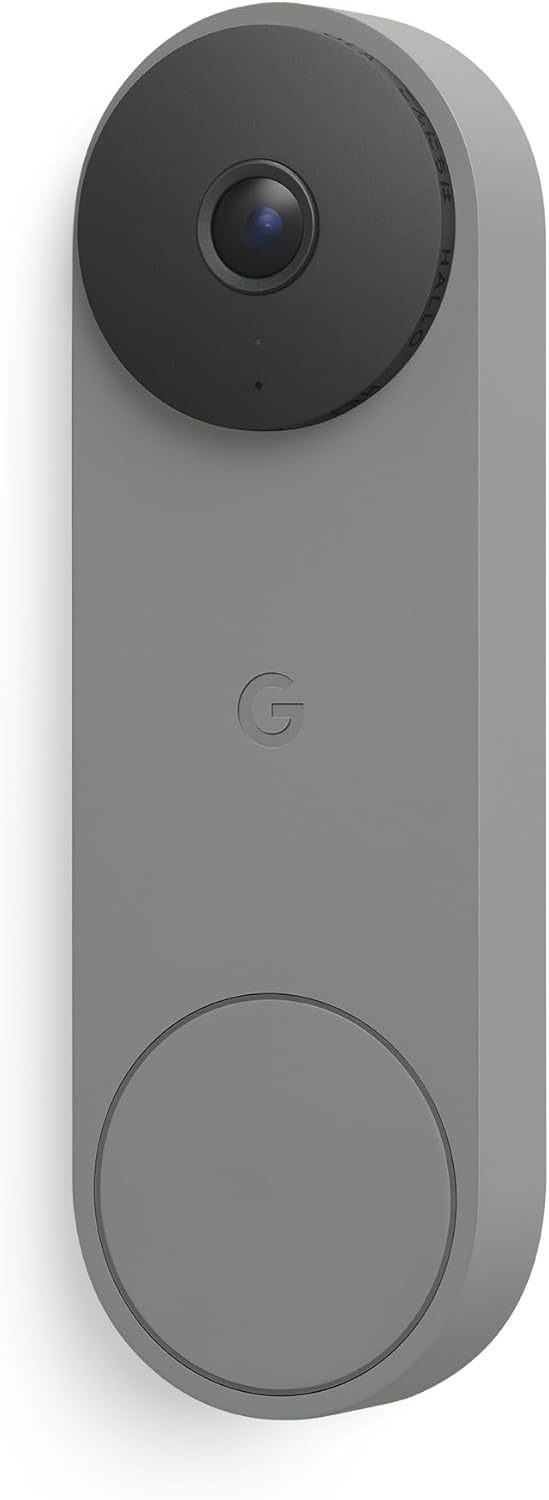
Key specs: 2025 model; 2K HDR video at a 2048×2048 square sensor with a 166-degree diagonal field of view; color night vision; two-way audio; wired only, requires a 16-24 V AC, 10-40 VA doorbell transformer; Google Home app; works with Gemini for Home
This is the current-generation product and the only one of the three carrying Google’s 2025 hardware. What matters is not the resolution number alone but the shape of the frame: a square 2048×2048 sensor with a 166-degree diagonal view, up from 145 degrees on both older models. In doorbell terms the frame reaches further sideways across a porch and further down toward the mat without angling the unit on a wedge. It is also the current Amazon’s Choice pick here. It is new enough that its buyer feedback base is a fraction of the battery model’s, so there is less long-run reliability signal behind it, and the Gemini features Google leads with are not free. If you are weighing the whole Google ecosystem rather than this one device, our Nest versus Ring comparison covers that decision head on.
✅ Pros
- The only current-generation Nest doorbell, and the only one with the 2K square sensor
- 166-degree diagonal view, meaningfully wider than the 145 degrees on both older models
- Eligible for 24/7 video history, which no battery Nest doorbell is
- Wired power means no recharging, ever, and no cold-weather battery drop-off
❌ Cons
- Hard-blocked by wiring: no compliant 16-24 V AC, 10-40 VA transformer means no install
- Its headline Gemini descriptions and searchable history sit on the top paid tier
- Newest of the three, so the least accumulated buyer feedback to judge durability by
- Sold in several colorways; the listing linked here is one specific finish, so check the color before ordering
Nest Doorbell (Battery) — the one to buy if it does not

Key specs: Rechargeable 6,600 mAh battery with optional doorbell-wire connection; 960×1280 video in a 3:4 vertical frame; 145-degree field of view; HDR and night vision; IP54; stores up to one hour of events on the device during an outage; Google Home app
If the transformer check went badly, this is the whole of your Nest shortlist, and it is a genuinely good doorbell that happens to be five years old. The built-in battery means it installs on any door frame with two screws and no electrician. Its 3:4 vertical frame is unusually tall for its generation, which is exactly what you want pointed at a doormat, and it keeps up to an hour of recorded events on the device itself if the wifi or the power drops. The catch is one Google states outright: connecting it to doorbell wires does not convert it into a wired doorbell. The wires trickle charge the battery, the device still runs off that battery, and 24/7 video history stays unavailable. If a doorbell is your first security device rather than an addition, our doorbell versus smart lock comparison is a useful sanity check on where the money goes first.
✅ Pros
- Installs anywhere, with no wiring, no transformer and no electrician
- Tall 3:4 frame is well suited to seeing packages on the ground rather than only faces
- Holds up to an hour of events locally through a wifi or power outage
- Can still be wired if you want it, which removes the recharging chore without changing anything else
❌ Cons
- 24/7 video history is unavailable, and stays unavailable even when wired
- 2021 hardware: 960×1280 and a 145-degree view against the 3rd gen’s 2K and 166 degrees
- Recharging is a recurring task, and cold weather shortens the interval
- Google’s 2025 refresh skipped this model entirely, so it is not on a visible upgrade path
Nest Doorbell (Wired, 2nd Gen) — the cheaper wired route

Key specs: Wired-only doorbell; 145-degree diagonal field of view in a tall frame that reaches deliveries about 8 inches from the door; HDR with color night vision; IP54; dual-band 2.4 GHz and 5 GHz wifi; ships with a chime connector, 20-degree wedge and spacers; built with 43 percent post-consumer recycled materials; Google Home app only
The 2nd-gen wired model is still sold and still supported, and it is the sensible pick for one specific reader: you have good wiring, you want 24/7 video history, and you do not care about the 2K sensor or the Gemini layer. It sits on Google’s supported list for 24/7 history exactly like the 3rd gen does, which is the capability people are actually buying a wired doorbell for. The box is well thought out for a retrofit — chime connector, 20-degree wedge and spacers included — so an awkward door frame is usually solvable without a third-party mount. One note that catches upgraders from the original Nest Hello: this generation runs on the Google Home app and is not compatible with the old Nest app at all. Where you point it matters as much as which one you buy, and our camera placement walkthrough covers the front-door angle properly.
✅ Pros
- Full 24/7 video history eligibility, the same as the 3rd gen
- Wired power, so no recharging and no battery to age out
- Retrofit hardware included in the box: chime connector, 20-degree wedge, spacers
- Tall frame reaches deliveries roughly 8 inches from the door, per Google’s own listing
❌ Cons
- Same wiring gate as the 3rd gen — 16-24 V AC and 10-40 VA or nothing
- 145-degree view and no 2K sensor, so you are buying the older optics deliberately
- Not compatible with the legacy Nest app, which matters if you still run other Nest-app devices
- Being a generation behind, it is the model most likely to be quietly retired first
What the Battery Model Gives Up, and Why It Matters
It is easy to read “no 24/7 video history” as a spec-sheet footnote. It is not. Event history saves clips when the doorbell decides something happened. 24/7 history records continuously and saves everything, which is what you need when the thing you care about is precisely the thing the motion detector did not classify as an event — a car that slowed and moved on, someone standing at the edge of the frame, a package that never triggered a person alert. Google’s own comparison caps that continuous recording at 10 days on the top paid tier, and restricts it to wired cameras and doorbells.
The reason the restriction survives wiring is architectural rather than arbitrary. On the battery model the doorbell wires do not power the device directly; they trickle charge the internal battery, and the doorbell continues to run from that battery. A device running off a cell it is topping up cannot sustain a continuous encode and upload the way a mains-fed one can. Whatever you make of that engineering choice, the effect is fixed: Google lists the battery doorbell as unsupported with the explicit “even with optional wired installation” qualifier, and no subscription tier changes it.
So it is worth naming the household this actually binds, having scoped it at the top. It is the one whose door faces a street or a shared drive, where deliveries are left without anyone ringing, or where something has already gone missing in the gap between two event clips. It is anyone who has opened the app after the fact and found that the moment they wanted was never recorded, because nothing in it looked like a person walking up. For that household the battery model is not a cheaper Nest doorbell; it is a doorbell that cannot do the thing they are buying a doorbell for, and no subscription tier changes it. If that is you, the transformer check is not a preliminary. It is the decision. Since all three depend on a stable connection at the door, it is also worth testing the wifi at the mounting spot before you commit to any of them.
Nest Aware Is Now Google Home Premium
Research this purchase for an hour and you will read a dozen articles referring to Nest Aware and Nest Aware Plus. Those names are retired. On October 1, 2025 Google introduced Google Home Premium as the whole-home subscription that replaces Nest Aware, in two tiers, Standard and Advanced. Older reviews, forum threads and a fair amount of retail packaging still use the old names, so keep the rename in mind reading anything published before late 2025.
What each tier actually contains, from Google’s own subscription comparison: Standard covers event recordings stored for 30 days, familiar face detection and emergency calling in the US. Advanced extends event storage to 60 days and adds the Gemini layer — AI notifications, AI event descriptions, the Home Brief summary and searchable video history. Both tiers include up to 10 days of 24/7 video history, and Google notes that part applies to wired cameras and doorbells only. That last clause is the same wall the battery model hits, expressed from the subscription side.
Without any subscription the doorbells still do a lot: live view, two-way talk and listen, activity zones, and person, animal, vehicle and motion alerts all keep working. The free video allowance is where it gets murky, because it is not one number across the lineup — Google’s comparison lists short event video previews retained for a few hours on newer devices alongside a longer event history on older ones. Gizmodo’s hands-on with the 2025 doorbell put the practical version plainly: without paying you get generic alerts rather than notification previews, and package detection sits behind the subscription.
One more thing about the Gemini tier, since it is what Google leads its marketing with. Gizmodo’s reviewer found the AI descriptions repeatedly misidentified pets and produced what they called weird and wrong accounts of what the camera had recorded. That is one reviewer’s experience rather than a verdict, but it is first-hand, and it argues for treating the Advanced tier as a nice-to-have rather than the reason to choose Nest. If a subscription-free doorbell is what you are really after, our wireless video doorbell roundup compares the options that store footage locally instead.
A small inconsistency we ran into and will pass on rather than tidy away: Google’s own help pages have not fully caught up with the rename. The page listing which devices support 24/7 video history describes the requirement in Google Home Premium terms, while a closely related page on the same feature still says Nest Aware Plus. Same entitlement, two vocabularies live at once. Expect to translate between them if you cross-check specifications yourself.
Final Recommendation
There is no recommendation to give you until you have read the transformer, because the answer is a function of that number rather than of your budget or your preferences. Go and find it, then take the branch you land in.
If it reads 16-24 V AC and 10-40 VA and your chime has wires, buy the Nest Doorbell (Wired, 3rd Gen). It is the only current-generation Nest doorbell, its square 2K sensor and 166-degree view are a real improvement over the 145 degrees on everything older, and being wired keeps 24/7 video history on the table whether or not you ever switch it on. The one substitution inside this branch: if the 2K sensor and the Gemini layer genuinely do not interest you, the Nest Doorbell (Wired, 2nd Gen) keeps the capability that actually distinguishes a wired Nest doorbell and drops the parts you were not going to use.
If it reads under-rated, or there is no doorbell wiring at all, you have a wiring decision to make before you have a product decision. Google’s own routes out are an electrician bringing the transformer up to spec, or the indoor power adapter running a wired doorbell from a wall outlet. Take either and the branch above reopens, which is the right move if 24/7 history is why you are here at all. Refuse both — a rental, a visible cable you will not accept, an electrician you do not want to call — and the Nest Doorbell (Battery) is your Nest, on stated terms: 2021 optics, periodic recharging, and no 24/7 history at any subscription tier, wired or not.
What sits outside the branch entirely is the subscription marketing. Every tier applies to all three doorbells identically apart from that one hardware-gated feature, so power the doorbell your house can power and decide about Google Home Premium afterwards. If you are building the rest of a Nest setup around it, our Nest outdoor camera guide covers the cameras that pair with these doorbells, and our indoor camera guide covers what to put inside.
Frequently Asked Questions
Can I wire the Nest Doorbell (battery) and get continuous recording?
No. You can wire it, and doing so keeps the battery topped up so you stop recharging by hand, but Google lists the battery doorbell as unsupported for 24/7 video history and states that the exclusion applies even with wired installation. The wires trickle charge the battery rather than powering the doorbell directly.
Is there a 3rd-generation battery Nest Doorbell?
Not as of this writing. Google’s October 2025 camera refresh moved the indoor cam, the outdoor cam and the wired doorbell to 2K, and did not include a new battery doorbell. A buyer with no wiring is choosing hardware that launched in 2021.
Can I install a wired Nest Doorbell if my house has no doorbell wiring at all?
Yes, but only by adding power some other way. Google lists three routes for a home without usable wiring: have a professional install a transformer and run the wiring, use the indoor power adapter that feeds a wired doorbell from a wall outlet, or buy the battery model. The adapter route works, but it means a visible cable running through a wall or door frame, which is why most people in this situation end up on the battery doorbell.
What if my chime runs on batteries with no wires?
Then it is not compatible. Google states that doorbell chimes using batteries alone with no wires do not work with Nest doorbells. A mechanical chime with two or more wires works, and so does a digital chime that has both wires and batteries.
Do I need a subscription for the doorbell to work at all?
No. Live view, two-way talk and listen, activity zones and basic person, animal, vehicle and motion alerts all work without one. What a subscription buys is longer stored video history, familiar face detection, the 24/7 continuous recording option on wired models, and the Gemini description and search features.
Does the wired Nest Doorbell still ring my existing indoor chime?
Yes, provided the chime is a compatible wired type and you install the chime connector that ships in the box. That connector is required for wired chime operation and is not interchangeable with the equivalent part from an older Nest Hello.
Will the wired Nest doorbells work with the old Nest app?
No. The current wired doorbells are set up and managed in the Google Home app and are not compatible with the legacy Nest app or the old Nest website. That is a real friction point for households still running older Nest-app hardware, because it means two apps side by side rather than one.
What does a blinking yellow light on the doorbell mean?
Google identifies it as the doorbell not receiving enough power, which points at an under-rated transformer rather than a faulty unit. Replacing the doorbell will not resolve it; the transformer needs to be brought up to the required rating.
Sources
Show sources (7)
- [1] Google Home and Nest Help — “Upgrade your transformer for Nest Doorbell (wired, 2nd gen or 3rd gen),” support.google.com/googlehome/answer/12153643
- [2] Google Home and Nest Help — “Check Google Nest doorbell compatibility,” support.google.com/googlehome/answer/9247132
- [3] Google Home and Nest Help — “Learn about event and 24/7 video history,” support.google.com/googlehome/answer/9681538
- [4] Google Home and Nest Help — “Learn what you get with a Google Home Premium subscription,” support.google.com/googlehome/answer/9233159
- [5] Google — “We’re introducing the new Google Home Premium subscription plus new benefits for AI Pro and Ultra subscribers,” blog.google, October 1, 2025
- [6] 9to5Google — “Google Nest Doorbell, Indoor, and Outdoor Cams get 2K video,” October 1, 2025
- [7] Gizmodo — “Google Nest Doorbell Cam (2025) Review: I’m So Tired of Subscriptions”
SafeBode does not yet run an in-house product testing program. This guide is built from manufacturer specifications, official support documentation, current retail listings and verified buyer feedback rather than hands-on testing, and we say so plainly rather than implying testing we have not done.


