Ring Indoor Cam 2026: Which of the Three Models Fits Your Room
Affiliate Disclosure: This article contains affiliate links. If you buy through these links, we may earn a commission at no extra cost to you. Our editorial opinions are our own and are not influenced by affiliate relationships. Read our full disclosure policy →
Contents
Quick Answer
Ring sells three genuinely different indoor cameras, and the differences are about coverage, not quality. The Indoor Cam (2nd Gen) is 1080p and fits almost anywhere – the right answer for most rooms. The Indoor Cam Plus adds 2K and manual zoom, which matters when you need to read something rather than just see it. The Pan-Tilt Indoor Cam trades resolution back to 1080p but adds 360 degrees of motorized pan and 169 degrees of tilt, so one camera covers a whole open-plan room. Pick by room shape first, resolution second.
Three Cameras, Not Three Price Tiers
The usual way to present a lineup like this is good, better, best. That framing is wrong here, and following it leads people to the wrong camera. The Pan-Tilt is the most capable camera in the range for some rooms and the worst choice for others, and it records at 1080p while the Indoor Cam Plus records at 2K. There is no single ranking.
What actually separates them is how much of a room one unit can watch, and how much detail it resolves in the part it is watching. Those two things trade against each other in Ring’s current lineup, so the honest question is which one your room needs more of.
Start from the room, not the spec sheet
You need detail in a fixed spot
- A hallway or entry where you want to identify faces
- A desk, safe, or cabinet you want to watch closely
- A nursery where you want to see clearly at night
- Anywhere you might need to read a label, plate or screen
You need coverage across a space
- An open-plan living room with several approaches
- A room where the interesting thing moves around
- A shop floor or office where one fixed angle leaves blind spots
- Anywhere you would otherwise buy two cameras
Coverage Is the Real Decision
Ring publishes the numbers, and they explain the tradeoff cleanly. The Indoor Cam Plus sees 138 degrees diagonally, 115 horizontally and 60 vertically from a fixed position. The Pan-Tilt’s camera sees 143 degrees diagonally – similar – but sits on a motor giving 360 degrees of pan and 169 degrees of tilt. In other words, the Plus sees a wide slice sharply; the Pan-Tilt sees any slice, one at a time, in less detail.
Coverage and detail, from Ring’s own spec sheets
2K
Indoor Cam Plus resolution, 2560×1440
1080p
Pan-Tilt Indoor Cam resolution
115°
Indoor Cam Plus horizontal field of view
360°
Pan-Tilt pan coverage, plus 169° of tilt
The Plus resolves more in a fixed frame. The Pan-Tilt reaches anywhere in the room. Neither does both.
There is a catch with motorized cameras that nobody puts on the box: a Pan-Tilt camera is only pointing one direction at a time. If it is facing the window when someone comes through the door, it has to notice and turn. For a room you actively watch and steer, that is a feature. For unattended recording of a single entry point, a fixed camera pointed at the right thing beats a motorized one pointed at the wrong thing.
Specifications Side by Side
| Specification | Indoor Cam (2nd Gen) | Indoor Cam Plus | Pan-Tilt Indoor Cam |
|---|
| Video | 1080p HD | 2K, 2560×1440, manual zoom | 1080p HD, Color Night Vision |
| Field of view | Fixed | 138° diagonal, 115° horizontal, 60° vertical | 143° diagonal camera |
| Movement | None | None | 360° pan, 169° tilt |
| Siren | Remote-activated | 75 dB at 3 ft | 72 dB at 1 m |
| Privacy cover | Manual cover | Lens cover included | Built-in privacy cover |
| Power | Plug-in USB | USB-C adapter, 6.5 ft cable | Plug-in USB-C |
| Wifi | 2.4 GHz | 2.4 GHz | 2.4 GHz |
| Size | Smallest of the three | 1.9 x 1.9 x 3.8 in | 2.37 x 2.37 x 5.78 in |
| 24/7 Recording eligible | Yes, with add-on | Yes, with add-on | Yes, with add-on |
Ring Indoor Cam (2nd Gen) — the default for most rooms
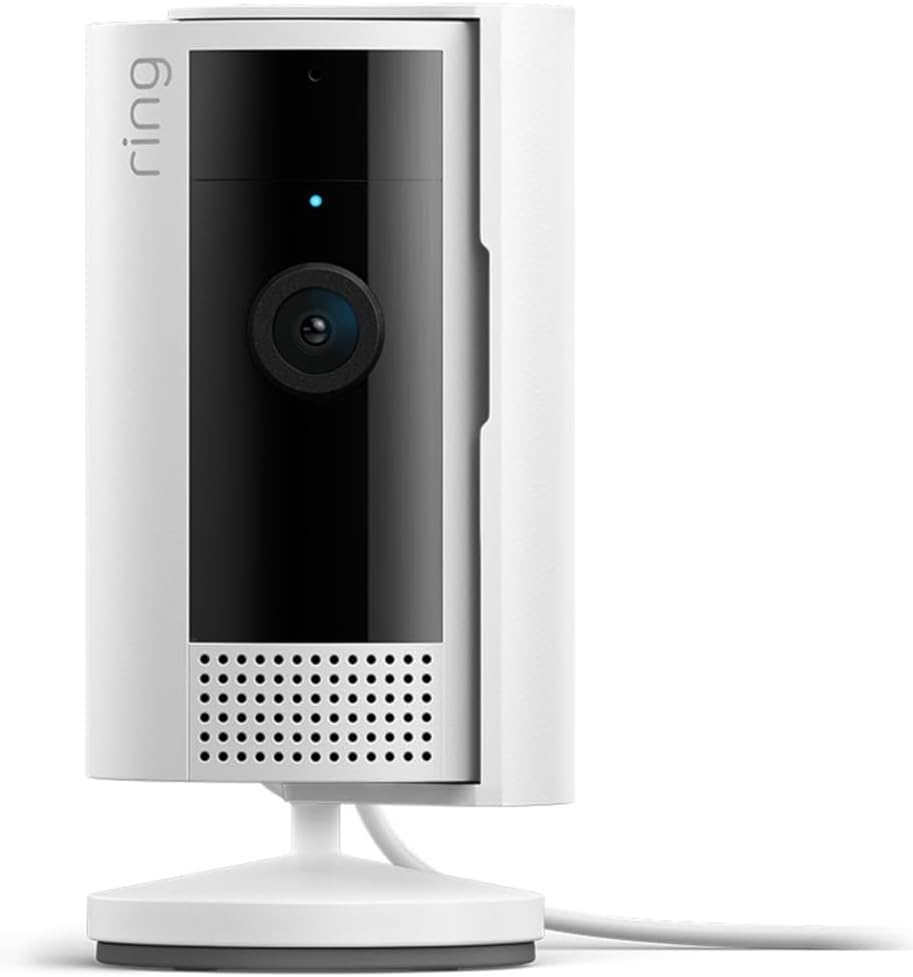
Key specs: 1080p HD indoor camera with a manual privacy cover; plug-in USB power; Two-Way Talk; the smallest and least expensive camera in Ring’s indoor lineup, and by a wide margin the most-reviewed
This is the camera to buy unless you have a specific reason not to. It is 1080p, it is the smallest of the three, it plugs in over USB, and it carries a review base far larger than the other two combined – which for a camera that has been in the lineup for years is a reasonable signal that it does the ordinary job without drama. At indoor distances 1080p resolves faces and activity perfectly well; the resolution argument only starts to matter when you need to crop in on something small. It also has the manual privacy cover, which is the feature people who put a camera in a living space actually end up using daily.
✅ Pros
- Least expensive way into Ring’s indoor lineup
- Physically the smallest – easiest to place discreetly
- Manual privacy cover for a lived-in room
- 1080p is genuinely enough at indoor distances
- Much the largest review base of the three
❌ Cons
- Fixed angle – no pan, no tilt
- No manual zoom, so cropping in loses detail
- 2.4 GHz wifi only
- Needs a nearby outlet like all three
Ring Indoor Cam Plus — when you need to read detail
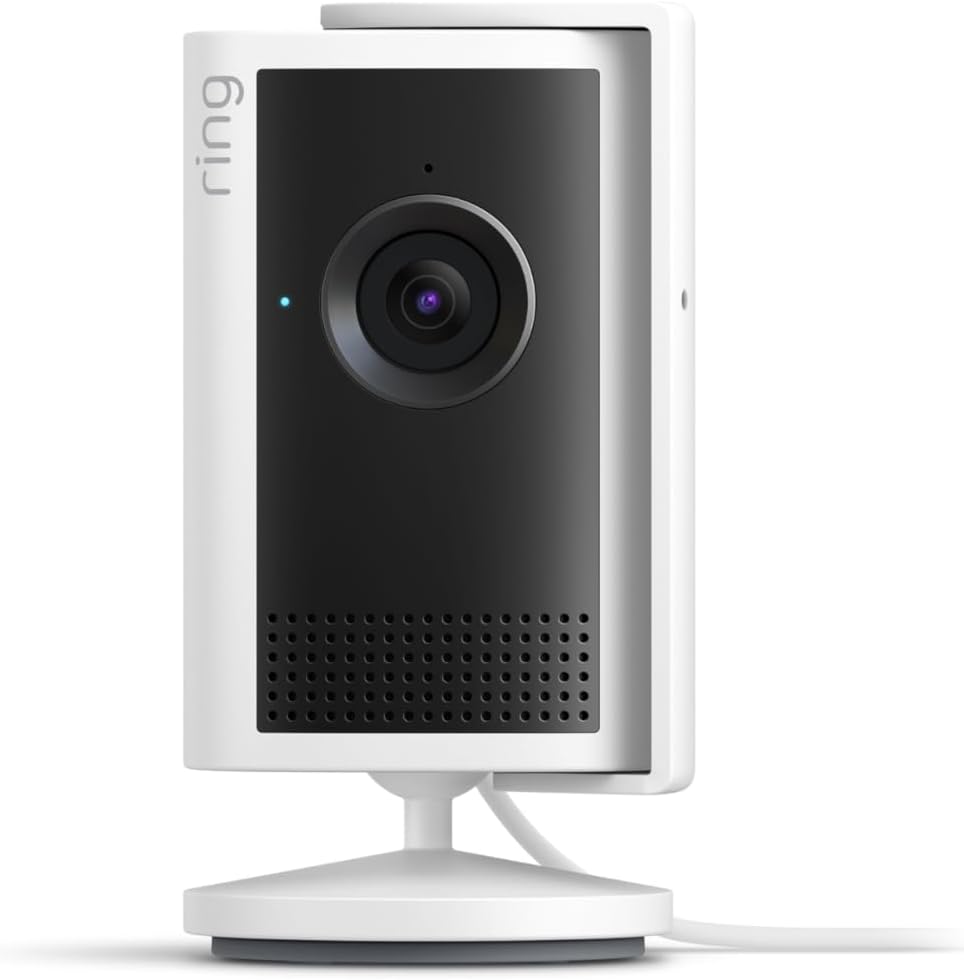
Key specs: 2K video at 2560×1440 with manual zoom and night vision; 138 degrees diagonal, 115 horizontal, 60 vertical field of view; remote-activated 75 dB siren measured at 3 ft; 1.9 x 1.9 x 3.8 in; USB-C power adapter; 2.4 GHz wifi; rated for indoor use only, -4F to 113F
The Plus is the one to pick when the camera has a specific job that involves detail. At 2K (2560×1440) with manual zoom it holds up when you crop into the frame, which is the difference between knowing someone was at the cabinet and knowing who. Ring publishes a 138 degree diagonal, 115 horizontal and 60 vertical field of view for it, along with a remote-activated 75 dB siren measured at three feet – loud enough to startle, not loud enough to be a deterrent from outside the room. Two honest constraints worth knowing before you buy: it is rated for indoor use only, -4F to 113F, and Ring recommends a minimum 5 Mbps upload speed, noting video resolution varies with available bandwidth. A 2K camera on a weak connection is not a 2K camera.
✅ Pros
- 2K resolution with manual zoom that survives cropping
- Published field of view, siren level and temperature range
- Compact at 1.9 x 1.9 x 3.8 in
- Lens cover included in the box
- Person and Vehicle Detection and Video Search available
❌ Cons
- Indoor use only – not a camera you can move outside
- Needs roughly 5 Mbps upload to hold 2K
- 2.4 GHz wifi only, no 5 GHz option
- Several of its smart features require a subscription
Ring Pan-Tilt Indoor Cam — when one angle is not enough
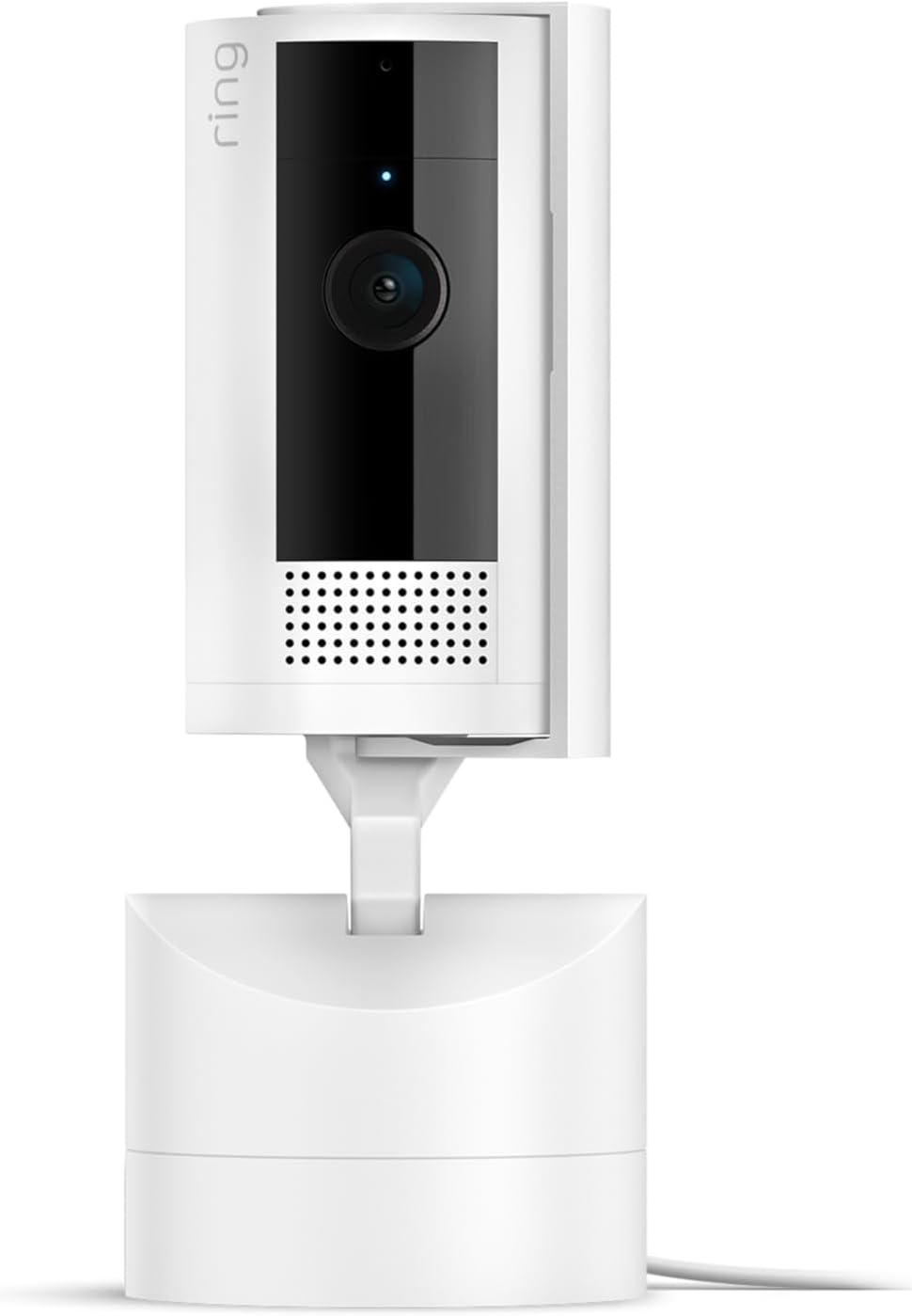
Key specs: 1080p HD with Color Night Vision; 143 degrees diagonal camera field of view plus 360 degrees of motorized pan and 169 degrees of tilt; built-in privacy cover; remote-activated 72 dB siren measured at 1 m; 2.37 x 2.37 x 5.78 in; 2.4 GHz wifi
The Pan-Tilt is the only camera here that can look somewhere else. Ring gives it 360 degrees of pan and 169 degrees of tilt on a motorized base, with a 143 degree diagonal camera field of view, Color Night Vision, and a built-in privacy cover. In an open-plan room, or anywhere you would otherwise be shopping for a second camera, that is a genuinely different proposition. It also has the most convincing privacy story in the lineup, because the cover is built into the mechanism rather than being a sticker you slide. The honest tradeoffs: it records at 1080p rather than 2K, it is the largest of the three at 5.78 inches tall, and its siren is quieter at 72 dB measured at one meter.
✅ Pros
- 360° pan and 169° tilt from one unit
- Built-in privacy cover, not an add-on
- Color Night Vision
- Replaces two fixed cameras in an open-plan room
- Widest single-frame diagonal of the three at 143°
❌ Cons
- 1080p, not 2K – a step down from the Plus
- Only points one way at a time
- Largest and most visible of the three
- Quieter siren than the Plus at 72 dB
The Privacy Cover Is Not a Gimmick
Every camera in this lineup ships with some form of physical lens cover, and it is the feature most worth caring about on a camera that lives in a room where people relax. Software toggles depend on the software being right; a piece of plastic over the lens does not. The Plus includes a lens cover in the box, and the Pan-Tilt’s is built into the body.
This matters more indoors than out. An outdoor camera watches a space nobody expects privacy in. An indoor camera watches your living room, and the household members who did not choose to buy it are entitled to a way of switching it off that they can see working. If you are placing cameras inside a shared home, our room-by-room placement walkthrough covers the rooms where a camera creates more problems than it solves.
What These Cameras Do Without a Subscription
The same rule applies to all three, and it is the thing most likely to disappoint someone who buys on price. Without a Ring subscription you can view live video and respond to alerts as they happen, but a subscription is required to review recorded video, and events are only recorded after you subscribe. There is no local storage option on any of these cameras.
Storage length is set per device, and in the US defaults to 60 days for 1080p and 2K cameras – which covers all three of these – adjustable from one day up to 180. Several of the Plus’s headline features, including Video Search and Person and Vehicle Detection, are subscription-gated rather than built in. We break down what each 2026 plan tier actually covers in our guide to Ring’s subscription plans, and if the recurring cost is the sticking point, our wider indoor camera roundup is the more useful comparison.
If You Want 24/7 Recording, Read This First
All three of these are on Ring’s eligibility list for 24/7 Recording, which is easy to read as a reason to buy. Three conditions come with it and each one surprises somebody.
What 24/7 Recording actually requires
1
Continuous power
The camera must be hardwired, plugged in or on PoE. All three indoor cams plug in, so this one is free here.
2
A Ring Protect subscription
The base plan is a prerequisite, not an alternative.
3
A per-camera add-on
24/7 Recording is bought separately for each camera you want it on, and is capped at 10 devices per location.
4
A 14-day ceiling
Continuous footage is held for up to 14 days – shorter than the 60-day default for event clips on the same camera.
The last one catches people. Continuous recording produces the shortest-lived footage in the Ring system.
Where to Put an Indoor Camera
Two placement mistakes account for most disappointing indoor camera footage, and neither is about the camera. The first is pointing one through a window – glass reflects the camera’s own night-vision illumination straight back into the lens, and passive infrared motion sensing does not see through it at all. If you want to watch outside, buy an outdoor camera; our Ring outdoor camera comparison covers that lineup.
The second is mounting too high. A camera above head height in a hallway captures the tops of heads, which is unhelpful for identification. Around eye level, angled slightly down, covering the space between the door and the rest of the house, is the placement that actually produces usable footage. For a whole-home plan rather than a single room, our wireless camera systems guide walks through the priority order.
Final Recommendation
Buy the Ring Indoor Cam (2nd Gen). For the overwhelming majority of indoor uses – a hallway, an entry, a nursery, a home office – 1080p at indoor distance is enough to see what happened and who did it, and this is the smallest, cheapest and most-proven camera in the lineup. Spending more on resolution you cannot use in a room you already see clearly is the most common mistake in this category.
Choose the Indoor Cam Plus when the camera has a job that involves reading detail rather than observing activity – watching a specific cabinet, a register, a doorway where identification actually matters – and only if your upload speed can carry it, since Ring is explicit that resolution varies with bandwidth and recommends at least 5 Mbps. Choose the Pan-Tilt Indoor Cam when one fixed angle genuinely cannot cover the room and you would otherwise buy two cameras, accepting 1080p as the price of 360 degrees of reach.
What would change this recommendation entirely: none of these record anything without a subscription, and none of them have local storage. If a recurring bill is a dealbreaker, do not buy the cheapest Ring – buy a camera from a platform that writes to a card or a hub, because no amount of choosing between these three solves that problem.
SafeBode does not yet run an in-house product testing program. This guide is built from manufacturer specifications, official support documentation, current retail listings and verified buyer feedback rather than hands-on testing, and we say so plainly rather than implying testing we have not done.
Frequently Asked Questions
Is 2K actually better than 1080p on an indoor camera?
Only when you need to crop into the frame. At normal indoor distances, both resolve faces and activity clearly. The 2K model’s manual zoom is what makes the extra pixels useful, not the pixel count on its own – and Ring notes resolution varies with your bandwidth.
Can any of these record without a subscription?
No. Live view and real-time alerts work unsubscribed, but recorded video requires a plan and events are only captured after you subscribe. None of the three has a memory card slot.
Does the Pan-Tilt camera follow people automatically?
Ring publishes 360 degrees of pan and 169 degrees of tilt on a motorized base, but treat the movement as something you steer rather than something that tracks for you. The practical limit is that it only points one direction at a time.
Can I use an indoor Ring camera outside under a porch?
Ring rates the Indoor Cam Plus for indoor use only, -4F to 113F. A covered porch is still outdoors as far as humidity and temperature swings are concerned, so use an outdoor-rated camera instead.
Will these work on 5 GHz wifi?
No. All three are 2.4 GHz cameras. If your router broadcasts a single combined network name, setup usually still works, but the camera will connect on 2.4 GHz.
How loud is the siren, really?
Ring publishes 75 dB at three feet for the Indoor Cam Plus and 72 dB at one meter for the Pan-Tilt. That is enough to startle someone in the room and not enough to alert a neighbor – treat it as a deterrent for the person standing there, not an alarm.
How long does Ring keep my indoor footage?
The US default is 60 days for 1080p and 2K cameras, and you can set anything from one day to 180 days per device. Continuous 24/7 recording is the exception and is capped at 14 days.
Do the privacy covers actually stop recording?
The cover blocks the lens physically, which is the point – it does not depend on software behaving correctly. Audio is a separate setting in the app, so covering the lens does not by itself mute the microphone.
Sources
Show sources (5)


