Best Wired Video Doorbells 2026: Three Picks, Three Different Reasons to Skip Batteries
Affiliate Disclosure: This article contains affiliate links. If you buy through these links, we may earn a commission at no extra cost to you. Our editorial opinions are our own and are not influenced by affiliate relationships. Read our full disclosure policy →
Contents
Quick Answer
A wired doorbell trades one afternoon of installation for never thinking about the device again — no charging, no seasonal battery drop-off, no missed events because the cell was flat. For most homes with existing doorbell wiring the Ring Wired Doorbell 4K Pro is the pick: it connects to the wires already behind your existing button, and the resolution is where the category has actually moved forward. Choose the Wyze Video Doorbell v2 if you want the same permanence for far less and can live in a smaller app ecosystem, and the Reolink Video Doorbell PoE if the point is to never pay a subscription and you can run an Ethernet cable rather than rely on doorbell wiring.
Why Anyone Still Buys a Wired Doorbell
The battery doorbell won the marketing argument years ago, and for renters and wire-free porches it genuinely is the right answer. But the reasons to hardwire have not gone away, and they are all the same reason wearing different clothes: a doorbell that is permanently powered behaves differently from one that is rationing.
What Constant Power Actually Changes
Wired doorbells get to
- Stay awake, rather than waking on motion and missing the approach
- Stream live view on demand without a battery penalty
- Skip the winter drop-off in run time that every battery device has
- Never need taking off the wall to charge
Battery doorbells get to
- Go anywhere, including rentals and porches with no wiring
- Install in minutes with no electrical work
- Survive a house power cut on their own charge
- Move with you when you leave
If you are weighing the two rather than committed to wiring, our wireless video doorbell roundup covers the battery side of that argument properly. This guide assumes you have decided to wire.
There Are Two Kinds of Wired, and They Are Not Interchangeable
This is the distinction that trips up most first-time buyers, and it decides which of the three picks below you can actually install. Doorbell-wired models reuse the low-voltage wiring already behind your existing button, fed by a transformer somewhere in the house. PoE models ignore doorbell wiring entirely and take power and data down a single Ethernet cable from a switch or injector.
Which Kind Fits Your House
1
Do you have an existing wired button?
If a button on the frame currently rings a chime inside, you have doorbell wiring and a transformer. That is the common case.
2
Is the transformer up to it?
Camera doorbells draw more than a mechanical button ever did. An undersized transformer produces the classic symptoms: reboots, a dim picture, a chime that will not ring.
3
Could you run Ethernet instead?
If the porch is reachable from a basement, attic or existing network run, PoE sidesteps the transformer question completely and brings a wired network connection with it.
4
Neither?
Then this is the wrong category and a battery model is the honest answer, not a wired one on an adapter.
The transformer point is the one that generates most of the disappointment in this category. It is worth reading our doorbell transformer voltage guide before you buy anything, because the fix is cheap when you know about it in advance and infuriating when you discover it with the old button already off the wall.
Ring Wired Doorbell 4K Pro — best overall
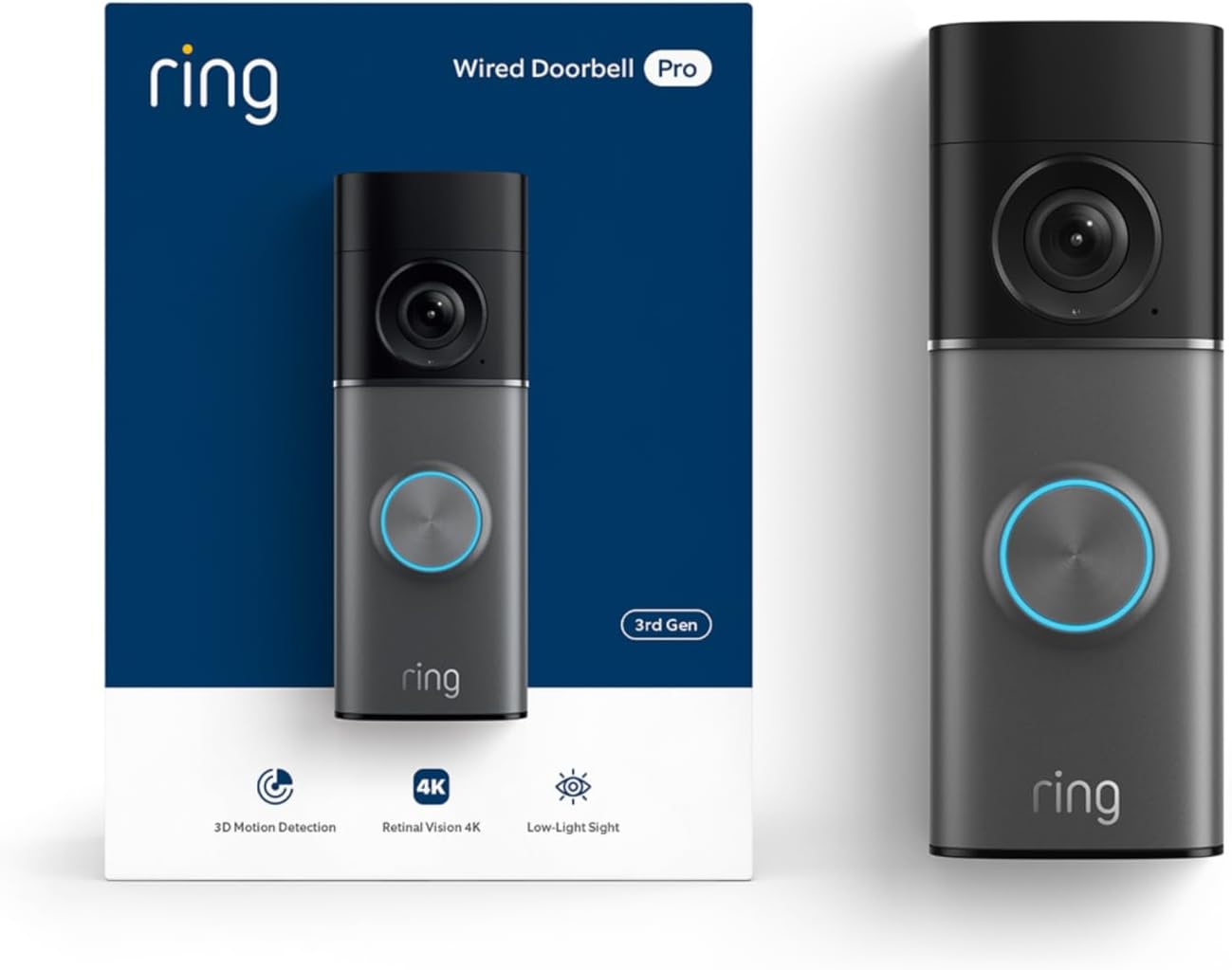
Key specs: 4K doorbell camera with up to 10x enhanced zoom and head-to-toe view; color night vision that adapts to no-light conditions; installs by disconnecting the existing doorbell button and connecting the existing doorbell wiring to the back of the unit
This is the wired doorbell to buy if you want the best picture and you already have doorbell wiring. Ring’s own installation description is exactly the job most people are expecting: disconnect the existing doorbell button outside, connect the existing doorbell wiring to the back of the unit. What you get for it is the sharpest image in the category, with up to 10x enhanced zoom and head-to-toe framing so a package on the step is in shot rather than below it. Night performance is treated as a separate engineering problem rather than a footnote: Ring describes a true-color view when there is streetlight to work with, adapting to no-light conditions and pulling back the overexposure that ruins close-up faces. The honest caveat is the one that applies to the whole brand rather than this model — the features people assume are included are tied to a plan.
✅ Pros
- Highest resolution in this comparison, with up to 10x zoom
- Head-to-toe framing that includes the doorstep
- Color night vision that adapts to no-light conditions
- Installs on existing doorbell wiring
- The largest accessory and integration ecosystem of the three
❌ Cons
- Recorded video and smart alerts lean on a subscription
- Most expensive of the three by a wide margin
- Needs a transformer that can actually feed it
Wyze Video Doorbell v2 — best value on existing wiring
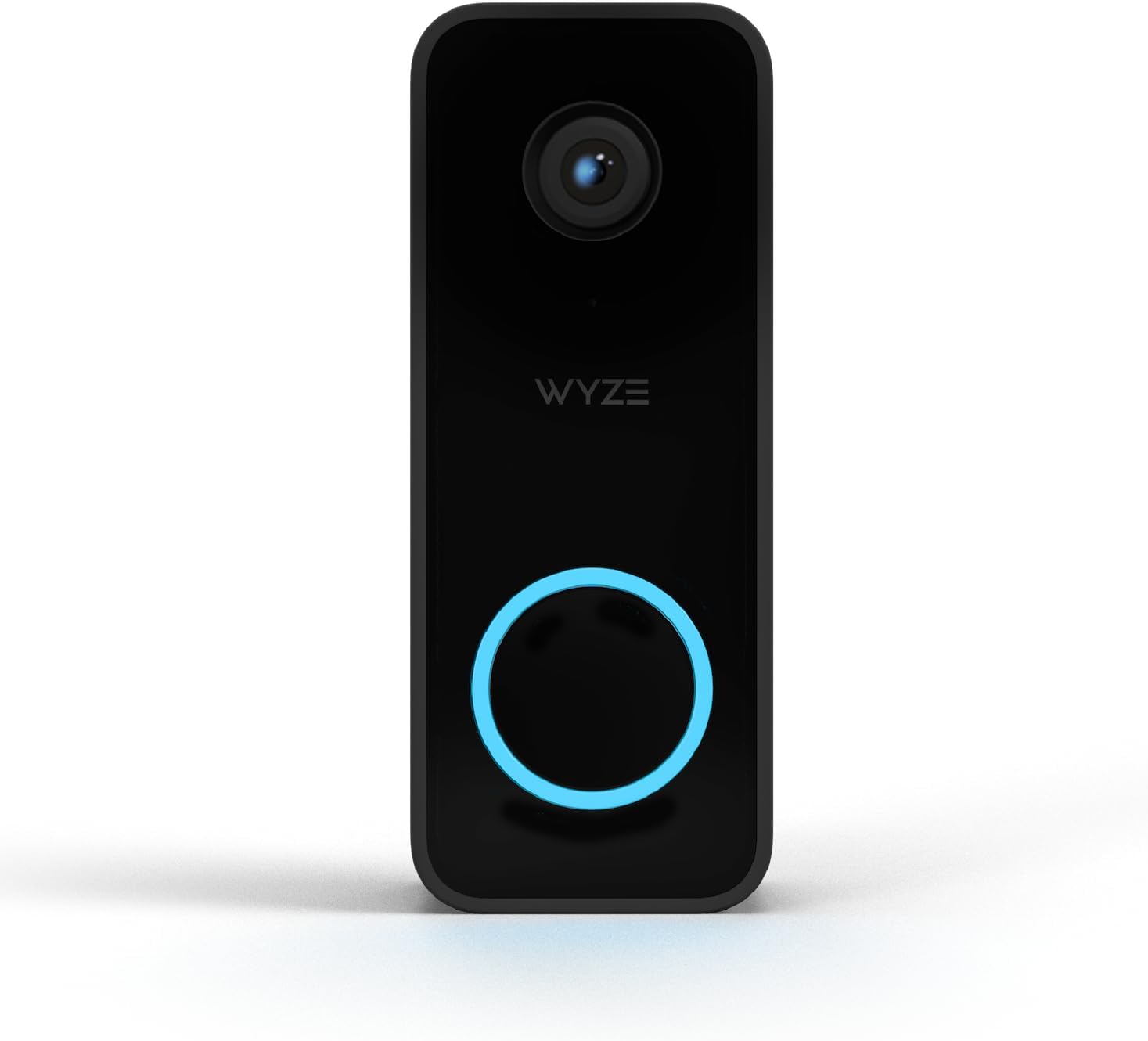
Key specs: 2K wired smart doorbell that requires existing doorbell wiring; ships with a chime controller; records to a microSD card, with the Cam Plus subscription optional rather than required for basic operation
The Wyze is the pick when the goal is a permanently powered doorbell rather than the best possible image. It is explicitly a wired product — Wyze requires existing doorbell wiring rather than offering a battery option — and it ships with a chime controller in the box, which is the part people forget to budget for on other brands. Recording goes to a microSD card, with Cam Plus offered as an optional layer rather than the only way to see yesterday’s footage. The trade-off is ecosystem: Wyze’s accessory range and third-party integrations are narrower, and if the rest of your home is already one brand this will sit outside it.
✅ Pros
- Wired permanence at a fraction of the flagship price
- Chime controller included in the box
- microSD recording, so a subscription is optional
- 2K resolution, comfortably enough for a doorstep
- Simple, fast setup on existing wiring
❌ Cons
- Requires existing doorbell wiring — no battery option
- Smaller ecosystem than Ring
- Advanced detection features still sit behind Cam Plus
Reolink Video Doorbell PoE — best for no subscription, ever
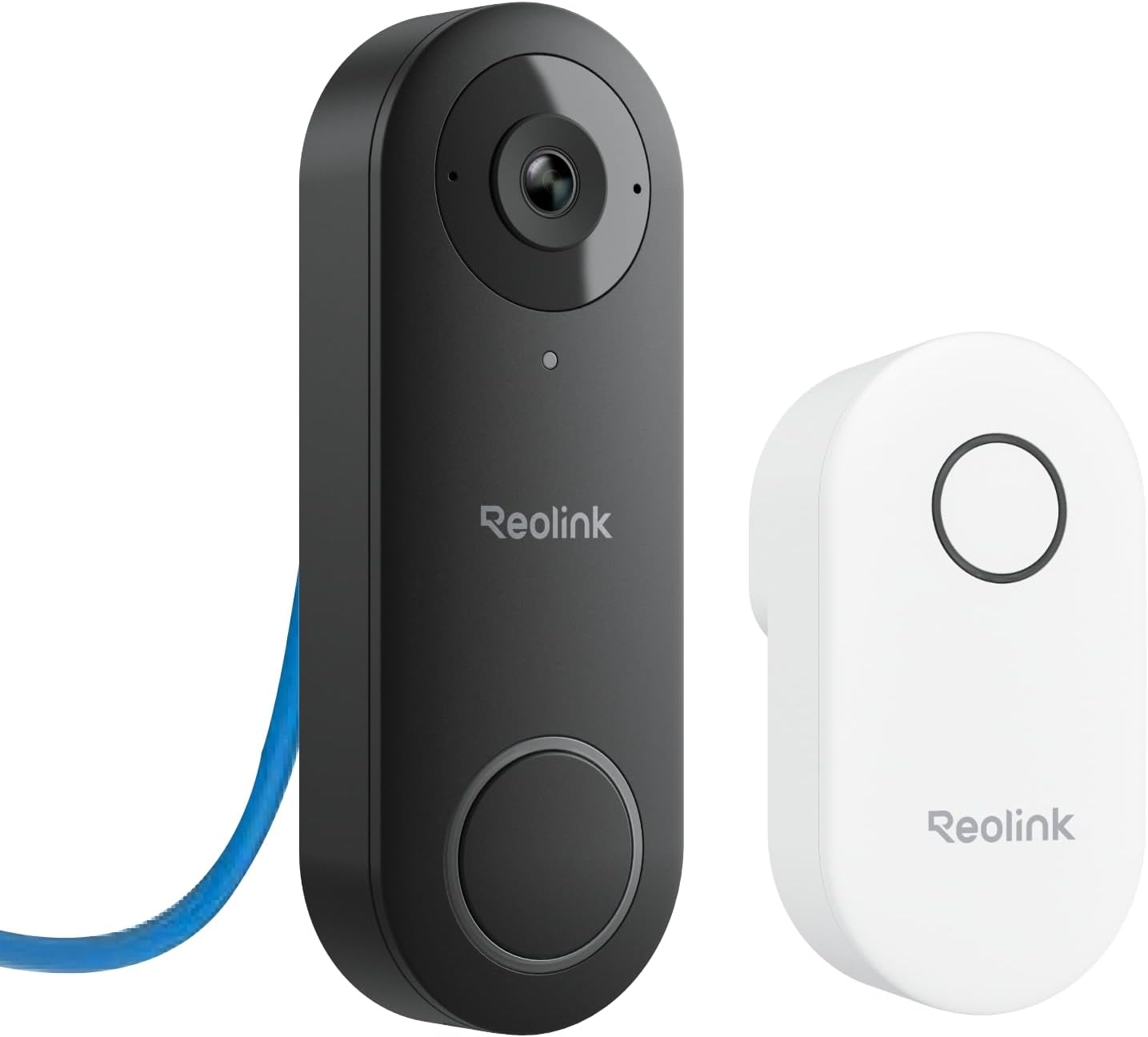
Key specs: 5MP 2K+ doorbell powered and networked over a single Ethernet run rather than doorbell wiring; 4:3 aspect ratio for head-to-toe visibility; chime included; local storage with no monthly fee
Reolink’s PoE doorbell answers a different question from the other two: what if the doorbell were simply another camera on the network? Power and data arrive down one Ethernet cable, so there is no transformer to size and no Wi-Fi contention at the front of the house, and Reolink states local storage with no monthly fees as the point of the product rather than a concession. The 4:3 aspect ratio is a deliberate choice for a doorbell, giving head-to-toe visibility so a parcel on the step is in frame, and a chime is included. The catch is the install: running Ethernet to a front door is genuinely more work than swapping a button, and if that is not realistic in your house this is the wrong pick no matter how good the economics are.
✅ Pros
- No subscription needed for local recording
- One Ethernet cable for power and data — no transformer question
- 4:3 framing for head-to-toe doorstep coverage
- Chime included
- Wired network connection rather than Wi-Fi at the front wall
❌ Cons
- Requires running Ethernet, which most homes have not got at the door
- Needs a PoE switch or injector at the other end
- Smaller smart-home integration list than Ring
The Three Side by Side
| Doorbell | Power source | Storage | Chime included | Best for |
|---|
| Ring Wired Doorbell 4K Pro | Existing doorbell wiring | Cloud, with a plan | No | The best picture on wiring you already have |
| Wyze Video Doorbell v2 | Existing doorbell wiring | microSD, cloud optional | Chime controller in the box | Wired permanence without the flagship outlay |
| Reolink Video Doorbell PoE | Power over Ethernet | Local, no monthly fee | Yes | Never paying a subscription |
Why This List Is Three Products and Not Ten
It would be easy to pad this to a round number by including doorbells that can be hardwired but ship as battery models. We have deliberately not done that, because the two things behave differently in practice: a battery doorbell on trickle-charge wiring still sleeps between events to protect the cell, which is exactly the behavior people hardwire to escape.
The genuinely wired-only category is small, and it is shrinking, because manufacturers make more margin on a device anyone can install in ten minutes. That is worth knowing as a buyer: the choice here is narrow not because we filtered aggressively, but because the market has moved. If a fourth pick appears that is wired-only and meaningfully different from these three, it belongs in this list; today it does not exist. Readers who want the wired approach across a whole property rather than at one door should look at wired camera systems instead, where the same reasoning applies at a larger scale.
Check These Three Things Before You Order
Three Checks, Five Minutes, Before You Spend Anything
1
Find the transformer and read its rating
2
Confirm the existing button is genuinely wired
3
Measure the view angle from the actual door
Doing these before ordering avoids the two most common returns in this category.
The third check gets skipped most often and matters more than the spec sheet. A doorbell mounted on a narrow porch, or angled at a wall because that is where the old button was, produces a view of a visitor’s shoulder no matter how many pixels it has. Wedge mounts exist for exactly this and are worth ordering at the same time rather than after you discover the problem. The same principle applies to every camera on the house, which our camera placement walkthrough goes through position by position.
One more thing worth settling before you buy rather than after: whether you are willing to pay a monthly fee at all. Two of the three picks here record locally and one does not, and that single decision narrows the list faster than any feature comparison. Our breakdown of what a Ring plan actually costs and what you lose without one covers the specifics for the brand where it matters most.
Final Recommendation
Buy the Ring Wired Doorbell 4K Pro if you have working doorbell wiring and a transformer that can feed it. It installs the way people expect a doorbell to install — old button off, existing wires onto the back of the new unit — and it is the only pick here where the image quality is genuinely a step forward rather than merely adequate.
Two things would change that. If the recurring fee is the part you object to, buy the Reolink Video Doorbell PoE and accept that you are running an Ethernet cable to your front door in exchange for never paying for storage again. If you simply want a permanently powered doorbell without the flagship outlay, buy the Wyze Video Doorbell v2 — it does the same core job on the same wiring, records to a card, and includes the chime controller in the box. What should send you out of this category altogether is having no doorbell wiring and no realistic Ethernet route: in that case a battery model is the right answer and no adapter changes it.
SafeBode does not yet run an in-house product testing program. This guide is built from manufacturer specifications, official support documentation, current retail listings and verified buyer feedback rather than hands-on testing, and we say so plainly rather than implying testing we have not done.
Frequently Asked Questions
Do wired video doorbells need a special transformer?
They need one that can supply enough power for a camera rather than a mechanical chime. Many existing transformers are fine and some are not, and the symptoms of an undersized one look like a faulty doorbell: reboots, a dim or stuttering picture, or an indoor chime that stops ringing.
Will a wired doorbell work if the power goes out?
No. It is drawing power from the house, so a power cut takes it offline along with your Wi-Fi. That is the one genuine advantage a battery doorbell keeps, and it is worth weighing if outages are common where you live.
Can I install a wired doorbell myself?
On existing doorbell wiring, usually yes — the wiring is low voltage and the job is disconnecting the old button and connecting two wires to the new unit. Replacing or adding a transformer is a different matter and is worth an electrician if you are not confident.
What is the difference between a wired doorbell and a PoE doorbell?
A wired doorbell reuses the low-voltage doorbell wiring already in your house. A PoE doorbell ignores that entirely and takes power and network down one Ethernet cable. PoE is more work to install and removes the transformer question completely.
Do any of these work without a subscription?
Two of the three record locally, so yes. The Wyze records to a microSD card with its subscription optional, and the Reolink is built around local storage with no monthly fee. The Ring leans on a plan for recorded video.
Will a wired doorbell ring my existing indoor chime?
Usually, but it often needs a chime controller or a bypass fitted at the chime unit. Some models include that part and others sell it separately, which is worth checking before you order rather than discovering mid-install.
Is 4K actually worth it on a doorbell?
It helps in one specific situation: enlarging a face or a plate afterwards, when someone was further from the door than you would like. At normal doorstep distance, 2K is already enough detail to identify a visitor clearly.
Can I hardwire a battery doorbell instead?
You can power many of them from doorbell wiring, but it does not turn them into wired doorbells. They still sleep between events to protect the battery, which is exactly the behavior most people hardwire to avoid in the first place.
Sources
Show sources (3)


