Abode Home Security Review 2026: The DIY System Built for Automation
Affiliate Disclosure: This article contains affiliate links. If you buy through these links, we may earn a commission at no extra cost to you. Our editorial opinions are our own and are not influenced by affiliate relationships. Read our full disclosure policy →
Contents
Quick Answer
Buy Abode if you already own smart-home gear and want your alarm to drive it. The iota hub is the only mainstream DIY security panel that carries Z-Wave, Zigbee and Apple HomeKit at once, and its CUE automation engine turns sensor events into actions across the rest of the house rather than just pushing a notification. Skip it if you want the best camera lineup or the deepest monitoring network — on those two axes it loses to companies that have been doing this for decades, and it says so itself by not including professional installation at all.
What Abode Actually Is
Abode launched in 2014, founded by a former ADT executive, with a specific thing it was pushing against: multi-year contracts, mandatory monitoring, and equipment that only talks to its own manufacturer. Everything the company builds still reflects that starting position. There is no contract. Monitoring is optional and month to month. And the hub is deliberately promiscuous about which devices it will pair with.
That last point is the one that matters, because it is the only place Abode is genuinely ahead of the field rather than competitive with it. Most DIY systems partner with a named list of brands. The Ring Alarm base station does speak Z-Wave, but pairing is restricted to smart locks and life-safety devices — a real limit our Ring Alarm walkthrough covers in detail. Abode’s iota hub carries Z-Wave and Zigbee radios with no such fence around them, plus Apple HomeKit, and connects up to 160 devices.
So the honest way to read this review: Abode is not the best-monitored system, and it is certainly not the best camera system. It is the best DIY alarm to buy if the alarm is meant to be the brain of a smart home rather than a standalone product sitting next to one.
Three Hubs, and the Only Decision That Matters
Abode sells three hubs and one set of sensors. The sensors, key fobs, keypads and cameras are interchangeable across all three, so the only real decision is which hub you buy — everything else can be added later at the same cost. The add-on range around them is broad for a company this size — door and window contacts, acoustic and vibration glass-break sensors, motion sensors, a keypad, a panic button, indoor and outdoor sirens, a water leak sensor, a smoke alarm monitor and Abode’s own lock.
| Smart Security Hub | Security Hub (2023) | iota Hub |
|---|
| Built-in camera | No | No | Yes, 1080p |
| Built-in motion sensor | No | No | Yes |
| Apple HomeKit | Yes | No | Yes |
| Z-Wave | Yes | No | Yes |
| Zigbee | Yes | No | Yes |
| Wi-Fi ready | No — Ethernet | Yes | Yes |
| Cellular backup | Yes | Yes | Yes |
| Alexa and Google Assistant | Yes | Yes | Yes |
Read that table once and the shape of the range is obvious. The 2023 Security Hub is the cheap one, and what it gives up is precisely the thing people buy Abode for: no HomeKit, no Z-Wave, no Zigbee. It is a perfectly good basic alarm, but if you buy Abode for its smart-home reach and then buy that hub, you have bought the wrong system and would have been better served by one of the kits in our DIY alarm roundup.
Between the other two, the split is straightforward. The iota puts a camera and a motion sensor inside the hub and adds Wi-Fi. The original Smart Security Hub has neither, and needs an Ethernet run to your router — which is a genuine constraint in a rental or an apartment where the router lives in a closet.
Which Abode Hub You Actually Want
✅ Buy the iota if
- You want one device on a shelf rather than three
- You need Wi-Fi, not an Ethernet cable to the router
- A hub-mounted camera covering one room is useful to you
- You want HomeKit, Z-Wave and Zigbee in the hub
- You are in an apartment or a smaller home
✅ Buy the Smart Security Hub if
- You already own real cameras and want no more
- The hub will sit next to the router anyway
- You want HomeKit and Z-Wave without paying for a camera
- You would rather place a motion sensor where it belongs
- You are covering a larger house with separate cameras
CUE: The Reason to Choose Abode Over SimpliSafe
CUE is Abode’s automation engine, and it lives in the same app as the alarm. The format is the familiar one — a trigger and an action — where the trigger can be a sensor tripping, a time of day or your phone’s location, and the action can be almost anything the hub can reach. You get up to 100 rules.
What makes that meaningfully different from a notification is that the alarm becomes a cause rather than an observer. A door opening after midnight can turn on every light in the living room and make a smart speaker play a siren, which is a materially better deterrent than a push alert to a phone that is upstairs and face down. Security.org’s tester built exactly that rule and describes it as the reason they kept the system.
The device list behind that is unusually long: Alexa, Google Assistant, Apple HomeKit, Nest, Philips Hue, ecobee, LIFX, Yale, Kwikset, First Alert and IFTTT, on top of the generic Z-Wave and Zigbee support that opens up thousands more. If you have already picked a side in the ecosystem wars, this is the alarm least likely to make you pick again — a contrast worth reading against our Nest versus Ring ecosystem comparison, where choosing the alarm really does mean choosing the ecosystem.
What an Abode Automation Actually Looks Like
1
Trigger
A door sensor opens, a time passes, or your phone leaves the geofence
2
Condition
The system is armed away, or it is between 11pm and 6am
3
Action
Lights on, thermostat set back, lock engaged, siren on a speaker
4
Result
The house reacts, instead of your phone buzzing in another room
CUE supports up to 100 of these rules, built in the same app that arms the alarm.
The Camera in the Hub Is a Bonus, Not a Camera System
The iota’s built-in camera is genuinely useful and genuinely limited, and being clear about which is which is the most important thing this review can do for you. It shoots 1080p with a 127-degree field of view, has infrared night vision, two-way audio and an SD card slot for local recording alongside the cloud storage that comes with a monitoring plan.
The limitation is not the sensor, it is the placement. This camera is inside your hub, and your hub goes wherever power and your router are — a bookshelf, an entertainment unit, a corner of the hallway. None of those is where you would put a camera if you were choosing freely, and there is no way to separate the two. Everything in our camera placement walkthrough about height, angle and covering an entry point is simply unavailable to you here.
It is also short on the detection features that have become standard elsewhere. There is basic person detection through CUE, but no package recognition and no pet filtering, so most alerts are driven by general motion. If you have ever wondered why a camera keeps recording birds, that is the mechanism, and this is a camera that will do it.
The right way to think about it: the iota camera is a free extra view of the room your hub is already in, and a decent one. Treat it as your camera system and you will be disappointed. Pair the system with proper outdoor cameras — our wireless camera system guide covers the options — and it becomes a sensible bonus.
Monitoring, and What Still Works Without It
Abode runs three tiers. The entry tier is genuinely free self-monitoring: livestreaming, one-touch arm and disarm, smart-home integrations and push notifications all work with no subscription at all. That is more than most competitors leave switched on, and it is the single best argument for the system if you object to recurring fees.
Moving up adds email and customizable notifications, unlimited users, an event timeline, home automation and cloud video retention that runs from none at the free tier to a week in the middle and a month at the top. The top tier is where 24/7 professional monitoring lives, and Abode’s is priced below most of the traditional names.
One honest note on that comparison, and Security.org’s reviewer makes it themselves: cheaper monitoring is not the same as equivalent monitoring. ADT runs nine fully redundant monitoring centers; Abode does not have that kind of infrastructure behind it. Whether that gap matters to you depends on what you expect monitoring to achieve in the first place, which our piece on whether a monitored alarm actually gets police to show up takes apart in detail. For a broader view of the tier structure across the industry, our guide to third-party monitoring is the companion read. At the opposite pole from Abode’s optional-monitoring model sits the traditional full-service contract — our Brinks Home review covers what that heavier approach buys and what it locks you into.
Abode iota All-in-One Security Kit — the system to start with
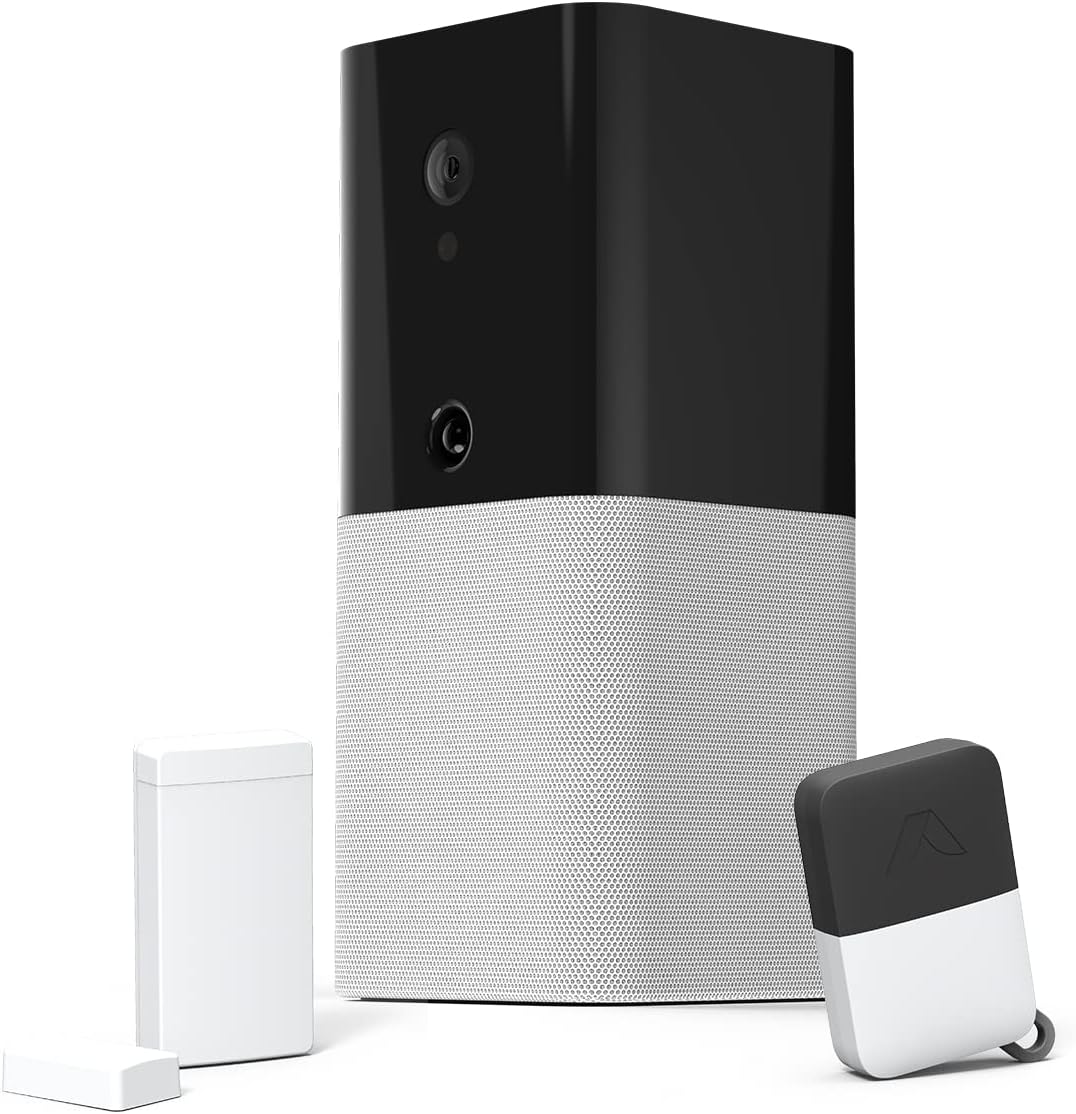
Key specs: Hub, 1080p camera, motion sensor, two-way voice and a 93 dB siren in one unit; ships with a key fob and a mini door/window sensor; contract-free with no required monthly fee; connects up to 160 compatible security and smart-home devices
This is the kit almost everyone should buy, because it is the one that contains the hub worth having. You get the iota itself — hub, 1080p camera, motion sensor, two-way voice and a 93 dB siren in a single unit — plus a key fob and one mini door/window sensor to prove the system works before you expand it. Setup is genuinely quick; Security.org’s tester had it running in about fifteen minutes, docking a point only because the initial configuration wants an Ethernet cable before it will switch to Wi-Fi. The hub holds a 72-hour backup battery and cellular backup, both of which matter more than the spec sheet suggests when the power goes out.
✅ Pros
- The only mainstream DIY hub with Z-Wave, Zigbee and HomeKit together
- Camera, motion sensor, siren and hub in one device on one shelf
- Free self-monitoring tier that is genuinely usable, not a trial
- SD card slot for local recording as well as cloud
- Up to 160 connected devices and 100 CUE automation rules
❌ Cons
- The camera goes where the hub goes, which is rarely where a camera should go
- No package detection and no pet filtering, so motion alerts are noisy
- Professional installation is not included and costs extra if you want it
- Marketplace owner ratings for this kit run noticeably below its reviewer scores
- One sensor in the box — a real house needs several more
Abode 4-Piece Smart Security System — the HomeKit alternative
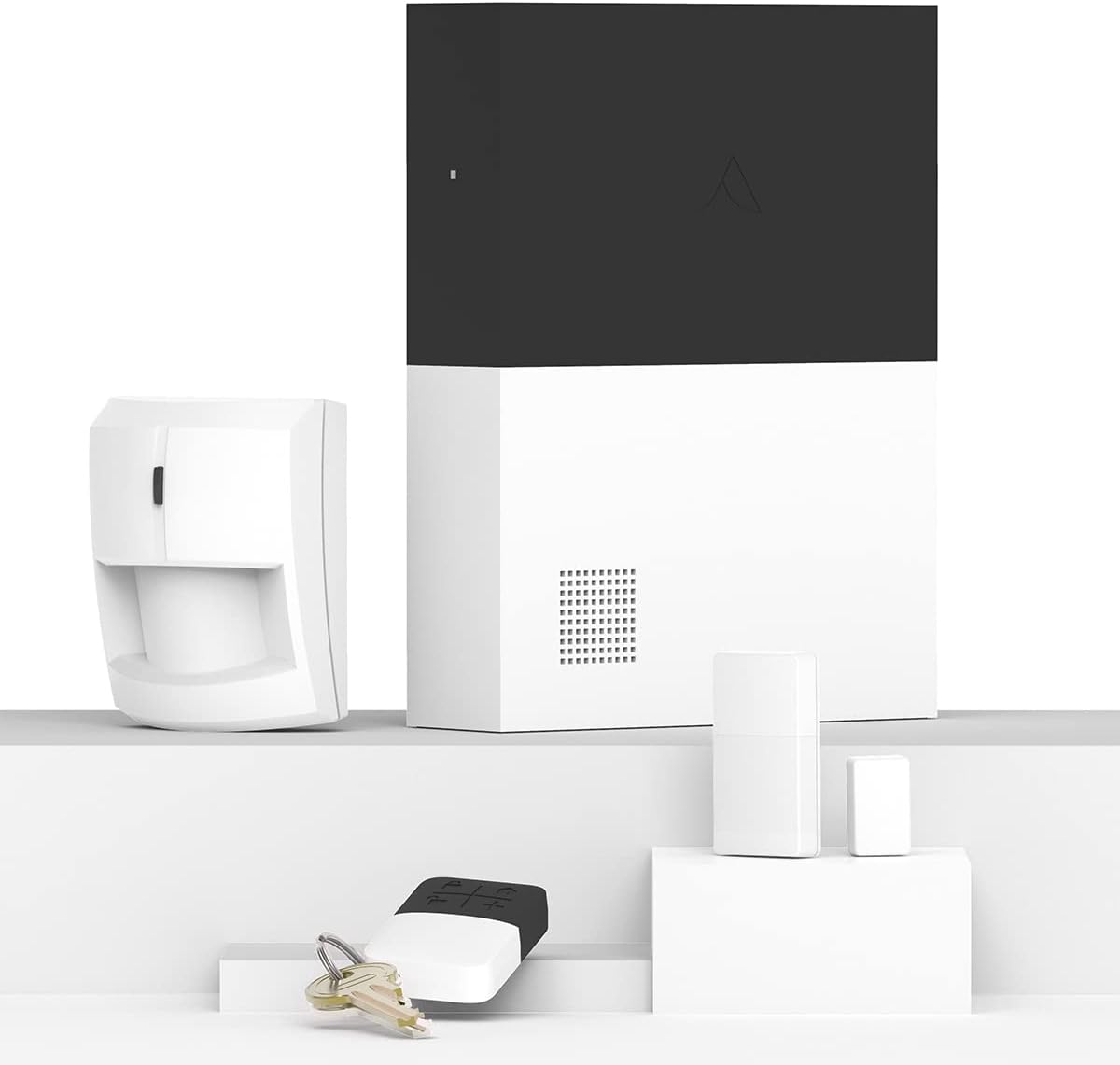
Key specs: Smart Security Hub with a built-in 93 dB siren, backup battery and Ethernet connectivity, plus a motion sensor, key fob and mini door/window sensor; Z-Wave and Zigbee hub functions; certified for Works with Apple HomeKit
Choose this instead when you already own cameras and do not want to pay for another one. You get the Smart Security Hub with its own 93 dB siren, backup battery and Ethernet connection, plus a motion sensor you can place properly, a key fob and a door/window sensor. Abode’s own claim for this hub is that it is the only home security system, DIY or professionally installed, certified for Works with Apple HomeKit and controllable from the iOS Home app — a strong claim, and one worth verifying against Apple’s current accessory list before buying on that basis alone.
✅ Pros
- Keeps HomeKit, Z-Wave and Zigbee without paying for a hub camera
- The motion sensor is separate, so it goes where it is actually useful
- Same sensors and accessories as every other Abode hub
- Backup battery and a 93 dB siren built into the hub
- Expandable to leak, smoke and CO sensors on the same panel
❌ Cons
- Needs an Ethernet run to the router — awkward in a rental
- No camera at all, so you are buying one separately
- No built-in motion sensor in the hub itself
- Older hardware than the iota, with a correspondingly older design
Honest Limitations
The camera lineup is thin. Abode is a hub company that also sells cameras, not a camera company. If video is the point of your system, the brands covered in our Reolink and eufy roundups will serve you better, and both work alongside an Abode alarm rather than against it.
Professional installation is not part of the offer. Security.org’s tester notes it is available but had to be paid for separately, and chose to self-install instead. If you want someone to arrive and do it, Abode is structurally the wrong company and Vivint or ADT are the right ones.
Marketplace ratings are weaker than the reviews. The iota kit’s owner rating on Amazon sits well below what its editorial scores would lead you to expect, on a modest number of reviews. That gap is worth knowing about before you buy, and it is the kind of thing a review that only cites other reviews will never tell you. It is not a reason to avoid the system, but it is a reason to buy from somewhere with a return window you are happy with.
It is still a small company. Abode has been around since 2014, which is long enough to be taken seriously and short enough that the cloud services behind the automations are not a given a decade from now. The sensors and siren keep working regardless; the CUE rules and remote access do not.
Who Abode Is and Isn’t For
This system rewards a specific kind of owner and frustrates another kind, and the difference is not budget. It is whether you want to configure things.
The Fit Test
✅ Abode fits you if
- You already own Hue, Nest, ecobee, Yale or Kwikset gear
- You want the alarm to trigger the house, not just your phone
- You are an Apple household and want real HomeKit support
- You refuse to sign a contract or accept mandatory monitoring
- You enjoy building rules rather than accepting defaults
❌ Look elsewhere if
- You want the best cameras — this is not a camera company
- You want someone else to install it for you as standard
- You want the largest, most redundant monitoring network
- You want a system you set up once and never open again
- You want the reassurance of a decades-old brand name
Final Recommendation
Start with the Abode iota All-in-One Security Kit and add sensors from there. It is the hub that carries every radio Abode supports, it needs no Ethernet run, and the camera and motion sensor built into it mean the starter kit covers one room properly on day one. Budget for three or four more door and window sensors immediately; one sensor is a demonstration, not a system.
Choose the 4-Piece Smart Security System instead in one specific case: you already own cameras you are happy with, the hub will live beside the router anyway, and you would rather put the motion sensor where it does some good. And do not buy the 2023 Security Hub at all if smart-home control is why you came — it drops HomeKit, Z-Wave and Zigbee, which is the entire reason to choose Abode.
What would make me pick a different company altogether: wanting professional installation, wanting the deepest monitoring network, or wanting video to be the centerpiece. On the first two, the traditional names still win. On the third, buy a camera brand and let Abode handle the sensors.
SafeBode does not yet run an in-house product testing program. This guide is built from manufacturer specifications, official support documentation, current retail listings and verified buyer feedback rather than hands-on testing, and we say so plainly rather than implying testing we have not done.
Frequently Asked Questions
Does Abode require a monthly fee?
No. Self-monitoring is free and includes livestreaming, arming and disarming, smart-home integrations and push notifications. Paid tiers add cloud video retention, email and customizable alerts, unlimited users, automation and, at the top, 24/7 professional monitoring — all month to month, with no contract.
Does Abode work with Apple HomeKit?
The iota hub and the original Smart Security Hub do. The 2023 Security Hub does not, and also drops Z-Wave and Zigbee. If HomeKit is why you are looking at Abode, that distinction is the most important thing on this page.
Is the iota camera good enough to be my only camera?
No, and not because of the sensor. It shoots 1080p with a wide field of view and clear night vision, but it is fixed inside the hub, so it points wherever the hub has to live. Use it as a free extra view of that room and buy proper cameras for entry points.
How does Abode compare to SimpliSafe?
They are close on price, contract terms and DIY installation. Abode is meaningfully ahead on smart-home reach because of Z-Wave, Zigbee and HomeKit in the hub. SimpliSafe is ahead on brand maturity, monitoring depth and its own camera range.
Can I install Abode myself?
Yes, and you are meant to. Testing puts a basic iota setup at roughly fifteen minutes: place the hub, connect it, run through the app, peel and stick the sensors. Professional installation exists but is a paid extra rather than part of the package.
Does Abode have cellular backup?
All three hubs support cellular backup, and the iota carries a multi-day internal battery as well. That combination is what keeps an alarm working through a power cut or a cut internet line, and it is the right thing to check on any system you are considering.
How many devices can an Abode system handle?
The iota is rated for up to 160 connected security and smart-home devices, which is far more than a normal house needs. The practical ceiling you will hit first is the 100-rule limit in the CUE automation engine, not the device count.
What happens to my system if Abode goes out of business?
The local half keeps working: sensors still trip the hub, the siren still sounds. The cloud half does not, which means remote access, push notifications and CUE automations. That is the standard trade for any connected system and is worth weighing against how much of the value for you sits in the automation.
Is Abode good for renters?
It is one of the better options. Nothing is drilled, the sensors are adhesive, the iota needs only power and Wi-Fi, and there is no contract to break when you move. The Ethernet requirement on the older hub is the one thing that can bite in an apartment.
Sources
Show sources (4)
- [1] Security.org — abode Security Review, hands-on testing of the iota system, www.security.org/home-security-systems/abode/review
- [2] Abode — iota All-in-One Security Kit, current retail listing specifications (ASIN B07KY4LKHJ)
- [3] Abode — 4 Piece Wireless Smart Security System, current retail listing specifications (ASIN B0793N1V54)
- [4] Abode — company site and current system lineup, goabode.com


