Small Business Burglar Alarm Systems: What Fits an Office or Storefront
Affiliate Disclosure: This article contains affiliate links. If you buy through these links, we may earn a commission at no extra cost to you. Our editorial opinions are our own and are not influenced by affiliate relationships. Read our full disclosure policy →
Contents
Quick Answer
A residential DIY alarm kit and a small-business alarm system solve the same problem differently. A home kit assumes one household and a single person arming and disarming it. A small business has more entry points, staff who need their own codes, and an opening/closing routine an owner actually wants tracked [2, 3]. For a single storefront or small office suite, a larger DIY kit with more sensors can genuinely work. Past roughly a dozen doors, multiple zones needing separate arming, or any fire-alarm code requirement, professional installation stops being optional in a lot of states — it becomes a licensing question, not a preference.
Why a Residential DIY Kit Doesn’t Scale Cleanly to a Business
Most “best alarm system” content is written for a house. That’s not a criticism — it’s the bigger market — but it means the advice quietly assumes things that aren’t true of a storefront or office. A house has one household deciding when the alarm is on. A small business has employees arriving and leaving on different schedules, a public-facing front door that behaves differently from every other entry point, and often a stockroom or loading door a residential kit’s sensor count was never designed around.
Security.org’s business security guide frames this directly: “every business faces unique security challenges — from a small boutique worried about shoplifting to a sprawling warehouse managing after-hours access,” and for a business at the smaller end, it recommends a system suited to a “single location with straightforward access needs”. That’s the sweet spot this guide is written for — a single storefront, small office suite or single-location practice, not a multi-building campus. If you already reviewed our guide to residential DIY alarm systems, several of those same kits scale up fine for a small business. What changes is which features matter once more than one person is arming and disarming the same system.
The other real difference is what a burglary actually costs. Security.org cites business burglaries averaging well into five figures once inventory and property damage are counted together, noting that while businesses are burglarized less often than homes day to day, the events that happen tend to be more expensive and disruptive. That’s the case for taking coverage seriously even at a single-location scale, without buying more system than the space actually requires.
What Actually Differs: Coverage, Entry Points and Who’s Coming and Going
Berkley Security’s comparison of residential and commercial alarms puts it plainly: residential systems “focus on common vulnerabilities like front doors and ground-level windows,” prioritizing “immediate alerts, ease of use, and quick wireless setups,” while commercial systems have to “monitor vast square footage” and often use “complex partition systems so certain areas of a building can be armed while employees work in others”. A small business rarely needs a large installation’s full partition complexity, but the underlying issue — more doors, more windows, more than one person needing access — is real even at a small scale.
There’s a code-compliance angle too, mostly relevant if your business carries a separate fire-alarm system: Berkley Security notes commercial installations often require “hardwired components and robust battery backups mandated by local fire and safety codes,” and that using a residential-grade system where a commercial one is required can “result in code violations and denied insurance claims”. A standalone burglar alarm for a small retail space is usually not where this bites — it matters once a business adds fire detection or life-safety equipment, a genuinely different, licensed-installer conversation.
The Insurance Information Institute’s small-business theft-reduction guidance keeps the hardware side simple: sensors belong “at doors, windows and other places of entry, as well as motion detectors,” and it advises checking “local regulations concerning alarms and options for a system tied to a monitoring service” before installing anything. A real number of cities charge permit fees or false-alarm fines specific to commercial addresses — worth a quick check with your city, covered in more depth in our security system cost breakdown.
| A residential DIY kit | A small-business setup |
|---|
| Typical entry points covered | Front door, 1-2 ground-floor windows, maybe a back door | Front entrance, back/loading entrance, multiple street-level windows or a storefront glass front |
| Who arms and disarms it | One household, usually one shared code | Multiple staff, often with individual codes so activity is traceable |
| Zones / partitions | Rarely more than home/away modes | Can need separately-armed areas — a stockroom armed while a front counter stays staffed |
| Schedule awareness | Not a feature most residential systems have | Open/close reporting flags a late opening or early closing automatically [3, 4] |
| Code / insurance requirements | Almost never applicable | Can apply once fire alarm or life-safety equipment is added, varies by city and state [2, 7] |
| Who typically installs it | The owner, in an afternoon | Owner for a small kit; a licensed alarm contractor once complexity increases |
None of this means a small business automatically needs a commercial installer on day one. A single storefront with eight or ten sensors and one shared code is genuinely well served by a larger version of a residential kit. The table above is meant to help you recognize which side of that line your specific space is on, rather than assuming either extreme by default.
Opening and Closing Schedules: The Feature Homes Don’t Need
This is the single feature that most cleanly separates a business alarm from a home one, and it rarely gets mentioned in general buying guides because a household doesn’t need it. SEi Security, a commercial alarm monitoring provider, describes the mechanism: each employee gets their own individual code, “so there are no mix-ups, or he said/she said about what actually happened and when,” and the system logs exactly who armed or disarmed it and at what time. Over weeks that produces a genuinely useful record of who is actually opening and closing your business, not just whether the alarm happened to be on.
Alarm.com’s support documentation for its commercial platform draws a distinction worth understanding before you buy anything: “Business Hours” is a reporting layer that labels each open/close event as On Time, Early, Late or Unexpected — it’s explicitly “not” an automation feature on its own. To auto-arm or auto-disarm at set times, a business has to separately configure “arming schedules”. Tracking who opened late is a different setting from automatically locking down at 9pm, and cheaper DIY kits often have neither.
What an Open/Close Report Actually Shows
1
Each employee gets a code
Individual user codes replace one shared code, so every arm/disarm event is attributable.
2
The system timestamps every event
Openings and closings are logged automatically, not just remembered or guessed at later.
3
Late or unexpected events get flagged
A store set to open at a fixed time that isn’t disarmed on schedule shows up as Late, not silent.
4
Reports go to the owner
Daily, weekly or on-demand summaries — the same record a manager would otherwise chase down by hand.
SEi Security and Alarm.com both document this as a distinct commercial feature, not something most residential systems include by default [3, 4].
If your business is a single-owner operation with no other keyholders, none of this matters much — you already know when you open and close. Once more than one or two people carry a code, it stops being a nice-to-have and starts being the difference between knowing what happened and guessing. Of the four products below, only the touchscreen panel is built with per-user codes and staff-facing controls in mind from the start; the others are honest about not offering that.
NDAA Section 889 and Federal Contractor Compliance
Our guide to business security camera systems covers NDAA Section 889 in detail, since it applies directly to the video surveillance equipment that guide features. It’s worth being precise about what it does and doesn’t cover for a burglar alarm, rather than assuming the same rule applies wholesale.
FAR Subpart 4.21 — the regulation implementing NDAA Section 889 — prohibits federal agencies (and, by extension, many federal contractors and grant recipients) from procuring systems that use covered telecommunications and video surveillance equipment as a substantial or essential component. The named manufacturers are Huawei Technologies, ZTE Corporation, Hytera Communications, Hangzhou Hikvision Digital Technology and Dahua Technology, plus their subsidiaries and affiliates. None of the four alarm panels in this guide are covered equipment — a plain intrusion panel with sensors, siren and keypad but no camera is not what the regulation targets in the first place.
Who Actually Needs to Check This
🏛️ Check before you buy
- Federal contractors or subcontractors bidding on or performing federal contracts
- Businesses receiving certain federal grants tied to procurement rules
- Any business adding video verification cameras or a video doorbell to its alarm setup — that’s where Section 889’s scope actually lands
🏪 Not who this targets
- A private storefront or office with no federal contracts
- A plain burglar alarm panel with sensors and a siren but no camera
- Consumer-market alarm brands like the ones featured in this guide — none are on the named list
If your business does hold a federal contract and is adding camera-based verification to its alarm system, the compliance detail belongs in our business camera systems guide, which covers it against the same primary acquisition.gov source. For the sensor-and-panel equipment in this guide, it is not a relevant constraint for the overwhelming majority of small businesses buying an alarm kit.
D1D9 24-Piece Wireless Alarm System — widest entry-point coverage
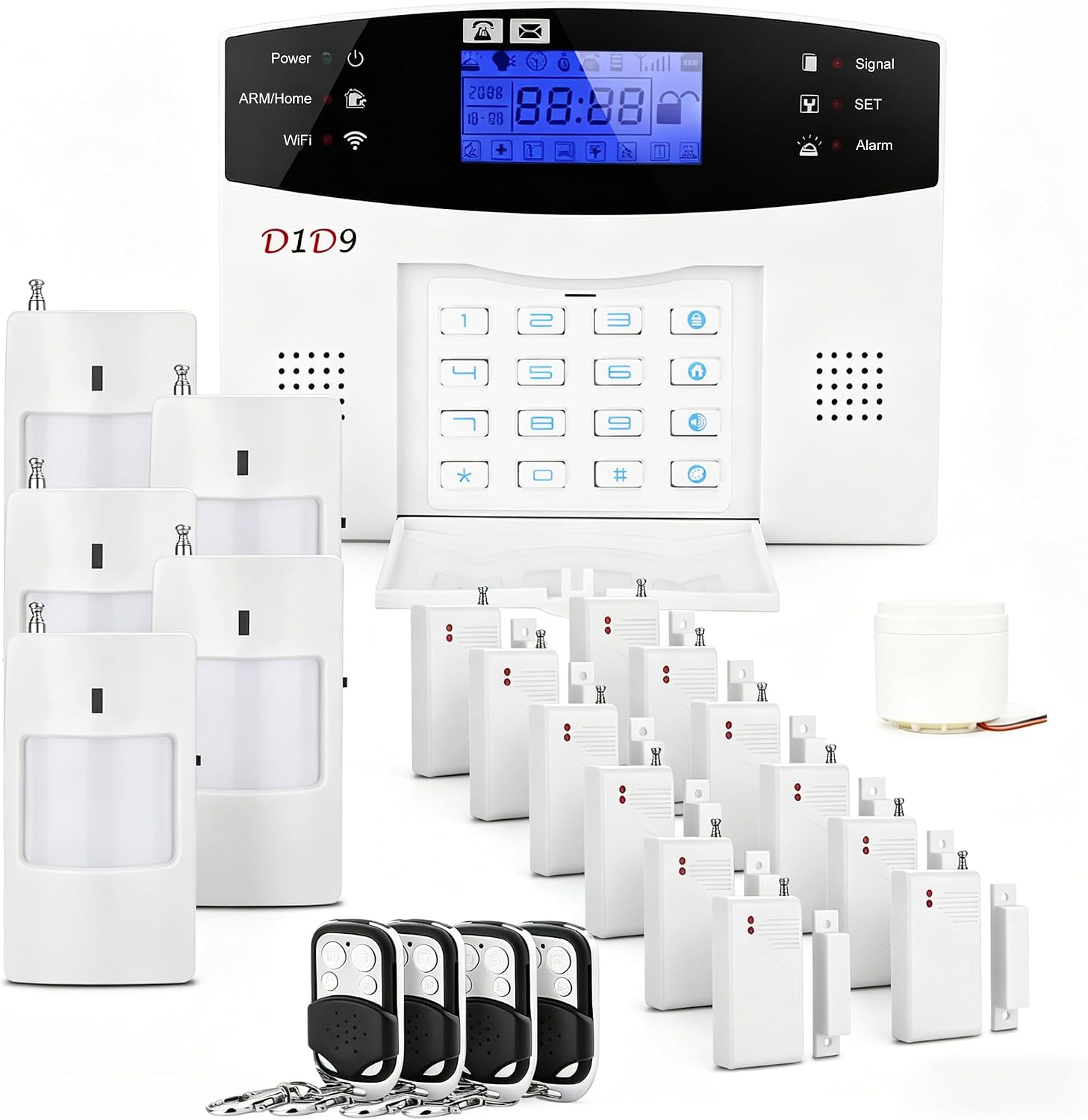
Key specs: 24-piece kit: 12 door/window contact sensors, 5 motion detectors, 1 wired siren, 4 remote controls; dual-band WiFi plus 4G/GSM cellular backup (SIM card needed for call/SMS alerts); no monthly monitoring fee; self-adhesive, no-drill sensors; roughly 80-meter sensor range; expandable with additional accessories
This is the pick for a single storefront or office suite with more doors and windows than a typical house — a boutique with a front entrance, a fitting-room hallway and a back exit, or a small office with a reception door and several ground-floor windows. Twelve door/window sensors and five motion detectors cover more entry points than a typical 8-piece residential kit, and cellular backup means the alarm can still call or text if the WiFi goes down overnight. If you compared it against smaller kits in our DIY home alarm systems guide, this is the scaled-up version built for the same no-monthly-fee approach.
Honest limitation: a verified buyer using it in a retail shop reported the motion detectors triggering repeatedly, most likely from insect activity near the sensors — a real issue in a stockroom that a house generally does not have. If your space has stored inventory, plan on repositioning sensors away from shelving and expect some tuning. See our guide on why an alarm keeps going off if that happens.
✅ Pros
- Twelve contact sensors plus five motion detectors — enough for a small multi-room space, not just a front door and one window
- Cellular backup keeps alerts working through a WiFi or internet outage
- No monthly monitoring fee required to get app alerts
- Self-adhesive, no-drill installation — no landlord permission needed for a leased storefront
❌ Cons
- Single shared code by default — it does not track which employee armed or disarmed it
- A verified buyer reported repeated false motion triggers in a retail setting
- Cellular alerts require a separately purchased SIM card
- No true multi-zone partitioning — one system, one arm/disarm state
RenseCum 24-Piece Touchscreen Alarm System — a shared keypad for staff
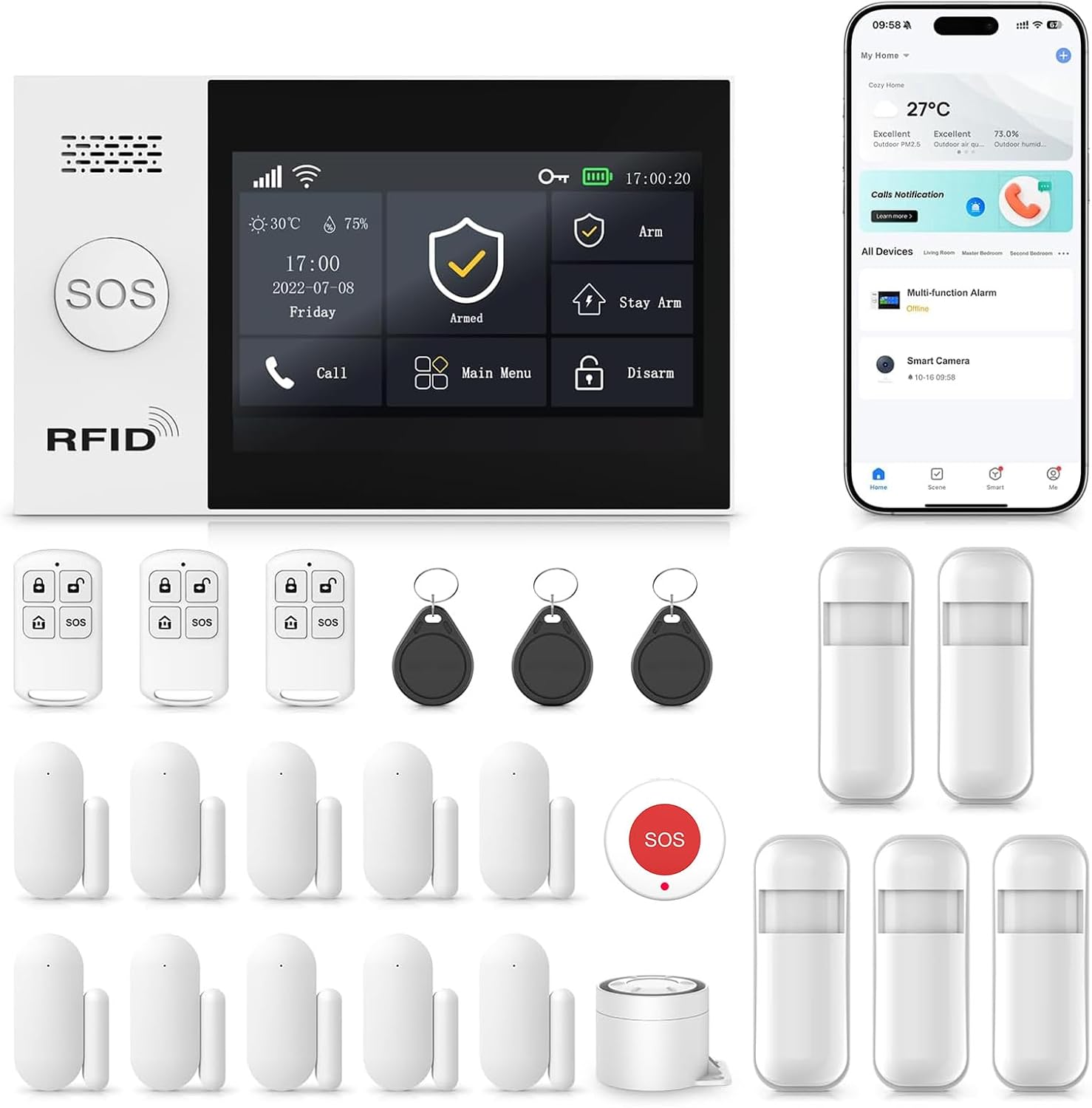
Key specs: 24-piece kit built around a 4.3-inch touchscreen control panel rather than a phone app alone; expandable to up to 100 connected sensors on one system; WiFi plus 2G/4G cellular connectivity (5G not supported); sensors ratable up to roughly 393 feet from the panel; SOS panic button; the manufacturer’s own listing markets it for home or business use
Pick this one because it is built around a physical touchscreen rather than assuming every employee has the owner’s phone and app login. A shared keypad by the front door is how most real small businesses actually arm and disarm day to day, and a large screen with plain arm/disarm buttons is easier to hand off to a new hire than explaining a phone interface. Expandability to up to 100 sensors gives this pick the most headroom if your space grows.
Honest limitation: a verified buyer reported that this exact panel’s advertised backup battery does not actually hold the system up when unplugged — it powered off immediately despite the battery showing voltage. That’s a real reliability concern for a business, where a power blip after hours is exactly when you need the alarm to keep working. Test the battery backup by unplugging the panel the same day it arrives, before you’re relying on it.
✅ Pros
- 4.3-inch touchscreen panel — staff can arm/disarm without installing or learning an app
- Expandable to up to 100 sensors, more headroom than most DIY kits in this price range
- SOS panic button built into the panel itself
- The manufacturer’s own listing explicitly markets it for business use, not just households
❌ Cons
- A verified buyer found the advertised battery backup did not actually keep the panel powered during an outage — test this on arrival
- 5G cellular is not supported, only WiFi plus 2G/4G
- Still a single shared arming state, not true per-zone partitioning
- No professional monitoring option — alerts go to your phone only
Ring Alarm 8-Piece Kit (Newest Model) — the path to real professional monitoring
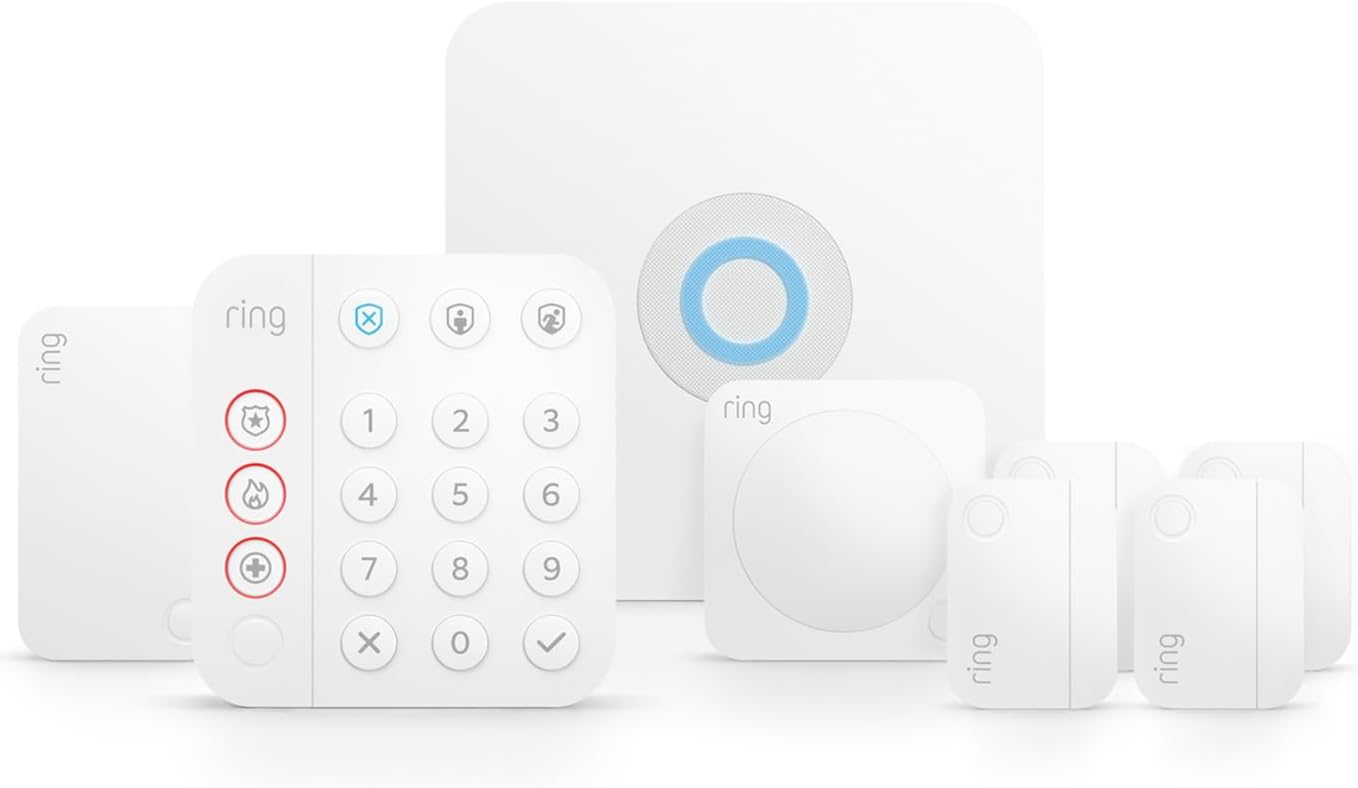
Key specs: 8-piece starter kit: 1 base station, 1 keypad, 4 contact sensors, 1 motion detector, 1 range extender; additional Alarm Sensors and accessories sold separately to expand coverage; an optional Ring Protect Pro subscription adds 24/7 professional monitoring, cellular backup and Alexa voice arming; the manufacturer’s own listing title describes it as a home or business security system
Ring’s own listing describes this kit as a “home or business security system with optional 24/7 professional monitoring,” and that’s the real reason to pick it over the two kits above. Neither the D1D9 kit nor the touchscreen panel offers a path to a monitoring center that can contact police — both rely entirely on the app notification reaching you personally. A Ring Protect Pro subscription changes that, adding cellular backup and professional monitoring, which matters more for a business than a house since nobody is there to hear the siren after closing. Our full Ring Alarm system guide and Ring subscription plans breakdown cover that monitoring tier in more depth.
Honest limitation: the base 8-piece kit is described in Ring’s own listing as “a great fit for 1-2 bedroom homes” — genuinely sized for a residential footprint, not a storefront. Most small businesses will need to buy additional sensors separately to cover every entry point. It also has no per-employee code tracking or open/close reporting the way the touchscreen kit does — everyone typically shares one PIN unless you set up user codes manually.
✅ Pros
- Real path to 24/7 professional monitoring with actual police dispatch, not just a phone alert
- Most-reviewed and best-established of the four picks, with a long public track record
- Alexa voice control and tight integration if you already run Ring cameras or a Ring doorbell
- Officially marketed by the manufacturer for business use, not repurposed from a home-only line
❌ Cons
- Base 8-piece kit is sized for a small residential footprint — expect to buy more sensors
- Professional monitoring is a recurring subscription cost, unlike the two DIY-only kits above
- No dedicated open/close reporting or per-employee code auditing out of the box
- Requires Ring’s own ecosystem and app, less standalone than a hardwired commercial panel
When DIY Stops Being the Answer
Every product above is genuinely DIY-installable, and for a single storefront or small office suite, any of the three can be the right answer. But there is a real point where a business outgrows a plug-and-play kit, and it’s worth naming plainly rather than pretending a bigger kit always solves it: more entry points than one panel’s sensor count can reasonably cover, a need to arm one part of a space while people work in another, a fire-alarm or life-safety requirement layered on top, or a landlord or insurer that specifically requires a UL-listed, professionally monitored system. Berkley Security’s comparison makes the insurance point directly: using residential-grade equipment where a commercial-grade system is actually required can risk a “denied insurance claim” after the fact.
There’s also a licensing reality most buying guides skip. The National Systems Contractors Association’s state-by-state guide confirms that a majority of states require some form of license — an Alarm Contractor, Alarm Technician or Qualifying Agent credential — to sell, install, service or monitor burglar alarm systems commercially, with exact requirements varying by state, and a handful leaving licensing to local jurisdictions instead. That requirement generally applies to someone doing this work for other businesses, not an owner installing a kit in their own space — but it’s why a commercial alarm company shows up with a licensed technician rather than a box from Amazon once a job gets complex enough to need one.
The product below is not a recommendation to self-install. It exists to show, concretely, what a real commercial-capable panel looks like — so you can recognize the difference between a bigger DIY kit and the hardware a licensed installer would actually spec.
Honeywell Ademco Vista-20P Intrusion Kit — what a licensed installer would actually spec
Key specs: 8-zone hardwired control panel (Vista-20P) plus an alphanumeric keypad, a wired motion detector and a siren; wired RJ45 connectivity; the manufacturer’s own listing describes it as an 8-zone commercial or residential alarm; expandable well beyond 8 zones with add-on modules the way licensed installers configure it for larger spaces; no app-first setup path — this is a wired panel meant to be programmed by a trained installer
The manufacturer’s own listing describes the Vista-20P as “an 8-zone commercial or residential alarm,” and that isn’t marketing language — this is a widely installed panel in the professional alarm industry, expandable well past its base 8 zones with add-on modules, and wired rather than app-first. It’s the concrete answer to what a real commercial panel looks like for a business that has outgrown the three DIY kits above.
Honest limitation, stated as plainly as we can: this is not a plug-and-play product, and we are not recommending you self-install it. Multiple verified buyers describe struggling with the programming even for a residential install — one review is literally titled needing “A BS Degree and YouTube” to get through setup, and another buyer gave up after two hours on the phone with support and had to bring in a professional installer to finish the job. It’s included here to illustrate the professional tier, not as a DIY purchase recommendation — if this is the class of hardware your business actually needs, the honest next step is calling a licensed local alarm contractor.
✅ Pros
- Genuine 8-zone commercial-or-residential panel, not a relabeled consumer kit
- Expandable well beyond 8 zones the way a licensed installer configures larger spaces
- Wired reliability without dependence on a phone app or cloud account to function
- Compatible with real professional monitoring the way commercial alarm companies deploy it
❌ Cons
- Multiple verified buyers describe the programming as genuinely difficult without training
- No app-based setup path — this expects a technician, not a homeowner with a screwdriver
- Requires wiring to door/window contacts rather than self-adhesive wireless sensors
- Buying the panel alone does not get you monitoring — that still has to be arranged separately
Final Recommendation
Start by counting real entry points and real keyholders, not by picking the biggest kit. For a single storefront or office with a handful of doors and one or two people arming/disarming it, the D1D9 24-Piece Wireless Alarm System gives the most sensor coverage for the money, no ongoing fee. If several employees will be arming and disarming and you want that tracked without training everyone on an app, the RenseCum 24-Piece Touchscreen Alarm System is the better fit — test its battery backup the day it arrives. If what matters is that someone calls police when the alarm trips after hours, not just that your phone buzzes, the Ring Alarm 8-Piece Kit (Newest Model) with Ring Protect Pro is the only one of the three built for that.
None of the three DIY kits is right once your space has more entry points than one panel can reasonably cover, needs a fire-alarm or life-safety layer on top, or your insurer or landlord specifically requires a UL-listed, professionally monitored system. At that point, stop shopping for a bigger DIY kit and call a licensed alarm contractor — the Vista-20P panel exists in this guide to show what that conversation is actually about, not to talk you into self-installing it. For the camera side of the same decision, our business security camera systems guide covers picks scaled the same way.
SafeBode does not yet run an in-house product testing program. This guide is built from manufacturer specifications, official support documentation, current retail listings and verified buyer feedback rather than hands-on testing, and we say so plainly rather than implying testing we have not done.
Frequently Asked Questions
Can a DIY alarm kit from Amazon really work for a small business?
For a single storefront or small office with a modest number of entry points, yes — several kits in this guide are explicitly marketed for business use and scale up cleanly from a residential kit. DIY stops working on size and complexity, not the category of product itself.
How many sensors does a small storefront actually need?
Count real entry points first: the front door, every ground-floor window a person could climb through, and any back or loading door. Add one motion detector per open room. Most single-location businesses land between 8 and 20 sensors, why the kits here range from 8 to 24 pieces.
Do I need a licensed alarm company to install a business alarm system?
Not for a straightforward DIY kit installed in your own space. Licensing generally applies to a company or technician installing, servicing or monitoring systems for other businesses, and requirements vary by state and sometimes by city.
What is an opening and closing schedule, and does my business need one?
It’s a feature that logs who armed or disarmed the system and when, and can flag a late opening or early closing automatically. It matters once more than one or two people carry a code.
Does NDAA Section 889 apply to the alarm panels in this guide?
No. Section 889 targets specific named video surveillance and telecommunications manufacturers. A plain alarm panel with sensors and a siren, no camera, isn’t the equipment it covers — it becomes relevant only if a federal contractor adds camera-based verification to the setup.
Will a DIY alarm system actually lower my business insurance premium?
Ask your insurer before assuming so — many commercial policies require the system to be professionally monitored, not just app-connected, to qualify for a discount. A monitored option like the Ring Alarm kit’s Protect Pro subscription is more likely to qualify than an app-only kit.
What’s the real difference between a door chime and a burglar alarm for a business?
A door chime just announces a door opened — useful for knowing a customer walked in, but it does nothing when the business is closed. A burglar alarm is armed when nobody is present and built to detect and report an actual intrusion.
Can one system cover both a storefront and a small stockroom or back office?
Yes, as long as sensor count and expansion capacity cover every entry point in both spaces. None of the three DIY kits here offer true zone partitioning, so the space arms and disarms as one unit rather than room by room.
What happens to a DIY alarm system if the power goes out?
It depends entirely on the product’s battery backup, and that backup isn’t always reliable — one kit here was found by a verified buyer to lose power the moment it was unplugged despite an advertised backup battery. Test any panel’s battery backup on arrival rather than trust the spec sheet.
Sources
Show sources (7)
- [1] Security.org — “Best Business Security Systems of 2026,” security.org/home-security-systems/best/business/
- [2] Berkley Security — “Residential vs Commercial Alarms: What You Need to Know,” berkleysecurity.com/blog/blog-residential-vs-commercial-alarms
- [3] SEi Security — “Open/Close Reporting for Business Security,” seisecurity.com/open-close-reporting-business-security/
- [4] Alarm.com Support — “Enable/configure business hours,” answers.alarm.com/Customer/Website_and_App/Commercial/Commercial_Management/Enable_configure_business_hours
- [5] Insurance Information Institute — “Steps to Reduce Your Vulnerability to Theft,” iii.org/article/steps-to-reduce-your-vulnerability-to-theft
- [6] Acquisition.gov — “FAR Subpart 4.21, Prohibition on Certain Telecommunications and Video Surveillance Services or Equipment,” acquisition.gov/far/subpart-4.21
- [7] NSCA — “Guide to State Licensing,” nsca.org/resources/guide-to-state-licensing/


