SimpliSafe Review 2026: What You Get (Equipment, Monitoring, and Honest Limitations)
Affiliate Disclosure: This article contains affiliate links. If you buy through these links, we may earn a commission at no extra cost to you. Our editorial opinions are our own and are not influenced by affiliate relationships. Read our full disclosure policy →
SimpliSafe is one of the most-searched DIY home security brands for a reason: no contract, self-installation under an hour by most owners’ accounts, and a monitoring structure that scales from completely free to fully professional. It’s also not without real friction — a camera that won’t record anything unless you’re paying for monitoring, a keypad more than one reviewer has called dated, and monitoring pricing that has climbed over time. This guide covers exactly what’s in the box, what each monitoring tier actually adds, and the honest limitations worth knowing before you buy.
Table of Contents
Quick Answer
SimpliSafe is a genuinely no-contract DIY system — month-to-month at every tier, with a 60-day equipment money-back guarantee. The core equipment (base station, keypad, entry and motion sensors, one indoor camera) works self-monitored for free, but the included camera can’t record or save footage at all without a paid monitoring plan — that single limitation shapes whether SimpliSafe fits your budget more than any other factor.
What’s In the Box
SimpliSafe sells several package sizes, but the most popular current bundle on Amazon — and the one this guide is built around — includes a base station, a wireless keypad, 4 entry sensors, 2 motion sensors, and one wired indoor camera with a 120° field of view and 1080p video. The base station is the system’s brain: it holds a cellular radio for alarm signaling, a battery backup rated for up to 24 hours, and a 95dB siren. Every sensor mounts with pre-applied adhesive rather than requiring drilling, and setup is guided step-by-step inside the SimpliSafe app rather than a printed manual.
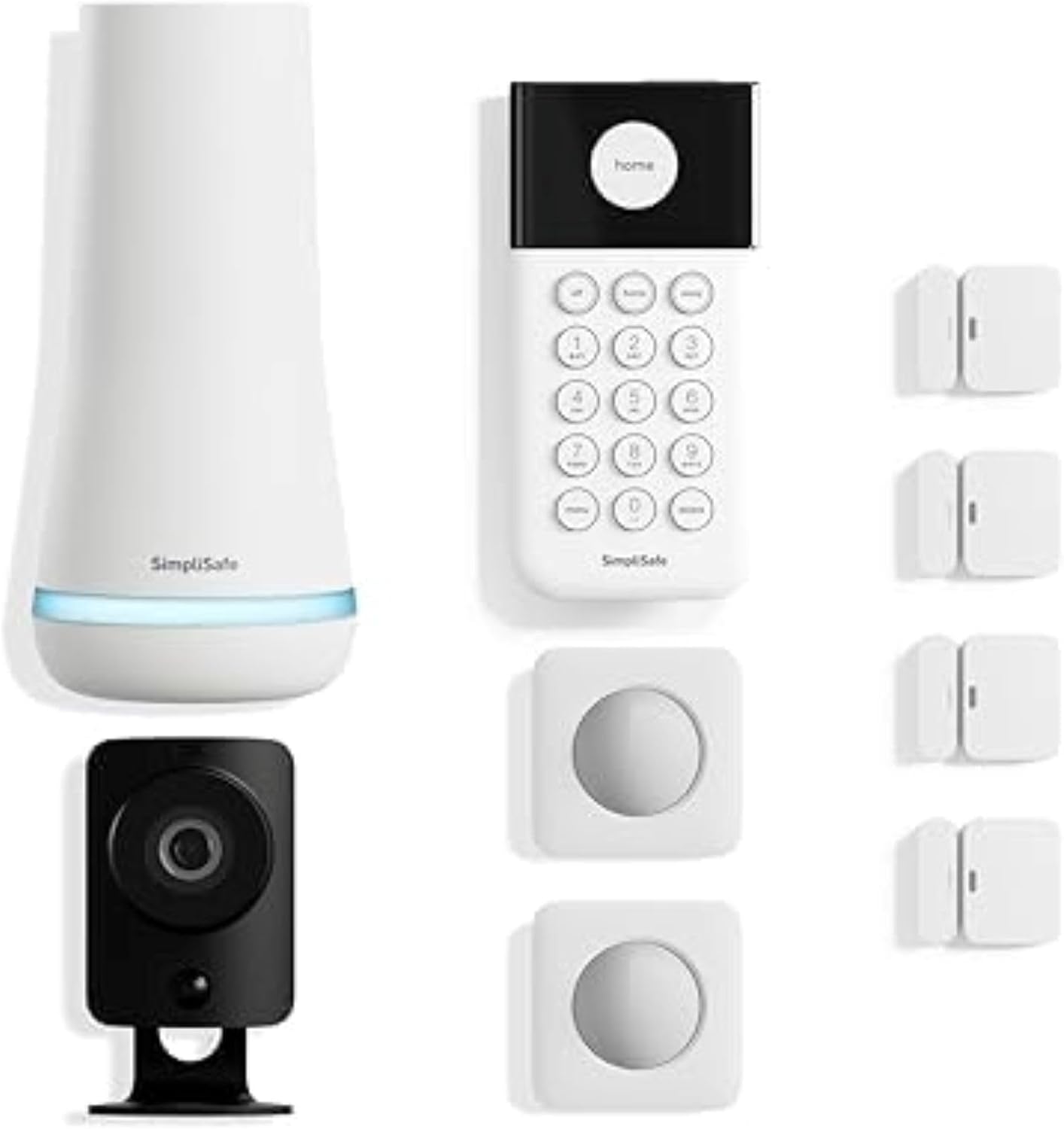
Larger and smaller kits exist for bigger homes or apartments, and outdoor cameras, glass-break sensors, and environmental sensors (smoke, water, temperature) are all sold as add-ons rather than bundled by default — see our smart smoke detector picks for how SimpliSafe’s own detector compares to the alternatives. Renters weighing a kit like this against a single camera should read our apartment security decision guide first.
Monitoring Plans: What Each Tier Actually Adds
SimpliSafe’s monitoring structure runs from genuinely free to fully professional, and the tier you pick determines far more of the real-world experience than the hardware does:
| Tier | What It Adds |
|---|
| Free (self-monitored) | App control, push notifications, 7-day event history — no professional dispatch, no camera recording |
| Standard | 24/7 professional alarm monitoring with cellular backup and police/fire dispatch |
| Core | Adds video verification and Intruder Intervention (a live agent can view and speak through indoor cameras during an alarm), plus environmental monitoring |
| Pro / Pro Plus | Extends live-agent intervention to outdoor cameras, with Pro Plus adding round-the-clock outdoor coverage |
Every tier above Free is month-to-month with no contract and no early-termination fee. Current dollar pricing changes often enough that we’re not hardcoding it here — check SimpliSafe’s own pricing page for today’s numbers before buying. Our dedicated guide to SimpliSafe monitoring plans goes tier by tier, including what video verification actually buys.
Real Installation Experience
SimpliSafe has not been installed by our own team, so this section draws on verified buyer accounts rather than firsthand testing. The consistent theme across genuinely verified Amazon purchase reviews is that setup takes under an hour for most people: plug in the base station, pull the battery tabs on the sensors, and the app walks through naming and placing each device as it’s detected. One verified reviewer who installed the system at a remote cabin described the whole process, including mounting sensors on rough-hewn wood surfaces, as “truly easy,” while another reported completing a 9-piece install “in about an hour.”
Not every account is glowing. At least one verified reviewer reported the base station losing connection to the keypad and app for nearly 20 minutes on the first night, forcing a battery pull to disarm the system. That kind of first-night connectivity issue isn’t the norm across reviews, but it’s a real, documented outcome worth knowing rather than pretending every install goes perfectly. If you would rather someone else did the install and you live on the West Coast, our Bay Alarm Company review covers a professionally installed alternative with a much smaller footprint than ADT.
The Camera Won’t Record Without a Subscription
The included SimpliCam has no memory card slot at all — it’s built to stream live view only unless you’re on a paid monitoring plan. Multiple verified buyers confirm this directly: one wrote that their “only complaint is about the camera … it will not record video unless you subscribe,” and another said the same limitation was the one downside in an otherwise positive review. If recorded footage matters to you at all, budget for at least the Standard monitoring tier — the free plan’s live-view-only camera won’t save anything to look back on.
The Honest Limitations
- The keypad design is dated. Independent reviewers have specifically called out the keypad’s design as “chunky” and dated compared to newer competitors’ touchscreen interfaces.
- Camera selection is limited. Compared to brands built around cameras first, SimpliSafe’s camera lineup is smaller and less frequently updated.
- Monitoring pricing has climbed over time. Reviewers tracking SimpliSafe over multiple years note that professional monitoring costs have increased more than once since launch.
- Third-party smart home integration needs a paid plan. Connecting SimpliSafe to other smart-home ecosystems beyond basic Alexa/Google voice arming requires a monitoring subscription.
- Motion sensors have a narrower field of view than some competitors, and don’t pivot — they mount flat or at a fixed 45-degree angle, which can require creative placement to cover an entire room.
Who This Is For
SimpliSafe is a good fit if:
- ✅ You want a no-contract system you can cancel or downgrade anytime
- ✅ You’re comfortable self-installing rather than paying for a professional install
- ✅ You want the option to self-monitor for free, at least to start
- ✅ You’re renting or might move, and want equipment that isn’t tied to a specific home
Look elsewhere if:
- ❌ You want the included camera to record footage without paying for monitoring — it can’t
- ❌ You want a wide camera lineup with frequent new releases — see our wireless camera systems guide instead
- ❌ You want a system with a long-established professional-install-first reputation — that’s the traditional strength of a brand like ADT
SimpliSafe vs. the Alternatives
SimpliSafe’s core tradeoff is DIY flexibility and no contract in exchange for a smaller camera lineup and a dated keypad. Traditional professionally-installed brands like ADT trade that flexibility back for a longer track record and full-service installation, at the cost of contracts and a higher starting price in most cases. If you’re weighing SimpliSafe specifically against ADT or Vivint rather than deciding on DIY vs. professional in the abstract, see our full ADT vs. SimpliSafe vs. Vivint comparison, which breaks down contract length, install type, equipment ownership, and cancellation policy across all three. If Ring Alarm is the specific alternative you’re weighing instead, our SimpliSafe vs. Ring comparison covers that head-to-head.
Final Recommendation
SimpliSafe earns its popularity honestly: no contract, fast self-install by most accounts, and a monitoring structure you can start for free and upgrade only if you want to. The tradeoff worth going in aware of is the included camera — it’s a live-view-only device until you’re paying for monitoring, and the keypad and camera lineup both show their age against newer competitors. If a recording camera matters to you, budget for at least the Standard monitoring tier from day one rather than being surprised by it after setup.
FAQ
Does SimpliSafe require a long-term contract?
No. Every SimpliSafe monitoring plan is month-to-month, with no early-termination fee and a 60-day money-back guarantee on equipment.
Can I use SimpliSafe without paying for monitoring?
Yes, with real limitations. The free self-monitored plan gives you app control, notifications, and 7-day event history, but there’s no professional dispatch and the included camera can’t record or save any footage — it only streams live view.
Does SimpliSafe need a landline?
No. SimpliSafe’s base station uses a built-in cellular connection for alarm signaling, so it works without a landline or even a working home internet connection during an outage, as long as the base station’s battery backup has charge.
How long does SimpliSafe installation actually take?
Based on verified buyer accounts, most self-installs for a standard kit take under an hour, since sensors mount with pre-applied adhesive and the app guides device pairing step by step. A minority of reviewers report first-time connectivity hiccups between the base station and keypad, so budget some buffer time in case troubleshooting is needed.
Is SimpliSafe or ADT the better choice?
It depends on what you’re optimizing for. SimpliSafe wins on flexibility — no contract, DIY install, cancel anytime. ADT has a longer professional-monitoring track record and full-service installation, typically at a higher starting cost and with contract terms. See our DIY alarm systems guide for how SimpliSafe stacks up against other no-contract options specifically.
A note on our research approach: SafeBode has not purchased or personally installed a SimpliSafe system for this guide. Every equipment detail, monitoring-tier description, and installation account above is sourced from SimpliSafe’s own official documentation, independent reviews from Security.org, and genuinely verified Amazon purchase reviews (both positive and negative), linked in the Sources section below — not fabricated or assumed.
Sources
Show sources (4)
- SimpliSafe, Official Pricing Page
- Security.org, “SimpliSafe Security Review 2026”
- SafeHome.org, “SimpliSafe Monitoring Plan Cost, Options & Fees”
- Amazon, SimpliSafe 9 Piece Wireless Home Security System, verified customer reviews


