Ring Alarm Pro 8-Piece Kit: What the Built-In eero Router Changes
Affiliate Disclosure: This article contains affiliate links. If you buy through these links, we may earn a commission at no extra cost to you. Our editorial opinions are our own and are not influenced by affiliate relationships. Read our full disclosure policy →
Contents
Quick Answer
The Ring Alarm Pro 8-Piece Kit is not just a renamed Ring Alarm. Its base station has a built-in eero Wi-Fi 6 router, and Ring designs it to be your home’s primary router – “plugged directly into your modem” as the gateway device, not an accessory that sits alongside a router you already own. That buys real mesh Wi-Fi coverage rated up to 1,500 sq. ft. and, if you pay for Ring’s Pro subscription tier, cellular internet backup for your whole network during an outage. It also means one company and one physical device is now responsible for your alarm and your home network, and Ring’s own documentation confirms that on battery power alone, without add-on Power Packs, the unit “turns off most functions and wifi to save energy”. That is the actual trade you are making, not a hypothetical one.
What the Router Actually Changes
SafeBode already covers the standard Ring Alarm system – the base station, keypad and sensors that make up Ring’s DIY alarm line without any router hardware attached. The Alarm Pro line is a genuinely different product built around one change: its base station has an eero Wi-Fi 6 router built into the same enclosure as the alarm hub, siren and cellular backup radio. Ring’s own product documentation is specific about what that means in practice – the base station “must be directly connected to your modem, replacing your existing network” and “should not be set up as an extender to existing networks” in a normal installation.
That is the whole distinction most buying guides bury in a spec sheet. A standard Ring Alarm base station is a Z-Wave and Wi-Fi client – it joins whatever network you already have. An Alarm Pro base station is designed to be the network, in the same role your existing router or mesh gateway currently plays. If you already like your router, that is a downgrade path, not an upgrade. If your router is old, weak, or you were about to buy a mesh system anyway, it is one purchase instead of two.
How the Built-In eero Router Actually Works
eero is Amazon’s own mesh Wi-Fi brand, acquired outright by Amazon in 2019 – both eero and Ring have sat under the same parent company since. That is not a trivia point; it is the reason Ring can build a real eero radio into an alarm base station rather than a generic Wi-Fi chipset, and the reason the setup flow runs through the eero app rather than anything Ring built from scratch.
Ring rates the built-in router at up to 1,500 sq. ft. of coverage and speeds up to 900 Mbps, and says you can add eero 6 extenders later for more range. Functionally this is the same eero mesh technology sold as standalone routers, just packaged inside your alarm’s base station instead of a separate box on a shelf.
What Ring Publishes About the Built-In Router
1,500 sq ft
Wi-Fi coverage Ring rates the built-in eero router for
900 Mbps
Maximum Wi-Fi speed Ring states the router supports
3 GB
Cellular data included free each month with 24/7 Backup Internet, if subscribed
24 hrs
Internal battery backup life Ring rates for Low Power Mode
Coverage and speed figures are Ring’s own published ratings, not independent testing – actual results vary with walls, interference and connected-device count.
Ring Alarm Pro (Newest Model), 8-Piece Kit — what’s actually in the box
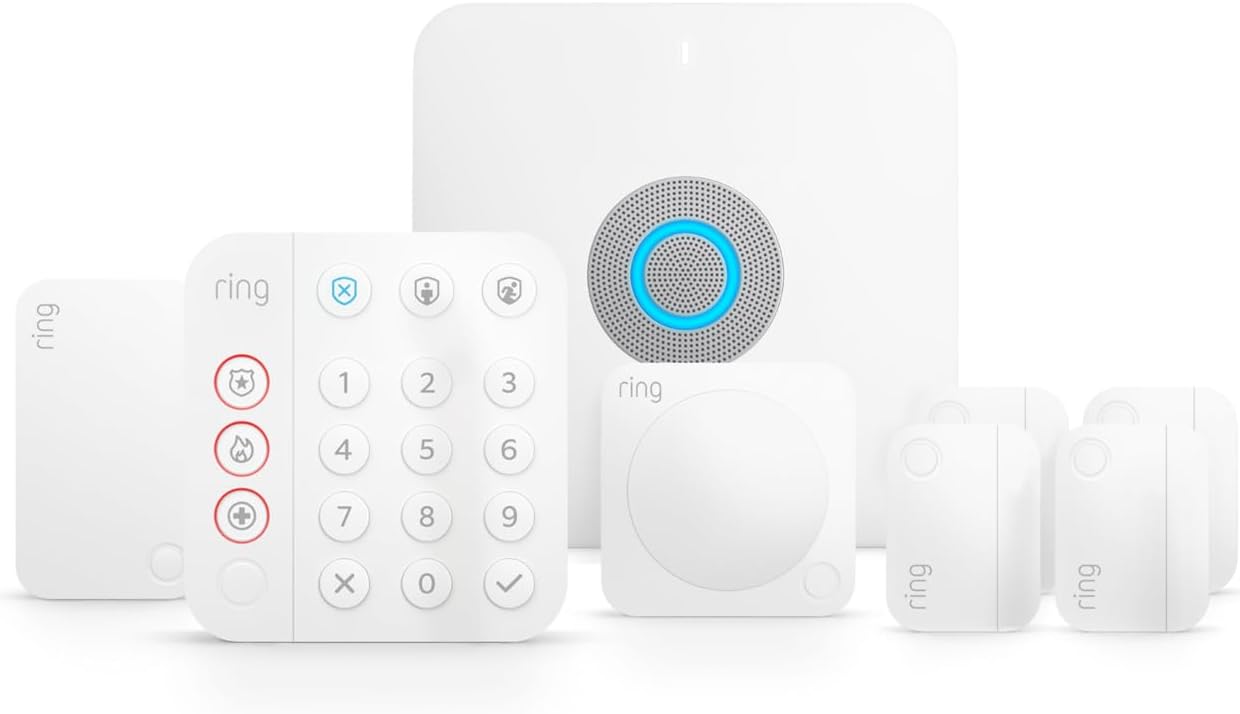
Key specs: 8-piece kit: 1 Alarm Pro Base Station with a built-in eero Wi-Fi 6 router, 1 Keypad, 4 door/window contact sensors, 1 motion detector, 1 range extender; router rated up to 1,500 sq. ft. of Wi-Fi coverage and speeds up to 900 Mbps; internal battery backup rated up to 24 hours in Low Power Mode
The 8-piece configuration is the mid-size Alarm Pro kit: one base station, one keypad, four door/window contact sensors, one motion detector and one range extender. That sensor count is intentionally modest – enough to cover the main entry points and one interior zone of an average single-family home, not a large or multi-story property. Ring also sells a 14-piece Alarm Pro kit with more sensors and the identical base station and router, so buying the 8-piece kit does not lock you out of expanding later; contact sensors, motion detectors and range extenders are all sold separately and pair the same way. The listing includes a short introductory Ring Protect trial, after which continued professional monitoring, video features and 24/7 Backup Internet all revert to whatever paid plan you choose – covered in the backup-internet section below.
✅ Pros
- One box replaces both your alarm system and your home router
- Sensor count (4 contact, 1 motion) suits a typical single-family entry-point setup
- Range extender included, and more eero 6 extenders can be added later
- Same base station and router as every other Alarm Pro kit, so upgrading sensor count later is a normal purchase, not a re-buy
❌ Cons
- Four contact sensors covers doors and a couple of windows, not a whole house
- The trial subscription is short; ongoing monitoring and 24/7 Backup Internet cost extra
- Committing to this kit means committing to eero for your home network, covered below
- No outdoor camera or video doorbell included – this is alarm and network hardware only
The Real Benefit: Mesh Wi-Fi From a Company Usually Good at Staying Online
The strongest honest case for Alarm Pro’s router is not that it is unusually powerful – 1,500 sq. ft. and 900 Mbps are ordinary numbers for a mid-range mesh system. It is that you are getting genuine eero hardware, not a security company’s first attempt at networking gear. eero built its reputation on mesh Wi-Fi specifically, and Amazon has kept it as a standalone product line since the acquisition rather than folding it away. A reader deciding between a bargain-bin router bundled into a random alarm kit and a real eero radio built into Ring’s own hardware is choosing the latter for a reason.
That matters most if your existing Wi-Fi already has dead zones the alarm sensors themselves struggle to reach. Before assuming a new router will fix a flaky connection, it is worth actually testing your Wi-Fi at the spot where a device will live, because a genuinely weak signal at the mounting location is a placement problem no router swap alone solves. If the problem really is your current router’s range or age, replacing it with Alarm Pro’s built-in eero radio is a real, not cosmetic, upgrade – and one you would otherwise be paying for as a second purchase.
24/7 Backup Internet Is a Ring Pro Feature, Not a Free One
This is the feature most people assume comes free with the router, and it does not. Ring’s own subscription page lists 24/7 Backup Internet – the feature that keeps your eero network and every Wi-Fi device on it online using cellular data during an internet outage – under the Ring Pro tier specifically, the same paid tier that includes 24/7 Professional Monitoring. It is not included on the cheaper Solo or Multi plans. When it is active, Ring includes 3 GB of cellular data a month at no extra charge, with additional data available at a flat rate per gigabyte if you opt in. Cross the free allowance without opting into extra data and Backup Internet simply turns off for the rest of the month.
A separate, more limited feature called Alarm Cellular Backup also exists, and it is worth not confusing the two. Cellular Backup does not restore your internet or Wi-Fi at all – it only keeps the alarm itself able to send emergency alerts over cellular during an outage. Ring’s own documentation lists it as requiring a compatible subscription too, separately from the Pro-tier 24/7 Backup Internet feature, though Ring does not spell out the exact minimum plan for Cellular Backup as clearly as it does for the router-wide feature – worth confirming against current plan details before you buy, rather than assuming either feature is included free. Our guide to what a Ring Protect plan actually gets you and our full rundown of Ring’s current subscription tiers both cover this in more depth than the numbers on this page alone.
Alarm Pro vs. the Base Ring Alarm Kit, Side by Side
Both kits pair the same category of sensors through the same Ring app, and both can run with or without professional monitoring. The router is genuinely the entire difference.
| Base Ring Alarm 8-Piece Kit | Ring Alarm Pro 8-Piece Kit |
|---|
| Built-in Wi-Fi 6 router | No – connects to your existing network | Yes, eero Wi-Fi 6, up to 1,500 sq. ft. |
| Designed as your primary router | Not applicable | Yes, plugs directly into the modem |
| Requires an eero account | No | Yes, plus agreement to eero’s Terms of Service |
| 24/7 Backup Internet available | No | Yes, on the Ring Pro subscription tier |
| Alarm Cellular Backup available | With a compatible subscription | With a compatible subscription |
| Wi-Fi shuts off on internal battery alone | Not applicable – no built-in router | Yes, to save power, unless Power Packs are added |
| What it replaces in your home | Nothing beyond the alarm itself | Your alarm and your router or mesh system |
Read the fourth and sixth rows together. The router is the reason to want this kit, and the same router is the reason a power or connectivity problem now has a bigger blast radius than it would with the base kit sitting quietly on your existing network.
What Setup Actually Involves
Setting up Alarm Pro is not the same single-app process as a standard Ring Alarm kit, because a real router replacement is happening underneath it.
Alarm Pro Setup, In Order
1
Create or link an eero account
Ring requires an eero account and agreement to eero’s Terms of Service before the built-in router will do anything.
2
Connect the base station to your modem
Ring designs Alarm Pro to be the gateway – it should plug directly into your modem, not into an existing router.
3
Configure Wi-Fi in the eero app
Network name, password and any extenders are managed in a second app, separate from the Ring app.
4
Add sensors in the Ring app
The keypad, contact sensors and motion detector from the 8-piece kit still pair and arm through Ring’s own app, unchanged from the base system.
5
Choose gateway or extender mode
Already running an eero mesh network? Ring recommends adding Alarm Pro as an extender instead of replacing your gateway – it still takes over and provides 24/7 Backup Internet during an ISP outage, then reverts automatically.
Two apps, not one, is the practical cost of the router – budget an extra 15-20 minutes over a standard Ring Alarm setup for the eero half alone.
The Real Tradeoff: One Device Now Runs Two Critical Systems
This is the part a spec sheet will not tell you, and it is the honest reason to hesitate before buying the Pro kit purely for the router. With a standard Ring Alarm, a router outage and an alarm-hardware problem are two separate failures with two separate causes. With Alarm Pro, they are the same box. If the base station loses power, freezes, or needs a factory reset, you are troubleshooting your home network and your alarm system at the same time, because they were never actually separate systems – they share one physical unit and one company’s cloud infrastructure end to end.
Ring’s own outage documentation confirms the sharpest version of this risk. Running on the internal battery alone – no external Power Pack installed – the base station “turns off most functions and wifi to save energy, even if you have an active internet connection”. In plain terms: a power outage with no Power Pack does not just risk your alarm going dark, it can take your entire home Wi-Fi network down with it, because the router and the alarm hub are the same hardware running the same battery.
Power Outage: With vs. Without Ring Power Packs
Internal battery only (no Power Packs)
- Wi-Fi and most functions turn off to save energy, even with power still flowing back on later
- Your whole home network goes down, not only the alarm siren and sensors
- Alarm Cellular Backup can still send emergency alerts if you carry a compatible subscription
- Rated up to 24 hours in this reduced Low Power Mode before the battery is exhausted
With Power Packs added (sold separately)
- Up to three Power Packs can keep the base station and eero extenders running through an outage
- 24/7 Backup Internet keeps functioning if you are subscribed to Ring Pro
- Wi-Fi to the rest of the house stays up rather than dropping with the power
- An extra purchase most buyers do not budget for at checkout
None of this makes the kit a bad purchase – it makes it a purchase with a dependency worth knowing before, not after, a storm knocks your power out. A reader who already treats false alarms and outage handling as a real planning question, not an edge case, should also read our breakdown of why alarms misfire in the first place and what monitored dispatch actually depends on – both are relevant once the alarm, the network and the monitoring plan are all running through one device.
Yes, You Need a Separate eero Account Too
Ring’s own setup documentation is direct about this rather than burying it: “Use of eero products and services, including the eero wifi router, requires creation of an eero account and agreement to eero’s Terms of Service”. That is a second account, a second app, and a second company’s terms governing part of your home network – on top of the Ring account and Ring app you already use for the alarm side.
This is not a one-time setup formality either. Wi-Fi network settings, extender management and firmware for the router half of the base station are handled in the eero app going forward, not the Ring app. If you replace an existing eero gateway with Alarm Pro, Ring notes the transition itself can take up to 10 minutes for the network to fully reassign the new device as the primary router – a real, if minor, disruption during setup that a standard Ring Alarm installation does not have because it never touches your network at all.
Who Should Actually Buy This
The router, not the alarm hardware, should decide this purchase. If you would be buying a mesh Wi-Fi system in the next year regardless of the alarm, folding that purchase into the Alarm Pro kit is close to free – you get real eero mesh hardware for the price difference over the base kit rather than paying for two separate boxes.
Is the Router Half Actually Worth It for You?
Good fit
- You would be buying a router or mesh system anyway, alarm or not
- 1,500 sq. ft. of coverage genuinely matches your home’s size
- You are willing to pay for the Ring Pro tier if you want 24/7 Backup Internet, not just the trial
- You are comfortable managing two apps and two accounts for one physical device
Skip it
- You already own a router or mesh system you like and do not want to replace it
- You are not willing to create and maintain a separate eero account
- You want your Wi-Fi to survive an alarm-hardware failure, or vice versa
- You mainly want the sensors – the base Ring Alarm 8-Piece Kit does that with less to manage
For that last group, our full write-up on what the standard Ring Alarm system actually gets you covers the non-router version in detail, and our roundup of DIY home alarm systems is the place to compare it against brands outside Ring entirely. If professional monitoring specifically is the deciding factor rather than the router, how third-party alarm monitoring works is worth reading before you commit to Ring’s own plan tiers. And if you are weighing Z-Wave sensors like the ones in this kit against Zigbee alternatives on other systems, our protocol comparison covers that separately from the router question entirely.
Final Recommendation
Buy the Ring Alarm Pro (Newest Model), 8-Piece Kit if you were already going to replace your router or add a mesh system this year. At that point the eero hardware inside the base station is not a novelty, it is the router you were going to buy anyway, bundled with a genuinely usable 8-sensor alarm kit and the option to add 24/7 Backup Internet later on the Ring Pro tier.
Do not buy it purely because “Pro” sounds like the better alarm. If your current router or mesh system works fine and you are not looking to touch it, the standard Ring Alarm system gives you the same sensors and the same app without adding a second account, a second app, or a single point of failure that now covers both your security and your internet.
What would change this: if you have no backup power plan for outages, budget for at least one Ring Power Pack alongside the kit – buying the router without it means a power cut can take down your Wi-Fi along with your alarm at exactly the moment you would most want both working.
SafeBode does not yet run an in-house product testing program. This guide is built from manufacturer specifications, official support documentation, current retail listings and verified buyer feedback rather than hands-on testing, and we say so plainly rather than implying testing we have not done.
Frequently Asked Questions
Does the Ring Alarm Pro kit really replace my home router?
Yes, that is how Ring designs it to be used. The base station is meant to plug directly into your modem as the primary gateway, not sit alongside a router you already have. Ring does offer an extender mode for households that already run an eero mesh network and want to keep their existing gateway in place.
Do I need an eero account to use Ring Alarm Pro?
Yes. Ring requires creating an eero account and agreeing to eero’s Terms of Service before the built-in router will function, in addition to the Ring account you already use for the alarm and app.
What happens to my Wi-Fi if the power goes out?
Without an add-on Power Pack, the base station switches to internal battery and turns off most functions, including Wi-Fi, to conserve power. Adding Power Packs keeps the router and eero extenders running through the outage instead.
Is 24/7 Backup Internet included for free with the kit?
No. It is listed as a feature of Ring’s Pro subscription tier, not the base kit or the cheaper plans. When active, it includes a set amount of cellular data free each month, with extra data available at a flat per-gigabyte rate if you opt in.
What is the difference between Alarm Cellular Backup and 24/7 Backup Internet?
Alarm Cellular Backup only keeps the alarm itself able to send emergency alerts during an outage – it does not restore any internet access. 24/7 Backup Internet is the broader feature that keeps your whole eero network and connected devices online using cellular data.
Can I use Ring Alarm Pro as a Wi-Fi extender instead of my main router?
Yes, if you already run an eero mesh network. Ring recommends adding it as an extender rather than replacing your existing gateway in that specific case, and it still steps in to provide backup internet during an outage before reverting to extender duty automatically.
What’s actually in the 8-piece kit?
One Alarm Pro base station, one keypad, four door/window contact sensors, one motion detector and one range extender. Ring also sells a larger 14-piece kit with the same base station and router for bigger homes.
Is the base Ring Alarm system cheaper, and what do I lose without the router?
The base Ring Alarm system uses the same style of sensors and app, but its base station has no built-in router at all – it simply joins whatever network you already have. You lose nothing on the alarm side, only the router hardware and the account/app overhead that comes with it.
Does Ring Alarm Pro work with sensors from other brands?
Ring’s own Alarm Pro contact sensors, motion detectors and range extenders pair through Ring’s Z-Wave-based ecosystem, and Ring does not document broad third-party sensor support for the alarm side the way some smart-home hubs do.
Sources
Show sources (9)


